link to the post
What is ‘good’ HTML?
By ‘good’ HTML, I mean semantic HTML, a posh term for choosing the right HTML element for the content. This isn’t a philosophical exercise; it has directly observable practical benefits.
For example, consider the element. Using this gives you some browser behaviour for free:
- A button is focusssable via the keyboard. I bet you, dear reader, know all the keyboard shortcuts for your IDE; it makes development much faster. Many people use only the keyboard when using a webpage. I do it because I have multiple sclerosis – therefore the fine motor control required to use a mouse can be difficult for me. My neighbour has arthritis, so she prefers to use the keyboard.
- Buttons can be activated using the space bar or the enter key; you don’t have to remember to listen for these keypresses in your script.
- Inside a , it doesn’t even need JavaScript to work.
Here’s another example: semantically linking a to its associated increases usability for a mouse-user or touch-screen user, because clicking in the label focusses into the input field. See this in action (and how to do it) on MDN.
This might be me, with my MS; it might be you, on a touch-screen device on a bumpy train, trying to check a checkbox. How much easier it is if the hit area also includes the label “uncheck to opt out of cancelling us not sending you spam forever”. (Compare the first and second identical-looking examples in a checkbox demo.)
But the point is that by choosing the right element for the job, you’re getting browser behaviour for free that makes your app more usable to a range of different people.
Invisible browser behaviours
HTML5 has some semantics that you can use for indicating regions on a page. For example,
, , , .
If you wrap your main content – that is, the stuff that isn’t navigation, logo and main header etc – in a
tag, a screen reader user can jump immediately to it using a keyboard shortcut. Imagine how useful that is – they don’t have to listen to all the content before it, or tab through it to get to the main meat of your page.
And for people who don’t use a screenreader, that
element doesn’t get in the way. It has no default styling at all, so there’s nothing for you to remove. For those that need it, it simply works; for those that don’t need it, it’s entirely transparent.
Similarly, using
for your primary navigation provides screenreader users with a shortcut key to jump to the navigation so they can continue exploring your marvellous site. You were probably going to wrap your navigation in a
to position it and style it; why not choose instead (it’s shorter!) and make your site more usable to the 15% of the world who have a disability?
New types of devices
We’re seeing more and more types of devices connecting to the web, and semantic HTML can help these devices display your content in a more usable way to their owners. And if your site is more usable than your competitors’, you win, and your boss will erect a massive gold statue of you in the office car park. (Trust me, your boss told me. They’ve already ordered the plinth.)
We’ve brought Reader to watchOS 5 where it automatically activates when following links to text heavy web pages. It’s important to ensure that Reader draws out the key parts of your web page by using semantic markup to reinforce the meaning and purpose of elements in the document. Let’s walk through an example. First, we indicate which parts of the page are the most important by wrapping it in an article tag.
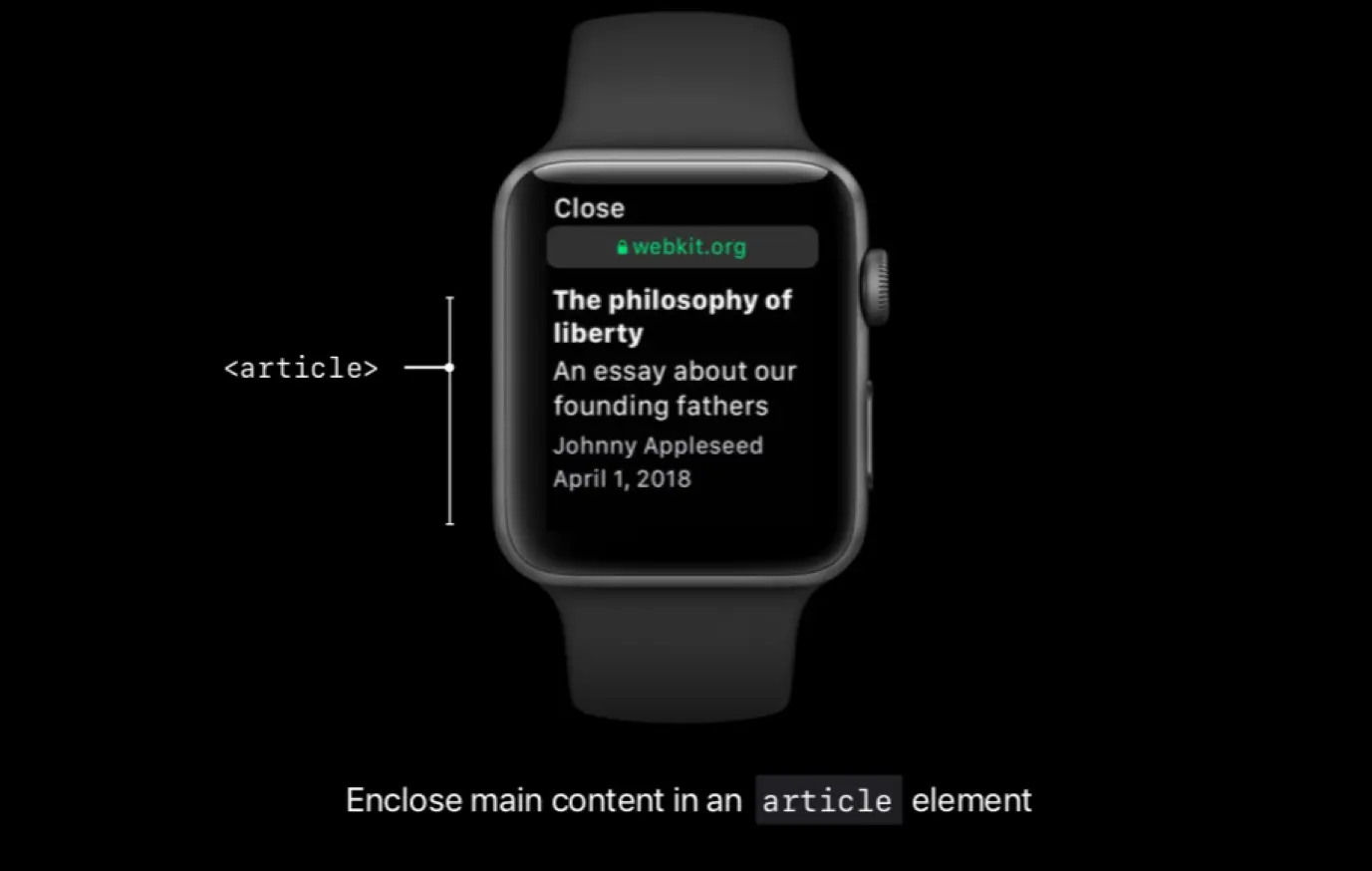
Specifically, enclosing these header elements inside the article ensure that they all appear in Reader. Reader also styles each header element differently depending on the value of its itemprop attribute. Using itemprop, we’re able to ensure that the author, publication date, title, and subheading are prominently featured.
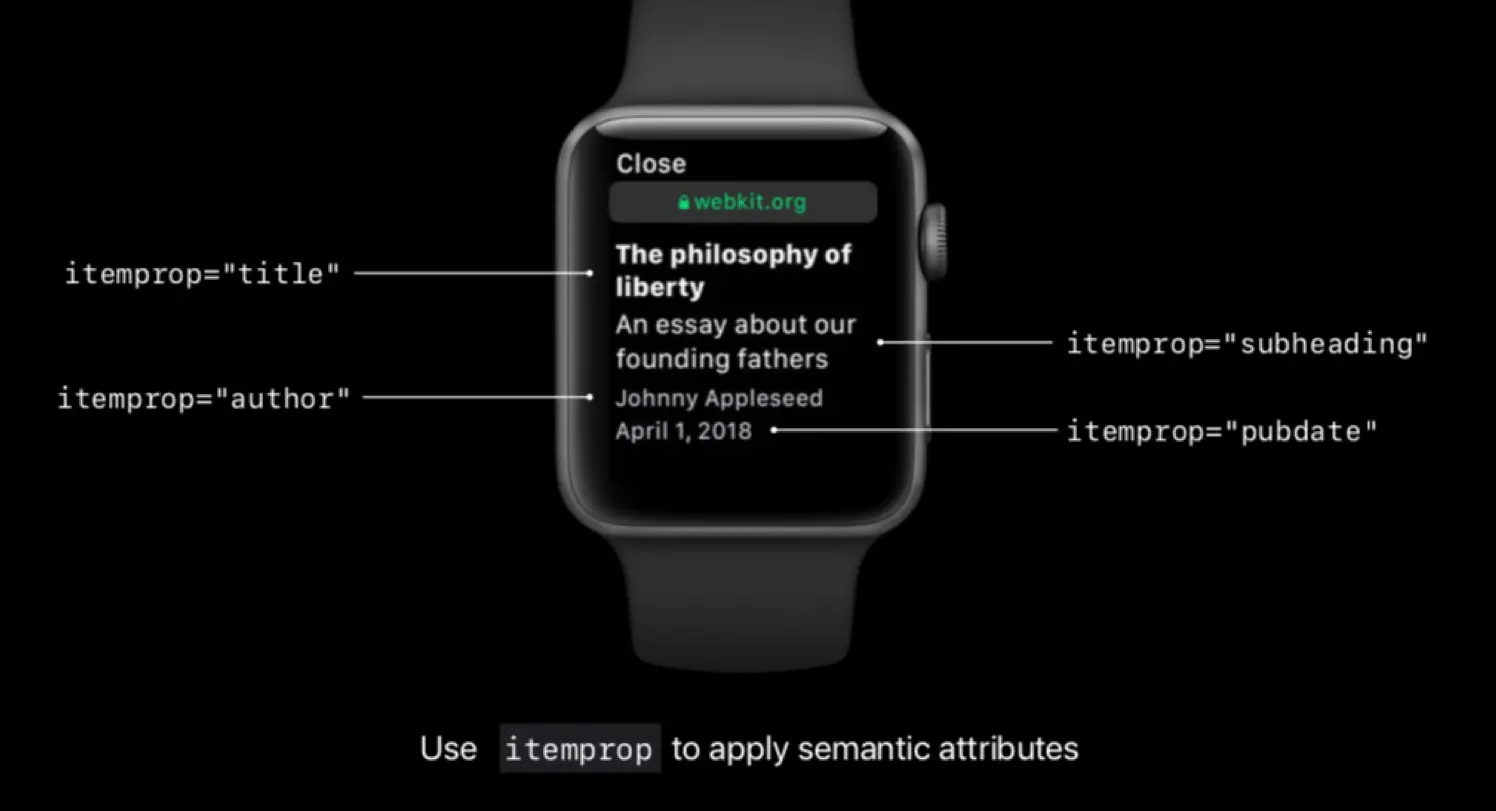
itemprop is an HTML5 microdata attribute. There are shared vocabularies documented at schema.org, which is founded by Google, Microsoft, Yahoo and Yandex. Using schema.org vocabularies with microdata can make your pages display better in search results:
Apple WatchOS also optimises display of items wrapped in
elements:
Reader recognizes these tags and preserves their semantic styles. For this image, we use figure and figcaption elements to let the Reader know that the image is associated with the below caption. Reader then positions the image alongside its caption.

You probably know that HTML5 greatly increased the number of different types, for example on a mobile device shows a keyboard with the “@” symbol and “.” that are in all email addresses; on a mobile device shows a numeric keypad.
On desktop browsers, where you have a physical keyboard, you may get different User Interface benefits, or built-in validation. You don’t need to build any of this; you simply choose the right semantic that best expresses the meaning of your content, and the browser will choose the best display, depending on the device it’s on.
In WatchOS, input types take up the whole watch screen, so choosing the correct one is highly desirable.
First, choose the appropriate type attribute and element tag for your form controls.
WebKit supports a variety of form control types including passwords, numeric and telephone fields, date, time, and select menus. Choosing the most relevant type attribute allows WebKit to present the most appropriate interface to handle user input.

Secondly, it’s important to note that unlike iOS and macOS, input methods on watchOS require full-screen interaction. Label your form controls or specify aria label or placeholder attributes to provide additional context in the status bar when a full-screen input view is presented.

I didn’t choose to use
and itemprop and input types because I wanted to support the Apple Watch; I did it before the Apple Watch existed, in order that my code is future-proof. By choosing the right semantics now, a machine that I don’t know about yet can understand my content and display it in the best way for its users. You are opting out of this if you only use
or
because, by definition, they have “no special meaning at all”.
Summary
I hope I’ve shown you that choosing the correct HTML isn’t purely an academic exercise. Perhaps you can’t use all the above (and there’s much more that I haven’t discussed) but when you can, please consider whether there’s an HTML element that you could use to describe parts of your content.
For instance, when building components that emit banners and logos, consider wrapping them in
rather than . If your styling relies upon classnames, will work just as well as
.
Semantic HTML will give usability benefits to many users, help to future-proof your work, potentially boost your search engine results, and help people with disabilities use your site.
And, best of all, thinking more about your HTML will stop Dull Old Web Farts like me moaning at you.
What’s not to love? Have a splendid holiday season, whatever you celebrate – and here’s to a semantic 2019!

link to the post
What is ‘good’ HTML?
By ‘good’ HTML, I mean semantic HTML, a posh term for choosing the right HTML element for the content. This isn’t a philosophical exercise; it has directly observable practical benefits.
For example, consider the element. Using this gives you some browser behaviour for free:
Here’s another example: semantically linking a to its associated increases usability for a mouse-user or touch-screen user, because clicking in the label focusses into the input field. See this in action (and how to do it) on MDN.
This might be me, with my MS; it might be you, on a touch-screen device on a bumpy train, trying to check a checkbox. How much easier it is if the hit area also includes the label “uncheck to opt out of cancelling us not sending you spam forever”. (Compare the first and second identical-looking examples in a checkbox demo.)
But the point is that by choosing the right element for the job, you’re getting browser behaviour for free that makes your app more usable to a range of different people.
Invisible browser behaviours
HTML5 has some semantics that you can use for indicating regions on a page. For example,
, , , .If you wrap your main content – that is, the stuff that isn’t navigation, logo and main header etc – in a
tag, a screen reader user can jump immediately to it using a keyboard shortcut. Imagine how useful that is – they don’t have to listen to all the content before it, or tab through it to get to the main meat of your page.And for people who don’t use a screenreader, that
element doesn’t get in the way. It has no default styling at all, so there’s nothing for you to remove. For those that need it, it simply works; for those that don’t need it, it’s entirely transparent.Similarly, using
for your primary navigation provides screenreader users with a shortcut key to jump to the navigation so they can continue exploring your marvellous site. You were probably going to wrap your navigation in aNew types of devices
We’re seeing more and more types of devices connecting to the web, and semantic HTML can help these devices display your content in a more usable way to their owners. And if your site is more usable than your competitors’, you win, and your boss will erect a massive gold statue of you in the office car park. (Trust me, your boss told me. They’ve already ordered the plinth.)
We’ve brought Reader to watchOS 5 where it automatically activates when following links to text heavy web pages. It’s important to ensure that Reader draws out the key parts of your web page by using semantic markup to reinforce the meaning and purpose of elements in the document. Let’s walk through an example. First, we indicate which parts of the page are the most important by wrapping it in an article tag.
Specifically, enclosing these header elements inside the article ensure that they all appear in Reader. Reader also styles each header element differently depending on the value of its itemprop attribute. Using itemprop, we’re able to ensure that the author, publication date, title, and subheading are prominently featured.
itemprop is an HTML5 microdata attribute. There are shared vocabularies documented at schema.org, which is founded by Google, Microsoft, Yahoo and Yandex. Using schema.org vocabularies with microdata can make your pages display better in search results:
Apple WatchOS also optimises display of items wrapped in
elements:You probably know that HTML5 greatly increased the number of different types, for example on a mobile device shows a keyboard with the “@” symbol and “.” that are in all email addresses; on a mobile device shows a numeric keypad.
On desktop browsers, where you have a physical keyboard, you may get different User Interface benefits, or built-in validation. You don’t need to build any of this; you simply choose the right semantic that best expresses the meaning of your content, and the browser will choose the best display, depending on the device it’s on.
In WatchOS, input types take up the whole watch screen, so choosing the correct one is highly desirable.
I didn’t choose to use
and itemprop and input types because I wanted to support the Apple Watch; I did it before the Apple Watch existed, in order that my code is future-proof. By choosing the right semantics now, a machine that I don’t know about yet can understand my content and display it in the best way for its users. You are opting out of this if you only useSummary
I hope I’ve shown you that choosing the correct HTML isn’t purely an academic exercise. Perhaps you can’t use all the above (and there’s much more that I haven’t discussed) but when you can, please consider whether there’s an HTML element that you could use to describe parts of your content.
For instance, when building components that emit banners and logos, consider wrapping them in
rather thanSemantic HTML will give usability benefits to many users, help to future-proof your work, potentially boost your search engine results, and help people with disabilities use your site.
And, best of all, thinking more about your HTML will stop Dull Old Web Farts like me moaning at you.
What’s not to love? Have a splendid holiday season, whatever you celebrate – and here’s to a semantic 2019!