


A full-stack web application for URL shortening and QR code generation with OAuth authentication
Experience Clippr in action! Create short URLs, generate custom QR codes, and manage your links with our live production deployment.
- Overview
- Key Features
- Technology Stack
- Application Setup
- Usage Guide
- API Endpoints
- Deployment
- Demo Video
- Contributing
- License
- Technical Documentation
Clippr is a full-stack web application that provides URL shortening and QR code generation services with OAuth-based user authentication. Users can create shortened URLs, generate customizable QR codes with gradient support, and manage their links through a personalized dashboard.
Clippr demonstrates a complete end-to-end system integrating:
- Java Servlets (Jakarta EE)
- MySQL database
- OAuth 2.0 authentication (Google & Zoho)
- Vanilla JavaScript frontend with Canvas API
The combination of traditional server-side rendering with modern JavaScript capabilities creates a responsive and feature-rich user experience, while the robust backend ensures data integrity and security.
This project serves as an excellent learning resource for developers interested in:
- Full-stack Java web development with modern practices
- OAuth 2.0 authentication implementation
- RESTful API design and implementation
- Database integration with MySQL
- Frontend JavaScript and Canvas API usage
- Cloud deployment on Oracle Cloud Infrastructure
Students and developers are encouraged to explore, learn from, and contribute to this codebase!
- URL Shortening with unique alphanumeric short codes
- QR Code Generation with gradient color customization
- OAuth 2.0 Authentication (Google & Zoho)
- User Dashboard with comprehensive analytics
- Real-time Click Tracking for shortened URLs
- CRUD Operations for user URL management
- QR Code Customization: Solid colors, linear gradients, radial gradients, diagonal gradients
- Analytics Dashboard: View creation date, last clicked timestamp, click counts
- Responsive Design: Mobile-first design with cross-device compatibility
- Secure Authentication: Industry-standard OAuth 2.0 implementation
- Real-time Updates: Instant URL validation and QR code generation
- Multiple Download Formats: PNG and SVG support for QR codes
- Java 17+ with Jakarta EE (Servlet API 6.0)
- Apache Tomcat 10.1.48 (Servlet Container)
- MySQL 8.0+ (Database)
- Maven 3.6+ (Build Tool)
- Apache HttpClient 4.5.14 (OAuth HTTP requests)
- Gson 2.10.1 (JSON Processing)
- HTML5 with semantic markup
- CSS3 with Flexbox/Grid layouts
- Vanilla JavaScript ES6+ with Canvas API
- Font Awesome 6 (Icons)
- QR Server API (External QR generation service)
- MVP Pattern for clean separation of concerns
- RESTful API Design for frontend-backend communication
- Session-based Authentication with HTTP cookies
- Responsive Single Page Application (SPA)
- Oracle Cloud Free Tier (Cloud hosting platform)
- Compute Instance (VM for application hosting)
- Oracle MySQL Database Service (Managed database)
Ensure you have the following installed:
- Java JDK 17+ (Download)
- Apache Maven 3.6+ (Download)
- MySQL 8.0+ (Download)
- Apache Tomcat 10.1+ (Download)
- Git (Download)
git clone https://github.com/yourusername/clippr-app.git
cd clippr-app-
Start MySQL Server
-
Create Database and User
-- Login to MySQL
mysql -u root -p

-- Create database
CREATE DATABASE clippr_db;

-- Create user (replace 'your_password' with a secure password)
CREATE USER 'clippr_user'@'localhost' IDENTIFIED BY 'your_password';

-- Grant privileges
GRANT ALL PRIVILEGES ON clippr_db.* TO 'clippr_user'@'localhost';
FLUSH PRIVILEGES;
-
Import Database Schema
mysql -u clippr_user -p clippr_db < database-schema.sql
- Go to Google Cloud Console
- Create a new project or select existing
- Enable Google+ API
- Go to Credentials > Create Credentials > OAuth 2.0 Client ID
- Configure OAuth consent screen
- Add authorized redirect URI:
http://localhost:8080/clippr/auth/google/callback - Copy Client ID and Client Secret
- Go to Zoho API Console
- Click Add Client > Server-based Applications
- Add authorized redirect URI:
http://localhost:8080/clippr/auth/zoho/callback - Copy Client ID and Client Secret
Edit src/main/resources/config.properties:
# Database Configuration
db.url=jdbc:mysql://localhost:3306/clippr_db?useSSL=false
db.username=clippr_user
db.password=your_password
db.driver=com.mysql.cj.jdbc.Driver

# Google OAuth
google.client.id=YOUR_GOOGLE_CLIENT_ID
google.client.secret=YOUR_GOOGLE_CLIENT_SECRET
google.redirect.uri=http://localhost:8080/clippr/auth/google/callback

# Zoho OAuth
zoho.client.id=YOUR_ZOHO_CLIENT_ID
zoho.client.secret=YOUR_ZOHO_CLIENT_SECRET
zoho.redirect.uri=http://localhost:8080/clippr/auth/zoho/callbackmvn clean packageThis creates target/clippr.war
Option A: Manual Deployment
cp target/clippr.war /path/to/tomcat/webapps/Option B: Using Deployment Script (Windows)
deploy.bat# Linux/Mac
./catalina.sh run
# Windows
catalina.bat runOpen your browser and navigate to:
http://localhost:8080/clippr
- Visit
http://localhost:8080/clippr - Click Login button
- Choose Google or Zoho
- Complete OAuth authorization
- You'll be redirected to the dashboard
- Navigate to Short URL tab
- Enter your long URL (e.g.,
https://www.example.com/very-long-url) - Click Get Your Short Link
- Copy the generated short URL
- Share it anywhere
Example:
Input:  https://www.example.com/products/category/subcategory/item-12345
Output: http://localhost:8080/clippr/s/aB3xYz
-
Navigate to QR Code tab
-
Enter URL or text to encode
-
Simple Mode (Solid Colors):
- Choose foreground color
- Choose background color
- Click Generate QR Code
-
Advanced Mode (Gradients):
- Check Use Gradient Effect
- Select gradient type (Linear/Radial/Diagonal)
- Choose two colors
- Click Generate QR Code
-
Download in PNG or SVG format
- Click your profile icon (top right)
- View all your shortened URLs
- See analytics:
- Click count
- Creation date
- Last clicked timestamp
- Edit or Delete URLs as needed
- Solid Colors: Choose foreground and background colors
- Linear Gradients: Horizontal, vertical, diagonal directions
- Radial Gradients: Center-to-edge color transitions
- Single Color Mode: Apply single color to QR pattern
| Method | Endpoint | Description | Authentication |
|---|---|---|---|
| GET | /auth/google |
Initiate Google OAuth login | None |
| GET | /auth/google/callback |
Handle Google OAuth callback | None |
| GET | /auth/zoho |
Initiate Zoho OAuth login | None |
| GET | /auth/zoho/callback |
Handle Zoho OAuth callback | None |
| GET | /auth/logout |
Logout current user | Session |
| Method | Endpoint | Description | Authentication |
|---|---|---|---|
| POST | /api/create-short-url |
Create new shortened URL | Required |
| GET | /api/get-all-urls |
Get user's all URLs | Required |
| PUT | /api/update-url |
Update existing URL | Required |
| DELETE | /api/delete-url?id={id} |
Delete URL by ID | Required |
| GET | /s/{shortCode} |
Redirect to original URL | None |
| Method | Endpoint | Description | Authentication |
|---|---|---|---|
| GET | /api/user-profile |
Get user profile info | Required |
// Request
POST /api/create-short-url
Content-Type: application/json

{
  "longurl": "https://www.example.com/very-long-url"
}

// Response
{
  "status": "ok",
  "shorturlid": "abc123",
  "shorturl": "http://localhost:8080/clippr/s/abc123"
}// Response
[
{
"id": 1,
"longurl": "https://www.example.com",
"shorturlid": "abc123",
"count": 5,
"created_at": "2025-11-10T14:30:00",
"last_clicked": "2025-11-10T16:45:00"
}
]Clippr is configured to deploy on Oracle Cloud Infrastructure (OCI) Free Tier, providing:
- Always Free Compute Instance (VM.Standard.E2.1.Micro)
- Oracle MySQL Database Service (Free tier eligible)
- 50 GB Block Storage
- 10 TB Outbound Data Transfer per month
- Oracle Cloud Account (Sign Up Free)
- SSH Key Pair for instance access
- Domain Name (optional, for custom URLs)
-
Create Compute Instance
- Login to Oracle Cloud Console
- Navigate to Compute > Instances
- Click Create Instance
- Select Always Free Eligible shape (VM.Standard.E2.1.Micro)
- Choose Oracle Linux 8 or Ubuntu 20.04
- Configure networking and add SSH key
- Note the Public IP Address
-
Configure Security List
- Navigate to Networking > Virtual Cloud Networks
- Select your VCN > Security Lists
- Add Ingress Rules:
- Port 8080 (Tomcat)
- Port 3306 (MySQL) - only if using separate DB instance
- Port 80/443 (HTTP/HTTPS) - optional
-
Connect to Instance
ssh -i /path/to/private-key opc@<public-ip-address>
-
Install Required Software
# Update system
sudo yum update -y

# Install Java 17
sudo yum install java-17-openjdk java-17-openjdk-devel -y

# Install Maven
sudo yum install maven -y

# Install MySQL
sudo yum install mysql-server -y
sudo systemctl start mysqld
sudo systemctl enable mysqld

# Install Tomcat
wget https://dlcdn.apache.org/tomcat/tomcat-10/v10.1.48/bin/apache-tomcat-10.1.48.tar.gz
tar -xzf apache-tomcat-10.1.48.tar.gz
sudo mv apache-tomcat-10.1.48 /opt/tomcat
-
Setup Database
# Secure MySQL installation
sudo mysql_secure_installation

# Create database and user
mysql -u root -p
CREATE DATABASE clippr_db;
CREATE USER 'clippr_user'@'localhost' IDENTIFIED BY 'secure_password';
GRANT ALL PRIVILEGES ON clippr_db.* TO 'clippr_user'@'localhost';
FLUSH PRIVILEGES;
EXIT;

# Import schema
mysql -u clippr_user -p clippr_db < database-schema.sql
-
Deploy Application
# Clone repository
git clone https://github.com/yourusername/clippr-app.git
cd clippr-app

# Update config.properties with production values
nano src/main/resources/config.properties

# Build application
mvn clean package

# Deploy to Tomcat
sudo cp target/clippr.war /opt/tomcat/webapps/
-
Configure OAuth for Production
- Update OAuth redirect URIs in Google Cloud Console and Zoho API Console:
http://<your-public-ip>:8080/clippr/auth/google/callback http://<your-public-ip>:8080/clippr/auth/zoho/callback - Update
config.propertieswith production redirect URIs
- Update OAuth redirect URIs in Google Cloud Console and Zoho API Console:
-
Start Tomcat
/opt/tomcat/bin/startup.sh
-
Configure Firewall
sudo firewall-cmd --permanent --add-port=8080/tcp
sudo firewall-cmd --reload
-
Access Application
http://<your-public-ip>:8080/clippr
-
Configure Domain
- Point your domain's A record to the instance public IP
- Install and configure Apache/Nginx as reverse proxy
- Proxy port 80/443 to Tomcat port 8080
-
Install SSL Certificate
# Install Certbot
sudo yum install certbot python3-certbot-apache -y

# Obtain certificate
sudo certbot --apache -d yourdomain.com
For local development and testing, follow the Application Setup section above.
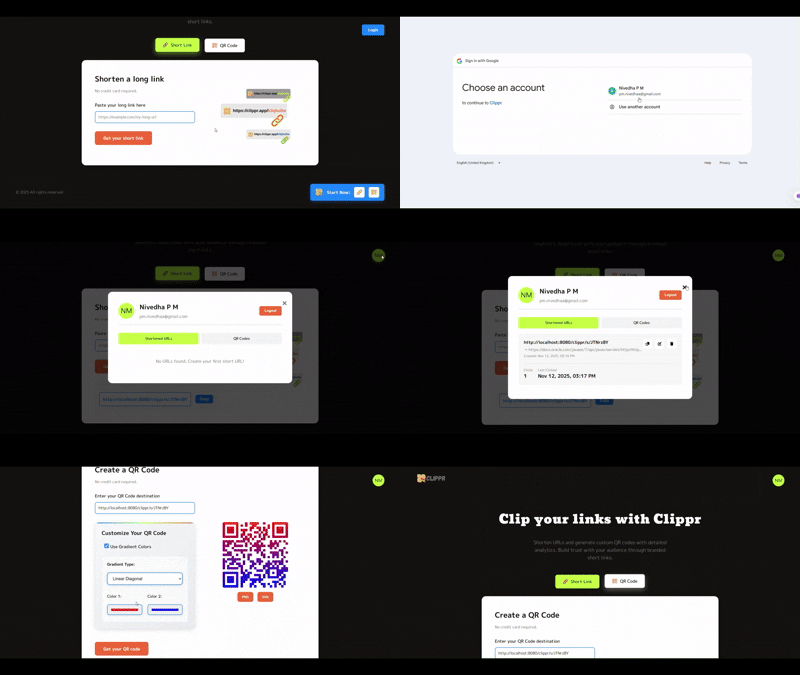
To view the application demo:
Contributions are welcome. To contribute:
-
Fork the repository.
-
Create a new branch:
git checkout -b feature/new-feature
-
Make your changes and commit:
git commit -m "Add new feature" -
Push to your branch:
git push origin feature/new-feature
-
Submit a Pull Request.
Report bugs or request features here:
This project is licensed under the MIT License. See the LICENSE file for details.
For complete architecture details, API endpoints, database schema, and OAuth flow explanation, refer to:
CLIPPR_TECHNICAL_DOCUMENTATION.md
Made with dedication by Nivedha P M