- Namrata Mehare
The primary goal of this spike is to determine the easiest way to use the API to create and configure projects without needing to tweak config in the UI post-creation. A secondary goal is to analyse the best possible way for authentication.
- Node JS (latest)
- Command Line Interface cURL
- Used the following documentations JIRA REST API and GitHub REST API as a base. The examples are given using different technologies including cURL, Node.js, Java, Python, PHP.
- Usage of cURL and NodeJS to test the sample examples.
- Authentication has been done based on OAuth Basic Auth by generating API token.
- Investigated different authentication methods and read experiences from different users through Atlassian Community
- While investigating on this, came across various methods which are deprecated and will be discontinued soon, so have not considered these methods.
API tokens are the recommended method for using basic auth. User can generate an API token for both JIRA/Github and use it to authenticate anywhere where user would have used a password. This enhances security because user is not saving primary account password.
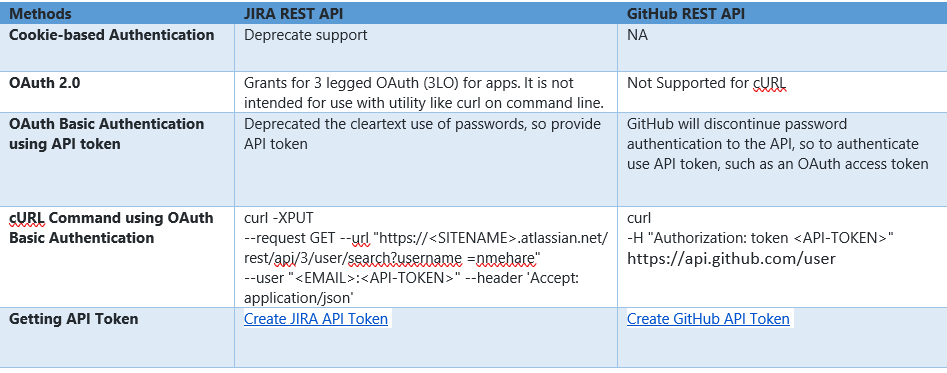
Best possible authentication method is using Basic OAuth compared to Cookie based authentication and OAuth. while using cookie-based authentication the actual password of the user needs to be added.
API Authentication methods (which will be suitable for either a CLI application or a deployed web app)
Best possible authentication method is using Basic Auth compared to Cookie based authentication and OAuth. As OAuth includes 3LO which does not support cURL and while using cookie-based authentication the actual password of the user needs to be added, so Basic Auth method is best which uses API token-based authentication. There are different methods for authenticating the REST API.
Get all projects – User can get all the projects using REST API which will return all projects visible to the user.
If getting response null that means user don’t have projects or permissions assigned. REST API’s are protected by some restrictions, if user log in and do not have permission to view something, he will not be able to view it using the Jira or GitHub REST API either. Below request can be used to verify permissions:
Below CURL command can be used to get all project details from JIRA:
curl -XPUT
--request GET
--url "https://dstilab.atlassian.net/rest/api/3/project"
--user "<EMAIL>:<API_TOKEN>"
--header 'Accept: application/json'
Below CURL command can be used to get all user projects from GitHub:
curl -i
-H "Authorization: token <API-TOKEN>"
-H "Accept:application/vnd.github.inertia-preview+json"
https://api.github.com/ users/ nmehare/projects
Yes, next-gen project can be created using JIRA REST API. User must have “Administer Jira” permission to create the project and repositories/organizations/projects can be created using GitHub REST API.
Below CURL command can be used to create project in JIRA:
curl -g -XPUT
--request POST
--url "https://dstilab.atlassian.net/rest/api/3/project"
--user "<EMAIL>:<API_TOKEN>" --header 'Accept:application/json'
--header 'Content-Type:application/json'
--data '{"description":"Example Project description","url": "http://atlassian.com","avatarId":10200,"name":"Example","projectTypeKey":"software","projectTemplateKey":"com.pyxis.greenhopper.jira:gh-simplified-agility-scrum","key":"EXAM","leadAccountId":"5d368fc075218c0c20ad77f0","assigneeType":"UNASSIGNED"}'
Below CURL command can be used to get all user projects from GitHub:
curl -i
-H "Authorization: token <API_TOKEN>"
-H "Accept:application/vnd. github.inertia-preview+json"
-d "{ \"name\": \"Example\"}"
https://api.github.com/ user/repos /json'
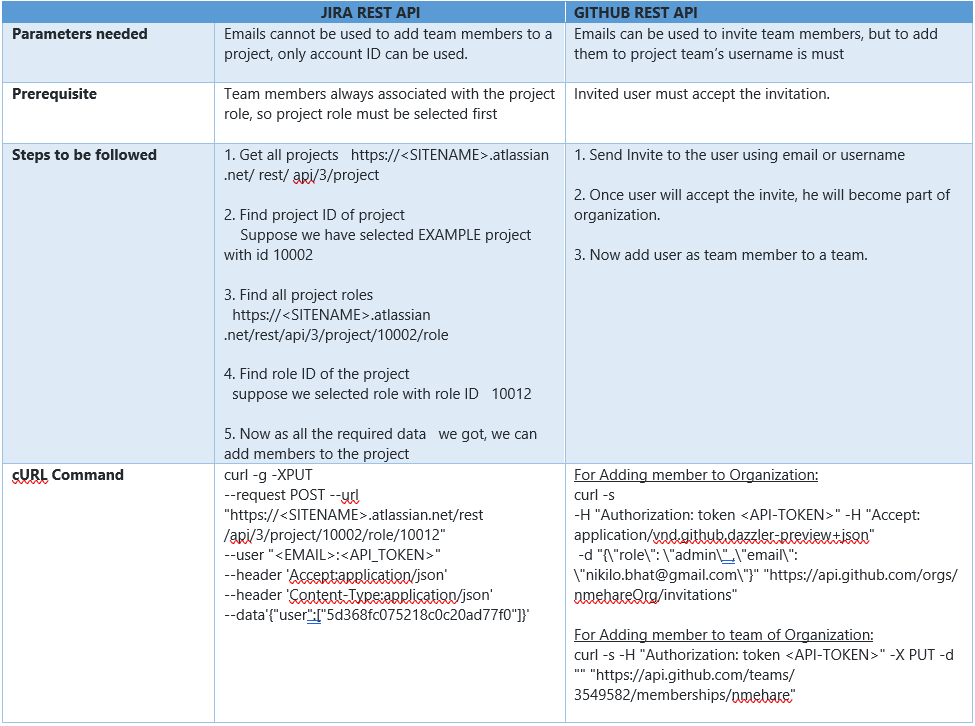
Below table can be referred
As this spike is based on securely accessing REST API’s, User Security is at risk.
I found the cURL is flexible enough to allow the examples to work. If you are dealing with a more security other authentication methods can be used.
-
Getting your API token. Allow REST clients to authenticate themselves using basic authentication with API token. This is one of the simplest methods that can be used for authentication against the Jira and GitHub REST API. As we are using two-step verification to authenticate, script will need to use a REST API token to authenticate. Below steps can be followed to create an API token:
- Log in to https://id.atlassian.com/manage/api-tokens for JIRA or https://id.atlassian.com/personal-access-token for creation of GitHub API token and follow the steps.
- From the dialog that appears, enter a memorable and concise Label for your token and click Create.
- Click Copy to clipboard, then paste the token to your script, or elsewhere to save
-
Open Command Prompt to run cURL
-
Run various cURL commands mentioned in “What was found out” section