roctop is a small AMD ROCm GPU monitor. It shows GPU VRAM usage,
utilization, type, temperature, fan, power, clocks, live system/GPU graphs,
and GPU processes in a refreshing terminal UI.
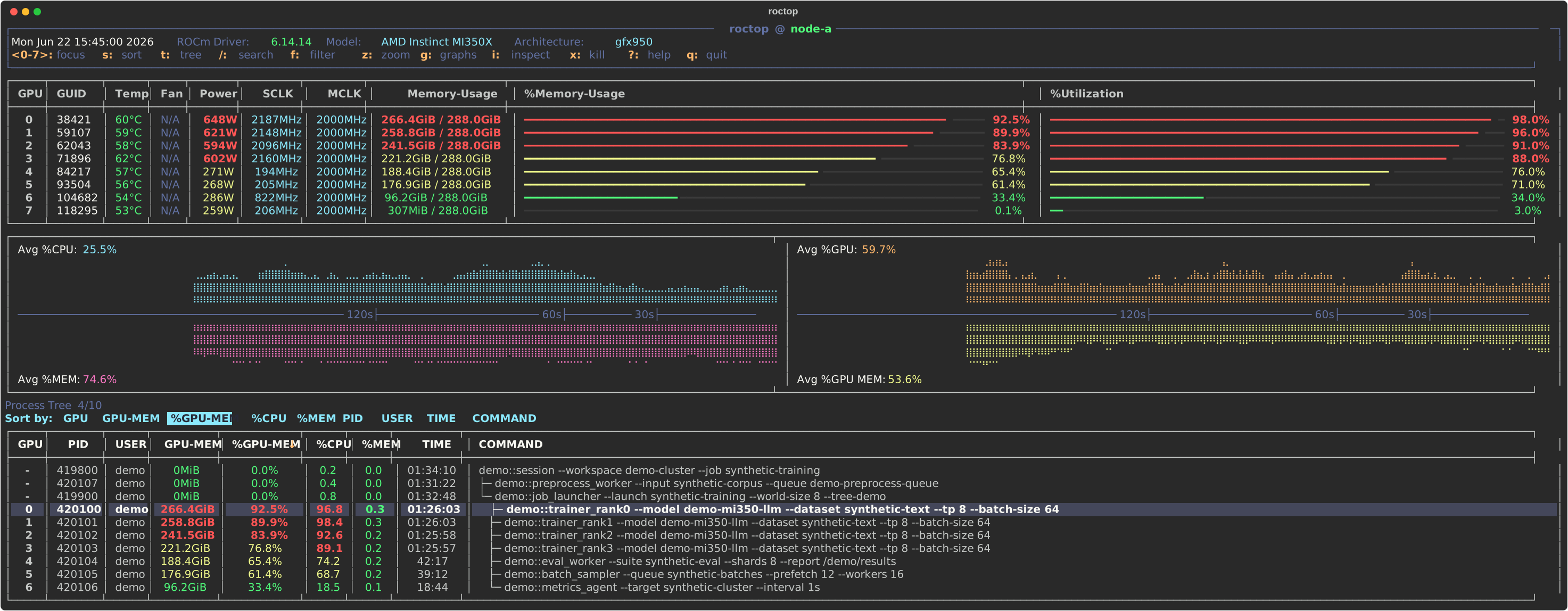
The demo is rendered from synthetic data; process names, PIDs, users, and metrics are placeholders.
- GPU overview: compact table for every ROCm GPU with GUID, standardized model, architecture, temperature, fan status, power draw, SCLK/MCLK clocks, VRAM usage, and utilization.
- Readable utilization bars: memory and GPU utilization are shown as inline bars with percentage labels and threshold colors, making idle, busy, and saturated devices easy to scan.
- Live history graphs: split graph panel tracks average host CPU, host memory, GPU utilization, and GPU memory usage over the recent refresh window.
- Process visibility: process table shows GPU index, PID, user, GPU memory, GPU memory percent, host CPU/memory percent, elapsed runtime, and full wrapped command lines.
- Interactive process navigation: move through processes with
j/kor arrow keys, page through long lists, toggle process tree view, keep the selected process visible across refreshes, and sort by GPU, memory, CPU, PID, user, time, or command. - Inspect and help popups:
iinspects the selected process using the current snapshot and/proc, while?opens an in-app keybinding reference. Both popups support arrow keys andh/j/k/lnavigation. - Safe process actions:
xopens a high-contrast confirmation menu with Cancel, SIGTERM, and SIGKILL choices, plus status messages for missing processes, permission errors, and other failures. - Robust data collection: combines
rocm-smiGPU snapshots,amd-smi processprocess memory data, andpsprocess metadata, with fallbacks when process-specific data is missing or malformed. - Script-friendly modes:
--oncerenders a single terminal snapshot,--jsonprints normalized snapshot data, and--intervalcontrols live refresh cadence.
roctop expects ROCm command-line tools on PATH: rocm-smi is required,
and amd-smi is used when available for richer per-process memory data.
From PyPI:
pip install roctopBuild from source:
git clone https://github.com/nrhevu/roctop.git
cd roctop
python3 -m venv .venv
.venv/bin/python -m pip install -e .
export PATH="$PWD/.venv/bin:$PATH"roctop
roctop --interval 0.5
roctop --once
roctop --json
roctop --version
python -m roctop --oncej/k or Up/Down move process cursor
PgUp/PgDn scroll processes
s open sort menu
t toggle process tree
p jump to parent process in tree view
h/Left, l/Right jump to previous/next sibling in tree view
/ search processes
n/N next/previous search match
f filter visible processes
i inspect selected process
x kill selected process with confirmation
? open/close help
q or Ctrl-C quit
j/k or Up/Down      scroll help or inspect view
h/l or Left/Right   page help or inspect view
? or Esc            close help
i or Esc            close inspect view
h/l or arrows       move sort or kill menu selection
Enter               apply selected sort or kill option
y                   send SIGTERM in kill confirmation
Esc or q            cancel menus