
Multi-step jobs that survive crashes. Define a workflow as a graph of steps - activities, decisions, terminal states. The engine persists every step's result to Postgres, picks up where it left off if a worker dies, and keeps a full journal of what happened. Multiple workers can process executions concurrently with lease-based coordination.
npm install @prsm/workflowOptional storage adapters:
npm install sqlite3
npm install pgimport WorkflowEngine, { defineWorkflow } from '@prsm/workflow'
const workflow = defineWorkflow({
name: 'review',
version: '1',
start: 'fetch',
steps: {
fetch: {
type: 'activity',
next: 'route',
retry: { maxAttempts: 3, backoff: '5s' },
run: async ({ input }) => ({ message: input.message.trim() }),
},
route: {
type: 'decision',
transitions: { spam: 'reject', normal: 'complete' },
decide: ({ data }) => (data.message.includes('buy now') ? 'spam' : 'normal'),
},
complete: {
type: 'succeed',
result: ({ data }) => ({ outcome: 'sent', message: data.message }),
},
reject: {
type: 'fail',
result: ({ data }) => ({ name: 'Spam', message: data.message }),
},
},
})
const engine = new WorkflowEngine()
engine.register(workflow)
const execution = await engine.start('review', { message: ' hello ' })
await engine.runUntilIdle()
const result = await engine.getExecution(execution.id)
console.log(result.status) // "succeeded"
console.log(result.output) // { outcome: "sent", message: "hello" }Four step types:
| Type | Purpose |
|---|---|
activity |
Run application code, then move to one explicit next step |
decision |
Choose one route from a fixed transitions map |
succeed |
End the workflow successfully |
fail |
End the workflow with a failure |
{
  type: "activity",
  next: "publish",
  timeout: "30s",
  retry: { maxAttempts: 3, backoff: "5s" },
  run: async ({ input, data, steps, step }) => {
    console.log(step.idempotencyKey)
    return await doWork(input)
  },
}{
type: "decision",
transitions: {
approved: "publish",
rejected: "reject",
},
decide: ({ data, steps }) => "approved",
}The chosen route is persisted in the step state and execution journal.
If decide() returns a route name that is not in transitions, the step fails and normal retry/failure rules apply.
const engine = new WorkflowEngine({
  storage, // defaults to in-memory
  leaseMs: '5m', // how long a worker owns an execution before another worker may reclaim it
  leaseRenewInterval: '100s', // how often the lease is renewed while a step is running (defaults to leaseMs / 3)
  defaultActivityTimeout: '30s',
  owner: 'node-a', // worker identity written into claims and checked on save
  batchSize: 10, // max executions to claim and process concurrently per polling cycle
})
Core methods:
engine.register(workflow)
await engine.start(name, input, options?)
await engine.runDue(options?)
await engine.runUntilIdle(options?)
await engine.startWorker(options?)
await engine.getExecution(id)
await engine.listExecutions(filter?)
await engine.cancel(id, reason?)
await engine.resume(id)
engine.describe(name, version?)| Method | What it does |
|---|---|
start(name, input) |
Create a persisted execution |
runDue() |
Process ready executions once, then return |
runUntilIdle() |
Keep calling runDue() until nothing is immediately runnable |
startWorker() |
Poll forever on a timer, calling runDue() each interval |
runUntilIdle() is useful in tests and scripts. startWorker() is what you use in production.
Create the engine once, register workflows, start the worker loop. Trigger workflows from routes, jobs, or anywhere else.
// workflows/engine.js
import WorkflowEngine from '@prsm/workflow'
import { postgresDriver } from '@prsm/workflow/postgres'
import { triageWorkflow } from './triage.js'

export const engine = new WorkflowEngine({
  storage: postgresDriver({ connectionString: process.env.DATABASE_URL }),
  owner: `worker-${process.pid}`,
  leaseMs: '30s',
})

engine.register(triageWorkflow)

engine.on('execution:succeeded', ({ execution }) => {
  console.log('done:', execution.id, execution.output)
})

engine.on('execution:failed', ({ execution }) => {
  console.error('failed:', execution.id, execution.error)
})

await engine.startWorker({ interval: '100ms' })
// routes/tickets.js
import { engine } from '../workflows/engine.js'
router.post('/', async (req, res) => {
const execution = await engine.start('triage', {
subject: req.body.subject,
message: req.body.message,
})
res.json({ executionId: execution.id })
})For tests and local prototypes:
import { memoryDriver } from '@prsm/workflow'Single-node durable storage:
import WorkflowEngine from '@prsm/workflow'
import { sqliteDriver } from '@prsm/workflow/sqlite'

const engine = new WorkflowEngine({
  storage: sqliteDriver({ filename: './workflow.db' }),
})Shared storage for distributed workers:
import WorkflowEngine from '@prsm/workflow'
import { postgresDriver } from '@prsm/workflow/postgres'

const engine = new WorkflowEngine({
  storage: postgresDriver({
    connectionString: process.env.DATABASE_URL,
  }),
})
The Postgres adapter uses atomic claiming and owner-guarded saves so only one worker can acquire a ready execution, and a stale worker cannot overwrite a newer claimant's state.
Each execution stores:
status:queued | waiting | running | succeeded | failed | canceledcurrentStepsteps[stepName]- persisted state for each stepjournal- timeline of what happened during the execution- final
outputorerror
Each step stores:
statusattemptsoutputerrorstartedAtendedAtrouteidempotencyKey
Step idempotency keys are stable per execution:
<executionId>:<stepName>Use them for external side effects.
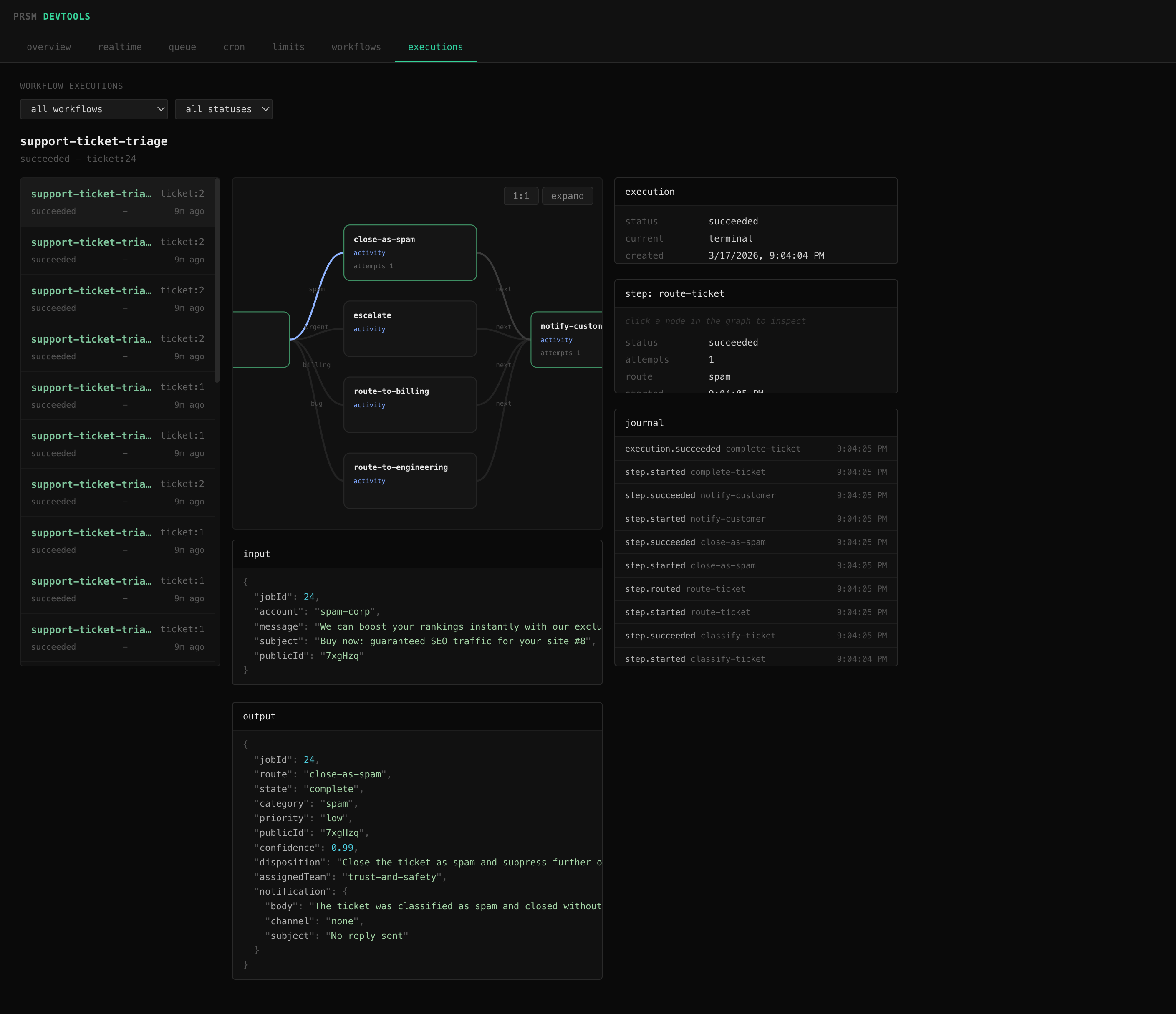
Workflow definitions expose a serializable graph of nodes and edges:
const { graph } = engine.describe('review')
// graph.nodes - step name, type, label, retry config, timeout
// graph.edges - from, to, label (route name for decisions)
@prsm/devtools uses this to render live workflow visualization alongside execution state, journals, and step output:
Execution lifecycle - use these to sync external state (update your database, push to websockets, trigger alerts):
engine.on('execution:queued', ({ execution }) => {})
engine.on('execution:succeeded', ({ execution }) => {})
engine.on('execution:failed', ({ execution }) => {})
engine.on('execution:canceled', ({ execution }) => {})
Step lifecycle - use these for logging, metrics, or debugging:
engine.on('step:started', ({ execution, step, attempt }) => {})
engine.on('step:succeeded', ({ execution, step, output }) => {})
engine.on('step:routed', ({ execution, step, route, to }) => {})
engine.on('step:retry', ({ execution, step, attempt, error, availableAt }) => {})
engine.on('step:failed', ({ execution, step, attempt, error }) => {})
Worker health:
engine.on('execution:lease-lost', ({ executionId, step }) => {})
engine.on('worker:error', ({ error }) => {})Workflow graphs are versioned and static. activity steps run code and move to one next step. decision steps choose one named route from a fixed map. Terminal steps end the execution.
Workers claim ready executions using a lease and process them concurrently (up to batchSize per polling cycle). While a step is running, the worker renews that lease. If the lease expires, another worker can reclaim the execution. Saves are guarded by lock owner so a stale worker cannot commit after losing ownership.
If a worker completes a step but crashes before advancing to the next one, another worker will reclaim the execution. The engine checks whether the current step already succeeded and skips it, advancing directly to the next step without re-running the handler. This prevents duplicate side effects like double-charging a credit card or sending an email twice.
For side effects that happen within a step (e.g. the step sends an email, then crashes before the step result is saved), each step exposes a stable idempotencyKey (<executionId>:<stepName>) that you can pass to external services for deduplication.
The package includes integration tests for:
- atomic claiming across competing Postgres workers
- recovery after stale lease expiry
- lease renewal for long-running steps
Run them with:
make up
npm test
make downmake install
make test
make typesMIT