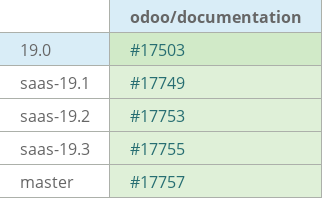
[ADD] point_of_sale: add Mollie terminal doc#17503
Conversation


|
|


 emmi-odoo
left a comment
emmi-odoo
left a comment
emmi-odoo
left a comment
There was a problem hiding this comment.
Hello @MaxTheWhale Thank you for adding this documentation page. See my comments and suggestions 😄
| Connecting a **Mollie** :doc:`payment terminal <../terminals>` allows you to offer a fluid payment | ||
| flow to your customers and ease the work of your cashiers. |
There was a problem hiding this comment.
| Connecting a **Mollie** :doc:`payment terminal <../terminals>` allows you to offer a fluid payment | |
| flow to your customers and ease the work of your cashiers. | |
| **Mollie** is a payment service that offers payment solutions through physical :doc:`payment terminals <../terminals>`, tap terminals, and terminal apps for Android and iOS devices. |
| flow to your customers and ease the work of your cashiers. | ||
|
|
||
| .. note:: | ||
| - Mollie payment terminals do not require an :doc:`IoT Box </applications/general/iot>` to |
There was a problem hiding this comment.
Since it does not require an IoT box, I think we can remove the doc link here.
| - Mollie payment terminals do not require an :doc:`IoT Box </applications/general/iot>` to | |
| - Mollie payment terminals do not require an IoT Box to |
| .. note:: | ||
| - Mollie payment terminals do not require an :doc:`IoT Box </applications/general/iot>` to | ||
| operate. | ||
| - The Mollie Tap app allows a smartphone with an NFC chip to be used as a payment terminal. |
There was a problem hiding this comment.
Tables cannot be used as payment terminals, right? I'm asking because Mollie's website never specifies "smartphones" and uses the term "devices".
| To configure a Mollie terminal, go to your `Mollie account <https://my.mollie.com>`_, | ||
| and then follow these steps: |
There was a problem hiding this comment.
| To configure a Mollie terminal, go to your `Mollie account <https://my.mollie.com>`_, | |
| and then follow these steps: | |
| To configure a Mollie terminal, create a `Mollie account <https://my.mollie.com>`_, then follow these steps: |
| To configure a Mollie terminal, go to your `Mollie account <https://my.mollie.com>`_, | ||
| and then follow these steps: | ||
|
|
||
| #. Go to :guilabel:`Point-of-sale` in the left sidebar. |
There was a problem hiding this comment.
| #. Go to :guilabel:`Point-of-sale` in the left sidebar. | |
| #. Go to the :guilabel:`In-person payments` section in the left sidebar to access the list of terminals. |
There was a problem hiding this comment.
I do not see any Point-of-sale section, but I see the list of terminals in the In-person payments section.

| Treat your Live API key like a password, do not share it with anyone or write it down anywhere insecure, | ||
| as it can grant access to your Mollie account. |
There was a problem hiding this comment.
| Treat your Live API key like a password, do not share it with anyone or write it down anywhere insecure, | |
| as it can grant access to your Mollie account. | |
| Treat the :guilabel:`Live API key` as a password and keep it secure, as it provides access to your Mollie account. |
| #. :guilabel:`Activate` the Mollie integration from the list of providers if you haven't already. | ||
| #. Set the :guilabel:`Integrate with` field to :guilabel:`Mollie`. |
There was a problem hiding this comment.
| #. :guilabel:`Activate` the Mollie integration from the list of providers if you haven't already. | |
| #. Set the :guilabel:`Integrate with` field to :guilabel:`Mollie`. | |
| #. Click :guilabel:`Activate` or :guilabel:`Setup` under the Mollie integration from the list of providers if needed. | |
| #. Optionally, set the :guilabel:`Integrate with` field to :guilabel:`Mollie`. |
| #. Set the :guilabel:`Integrate with` field to :guilabel:`Mollie`. | ||
| #. Set the :guilabel:`Mollie Payment Provider` field to :guilabel:`Mollie`. | ||
| #. Paste the Terminal ID into the :guilabel:`Mollie Terminal ID` field. | ||
| #. Save the form. |
There was a problem hiding this comment.
| #. Save the form. | |
| #. Save the payment method. |
| #. Set the :guilabel:`Mollie Payment Provider` field to :guilabel:`Mollie`. | ||
| #. Paste the Terminal ID into the :guilabel:`Mollie Terminal ID` field. | ||
| #. Save the form. | ||
| #. Follow the internal link on :guilabel:`Mollie Payment Provider`. |
There was a problem hiding this comment.
| #. Follow the internal link on :guilabel:`Mollie Payment Provider`. | |
| #. Click the :icon:`fa-arrow-right` (:guilabel:`Internal link`) icon next to the :guilabel:`Mollie Payment Provider` field. |
| #. Paste the API key into the :guilabel:`API Key` field. You can leave the payment provider as | ||
| :guilabel:`Disabled` if you don't intend to also use it for online payments. |
There was a problem hiding this comment.
| #. Paste the API key into the :guilabel:`API Key` field. You can leave the payment provider as | |
| :guilabel:`Disabled` if you don't intend to also use it for online payments. | |
| #. Paste the API key into the :guilabel:`API Key` field. Leave the :guilabel:`State` field on :guilabel:`Disabled` if the payment provider is not used for online payments. |
 MaxTheWhale
force-pushed
the
19.0-pos-mollie-doc-mawh
branch
from
MaxTheWhale
force-pushed
the
19.0-pos-mollie-doc-mawh
branch
from
f5a7d37 to
ab30130
Compare
emmi-odoo
left a comment
emmi-odoo
left a comment
There was a problem hiding this comment.
Thanks @MaxTheWhale for the changes! There's just one comment left from my end ;) Then, I'll add my colleagues for validation.
| .. note:: | ||
| - Mollie payment terminals do not require an IoT Box to operate. | ||
|
|
||
| .. seealso:: | ||
| - `List of supported countries <https://help.mollie.com/hc/en-us/articles/33911501243154-In-person-payments-supported-countries>`_ |
There was a problem hiding this comment.
Could you please remove the bullet points within the Note and the See also banners? Since each only has one list item, like in the next section's Warning.
MaxTheWhale
force-pushed
the
19.0-pos-mollie-doc-mawh
branch
from
ab30130 to
1e23005
Compare
There was a problem hiding this comment.
All good on my side! @odoo/be-doc-review could you please check this PR?
Max can invite you guys to the Mollie organization platform in order to test it as well. There is also his Knowledge article on connecting a Mollie terminal, available for testing.

 auva-odoo
left a comment
auva-odoo
left a comment
auva-odoo
left a comment
There was a problem hiding this comment.
Thank you for the PR @MaxTheWhale 🙏 In addition to my review comments, could you please make sure no line exceeds the 100-character limit in the whole mollie.rst file (except line 12 of course as the link itself is too long and we have no choice). Thanks!
MaxTheWhale
force-pushed
the
19.0-pos-mollie-doc-mawh
branch
from
1e23005 to
7d0563b
Compare

This commit adds a page detailing the steps needed to setup a Mollie
payment terminal in the Point of Sale.

task-6139788
 auva-odoo
force-pushed
the
19.0-pos-mollie-doc-mawh
branch
from
auva-odoo
force-pushed
the
19.0-pos-mollie-doc-mawh
branch
from
7d0563b to
fec084a
Compare
auva-odoo
left a comment
auva-odoo
left a comment
There was a problem hiding this comment.
Thanks for addressing my comments @MaxTheWhale. I went ahead and pushed the two remaining changes, I hope that's alright!
@robodoo r+

4 participants


This commit adds a page detailing the steps needed to setup a Mollie payment terminal in the Point of Sale.
task-6139788