Python has five standard data types −
- Numbers
- Bool
- String
- List <--- list()
- Set <--- list unique set()
- Tuple
- Dictionary <--- list avec des key non ordonnées en texte {} resemble à du json
- Object <--- object classique
int(x [,base])-> Converts x to an integer. base specifies the base if x is a string.long(x [,base] )-> Converts x to a long integer. base specifies the base if x is a string.float(x)-> Converts x to a floating-point number.complex(real[,imag]) -> Creates a complex number.bool(x)-> Convert x to a bool.str(x)-> Converts object x to a string representation.repr(x)-> Converts object x to an expression string.eval(str)-> Evaluates a string and returns an object.tuple(s)-> Converts s to a tuple.list(s)-> Converts s to a list.set(s)-> Converts s to a set.dict(d)-> Creates a dictionary. d must be a sequence of (key,value) tuples.frozenset(s)-> Converts s to a frozen set.chr(x)-> Converts an integer to a character.unichr(x)-> Converts an integer to a Unicode character.ord(x)-> Converts a single character to its integer value.hex(x)->Converts an integer to a hexadecimal string.oct(x)-> Converts an integer to an octal string.
**	Exponentiation (raise to the power)
~ + -	Ccomplement, unary plus and minus (method names for the last two are +@ and -@)
* / % //	Multiply, divide, modulo and floor division
+ -	Addition and subtraction
<= < > >=	Comparison operators
<> == !=	Equality operators
= %= /= //= -= += *= **=	Assignment operators
is is not	Identity operators
in not in	Membership operators
not or and Logical operatorschoice(seq)-> A random item from a list, tuple, or string.randrange ([start,] stop [,step])-> A randomly selected element from range(start, stop, step)random()-> A random float r, such that 0 is less than or equal to r and r is less than 1seed([x])-> Sets the integer starting value used in generating random numbers. Call this function before calling any other random module function. Returns None.shuffle(lst)-> Randomizes the items of a list in place. Returns None.uniform(x, y)-> A random float r, such that x is less than or equal to r and r is less than y
  import math as mathematiques
  help('mathematiques')
  from math import fabs

  # Savoir si le fichier est importé ou s'il est le main
if __name__ == "__main__":- On peut écrire les programmes Python dans des fichiers portant l'extension
.py. - On peut créer des fichiers contenant des modules pour séparer le code.
- On peut créer des répertoires contenant des packages pour hiérarchiser un programme.
  def name(arg = arg1, arg2 = arg2, arg3 = arg3):
    """ Doc source de la fonction """
    return

  name(arg2 = 2, arg1 = 1)

def fonction_inconnue(nom, prenom, *commentaires): # * pour un nombre d'arguments variable f = lambda x: x * x
>>> sorted(etudiants, key=lambda colonnes: colonnes[2])
[
('Thomas', 11, 12),
('Charles', 12, 15),
('Damien', 12, 15),
('Clément', 14, 16),
('Oriane', 14, 18)
]
>>>
>>> sorted(etudiants, key=lambda etudiant: etudiant.age, reverse=True)
[
<Étudiant Clément (âge=14, moyenne=16)>,
<Étudiant Oriane (âge=14, moyenne=18)>,
<Étudiant Charles (âge=12, moyenne=15)>,
<Étudiant Damien (âge=12, moyenne=15)>,
<Étudiant Thomas (âge=11, moyenne=12)>
]
>>>
// Pour les listes volumineuses
from operator import itemgetter
sorted(etudiants, key=itemgetter(2))
from operator import attrgetter
sorted(etudiants, key=attrgetter("moyenne"))- Le tri en Python se fait grâce à la méthode de liste sort, qui modifie la liste d'origine, et la fonction sorted, qui ne modifie pas la liste (ou la séquence) passée en paramètre ;
- On peut spécifier des fonctions clés grâce à l'argument key. Ces fonctions sont appelées pour chaque élément de la séquence à trier, et retournent le critère du tri ;
- Le module operator propose les fonctions itemgetter et attrgetter qui peuvent être très utiles en tant que fonction clés, si on veut * trier une liste de tuples ou une liste d'objets selon un attribut ;
- Le tri en Python est « stable », c'est-à-dire que l'ordre de deux éléments dans la liste n'est pas modifié s'ils sont égaux. Cette propriété permet le chaînage de tri.
  try:
      # Bloc de test
  except type_de_l_exception as exception_retournee:
      print("Voici l'erreur :", exception_retournee)

  annee = input("Saisissez une année supérieure à 0 :")
    try:
        annee = int(annee) # Conversion de l'année
        assert annee > 0
    except ValueError:
        print("Vous n'avez pas saisi un nombre.")
    except AssertionError:
print("L'année saisie est inférieure ou égale à 0.")- On peut intercepter les erreurs (ou exceptions) levées par notre code grâce aux blocs tryexcept.
- La syntaxe d'une assertion est
assert test. - Les assertions lèvent une exception
AssertionErrorsi le test échoue. - On peut lever une exception grâce au mot-clé
raisesuivi du type de l'exception.
- Les méthodes spéciales permettent d'influencer la manière dont Python accède aux attributs d'une instance et réagit à certains opérateurs ou conversions.
- Les méthodes spéciales sont toutes entourées de deux signes « souligné » (_).
- Les méthodes
__getattr__, __setattr__, __hasattr__ et __delattr__contrôlent l'accès aux attributs de l'instance. - Les méthodes
__getitem__, __setitem__ et __delitem__surchargent l'indexation ([]). - Les méthodes
__add__, __sub__, __mul__… surchargent les opérateurs mathématiques. - Les méthodes
__eq__, __ne__, __gt__… surchargent les opérateurs de comparaison.
__init__ ( self [,args...] )-> Constructor (with any optional arguments) -> Sample Call : obj = className(args)__del__( self )-> Destructor, deletes an object -> Sample Call : del obj__repr__( self )-> Evaluatable string representation -> Sample Call : repr(obj)__str__( self )-> Printable string representation -> Sample Call : str(obj)__cmp__ ( self, x )-> Object comparison -> Sample Call : cmp(obj, x)
- L'héritage permet à une classe d'hériter du comportement d'une autre en reprenant ses méthodes.
- La syntaxe de l'héritage est class
NouvelleClasse(ClasseMere):. - On peut accéder aux méthodes de la classe mère directement via la syntaxe :
ClasseMere.methode(self). - L'héritage multiple permet à une classe d'hériter de plusieurs classes mères.
- La syntaxe de l'héritage multiple s'écrit donc de la manière suivante :
class NouvelleClasse(ClasseMere1, ClasseMere2,nClasseMereN):. - Les exceptions définies par Python sont ordonnées selon une hiérarchie d'héritage.
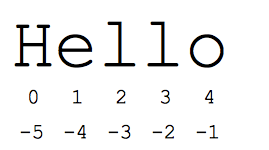
+-> Concatenation - Adds values on either side of the operator a + b will give HelloPython*-> Repetition - Creates new strings, concatenating multiple copies of the same string a*2 will give -HelloHello[]-> Slice - Gives the character from the given index a[1] will give e[ : ]-> Range Slice - Gives the characters from the given range a[1:4] will give ellin-> Membership - Returns true if a character exists in the given string H in a will give 1not in-> Membership - Returns true if a character does not exist in the given string M not in a will give 1
  chaine = str()
  chaine = "Hello"
  chaine[1:4] #is 'ell' -- chars starting at index 1 and extending up to but not including index 4
text = ("%d little pigs come out or I'll %s and %s and %s" % (3, 'huff', 'puff', 'blow down'))- String Methode()
- s.lower() / s.upper()
-- returns the lowercase or uppercase version of the string - s.capitalize()
*-- Capitalizes first letter of string - s.center( width, fillchar )
*-- Returns a space-padded string with the original string centered to a total of width columns. - s.count( str, beg= 0,end=len(string) )
*-- Counts how many times str occurs in string or in a substring of string if starting index beg and ending index end are given. - s.strip()
-- returns a string with whitespace removed from the start and end* - s.isalpha() / s.isdigit() / s.isspace() ...
-- tests if all the string chars are in the various character classes - s.startswith( 'other' ), s.endswith( 'other' )
-- tests if the string starts or ends with the given other string - s.find( 'other' )
-- searches for the given other string (not a regular expression) within s, and returns the first index where it begins or -1 if not found - s.replace( 'old', 'new' )
-- returns a string where all occurrences of 'old' have been replaced by 'new' - s.split( 'delim' )
-- returns a list of substrings separated by the given delimiter. The delimiter is not a regular expression, it's just text. 'aaa,bbb,ccc'.split(',') -> ['aaa', 'bbb', 'ccc']. As a convenient special case s.split() (with no arguments) splits on all whitespace chars. - s.join( list )
-- opposite of split(), joins the elements in the given list together using the string as the delimiter. e.g. '---'.join(['aaa', 'bbb', 'ccc']) -> aaa---bbb---ccc
- s.lower() / s.upper()

len([1, 2, 3]) = 3Length[1, 2, 3] + [4, 5, 6] = [1, 2, 3, 4, 5, 6]Concatenation['Hi!'] * 4 = ['Hi!', 'Hi!', 'Hi!', 'Hi!']Repetition3 in [1, 2, 3] = TrueMembershipfor x in [1, 2, 3]: print x = 1 2 3Iterationcmp(list1, list2)-> Compares elements of both lists.min(list), max(list)-> Returns item from the list with min or max value.
  squares = [1, 4, 9, 16]
  sum = 0
  for num in squares:
    sum += num
  print sum  ## 30

  list = ['larry', 'curly', 'moe']
  if 'curly' in list:
    print 'yay'

  >>> qtt_a_retirer = 7 # On retire chaque semaine 7 fruits de chaque sorte
  >>> fruits_stockes = [15, 3, 18, 21] # Par exemple 15 pommes, 3 melons...
  >>> [nb_fruits-qtt_a_retirer for nb_fruits in fruits_stockes if nb_fruits>qtt_a_retirer]
  [8, 11, 14]

  >>> inventaire = [
  ...     ("pommes", 22),
  ...     ("melons", 4),
  ...     ("poires", 18),
  ...     ("fraises", 76),
  ...     ("prunes", 51),
  ... ]
  >>>
  # On change le sens de l'inventaire, la quantité avant le nom
  inventaire_inverse = [(qtt, nom_fruit) for nom_fruit,qtt in inventaire]
  # On n'a plus qu'à trier dans l'ordre décroissant l'inventaire inversé
  # On reconstitue l'inventaire trié
inventaire = [(nom_fruit, qtt) for qtt,nom_fruit in sorted(inventaire_inverse, \reverse=True)]- List Methode()
- list.append( elem )
-- adds a single element to the end of the list. Common error: does not return the new list, just modifies the original. - list.insert( index, elem )
-- inserts the element at the given index, shifting elements to the right. - list.extend( list2 )
adds the elements in list2 to the end of the list. Using + or += on a list is similar to using extend(). - list.index( elem )
-- searches for the given element from the start of the list and returns its index. Throws a ValueError if the element does not appear (use "in" to check without a ValueError). - list.remove( elem )
-- searches for the first instance of the given element and removes it (throws ValueError if not present) - list.sort()
-- sorts the list in place (does not return it). (The sorted() function shown below is preferred.) - list.reverse()
-- reverses the list in place (does not return it) - list.pop( index )
-- removes and returns the element at the given index. Returns the rightmost element if index is omitted (roughly the opposite of append()). - list.remove( index )
-- removes and at the given index.
- list.append( elem )
- Contrairement à la classe str, la classe list vous permet de remplacer un élément par un autre. Les listes sont en effet des types dits mutables.
- Une liste est une séquence mutable pouvant contenir plusieurs autres objets.
- Une liste se construit ainsi : liste = [element1, element2, elementN].
- On peut insérer des éléments dans une liste à l'aide des méthodes append, insert et extend.
- On peut supprimer des éléments d'une liste grâce au mot-clé del ou à la méthode remove.
- Un tuple est une séquence pouvant contenir des objets. À la différence de la liste, le tuple ne peut être modifié une fois créé.
A tuple is a sequence of immutable Python objects. Tuples are sequences, just like lists. The differences between tuples and lists are, the tuples cannot be changed unlike lists and tuples use parentheses, whereas lists use square brackets.
  tup1 = ('physics', 'chemistry', 1997, 2000);
  tup2 = (1, 2, 3, 4, 5 );
  tup3 = "a", "b", "c", "d";
All Same as Liste
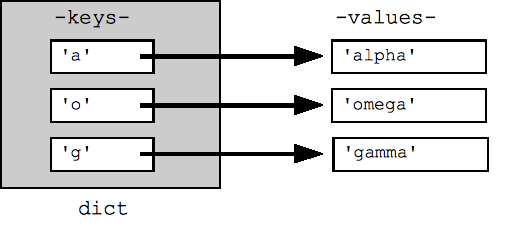
  dictionnaire = {} or new Dict()
  set = {1,"test",[],{}} #Pour créer des SETs

  for cle in fruits:
  for cle in fruits.keys():
  for valeur in fruits.values():
for cle, valeur in fruits.items():- Dict.method()
- dict.clear()
*-- Removes all elements of dictionary dict - dict.copy()
*-- Returns a shallow copy of dictionary dict - dict.fromkeys()
*-- Create a new dictionary with keys from seq and values set to value. - dict.get( key, default=None )
*-- For key key, returns value or default if key not in dictionary - dict.has_key( key )
*-- Returns true if key in dictionary dict, false otherwise - dict.items()
*-- Returns a list of dict's (key, value) tuple pairs - dict.keys()
*-- Returns list of dictionary dict's keys - dict.setdefault( key, default=None )
*-- Similar to get(), but will set dict[key]=default if key is not already in dict - dict.update( dict2 )
*-- Adds dictionary dict2's key-values pairs to dict - dict.values()
*-- Returns list of dictionary dict's values
- dict.clear()
- Un dictionnaire est un objet conteneur associant des clés à des valeurs.
- Pour créer un dictionnaire, on utilise la syntaxe
dictionnaire = {cle1:valeur1, cle2:valeur2, cleN:valeurN}. - On peut ajouter ou remplacer un élément dans un dictionnaire :
dictionnaire[cle] = valeur. - On peut supprimer une clé (et sa valeur correspondante) d'un dictionnaire en utilisant, au choix, le mot-clé del ou la méthode pop.
- On peut parcourir un dictionnaire grâce aux méthodes keys (parcourt les clés), values (parcourt les valeurs) ou items (parcourt les couples clé-valeur).
- On peut capturer les paramètres nommés passés à une fonction en utilisant cette syntaxe :
def fonction_inconnue(**parametres_nommes):(les paramètres nommés se retrouvent dans le dictionnaire parametres_nommes).
- Quand on utilise la boucle for element in sequence:, un itérateur de cette séquence permet de la parcourir.
- On peut récupérer l'itérateur d'une séquence grâce à la fonction
iter. - Une séquence renvoie l'itérateur permettant de la parcourir grâce à la méthode spéciale
__iter__. - Un itérateur possède une méthode spéciale,
__next__, qui renvoie le prochain élément à parcourir ou lève l'exceptionStopIterationqui arrête la boucle. - Les générateurs permettent de créer plus simplement des itérateurs.
- Ce sont des fonctions utilisant le mot-clé
yieldsuivi de la valeur à transmettre à la boucle.
  def intervalle(borne_inf, borne_sup):
      """Générateur parcourant la série des entiers entre borne_inf et borne_sup.
      Notre générateur doit pouvoir "sauter" une certaine plage de nombres
      en fonction d'une valeur qu'on lui donne pendant le parcours. La
      valeur qu'on lui passe est la nouvelle valeur de borne_inf.

      Note: borne_inf doit être inférieure à borne_sup"""
      borne_inf += 1
      while borne_inf < borne_sup:
          valeur_recue = (yield borne_inf)
          if valeur_recue is not None: # Notre générateur a reçu quelque chose
              borne_inf = valeur_recue
borne_inf += 1 file object = open(file_name [, access_mode][, buffering])
# Rename a file from test1.txt to test2.txt
os.rename( "test1.txt", "test2.txt" )
# Delete file test2.txt
os.remove("text2.txt")
# Pour éviter de close mot clef With
>>> with open('fichier.txt', 'r') as mon_fichier:
... texte = mon_fichier.read()
...
>>>rOpens a file for reading only. The file pointer is placed at the beginning of the file. This is the default mode.rbOpens a file for reading only in binary format. The file pointer is placed at the beginning of the file. This is the default mode.r+Opens a file for both reading and writing. The file pointer placed at the beginning of the file.rb+Opens a file for both reading and writing in binary format. The file pointer placed at the beginning of the file.wOpens a file for writing only. Overwrites the file if the file exists. If the file does not exist, creates a new file for writing.wbOpens a file for writing only in binary format. Overwrites the file if the file exists. If the file does not exist, creates a new file for writing.w+Opens a file for both writing and reading. Overwrites the existing file if the file exists. If the file does not exist, creates a new file for reading and writing.wb+Opens a file for both writing and reading in binary format. Overwrites the existing file if the file exists. If the file does not exist, creates a new file for reading and writing.aOpens a file for appending. The file pointer is at the end of the file if the file exists. That is, the file is in the append mode. If the file does not exist, it creates a new file for writing.abOpens a file for appending in binary format. The file pointer is at the end of the file if the file exists. That is, the file is in the append mode. If the file does not exist, it creates a new file for writing.a+Opens a file for both appending and reading. The file pointer is at the end of the file if the file exists. The file opens in the append mode. If the file does not exist, it creates a new file for reading and writing.ab+Opens a file for both appending and reading in binary format. The file pointer is at the end of the file if the file exists. The file opens in the append mode. If the file does not exist, it creates a new file for reading and writing.
- file.closed -> Returns true if file is closed, false otherwise.
- file.mode -> Returns access mode with which file was opened.
- file.name -> Returns name of the file.
- file.softspace -> Returns false if space explicitly required with print, true otherwise
- file.write( string )
- file.read( [count] )
- file.tell() -> method tells you the current position within the file; in other words, the next read or write will occur at that many bytes from the beginning of the file.
- file.seek( offset[, from] ) -> method changes the current file position. The offset argument indicates the number of bytes to be moved. The from argument specifies the reference position from where the bytes are to be moved.
--
- On peut ouvrir un fichier en utilisant la fonction open prenant en paramètre le chemin vers le fichier et le mode d'ouverture.
- On peut lire dans un fichier en utilisant la méthode
read. - On peut écrire dans un fichier en utilisant la méthode
write. - Un fichier doit être refermé après usage en utilisant la méthode
close. - Le module
pickleest utilisé pour enregistrer des objets Python dans des fichiers et les recharger ensuite.