This is the repository for the plugin_localization plugin. This plugin enhances the app_storefront_base cartridge by providing localization functionality, including the following capabilities:
- Country specific configuration:
- site id
- available currencies
- available locales
- applicable price books
- static redirect URL [optional]
- hostname [optional]
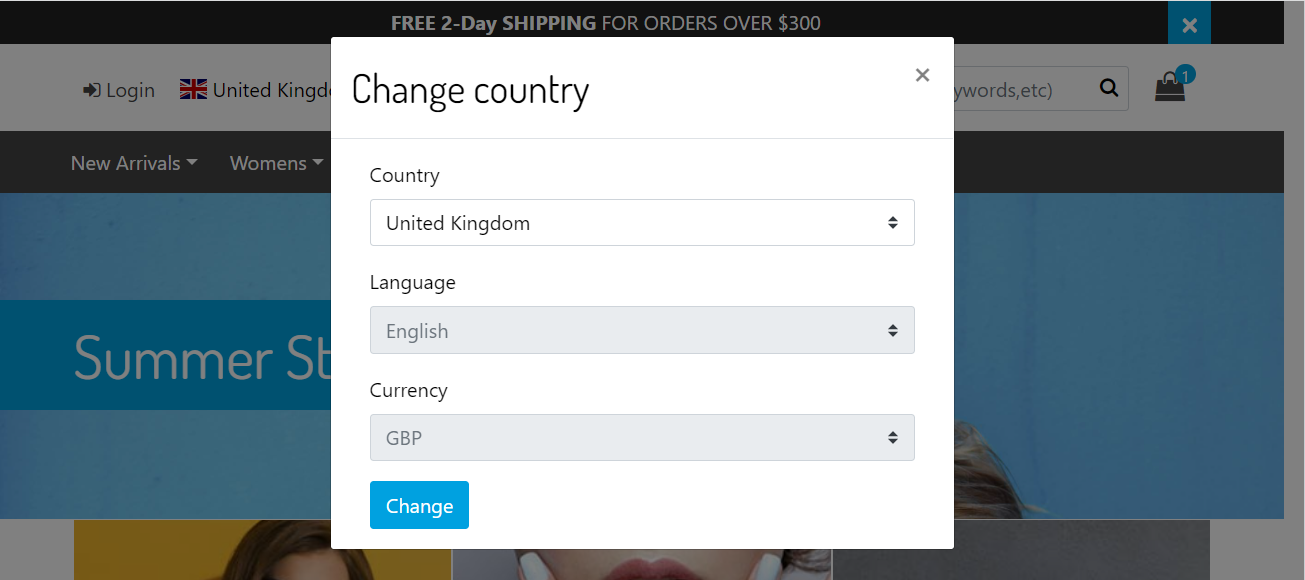
- Country, language and currency selector
- Automatic redirects to target country, language and currency
In the Business Manager, go to Merchant Tools > Custom Objects > Custom Object Editor, select CountryConfig and Click on New.
| Attribute | Example | Description |
|---|---|---|
| Country Code | CA | Country code ID |
| Name | Canada | Country name |
| Site ID | RefArchGlobal | The site to which the country is linked |
| Locales | en_CA fr_CA |
The list of available locales |
| Price Books | usd-m-list-prices usd-m-sale-prices cad-m-list-prices cad-m-sales-prices |
The list of applicable price books |
| Currencies | USD CAD |
The list of available currencies |
| Host Name [optional] | mybrand.ca | This field is used for multiple host names |
| Redirect URL [optional] | shop.legacy.com/ca | This field is used for redirection to legacy site locale |
The plugin_localization plugin requires the app_storefront_base cartridge. In your cartridge path, include the cartridges in the following order:
plugin_localization:app_storefront_base
Each template in the following table is present in multiple cartridges. If the file exists in the app_storefront_base cartridge and in this plugin cartridge, the plugin template overrides the base template. The presence of a template file in multiple plugin cartridges indicates a conflict that you have to resolve in a customization cartridge. However, if you are using only one of the conflicting plugin cartridges, no action is necessary.
| Template File | Cartridges | Location |
|---|---|---|
| countrySelector.isml | plugin_localization app_storefront_base |
cartridge/templates/default/components/header/countrySelector.isml |
| mobileCountrySelector.isml | plugin_localization app_storefront_base |
cartridge/templates/default/components/header/mobileCountrySelector.isml |
- Clone this repository. (The name of the top-level folder is plugin_localization.)
- In the top-level plugin_localization folder, enter the following command:
npm install. (This command installs all of the package dependencies required for this plugin.) - In the top-level plugin_localization folder, edit the paths.base property in the package.json file. This property should contain a relative path to the local directory containing the Storefront Reference Architecture repository. For example:
"paths": {
    "base": "../storefront-reference-architecture/cartridges/app_storefront_base/"
}
- In the top-level plugin_localization folder, enter the following command:
npm run compile:js && npm run compile:scss - In the top-level plugin_localization folder, enter the following command:
npm run uploadCartridge
Use the provided NPM scripts to compile and upload changes to your Sandbox.
npm run compile:scss- Compiles all scss files into css.npm run compile:js- Compiles all js files and aggregates them.npm run build- Compiles all js & scss files and aggregates them.
npm run lint - Execute linting for all JavaScript and SCSS files in the project. You should run this command before committing your code.
npm run watch - Watches everything and recompiles (if necessary) and uploads to the sandbox. Requires a valid dw.json file at the root that is configured for the sandbox to upload.