
One .char format for consistent, portable characters.
Official .char integration for ComfyUI. Build a character once and keep the same face, body,
clothes and voice across every model you already use. Currently MiniMax H3, Krea 2, FLUX.2 dev and
klein 9B / 4B, with consistent voice on MiniMax H3.
Install · Omnichar Studio · Try it in your browser · omnichar-sdk · Example workflows






A .char holds a character's reference images, its locked description, and often a trained LoRA.
Build one here with Encode Character, or in Omnichar Studio on your own GPU
or Omnichar Cloud. The same file then feeds FLUX.2, MiniMax H3 and
anything else that takes references.
- Character Files: Open a
.charbuilt in Omnichar Studio or Cloud - Reference Images: One batch, or one per numbered slot, both from the same resolved set
- Positions Kept: Reference order is preserved, because a prompt addresses images by number
- Conditioning: Wire a CLIP to get conditioning straight out, or take the prompt as text
- Trained LoRA: Applied to MODEL and CLIP when the character carries one
- Build Characters: Encode face, body and wardrobe references into a new
.char, three slots each - Voice: Store a short voice clip in the character and send it to MiniMax H3 when the prompt has dialogue
- Python Library: Omnichar's standalone package for
.charintegration, no dependencies
- ComfyUI
- Python 3.10+
omnichar-sdk(installed fromrequirements.txt)
-
Go to your ComfyUI custom nodes directory:
cd ComfyUI/custom_nodes -
Clone this repository:
git clone https://github.com/omnichar/ComfyUI-Omnichar cd ComfyUI-Omnichar -
Install the reader:
pip install -r requirements.txt
-
Restart ComfyUI
Put .char files in ComfyUI/models/characters/. The loader lists whatever is there.
To share one folder with Omnichar Studio, set INLINE_CHARACTERS_DIR to its characters directory
and both read the same files.
| Node | Inputs | Outputs |
|---|---|---|
| Load Character | char, char_path |
char |
| Decode Character | char, style, clip, prompt, arch, max_references, size_from, fit, voice, audio_position |
conditioning, references, refs, sheet, prompt, voice |
| Character Reference | refs, index |
image, role, count |
| Character References Split | refs |
image_0 to image_4, count |
| Character Reference Latent | conditioning, refs, vae |
conditioning |
| Apply Character LoRA | model, clip, char, strength, arch, min_key_coverage |
model, clip |
| Encode Character | name, description, resolution, face/body/cloths (3 slots each), voice |
char |
| Save Character | char, filename, overwrite |
path |
A character is a few reference images plus a description. Encode Character sorts them by role, so face comes first and the prompt numbers follow that order.
 |
 |
 |
 |
face |
body |
cloths |
cloths_2 |
Those four go into Encode Character, which writes sia.char. Save Character puts it in
ComfyUI/models/characters/, and Load Character picks it up from there.
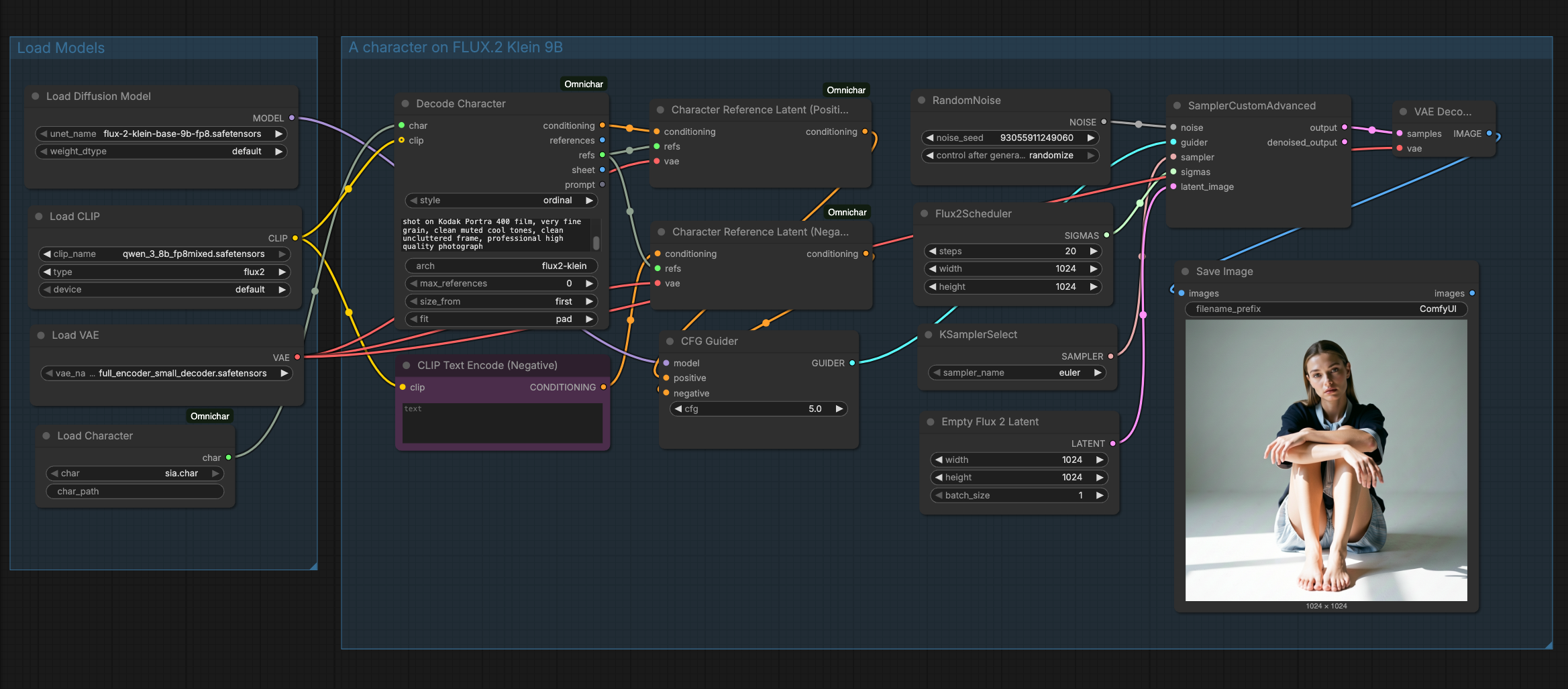
Decode Character turns a character into a prompt and a resolved reference list. Models
that take one batch read references. Models with numbered slots, like MiniMax H3, take refs into
a Character References Split node, or a Character Reference node per slot. Edit models that read references as latents, like FLUX.2, take
refs into a Character Reference Latent node on both the positive and the negative conditioning.
A character can carry a voice for MiniMax H3 Reference to Video. Wire Load Audio into Encode
Character's voice input: about 30 seconds of clean speech, no music. On Decode Character, use the
token style and wire voice into the H3 node's ref_audio_0.
With voice on auto, the clip is sent only when the prompt has dialogue:
| Prompt | Voice |
|---|---|
sia faces the camera and says "I built this look one frame at a time." |
sent |
close-up of sia as she whispers to someone off camera |
sent |
sia walks along the lake at dusk |
not sent |
The match is on words, so "no speaking" still counts as dialogue; set never for a silent shot
like that, or always to force the voice in. H3 speaks new words in a voice like the clip, so
expect a likeness rather than a copy.
- Build a
.charfrom face, body and wardrobe references - FLUX.2 Klein 9B, references as latents, to an image
- MiniMax H3, references in numbered slots, to a video
- Build a
.charwith a voice, a face reference plus a voice clip from Load Audio - MiniMax H3 with voice, the character's voice wired into
ref_audio_0, to a talking video
Omnichar's standalone package for .char integration. Install it anywhere, not only in ComfyUI:
pip install omnichar-sdkSee packages/omnichar-sdk/README.md.
packages/omnichar-sdk/ is Apache-2.0, so closed-source tools can read .char files.
Everything else is GPL-3.0-or-later, because ComfyUI is.