Supported Hardware
This page lists the machine known to work with Plover.
Table of Contents generated with DocToc
- Dedicated machines designed for use with Plover
- Stenotype Machines
- Keyboards
- Laptops with NKRO
Various steno enthusiasts are making and selling machines designed for use with Plover.
| Product Name | Manufacturer | About | Price |
|---|---|---|---|
| Georgi | g Heavy Industries | Portable, affordable, and light-touch option. Low-profile Kailh Choc switches with 20g-actuation springs swapped in makes this the lightest-touch and lowest-height machine made for Plover so far. The removal of a number bar reduces costs and weight for portability. A third thumb key is to be used as a number bar replacement like the TinyMod. 
|
$95 |
| SOFT/HRUF Splitography | Scott Urueta | Open source hardware. This has the shape of a stenography machine, but is built using computer keys rather than levers. The name is the steno representation for, and is pronounced as, "soft love". The SOFT/HRUF uses Matias Red switches (~40g actuation). 
|
$138 |
| TinyMod | Charley Shattuck | Open source hardware. A smaller, nonsplit version of the Stenomod that omits the number bar in order to reduce costs and size. The center vowel key is used as a number bar replacement. 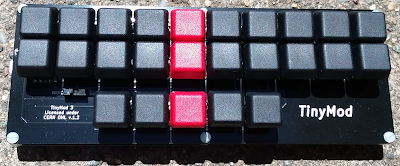
|
$160 |
| Stenomod | Charley Shattuck | Open source hardware. This has light (35g actuation) keys and a split design. See Ted Morin's review of the Stenomod as well as Martin Körner's review. The name is supposed to hint at how the machine is "modular" and adaptable. 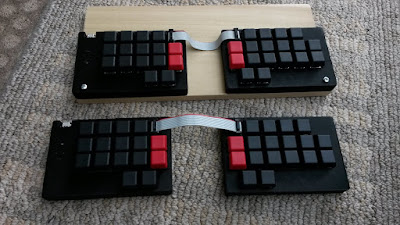
|
$200 |
| Stenoboard | Utopen (Emanuele Caruso) | Open source hardware. The first open source steno machine on the market, released in 2014. The Stenoboard's keys actuate like mouse-clicks instead of a keyboard or lever-machine. 
|
Out of production |
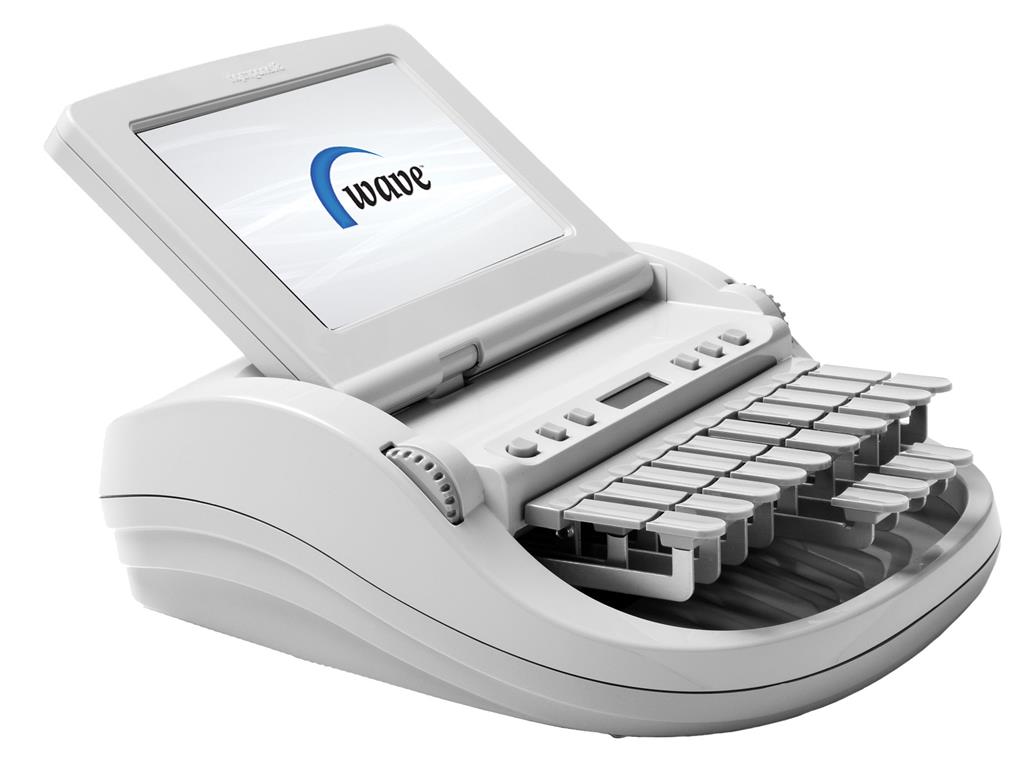
Plover supports several protocols that are in use by various machines:
- Stentura serial: most machines by Stenograph and many others.
- Gemini PR serial: typically any recent machine made by the Neutrino Group, such as the Piper, Revolution, or Infinity series.
- ProCAT: protocol used by all ProCAT machines.
- TX Bolt: an older protocol supported by some machines as a primary or secondary protocol.
- Treal: used only by the Treal from Word Technologies.
- Passport: used only by the Passport Writer from Advantage Software.
This means that, in theory, many machines work with Plover.
The following machines have been confirmed by users to work with Plover after actually trying it:
| Product Name | Manufacturer | Protocol/Connection | Comments |
|---|---|---|---|
| Elan Cybra Student | Stenograph | TX Bolt (serial) | |
| Flash, Blaze, Impression, and Xpression | ProCAT | ProCAT (serial, maybe) | (For Blaze and other Windows CE-based writers) USB cannot be used with Plover, it is only to transfer files created on the Blaze to your PC or CAT software. USB does not work on Windows 10, only Windows XP (with ActiveSync), and Windows Vista/7/8 with WMDC.exe (Windows Mobile Device Center). Both are abandonware. You need an RJ11 (male) to DB9 (female) to use this writer. |
| Flash Writer | ProCAT | TX Bolt | Press Mode (far right button), click Setup, then press the Emul button. Display should read Emulate: Baron
|
| Gemini2 | Neutrino Group | Gemini PR (serial) | |
| Gemini RT | Neutrino Group | TX Bolt | Must start a job on screen or in Infinity2 |
| Lightspeed | Stenovations | TX Bolt (serial over USB/Bluetooth) | Baud rate 9600 |
| Infinity Ergonomic | Neutrino Group | Gemini PR (serial over USB/Bluetooth) | Baud rate 115200 |
| Infinity Genesis | Neutrino Group | Gemini PR (serial) | |
| Passport | Advantage Software | Passport (USB) | |
| Passport Touch | Advantage Software | USB, Bluetooth | While in "Emulation Mode": Stentura over Bluetooth or TX Bolt over USB |
| Protege | Stenograph | Stentura (serial) | Connect Serial-to-USB cable to serial port of Protege. Use USB jack for power only (USB drivers not avail.) Setup Instructions |
| Revolution Grand | Neutrino Group | Gemini PR (serial) | |
| Stentura 400 SRT | Stenograph | Stentura (serial) | Setup Instructions |
| Stentura 200 SRT | Stenograph | Stentura (serial) | (same instructions as the 400 SRT) |
| Stentura 500 | Stenograph | Stentura (serial) | (same instructions as the 400 SRT) |
| Stentura 8000LX | Stenograph | Stentura (serial) | (same instructions as the 400 SRT) |
| Tréal | Word technologies | Treal (USB) | |
| Wave | Stenograph | Stentura (serial) OR Stenograph USB | Requires stenograph drivers to do serial on windows. All platforms can use the plover-stenograph-usb plugin. Make sure "serial protocol" on the Wave is set to "Stentura". |
If you don't have a steno machine, you can use a keyboard that supports N-Key Rollover (NKRO).

This is a feature of some keyboards that means that you can press as many keys as you want simultaniously, and they will all register. Typical keyboards stop working correctly when you press somewhere between 4 and 7 keys at once. For more information, see the Wikipedia entry about NKRO.
In general, most keyboards will not be NKRO. "Gamer" and mechanical keyboards are most likely to have NKRO, while budget as well as laptop keyboards are unlikely to have NKRO.
Note: this test results in a false positive on some Macbooks
To test your keyboard for NKRO capability:
- Open up a text editor.
- Hold down both shift keys.
- Type each letter on your keyboard (from A-Z).
Note: You must hold down both shift keys while you type each letter on your keyboard.
If all keys are typed into the text editor, your keyboard probably has NKRO.
The in-browser steno demo provides a browser-based application that lets you test your keyboard's capabilities for registering multiple key presses with simulated steno output.
To test your keyboard:
- Open your web browser and go to the in-browser steno demo.
- Click in the Output box to start
- Each key you press will light up in the picture of a keyboard.
- Press the middle row keys
asdfjkl;all at once.- With a normal keyboard only 6 of the 8 keys will light up (likely fewer).
- If your keyboard has N-key rollover, all 8 keys will light up.
- Press other multiple-key combinations, such as
yuhj, and see if they all light up. Ideally, your keyboard should register the entire first two rows of your keyboard at once, plusc,v,b, andn.
If you don't have a keyboard that's capable of NKRO, but still want to give Plover a try, you can arpeggiate/roll the keyboard chords. More info can be found at the bottom of this post.
Warning: Be wary of false advertising; some keyboards are advertised as NKRO or anti-ghosting, but are limited to certain combinations. Check reviews to get confirmation before making a purchase. Some keyboards might only support full-NKRO over a PS/2 connector (the old-style plug.) Full NKRO over USB is possible. Many keyboards do it well, and will work with Plover.
The following machines have been confirmed by users to work with Plover after actually trying it:
| Product Name | Manufacturer | Comments | Price |
|---|---|---|---|
| Anne Pro II | Obinslabs | NKRO over USB; 6KRO over bluetooth; Works on Mac | $20-100 |
| I-500 Victop (compact: 87 keys) | Eastern times tech | NKRO over USB | 27 GBP |
| TOMOKO (87 key Mechanical Keyboard) | TOMOKO | NKRO over USB (Works on Mac) | $30 |
| K552 | Redragon | NKRO over USB | $35 |
| X51 (Gaming Mechanical Keyboard 87/104) | Metoo | NKRO over USB | $40 |
| ZM-K600S | Zalman | NKRO over USB | $40 |
| K66 | Corsair | NKRO over USB | $55 |
| K63 | Corsair | NKRO over USB (Works on Mac!) | $80 |
| STRAFE | Corsair | NKRO over USB | $80 |
| CM Storm Quickfire TK | Cooler Master | NKRO over USB (Doesn't work on Mac) | $85 |
| Vengeance K65 | Corsair | NKRO over USB | $90 |
| Francium Pro | Deck | NKRO over USB when in "lightning" mode (Fn + F10). Full NKRO works on Windows and Linux, but is rumored NOT to work on Macs (you'd be stuck with 6KRO). | $94 |
| Noppoo Choc | Noppoo | NKRO over USB (works on Mac without adapters) | $95 |
| Apex M750 TKL | SteelSeries | NKRO over USB (Works on Mac, but for some reason if you install the SteelSeries Engine it stops working) | $120 |
| G710+ | Logitech | NKRO over USB | $130 |
| Majestouch-2 | Filco | NKRO over USB | $167 |
| Das Keyboard 4 Ultimate | Das Keyboard | NKRO over USB requires key sequence to enable. See fine print on underside of keyboard | $169 |
| Apex M800 | SteelSeries | NKRO over USB | $199 |
| Ergo Pro | Matias | NKRO over USB | $200 |
| Ultimate Hacking Keyboard | Ultimate Gadget Labs | NKRO over USB | $250 |
| Ergodox | Ergodox | NKRO over USB | $295 |
| Model01 | Keyboard.io | NKRO over USB | $329 |
Because you hit many keys with steno at once, there are two properties that are useful to have in a mechanical keyboard switch for steno: a light actuation force on a linear switch.
The light actuation makes it easier on your hands. For a chord like TKPWHRAOEUGD (gliding), you are hitting 8 keys with your left hand. That means that whatever switch force you need to depress one key, you have to push 8-times as much. For a 80cN (~80 grams, ~2.9 oz) switch, that's 640cN (~640g, ~22.6 oz). For this reason, your wrists will have a much easier time working with your machine if its actuation force is as light as possible.
The linearity is recommended because it's been found that the tactile feedback that one gets from an individual switch is not as useful when you are receiving 4-10 of those feedbacks at once. The brain just doesn't process all the fingers' feedback in a useful manner. And since the bump usually requires a small addition to the actuation force, we recommend keeping it linear and simple.
Professional steno machines, historically, always bottomed out (meaning the keys are pressed until they can no longer travel; the bottom.) Newer machines use more complicated mechanisms for detecting key travel, often using magnets and the hall effect to determine where the key is, allowing for customizable actuation points. The typical force required for a modern steno machine is between 10cN and 20cN, with some extremes on either end for personal preference. The travel of a typical lever steno machine is usually between 2mm and 30mm. The lower end is found in machines like the LightSpeed (nonlever), where the higher end is around the maximum that you can configure a lever machine to stroke.
Most of the mechanical switches have a 2mm actuation point and 4mm travel/bottoming out, but some community members have found that "speed switches" with an earlier actuation point (usually 1.1-1.4mm) are better for steno due to their increased sensitivity.
| Switch | Stat | Note | Machines |
|---|---|---|---|
| Gateron Clear / White | 35 cN linear | Best stock option available on the market | Stenomod uses this switch |
| Matias Red | 35 cN linear | Feels heavier than 35 cN switches due to having a "flat" force curve. Matias also has a different stem from Cherry | SOFT/HRUF uses this switch |
| Cherry MX Red | 45 cN linear | ||
| Kailh Silver | 50 cN spring* linear | Has an early actuation (1.1mm vs 2mm) | |
| Cherry MX Brown | 45 cN bumpy | While not ideal compared to other options, this switch is still a better choice than blues, blacks, and other Cherry switches | |
| Kailh Choc Red | 50 cN spring* linear | The Georgi uses this switch |
* The Kailh silvers and Choc reds use a spring that would cause a 50 cN actuation point at 2mm, but since they actuate earlier (1.1mm), the force required is nearer to 35 cN.
There are other methods to decrease actuation force for even these switches. This includes:
- Putting the Gateron Clear's 35 cN spring into the Kailh Silver for its earlier actuation point.
- Trimming the springs of a linear switch by several mm to reduce force.
- Using an aftermarket spring with lower forces, such as a prototype 20 cN spring that isn't yet released to the wider market.
- Removing the leaf-spring (not the primary spring) in the Matias Red switch to make the force curve less flat.

Most keyboards have the keys in staggered rows, which can make it difficult to press two keys in a column with a single finger. To adapt a keyboard for steno use, you can use:
- Keytoppers
- Keycaps
You can also use a keyboard with an ortholinear layout.
Laser-cut keytoppers are in the shape of the keys on a steno machine. You stick them on top of the relevant keys on the keyboard. You can buy laser-cut keytoppers from the Plover Store. You can also make your own keytoppers out of plastic or even coins.

If you have a mechanical keyboard, it is likely your keys have a Cherry MX stem and will work with custom keycaps. You can replace the existing keycaps on your keyboard with different keycaps, to improve the layout for stenoing.
-
StenoToppers is a 3D printed keycap set designed by Jason Cemra. It aligns the rows, raises the keys, and reduces the keycap tapering, slant and gap. The 3d model (.stl) files are available on Github. If you have access to a 3D printer, you can download .stl files and print them for a negligible cost. Otherwise, you would need to use a 3D printing service.
-
The G20 keycap set from Signature Plastics is a great set for steno, and will fit on an ErgoDox or other mechanical keyboard. The keys have a direction, so for optimal comfort, you should angle the top row of steno (
STPH...) down, so that they are close to the bottom row (SKWR...) -
You can 3D-print a steno-friendly keycap.
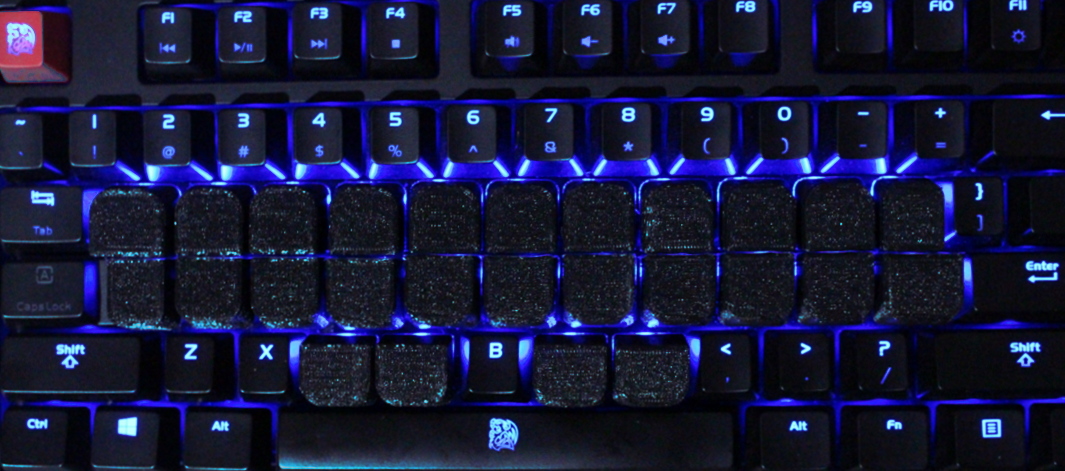

Keys that have little space between them are good for steno, because then you can hit two neighboring keys with one finger (which is frequently necessary).
Keyboards with an "ortholinear" layout have the keys in straight columns. This is handy for steno, as it makes it easier to press two keys in a column with a single finger.
The following machines have been confirmed by users to work with Plover after actually trying it:
| Product Name | Manufacturer | Protocol/Connection | Comments |
|---|---|---|---|
| ErgoDox | ErgodoxEZ, Massdrop, FalbaTech, others | USB | The ErgoDox is a fairly high-end NKRO keyboard at $200, with an ortholinear layout. It has two separate halves, so you can angle them to suit you. You can order it with the Gateron White keys, which have an extremely light, 35 gram activation force. Read a guide to Starting Stenography with an Ergodox by Paul Fioravanti. |
| Planck | OLKB | USB | The Planck is a fully programmable NKRO keyboard with an ortholinear layout. It is 40% the size of a standard keyboard. Read a guide to starting stenography with a Planck by DiDoesDigital. 
|
| Preonic | OLKB | USB | The Preonic is a fully programmable NKRO keyboard with an ortholinear layout. It is 50% the size of a standard keyboard. |
| Gherkin | USB | The Gherkin is a fully programmable NKRO keyboard with an ortholinear layout. It is 30% the size of a standard keyboard. |
If you want to always have steno on the go, you might consider finding a notebook with NKRO. Note that not all these machines are equivalent in terms of actuation force or key shape. You might find, for example, that chiclet keys don't feel as good as the Alienware's classic keyboard style. It's always best to try laptop keyboards at a local store, if possible.
| Model | Screen Size | Manufacturer | Rollover | Price (USD) | Weight |
|---|---|---|---|---|---|
| Alienware R3/R4 | 13", 15", 17" | Dell | n-key | $1000 to $3000 | 5.8 to 9.8 lbs |
| GL553 | 15" | Asus | 30-key | $1200 | 5.5 lbs |
| Razer Blade Stealth 8th Gen | 13" | Razer | 14-key | $1200+ | 2.98 lbs |
| Zephyrus GM501 | 15" | Asus | 30-key | $1500 to $2200 | 5.5lbs |
| Omen X | 17" | HP | n-key* | $1800 | 10.7 lbs |
| P57X | 17" | Gigabyte | 30-key | $1800 | 6.6 + 2.2 (power adaptor) lbs |
| GL502 | 15" | Asus | 30-key | $1900 | 4.9 lbs |
| Aero 15/15x | 15" | Gigabyte | 80-key* | $2000 to $2900 | 4.6 lbs |
| Legion Y920 | 17" | Lenovo | 100-key* | $2200 | 10.1 lbs |
| Zephyrus GX501 | 15" | Asus | 30-key | $2500 | 4.85lbs |
| Aorus X5 v8 and X7 v8 | 15", 17" | Aorus | 80-key* | $2600, $3000 | 5.51 lbs, 7.05 lbs |
| Predator Triton 700 | 15" | Acer | n-key (clicky keys) | $3000 | 5.3 lbs |
* Untested for use with Plover
After testing some of the laptops on the list above, they were found to not live up to their claims.
| Model | Manufacturer | Claimed Rollover | Findings |
|---|---|---|---|
| HP Omen 15 and 17 | HP | "26-key rollover anti-ghosting" | Combination "YUHJ" on Qwerty only produces 3 letters |
| GF62 and GP72 | MSI | "anti-ghosting for up to 45 keys" | 99% of chords were OK, certain combinations wouldn't work -- e.g. QWEAS blocked R. Keyboard also responded abnormally slow when writing chords. |