 Elementor
✅ Regenerate CSS & Data in the Admin Bar #21642

Replies: 6 comments 3 replies

|
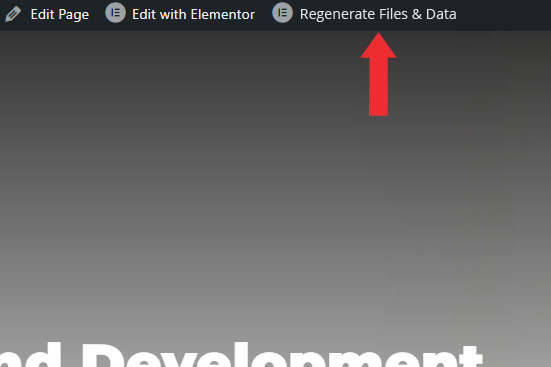
I was just thinking today that a button in the admin bar would be a real time-saver and would also likely cut down on support requests because it would be in people's faces all the time and they would be more likely to remember that option when things weren't working as expected. |

|
Yes, and have an option on the Elementor Configuration Menu where decide if we want to Regenerate Files & Data every time a post/page/cpt built with Elementor is saved or edited. This is time saving as well if you are constantly developing sites. |

|
Hi all, Add this to your Elementor Child Functions.php File to Enable the Regenerate Elementor CSS from the Backend/Frontend. |

|
YES! I've noticed this too! Need to constantly regenerate CSS now. Sure adding a button in the editor would be an improvement, but why is this needed in the first place?? |

|
Exactly it should clear the cache each time a backend user updates the design. In my case super stripped down the Hello Elementtor theme using Elementor Canvas and am experiencing the same. Need to clear it every time I update anything in the content or design. |

|
Completely agree. This function shouldn't even exist in the first place since this should be handled automatically. I genuinely do not understand the purpose of this, is this so the elementor devs don't have to fix the actual issue which requires this? Please @shilo-ey, can the devs add a fix so regenerating files is no longer necessary? @jsysnapjack Does your solution remove the need to use this feature? If so, could you submit a pull request so that the devs can integrate this and the process can be automated and the user facing button can be removed from settings/tools? |

|
How about this? // Your custom function to regenerate Elementor CSS // Hook into the update process |

|
Elementor v3.28 added a "Clear Files & Data" button in the Edit with Elementor dropdown, I believe it could be improved. The "Clear Files & Data" button under Elementor > Tools > General has a detailed explanation of what it does and the additional context of it being related to the Elementor Cache, which is really important. The “Clear Files & Data” button within the Edit with Elementor dropdown, does not have this additional context making it extremely confusing for normal users. Here's my suggestion for an improved Edit with Elementor dropdown: I've put the advanced “Clear Files & Data” feature within a subdropdown called Tools, making it less intrusive for non-advanced users and added Cache: to bring back this important context. Bonus: Also added the "Edit page" option on top (same action as directly clicking Edit with Elementor), which I believe would be a great addition for less experienced users. It's good practice to have the main action in the dropdown, see the WordPress "+ New" menu item, which has "Post" (both create a new post when clicked). |


|
Hello there! We have great news! 🙌 📢 We're happy to announce that this feature was released with Elementor v3.28.0! 🥳You can now Clear Files & Data directly from the Edit with Elementor dropdown in the WordPress Admin Bar while visiting your site in the frontend. For more info please check this article: ✅ Feel free to check it out and update your plugin to the new version!
Cheers 🥂 |


Uh oh!
There was an error while loading. Please reload this page.
Prerequisites
What problem is your feature request going to solve? Please describe.
Hi,
Every time a post/page/cpt is updated with design, we need to go to Tools > Regenerate Files & Data.
Most of the time, happens when we have a complex site with a lot of templates in the design.
This is very time consuming and if you forgot, CSS will be broken sometimes and is not good for any visitor.
Describe the solution you'd like
It would be GREAT to have a button to Regenerate Files & Data on the Admin Bar (top) and have an option to decide if we want to Regenerate Files & Data every time a post/page/cpt built with Elementor is saved or edited.
Thanks.
Describe alternatives you've considered
No response
Additional context
No response
All reactions