
🌐 Language / Idioma: English | Español
v3.0.1 | 🌍 Official Website | Download v3.0.1 | 🌐 USBAnywhere Server (Windows & macOS) | 📱 USBAnywhere Android | 💬 Reddit Community | 📖 User Manual | 🌐 VPN Connection
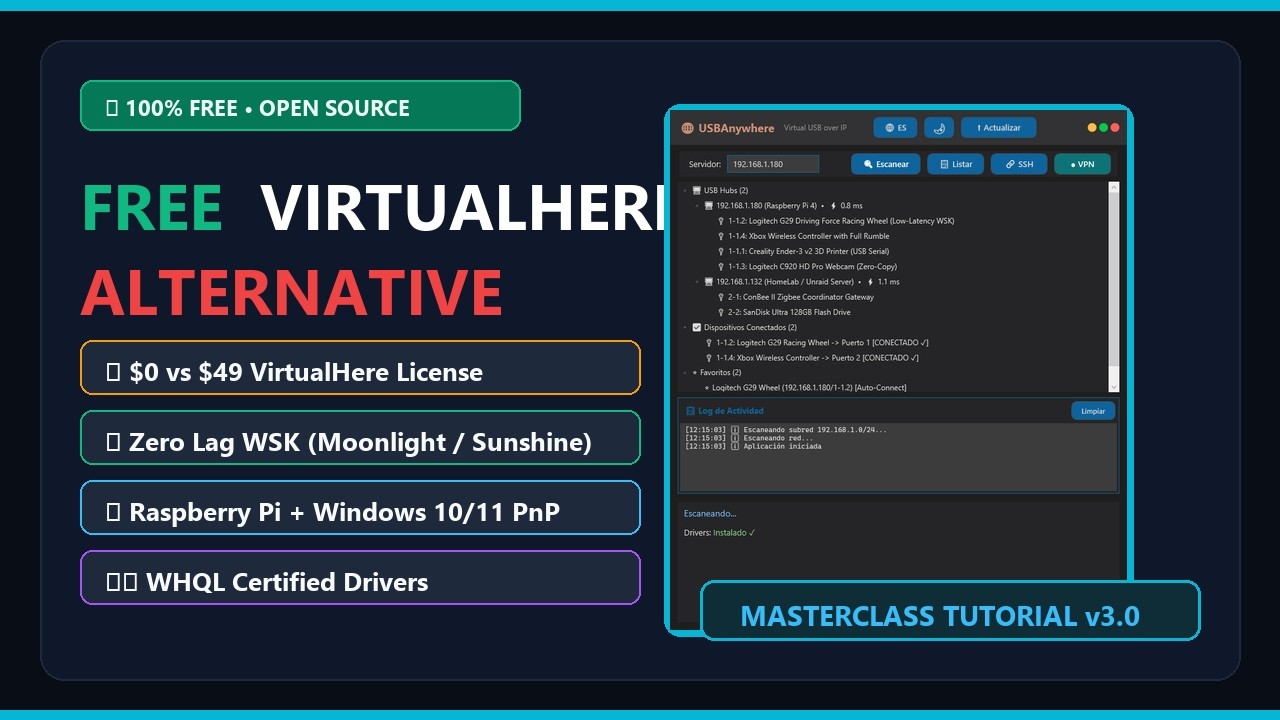
Why pay $49.00 per server and be restricted to a single USB device? USBAnywhere connects unlimited remote USB peripherals over LAN, Wi-Fi, and Internet with zero licensing fees, Microsoft WHQL-certified drivers, and tunable ultra-low latency.
Transform any Linux device (or Windows PC) into a high-performance Virtual USB Hub accessible from Windows 10 and 11. Compatible with Raspberry Pi, Orange Pi, Banana Pi, Proxmox/HomeLab, Steam Deck, OpenWRT routers, CrealityBox, and any ARM/x86 Linux server.




-lightgrey?style=flat-square&logo=windows)


USBAnywhere is a feature-rich desktop and networking solution designed to simplify USB-over-IP access for Windows environments.
The project continues to evolve through a mix of usability, interoperability, and operational reliability improvements. Engineering effort is centered on strengthening platform compatibility, release quality, user experience, and long-term maintainability.
| Feature | USBAnywhere v3.0 | VirtualHere | USB Network Gate |
|---|---|---|---|
| Price & License | 100% Free & Open Source (GPLv3) | $49.00 USD / Server | $159.00+ USD |
| Simultaneous Devices (Free) | ♾️ Unlimited | ❌ Trial Expired | |
| 1-Click Linux Server Setup | ✅ Built-in SSH & udev Hotplug Auto-Installer |
❌ Manual CLI setup | ❌ Proprietary daemon |
| Latency & Network Modes | ✅ Dual: Low-Latency WSK & Zero-Copy | ⚙️ Generic | ⚙️ Generic |
| User Interface | ✅ Modern WPF (Dark & Light Themes + [ms] Ping) |
🕰️ Legacy Win98 TreeView | 💻 Heavy Commercial UI |
| Drivers (Windows 10/11) | ✅ Microsoft WHQL Certified (HVCI Ready) | ✅ Signed | ✅ Signed |
| Native VPN Integration | ✅ Built-in Tailscale, ZeroTier & WireGuard | 💰 Extra / Manual | ❌ Manual |
- 🎮 Cloud Gaming, Moonlight / Sunshine & Steam Deck Pass Xbox/DualSense controllers (with full rumble, adaptive triggers, and audio), wireless headset dongles, and keyboards from your living room Raspberry Pi or handheld directly to your gaming rig.
- 🏎️ SimRacing & Flight Simulators (HOTAS / VR) Connect steering wheels, load-cell pedals, shifters, button boxes, and VR trackers simultaneously over Ethernet using Low-Latency WSK mode without hitting a 1-device paywall.
- 🖨️ 3D Printing (Klipper, Mainsail, OctoPrint, CrealityBox) Bridge multiple USB webcams, ADXL345 resonance accelerometers, and printer mainboards effortlessly.
- 🖥️ HomeLab, Proxmox & Self-Hosted Attach Zigbee/Z-Wave coordinators, hardware security keys, and license dongles (AutoCAD, iLok, eToken) over LAN or Tailscale VPN.
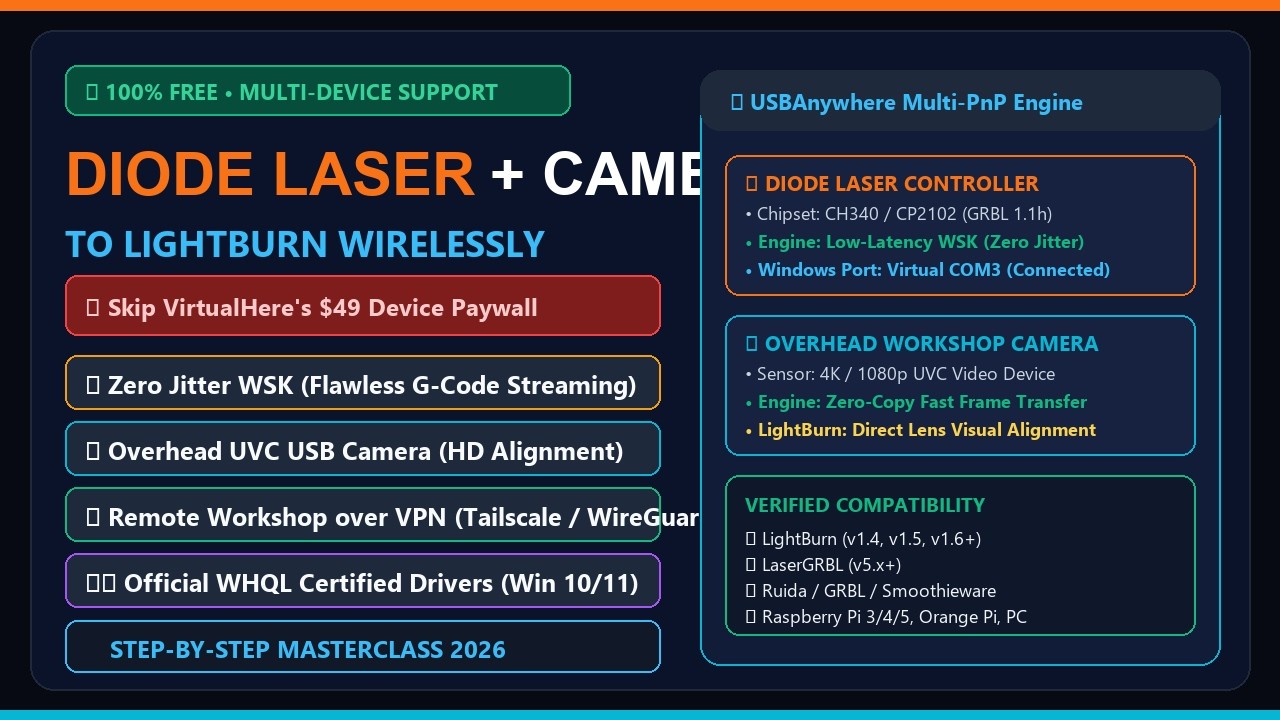
Connect your diode laser (GRBL/Ruida) and overhead alignment camera simultaneously over Wi-Fi or VPN with zero mid-burn disconnects and zero paywalls:
- 🌐 Rebranded to USBAnywhere - A modern identity built to be the #1 open-source alternative to VirtualHere and VirtualUSB, with automatic configuration migration from
SnakeUSBIPv2.x. - ⚡ 1-Click SSH & Plug & Play Server Auto-Setup - Turn any Raspberry Pi, Debian, or Ubuntu machine into a ready-to-use USB over IP server with automatic
udevhotplug device export. - 🏎️ Interactive Dual Performance Modes (
⚡ Mode: Zero-Copy/🏎️ Mode: Low-Latency) - Switch betweenzero-copy(high bandwidth storage/video) andlow-latency(fast WSK event callbacks for HID/gaming/SimRacing) directly from the status bar. - 📊 Live Server Latency Meter (
[ms]) & Custom Device Renaming (✏️) - Real-time TCP ping indicator next to each discovered server and persistent friendly naming per device. - 🔌 Graceful Detach & Hardened Driver Lifecycle - Automatically frees connected remote USB ports on exit/uninstall and safely manages the
ROOT\USBIP_WIN2\UDEvirtual controller without duplicate nodes or forced USB root hub resets. - 🛡️ Certified WHQL Drivers - Official Microsoft-certified drivers for Windows 10/11 x64 with full Core Isolation (HVCI) support.
- 📦 Hybrid Portable & Installer Mode - ZIP releases store config locally; the hardened Inno Setup installer uses
%AppData%\USBAnywhereand supports quiet--minimizedWindows startup. - 📚 Updated USB Database - Latest
usb.idswith 25,000+ recognized devices.
- 🔍 Auto-Discovery - Scan for USB/IP servers across your local network in seconds with live
[ms]latency - ⚡ 1-Click SSH Provisioning - Install and start
usbipdon your Raspberry Pi/Linux server automatically - 🌐 Internet Connection - Connect anywhere via Tailscale, ZeroTier, or WireGuard (NAT traversal)
- 🏎️ Tunable Latency - Status-bar toggle between Zero-Copy throughput and Low-Latency WSK packet handling
- 🔌 One-Click Connect & Auto-Disconnect - Connect/disconnect devices cleanly
- ⭐ Favorites & Auto-Reconnect - Save devices with automatic 3-attempt reconnection and per-device latency profiles
- 📋 Detailed Hardware Info & Renaming - Real-time VID:PID, vendor lookup for 25,000+ USB devices, and custom device names
- 🎨 Modern Native GUI - Fast .NET 9 WPF interface with live Dark and Light themes
- 🌐 Multi-language - Instant switching between English and Spanish
- 🔄 Secure Auto-Update - Verifies GitHub releases with mandatory SHA-256 cryptographic checks (
SHA256SUMS.txt)
- Download from USBAnywhere Downloads:
- Windows x64:
USBAnywhere-v3.0.1-x64.zip - Windows ARM64:
USBAnywhere-v3.0.1-arm64.zip(Surface Pro X, Snapdragon X Elite, etc.)
- Windows x64:
- Extract the ZIP to any folder
- Run
USBAnywhere.exeas Administrator - Done!
- Download
USBAnywhere_Setup_v3.0.1.exefrom USBAnywhere Downloads - Run the installer as Administrator
- Follow the installation wizard
ARM64 drivers are test-signed. See README_ARM64.md in the ZIP for instructions to enable Windows Test Mode.
- Scan - Click
🔍 Scanto find servers on your network - List - Click
📋 Listto see available USB devices - Connect - Double-click a device or right-click → Connect
- Disconnect - Right-click → Disconnect
- Click
🔗 SSHin the top toolbar - Enter your Raspberry Pi / Linux username (e.g.
piorroot) and IP - Click
⚡ 1-Click Auto-Setup— it automatically installsusbip, loads kernel modules persistently, starts the daemon, and lists your USB ports!
Or run our 1-Line Plug & Play Installer on Linux / Raspberry Pi:
curl -fsSL https://raw.githubusercontent.com/oscarlosu-lab/USBAnywhere/main/scripts/install-server.sh | sudo bash💡 100% Plug & Play (Like VirtualHere!): Installs
usbipd, creates asystemdservice, and adds audevhotplug rule that automatically exports any USB device as soon as you plug it into your Raspberry Pi/Linux server — zero manualusbip bindcommands required!
Run a Plug & Play USB/IP server on Unraid, TrueNAS, Synology, or Proxmox using docker/docker-compose.yml:
git clone --recursive https://github.com/oscarlosu-lab/USBAnywhere.git && cd USBAnywhere/docker && docker compose up -dAutomate controller, wheel, or headset attachment when starting a game stream:
USBAnywhere.exe --minimized --connect 192.168.1.50 1-1.4- Install Tailscale on Windows and your server
- Click
● VPNto scan peers with active USB/IP (port 3240) - Select remote server(s) and click Connect
See docs/VPN_INTERNET_EN.md for the complete guide.
Works on any Linux device with USB ports (Raspberry Pi, Orange Pi, Banana Pi, OpenWRT, CrealityBox, Debian/Ubuntu x86/ARM):
Debian / Ubuntu / Raspberry Pi OS:
sudo apt update && sudo apt install -y usbip hwdata usbutils
sudo modprobe usbip_host
sudo usbipd -D
sudo usbip list -l
sudo usbip bind -b 1-1.4  # Replace with your bus-id
OpenWRT:
opkg update && opkg install usbip-server kmod-usb-ohci
usbipd -D
See docs/RASPBERRY_PI_SERVER_EN.md for complete instructions.
| Guide | Description | Language |
|---|---|---|
| Security Policy | Zero-Trust defense, WHQL drivers & Authenticode validation | English · Español |
| Windows Client Manual | Comprehensive UI navigation, latency modes & shortcuts | English · Español |
| Desktop Server Guide | Unified Windows (.NET 9) & macOS (Swift) server suite | English · Español |
| macOS Server Manual | Native Swift server setup for Apple Silicon M1-M4 & Intel | English · Español |
| Raspberry Pi / Linux | 1-Click setup, systemd service & udev hotplug auto-export | English · Español |
| Docker Server Guide | Privileged container deployment & Docker Compose | English · Español |
| VPN & Internet Setup | Tailscale, ZeroTier & WireGuard remote gaming guide | English · Español |
| Windows ARM64 Guide | Test-signing instructions for Snapdragon X Elite / Surface Pro | English |
This project is licensed under the GNU General Public License v3.0 (GPLv3).
USBAnywhere is 100% Free and Open Source. You are free to run, study, share, and modify the software under the terms of the GNU General Public License as published by the Free Software Foundation.
See LICENSE for full legal terms and conditions.
| Component | Platform / Role | Description |
|---|---|---|
| USBAnywhere Client | 🖥️ Windows 10/11 (x64 / ARM64) | Connect to remote USB devices with WHQL drivers & WSK engine |
| USBAnywhere Server | 🌐 Windows & 🍎 macOS | Desktop USB/IP server with GUI (Windows) & Swift daemon (macOS) |
| USBAnywhere Android | 📱 Android & Android TV | Rootless USB/IP server, Sunshine handoff & DualSense haptics |
| Official Website | 🌍 Web Portal | Interactive guides, documentation & download hub |
| Reddit Community | 💬 r/UsbAnywhere | Support, discussions, community setups & announcements |
| Support on Ko-fi | ☕ Community | Support hosting, driver testing & open-source engineering |
If USBAnywhere helped your sim rig, cloud gaming, or 3D printing setup, consider buying us a coffee on Ko-fi. Your contributions directly fund driver code-signing certificates, test hardware (SBCs, controllers, wheelbases), and hosting.
| Project | Author | Contribution |
|---|---|---|
| usbip-win2 | Vadim Grn | Microsoft-signed USB/IP drivers (WHQL certified). Core of the Windows client. |
| OctoWrt | ihrapsa | Original OpenWrt guide for CrealityBox. Inspiration for embedded device support. |
| OctoWrt Fork | ShivaJiva | Active OctoWrt maintenance. Updated releases for CrealityBox. |
| USB/IP | Linux Kernel | Original USB/IP protocol |
| USBAnywhere | SnakeFoxu | .NET 9 WPF GUI, 1-Click SSH setup, VPN integration, latency modes & documentation |