Repository navigation
screen size headless tells

A headless browser has no screen, so every screen-related value it reports was decided by something other than a monitor. That is a whole family of tells, most of them free to check, and they have nothing to do with automation flags.
This page is what the values mean, which combinations do not occur on real machines, and the one detail that catches almost everybody.
screen.width, screen.height              // the display
screen.availWidth, screen.availHeight    // minus the taskbar and other OS chrome
window.outerWidth, window.outerHeight    // the browser window, including its own UI
window.innerWidth, window.innerHeight    // the page viewport
window.devicePixelRatio                  // CSS pixels to device pixels
screen.colorDepth, screen.pixelDepth     // almost always 24
Six numbers plus a ratio, and the relationships between them are far more informative than any of them alone.
availHeight should be smaller than height.
On a real Windows desktop the taskbar occupies the bottom of the screen, so the available area is shorter than the display by the height of that bar. Typically around 48 pixels at standard scaling, sometimes 40, occasionally more.
A headless browser that reports availHeight === height is saying its Windows machine
has no taskbar. Almost nobody hides theirs. It is one comparison and it is often the
first thing a screen check looks at.
The related traps:
-
availWidth === widthis normal on Windows, because the taskbar is horizontal by default. Making the width smaller too is the overcorrection. - On macOS the menu bar takes from the top and the dock may take from the bottom, so the numbers differ from Windows and should match whatever platform you claim.
- A machine claiming Windows with a macOS-shaped available area is a contradiction.
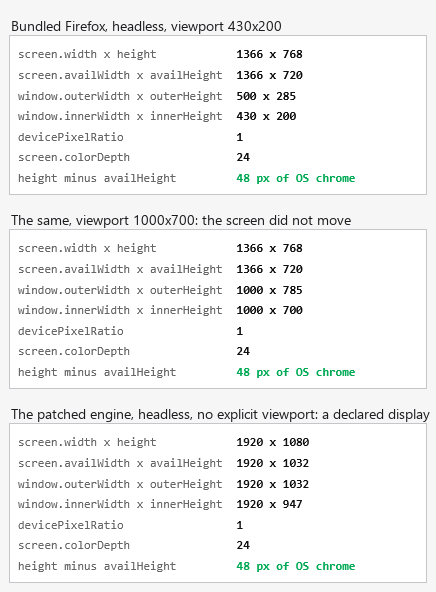
Before applying the check above, it is worth knowing what it returns today. One
Windows machine, one page served from 127.0.0.1, three headless sessions shown, and a
headful one measured alongside them but not printed here, because a headful window
reports the display of whichever machine it ran on.
The taskbar check does not fire on this browser. Playwright's bundled Firefox,
headless, reports 1366x768 with availHeight of 720: a 48 pixel gap, and the
headful session measured beside it reported the same 48. So availHeight === height is
a real class of tell and this particular browser is not an example of it. Test the
browser you actually run rather than inheriting the example.
What is a tell here is that the screen is a constant. The first two panels are the
same build at viewports of 430x200 and 1000x700, and the display stays 1366x768
through both. It is not derived from anything you asked for, and it is the same laptop
resolution in every stock headless session. A detector does not need the taskbar
comparison when the value itself never moves.
One sharp edge worth stating, because it is ours: with the patched engine, an
explicit viewport leaves outerWidth reporting the declared window while
innerWidth follows what you asked for. Measured at viewport 430x200 the pair reads
1920x1032 against 430x200, which is 1490 pixels of browser chrome and no real window
looks like that. With no_viewport=True, the panel above, the same pair reads 1920x1032
against 1920x947, an 85 pixel difference that is an ordinary tab strip and address bar.
If the identity matters more than the exact page size, do not pin the viewport.
The viewport cannot be bigger than the screen. innerWidth greater than
screen.width is impossible on real hardware, and it is exactly what happens when a
headless browser is told to use a large viewport while reporting a small display. This
is a documented, widely used check.
outerHeight should exceed innerHeight. The difference is the browser's own
chrome: tab strip, address bar. A window where they are equal is a browser with no
interface, which is what headless actually is.
outerHeight should not be zero. Some headless configurations report zero here,
which is a value no visible window has.
The device pixel ratio has to be plausible for the resolution. Common values are 1, 1.25, 1.5 and 2. A ratio of 1 on a very high resolution, or a fractional ratio no operating system offers, is a made-up number. See how devicePixelRatio is set per profile in Firefox for why this value has to travel with the rest of the identity.
The resolution should be one people have. 1920x1080 and 1366x768 are everywhere. 800x600 is not a laptop in 2026, and neither is 1024x768. A resolution chosen for a container default is recognisable as a container default.
None of the above says anything about whether a browser is being driven. It says the machine has no display, or has a display nobody buys.
That matters because it changes what fixes it. No stealth plugin touches these values in a way that survives comparison, because the problem is not that a flag is set, it is that a set of numbers has to describe one plausible physical machine and instead describes a virtual one.
It is the same category as a software WebGL renderer, fonts that belong to another platform and a missing audio device. Four independent ways of saying the same thing: this is a server.
The screen values come from the same seeded profile as everything else, so one identity is one machine and the numbers do not move between runs. The available height is derived from the full height rather than set independently, so the taskbar relationship holds by construction instead of by remembering to subtract.
The pool of resolutions and device pixel ratios is sampled from values that occur in the wild, which is worth saying because it is also the thing most likely to go wrong. Sampled faithfully from real data, a pool will occasionally hand out something unfortunate; we have written up the time ours handed out a software GPU for exactly that reason.
The viewport is derived for you: both new_context() and new_page() open with a viewport that
fits inside the seeded screen, along with the screen, the device pixel ratio and the colour scheme
from the same profile. It is still the one you can break yourself, because an explicit viewport
kwarg wins: ask for one larger than the seeded screen and you have created the impossible
relationship above.
console.table({
  screen: [screen.width, screen.height],
  avail: [screen.availWidth, screen.availHeight],
  outer: [outerWidth, outerHeight],
  inner: [innerWidth, innerHeight],
  dpr: devicePixelRatio,
  depth: screen.colorDepth,
});
Read it against this list:
-
availHeightis less thanheight, by an amount that suits the claimed platform. -
innerWidthandinnerHeightare smaller than the screen, comfortably. -
outerHeightis larger thaninnerHeightand is not zero. - The resolution is one a person would have.
-
devicePixelRatiosuits the resolution. -
colorDepthandpixelDepthare both 24.
Then open the same snippet in a normal browser on a normal machine and compare the shape of the numbers, not the numbers themselves.
Can a website detect a headless browser from the screen size? Yes, and it is one of the cheapest checks available. It detects the absence of a display rather than the automation itself.
What should screen.availHeight be? Less than screen.height on a desktop
platform. On Windows the difference is the taskbar, commonly around 48 pixels.
Why is window.outerHeight zero in headless mode? Because there is no real window.
It is a value no visible browser reports.
Does setting a viewport fix it? No. The viewport is innerWidth and
innerHeight. The screen values are separate, and setting one without the other
creates a mismatch.
What is the safest screen resolution to use? A common one, matching your claimed platform, held stable for the identity. Rarity is the problem, not the specific number.
Does devicePixelRatio matter? Yes, and it has to suit the resolution and the
platform. It is also the value people most often set to 1 for convenience, on a
resolution where 1 is implausible.
What screen size does Playwright's Firefox report in headless mode? 1366x768, with
availHeight at 720. Measured at two different viewports on the same machine and it
did not move either time, so it is a constant rather than something derived from your
session, and it is the same laptop resolution in every stock headless run.
-
MDN:
Screen.availHeight, retrieved 2026-08-28, for how the taskbar is expected to shrink the available area below the full display height. -
MDN:
Window.outerHeight, retrieved 2026-08-28, for the browser chrome that should separate it frominnerHeight. -
MDN:
Window.devicePixelRatio, retrieved 2026-08-30, for the standard display ratios a real operating system offers. - This project's own fingerprint-generation logs, for the time a GPU pool sampled from real-world data over-represented a software rasterizer, including in the seed used in the quickstart examples, the same failure mode a resolution or device-pixel-ratio pool can produce for a screen size.
See also: why headless browsers render different fonts and Firefox WebGL renderer strings, the other two members of the same family, and the checklist for being detected on one site, where all three sit at step three.
From the notes of invisible_playwright, a Firefox patched at the C++ level. The available height is derived from the full height here, which is the sort of thing you only get right once you have got it wrong.