Markdown
A lightweight, framework-agnostic analytics SDK for modern OTT web players.
ott-analytics normalizes complex internal metrics from Shaka Player and Dash.js into a simple, unified data stream. It is specifically designed for monitoring Low Latency (LL-DASH) performance and live stream health.

- Unified Adapter Pattern: One API for both Shaka and Dash.js.
- Low Latency First: Accurately calculates Live Edge drift and Latency to DASH (L2D) metrics.
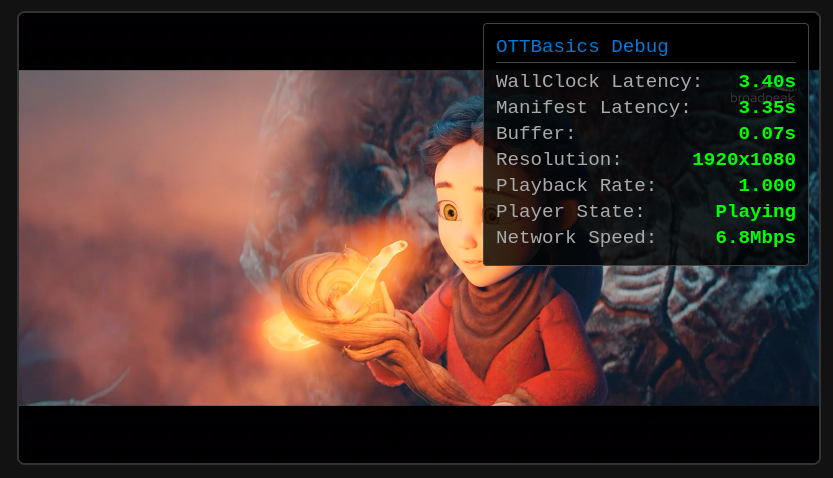
- Plug-and-Play UI: Includes a native Web Component diagnostic overlay using Shadow DOM for total style isolation.
- Zero Dependencies: Pure TypeScript. No React, Vue, or heavy libraries required.
- Memory Safe: Built-in
detach()logic to prevent memory leaks on Smart TVs.
npm install @ottbasics/ott-analyticsUse this if you want the built-in UI for showing the analytics.
import { OTTAnalytics } from "@ottbasics/ott-analytics";

const video = document.getElementById("my-video");
const player = new shaka.Player(video);

const analytics = new OTTAnalytics({ debug: true, speedTest: { interval: 5000 } });

//If you want to enable Network Speed too (use it cautiously, e.g. interval: 10000 as it is a heavy task)
//const analytics = new OTTAnalytics({ debug: true, speedTest: { interval: 5000 } });

// Attach to the player instance
analytics.attach(player, video);

// Listen for normalized updates
analytics.onMetrics((metrics) => {
    console.log(`Latency: ${metrics.latency}s | Buffer: ${metrics.bufferLevel}s`);
});

//The parent element to which the UI overlay should be attached
const container = document.getElementById("video-container");

analytics.showOverlay(container);The diagnostic UI is built using native Custom Elements to ensure maximum compatibility.
- Encapsulation: Using Shadow DOM ensures your site's CSS won't break our overlay, and our styles won't leak into your application.
- Portability: The UI works automatically across all modern frameworks (React, Vue, Angular) or plain HTML without requiring specific wrappers.
The SDK normalizes all player data into a consistent object format for easy monitoring:
| Property | Type | Description |
|---|---|---|
latency |
number |
End-to-end latency in seconds. |
manifestLiveGap |
number |
Distance from current playhead to manifest live edge. |
bufferLevel |
number |
Current forward buffer in seconds. |
resolution |
string |
Playback rate of the video elementCurrent playback resolution (e.g., "1920x1080"). |
isLowLatency |
boolean |
Whether the player is in Low Latency mode. |
playbackRate |
number |
Playback rate of the video element. |
playerState |
string |
Player state - paused or playing. |
networkSpeed |
number |
Network Speed in bps. |
To avoid memory leaks, especially on memory-constrained devices like Smart TVs, always detach the analytics when destroying the player:
// Detach the analytics instance and clean up listeners
analytics.detach();