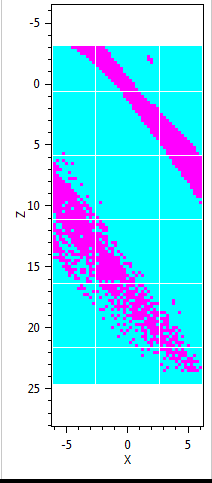
HeatMap drawn with rectangles shows white lines #1191

Description

Steps to reproduce
-
Add a PlotView to a WPF view with a binding to a PlotModel in the view model:
<oxy:PlotView Model="{Binding MyPlotModel}"/> -
Instantiate a PlotModel as followed:
 private PlotModel myPlotModel;

 public MyViewModel()
 {
     myPlotModel = new PlotModel { Title = "My Plot Model" };
     myPlotModel.Axes.Add(new LinearColorAxis
     {
         Maximum = 100,
         Minimum = 0,
         Palette = OxyPalettes.Cool(100)
     });

     myPlotModel.Axes.Add(new LinearAxis()
     {
         Title = "Z",
         StartPosition = 1,
         EndPosition = 0,
         Position = AxisPosition.Left
     });
     myPlotModel.Axes.Add(new LinearAxis()
     {
         Title = "X",
         Position = AxisPosition.Bottom
     });
 }
I also have a bindable property named MyPlotModel.
-
Add data to my plot model with some method accepting
plotModelandheatmapDataas parameters:var heatMap = new HeatMapSeries { X0 = parentViewModel.MinX, X1 = parentViewModel.MaxX, Y0 = parentViewModel.MinZ, Y1 = parentViewModel.MaxZ, RenderMethod = HeatMapRenderMethod.Rectangles, Interpolate = false, Data = heatmapData }; plotModel.Series.Add(heatMap); plotModel.InvalidatePlot(true);
Platform:
.NET version: 4.6.1
WPF application
Expected behaviour
I want to see a plot without these strange white lines running through it.
Actual behaviour
I see a plot with strange white lines running through it, as seen in the following example: