



Welcome to the Bash Menu codebase! This is a command-line menu system for Linux bash. It allows you to add custom commands to a menu with a short nickname. This is particularly useful for managing ssh targets or other command lists.
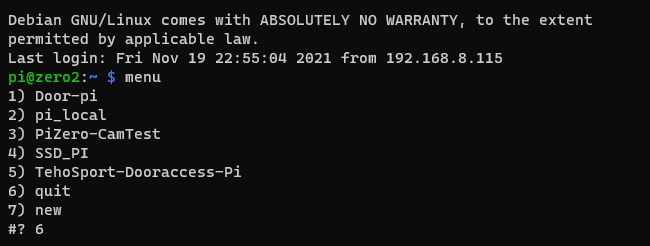

- Add custom commands to a menu with a short nickname.
- Options to run, create new, or quit the menu.
- When a new menu item is added, a new file is created in the bash menu folder. The file name is the nickname and the contents are the script that will be run when the menu item is selected.
- Unwanted menu items can be manually removed from the script folder.
Clone the repository:
cd
git clone https://github.com/paloj/bash_menu.git
Make the script executable:
sudo chmod +x ~/bash_menu/.bashmenu.shYou can add this script to aliases as menu or whatever you want:
touch .bash_aliases
echo "alias menu='~/bash_menu/.bashmenu.sh'" >> .bash_aliases
For nordic keyboard: if you want even shorter command for menu use the ½§ key above tab:
echo "alias §='~/bash_menu/.bashmenu.sh'" >> .bash_aliasesThen relogin and run:
menuAfter installation, you can run the menu by typing menu in your terminal. This will list all the files in the bash menu folder. You can select a file to run the command associated with it, create a new command, or quit the menu.
To add a new command, select "new" from the menu and follow the prompts to enter the command and nickname.
To remove an unwanted menu item, navigate to the bash menu folder and use the rm command:
cd ~/bash_menu
rm README.md
rm pi_localWe welcome contributions from the community! If you encounter a bug, please open an issue on our GitHub issues page. When submitting a pull request, please make sure your changes are well-documented and include a clear, detailed description of the problem and your proposed solution.
For support, please open an issue on our GitHub issues page. If you're interested in commercial support, please email the maintainer.
If you find this project useful and would like to make a donation, please email the maintainer.
This project is maintained by paloj.
For any inquiries, please open an issue on our GitHub issues page.
Happy coding! 😀