In this project we are going to implement a GraphQL API to query data from an EXCEL file. All this backend implementation is developed and hosted using AWS services. It is made up of the following parts:
- We upload an EXCEL file containing all data we want to a S3 bucket.
- A Lambda function is triggered, it parse the data on the file and upload it to a DynamoDB database.
- We used AppSync to deploy the GraphQL API that will receive requests and reply to them, querying the database.
The following diagram shows the implementation:
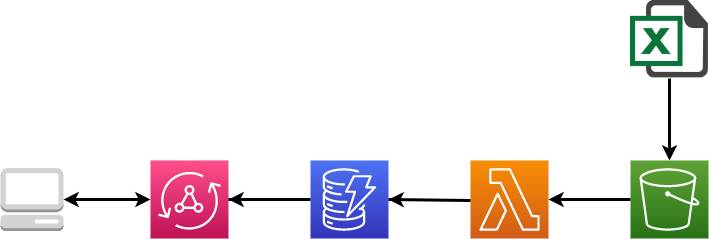
All this implementation has been build up trying to get advantage of a serverless architecture
We will start disscussing briefly the EXCEL file containing the data. This file is a ".xlsm" extension file and it is composed of some sheets, each one with different data entities all about job profiles, the neccesary skills for each one, and the levels of kwoledge on these skills to reach a category (Junior, Senior...) on that specific profile.
It looks like:


We upload this EXCEL file without any modifications to a S3 bucket.
The next step we are going to describe is the set up and design of the DynamoDB database in order to store all this data.
Amazon DynamoDB is a fully managed, serverless, key-value NoSQL database designed to run high-performance applications at any scale. DynamoDB offers built-in security, continuous backups, automated multi-Region replication, in-memory caching, and data export tools.
References: https://aws.amazon.com/dynamodb/getting-started/
DynamoDB is a schema-less database that only requires a table name and a primary key when creating the table. As a NoSQL database, its design changes from a typical relational database where for example we can use Joins operations. In this NoSQL approach we should know first the queries that we would like to implement. In our case, we want:
- "query per profile with all skills inside it",
- "list all profiles with their skills" and
- "query per skill with all profiles that have that skill".
With all these things in mind we are going to use a single table design to take advantages of DynamoDB features. The main benefit of using a single table in DynamoDB is to retrieve multiple, heterogenous item types using a single request. We will use a Primary Key (ProfileID) and a Sort Key (ID).
Our "SkillProfile" table looks like:
 In this picture we can see a profile and a skill in the same table. The skill got the ProfileID and the ID of the skill while the profile has got the same ProfileID and ID. Those fields that only exit in one datatype are missing for the other datatype (sparse index).
In order to accomplish the query per skill, we need to set up a global secondary index on ID.
We have set up the table using autoscaling to improve reading and writing operations. The capacity mode is set to "On-Demand"
Lambda is a compute service that lets you run code without provisioning or managing servers. Lambda runs your code on a high-availability compute infrastructure and performs all of the administration of the compute resources, including server and operating system maintenance, capacity provisioning and automatic scaling, code monitoring and logging. With Lambda, you can run code for virtually any type of application or backend service.
Reference: https://docs.aws.amazon.com/lambda/latest/dg/lambda-python.html
Like we have said before, the Lambda function can be divided in three parts, first it will read the data from the file stored in S3, then parse the data inside it (to retrieve only relevant data), and finally load it into the DynamoDB. The function is written in Python 3.8, and we have configured a S3 trigger (PUT operation in our bucket, for all files with the sufix ".xlsm"), so every time we upload a file to the bucket with the ".xlsm" extension the fuction will run.
We also have created a Lambda Layer to allow the fuction to use the package "Openpyxl", which have been used to parse the EXCEL.
Now let´s reviews the code of the lambda function. First of all we import the neccesary packages (boto3 is the AWS SDK for Python):
import boto3
import urllib.parse
from collections import OrderedDict
from itertools import islice
from openpyxl import load_workbook**
To be able to use "openpyxl" we have set up a Lambda Layer.
We connect to S3 and download the EXCEL file (to "/tmp/" in Lambda)
def lambda_handler(event, context):
    s3_client = boto3.client("s3")
    S3_BUCKET_NAME = 'skillprofilebucket'
    object_key = urllib.parse.unquote_plus(event['Records'][0]['s3']['object']['key'], encoding='utf-8')

    file_content = s3_client.download_file(S3_BUCKET_NAME, object_key,'/tmp/data.xlsm')
Note that we are retrieving the file name ("object_key") directly from the event that have trigger the function (S3 Trigger), so we do not have to hardcode the name or worry about different names (for example differents versions).
We could do the same for the bucket name if we want, but due to we only have one bucket in our implementation, we have decided to pass the name directly to show the simplest way of doing it.
Once we have the file downloaded, we parse its data to Python list using openpyxl as follows:
    wb = load_workbook('/tmp/data.xlsm')

    sheet1 = wb['Mapping SSP'] #Sheet with Profiles' info
    profile_list = []
    diccionario = {}

    for row in islice(sheet1.values, 3, (sheet1.max_row)-1):
	    profile = OrderedDict()
	    profile['ProfileID'] = row[1]
	    profile['ID'] = row[1]
	    profile['Name'] = row[2]
	    profile['Family'] = row[16]
	    profile['Cluster'] = row[17]
	    profile['Description'] = row[4]
	    profile_list.append(profile)
	    diccionario[row[2].upper()]=row[1]

    sheet2 = wb['Skill Profiles'] #Sheet with Skills' info
    skill_list = []

    for row in islice(sheet2.values, 11, (sheet2.max_row)-1):
	    skill = OrderedDict()
	    skill['ProfileID'] = diccionario[row[4].upper()]
	    skill['ID'] = row[5]
	    skill['Category'] = row[6]
	    skill['SkillName'] = row[9]
	    skill['Description'] = row[10]
	    Levels = OrderedDict()
	    Levels['Junior'] = row[11]
	    Levels['Specialist'] = row[12]
	    Levels['Expert'] = row[13]
	    Levels['Senior'] = row[14]
	    Levels['Principal'] = row[15]
	    skill['Levels']=Levels
	    skill_list.append(skill)
The profiles information is stored in a sheet called "Mapping SSP", while the skills information is the "Skill Profiles" sheet. The function iterates through the sheets (specifically in the cells where we know the data is; this means that if the data organization in the EXCEL file changes it would affect the implementation, WE SHOULD REWRITE THE FUCTION TO MAP THE DATA AUTOMATYCALLY, FOR EXAMPLE READING THE COLUMNS NAME IN THE FILE), and maps the data to the columns we are going to use in our database.
In the database the skills records will have the ProfileID, while in the file the skill sheet contains the Profile Name instead (as you can see here), that is why we have use "diccionario" to map this two fields and change their info.
Finally the fuction connects to DynamoDB and uploads the data to the table:
    dynamodb = boto3.resource('dynamodb', region_name='eu-west-1')
    table = dynamodb.Table('SkillProfile')
    for profile in profile_list:
	    table.put_item(Item=profile)
    for skill in skill_list:
	    table.put_item(Item=skill)
Note that with this fuction we only upload, overwrite data to the database; we are not taking care of data previously stored in the database. If a new file is put to the S3 bucket, it will trigger the function and upload its data to the database. No deletions are implemented in this fuction.
Appsync is the AWS service that allows to develop GraphQL APIs (link to graphql explanation) and host them in a serverless way. GraphQL allows the client to specify the arguments to retrieve in the request (usefull to not overload the client/frontend). The first step once we know the queries we want to implement is to define a schema that will contains the data definition an also the operations (queries and mutations) that will be applied to them.
Appsync allows to connect diferent services as datasource to the API, for this project we have set up our table in DynamoDB as datasource directly by using DynamoDB resolvers written in VTL.
Appsync also provides some others configurations options, like cache for requests and some authentication methods (you can check here a test implementation).
In this schema we have defined three basic data types that represent the entitties in our application.
- Profile:
type Profile {
	ProfileID: String!
	Name: String!
	Description: String
	Cluster: String
	Family: String
	skills: [Skill]
}
Even our DynamoDB stores ID for each Profile (as the Sort Key), we only use ProfileID because for every profile both ProfileID will be the same. We can also see how we have defined "skills" as a field inside data type Profile wich it is an array of data type Skill (because every profile has got inside many skills).
- Skill:
type Skill {
	ID: ID!
	ProfileID: String!
	SkillName: String!
	Description: String
	Category: String
	Levels: Level
}
In this case, Skill has got both ID and ProfileID ans also a field "Levels" containing the five different categories defined in our data.
- Level:
type Level {
	Junior: Int
	Senior: Int
	Expert: Int
	Specialist: Int
	Principal: Int
}
Level contains five fields, each one for each category; defined as Int. In our DynamoDb table Levels is a field inside each skill item, stored as a map.
In the schema we also define the queries that will be allowed:
type Query {
	getProfile(ProfileID: String!): Profile
	listProfiles(filter: TableProfileFilterInput, limit: Int, nextToken: String): ProfileConnection
	getSkill(ID: String!, nextToken: String): SkillProfile
}
Three queries are allowed:
- getProfile in which we ask a ProfileID and we get a Profile
- listProfiles to get all profiles that match a specific filter that we pass to the query (defined in the TableProfileFilterInput)
- getSkill in which we can ask a skill ID and it returns a skill and all profiles that have these skill with the levels asociated (we use another data type called SkillProfile which copy skill's field and add a field to include profiles, as the return type)

As we have said, we are using a single table DynamoDB as datasource, and the connection to it is implemented using resolvers written in VTL. A resolver contains a request template and a reply template. For each query we are going to use different DynamoDB operation to illustrate options we can use; the resolvers are implemented as follows:
This query has been implemented using DynamoDB Query method. Taking advantage of the single table design we can run this query using only one operation to the database. To return one profile and the skills asociated to it, we simply query using the ProfileID (PK, because we have stored our skills with this field pointing their profile). In order to not overfetch the response and get the skills if the client did not ask for them; in the request template we start by checking if the skills field were requested, if not we query for just the profile (adding the ID field to the query, which must be the same as the ProfileID for the profiles).
#if(!$ctx.info.selectionSetList.contains("skills"))
#set($expression=$expression + " and #ID = :ID")
$util.qr($expressionNames.put("#ID", "ID"))
$util.qr($expressionValues.put(":ID", $util.dynamodb.toDynamoDB($context.args.ProfileID)))
#end
In the response template we need to reorganize our response data to match the schema definition:
#if($context.result.items.size() == 0)
  $utils.error("NotFound", "NotFound");
#else
  #set ($profile = {})
  #foreach($item in $context.result.items)
    #if($item.ID == $item.ProfileID)
      #set ($profile = $item)
      $util.qr($profile.put("skills", []))
    #else
      #if($item.ID != $item.ProfileID)
        $util.qr($profile.skills.add($item))
      #end
    #end
  #end
  $utils.toJson($profile)
#end
We iterate through the items in the response and if they are skills (ID different from ProfileID) we add them to the profile.
Example: Query
query MyQuery2 {  getProfile(ProfileID: "00089-00") {
    Cluster
    Family
    skills {
      Levels {
	Junior
	Principal
      }
      SkillName
      ID
      ProfileID
    }
    Name
    ProfileID
   }}
Response
 { "data": {
    "getProfile": {
      "Cluster": "POQ",
      "Family": "CF",
      "skills": [
	{
	  "Levels": {
	    "Junior": 0,
	    "Principal": 3
	  },
	  "SkillName": "English",
	  "ID": "LANG_0018",
	  "ProfileID": "00089-00"
	},
	{
	  "Levels": {
	    "Junior": 0,
	    "Principal": 3
	  }, ........
      ......
      ....
      ...
      ..
      .
In this query we use the Scan method of DynamoDB, which retrieves all items in the table (consumes more capacity) and allows us to filter through them; all in one sigle operation as the getProfile query. First, in the request template, we check if some filter were used, in that case we add to the filter the expression that allows skills to be retrieve too (OR "is a skill").
#if($context.args.filter)
  #set($variable=$util.parseJson($util.transform.toDynamoDBFilterExpression($ctx.args.filter)))
  #set($variable.expression = $variable.expression + " or NOT contains(#ID, :ID)" )
  $util.qr($variable.expressionNames.put("#ID", "ID"))
  $util.qr($variable.expressionValues.put(":ID",{"S":"-"}))
#end
*In this case the "is a skill" condition have been implemented based in that all skills' ID contains an "-", this should be improved.
Due to the DynamoDB limitations (Scan/Query operation can only retrieve up to 1MB) we would not be able to get all items in just one operation so we need to implement pagination in order to recall the operation from the last evaluated key. For that we use the "nextToken" param.
In the response template we reorganize the data in a similar way as in the getProfile.
Example: Query
query MyQuery2 {  listProfiles(filter: {Family: {eq: "CF"}}) {
    items {
      Family
      Name
      ProfileID
      skills {
	Category
	ID
	Levels {
	  Expert
	}
      }
    } }}
Response
  "data": {
    "listProfiles": {
      "items": [
	{
	  "Family": "CF",
	  "Name": "Process Manager",
	  "ProfileID": "00089-00",
	  "skills": [
	    {
	      "Category": "Languages",
	      "ID": "LANG_0018",
	      "Levels": {
		"Expert": 3
	      }
	    },
	    {
	      "Category": "Professional",
	      "ID": "SKILL_00020",
	      "Levels": {
		"Expert": 1
	      }
	    }, .........
        ..........
        ......
        ..
        .
This query operation differs from the previous ones because it uses two call to the databases, thats why instead of using directly one resolver, we build a Pipeline resolver composed of 2 functions (each one is like a single resolver that pass the results to the next one).
The first function is getProfilesWithSkill, which make a first request using Query operation to retrieve all occurences of a skill. To accomplish that we set up a secondary index in DynamoDB on the field ID.
We have implemented an arguments check, so if the client does not request the profiles that got that skill, we only query 1 skill item (using limit=1) and in the second function we skip the DynamoDB opration (using a return) just to not overfetch.
#set( $limit = 100 )
## if the selectionSetList does not contain the profiles, we fetch only the skill
#if(!$ctx.info.selectionSetList.contains("profiles"))
  #set( $limit = 1 )
#end
In the response template we reorganize the data but in this case the Skill request will be the parent entity that contains some Profiles (because of that in the schema we have defined a SkillProfile type with this fields). This data is passed to the next function in the pipeline.
The second function is getBatchProfiles, which receives the ProfileID from all appearances of the skill requested and do a BatchGetItem (operation that allows us to retrieve more than one item in one database operation) to get all profiles.
#set($keys=[])
#foreach($item in $ctx.prev.result.profiles)
 #set($map = {})
    $util.qr($map.put("ProfileID", $util.dynamodb.toString($item.ProfileID)))
    $util.qr($map.put("ID", $util.dynamodb.toString($item.ProfileID)))
    $util.qr($keys.add($map))
#end
We iterate through the previous result "$ctx.prev.result.profiles" and set the keys that will be in the query. The BatchGetItem operation has a limitation of 100 items returned, so we need to implement pagination too using nextToken (also we have to be carefull with this limit and manage it in the previous function getProfilesWithSkill, that is why we have set the default limit to 100).
In the response template we reorganize the data (adding the profile info requested).
The pipeline also have an after mapping template in which we add the nextToken for pagination from the first function to the results and return them.
## getProfiles - after mapping
$util.qr($ctx.result.put("nextToken", $ctx.stash.nextToken))
$util.toJson($ctx.result)
Example: Query
query MyQuery2 { getSkill(ID: "SKILL_00504") {
    Category
    Description
    SkillName
    profiles {
      Levels {
	Junior
	Principal
      }
      Name
    }}}
Response
{"data": {
    "getSkill": {
      "Category": "Professional",
      "Description": "Knowledge and skills to use the configuration techniques, tools and processes.",
      "SkillName": "Configuration management",
      "profiles": [
	{
	  "Levels": {
	    "Junior": 2,
	    "Principal": 0
	  },
	  "Name": "Transition & Implementation Manager"
	},
	{
	  "Levels": {
	    "Junior": 0,
	    "Principal": 0
	  },
	  "Name": "Security Operator"
	},
	{
	  "Levels": {
	    "Junior": 0,
	    "Principal": 0
	  }, .......
      .......
      .....
      ...
      ..
      .
In the AppSync we have also implemented the Mutation type with operation for create, update and delete for both profiles and skills; and also the Suscription type with operations linked to each mutations. Resolvers are set up too but they have not been weel tested (because the main purpose of the project focus just on querying data from an EXCEL file).
In this section we are going to ilustrate the steps followed to import the API to Postman and test it.
First of all, we create a new API selecting the GraphQl as Schema Type (we are going to use GraphQL SDL as Schema format):
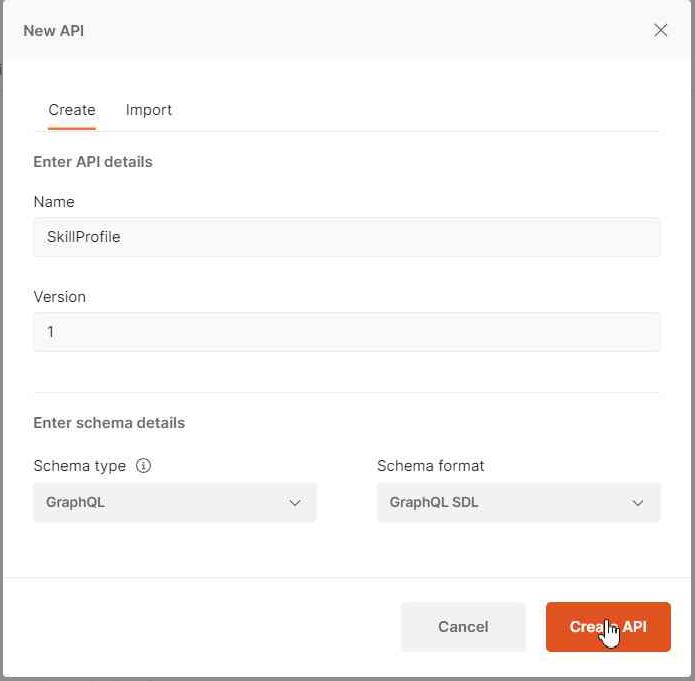
We can also select "Import" and select our graphql schema, but for us this option only worked with the schema in json format (downloaded from AppSync console)
Next step is to paste our GraphQL schema in the definition tab. We also delete/comment the subcriptions definitions, because these operations use WebSocket instead of HTTP requests (consult LINK to check subcriptions testing using Postman):
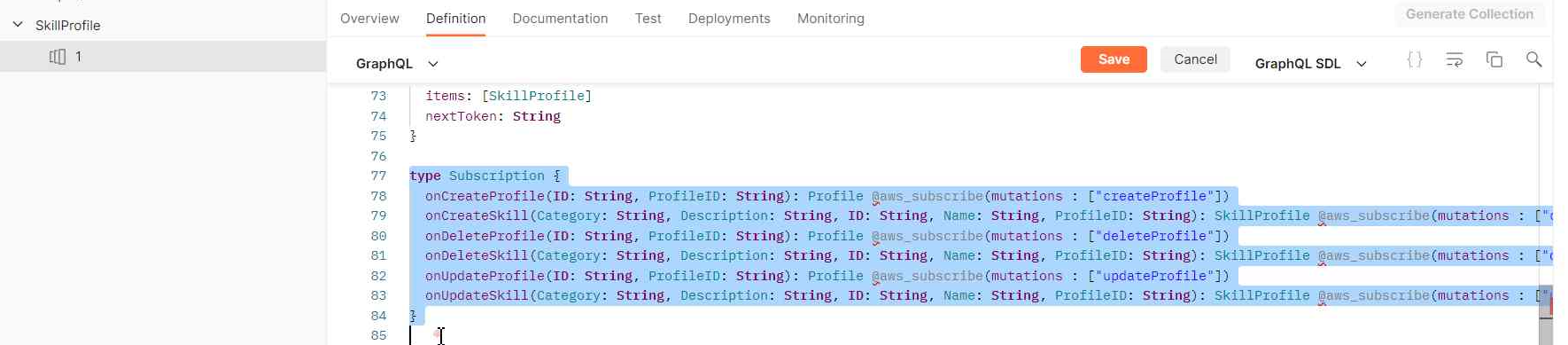
Postman also allow to import the schema automatically by doing a request to the API asking also for the schema (GraphQL instrspection) as showed here.
Then we can select the "Generate Collection" and we choose the "Test the API" option:
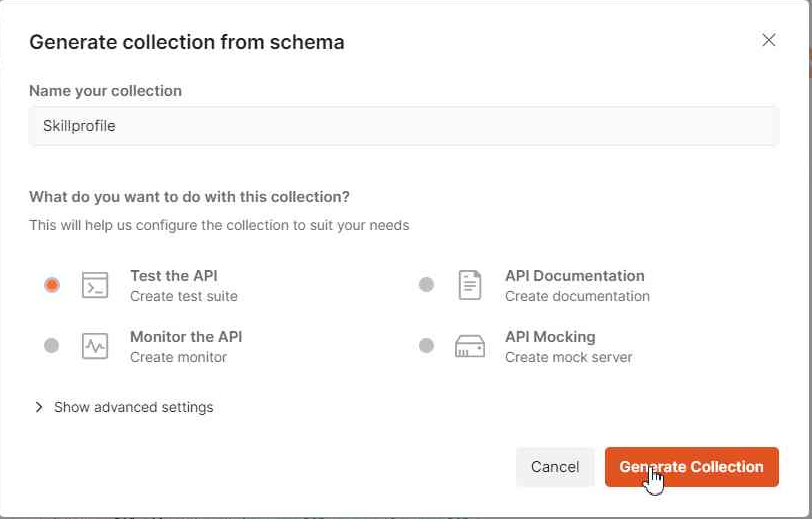
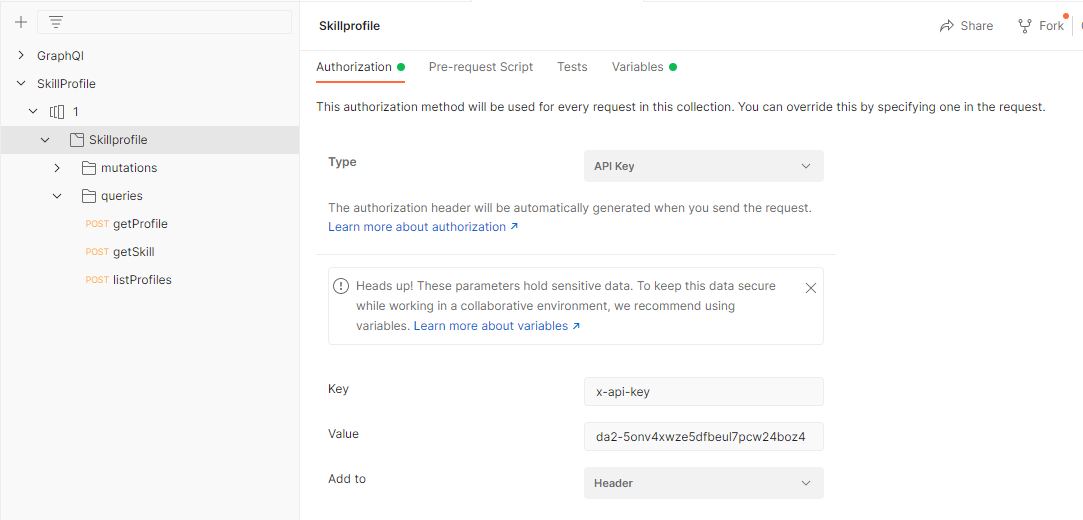
That would create automatically the operations we have defined in the schema and let us test each one. We can also configure the Authorization for all these operations, in this example we are using API Key (we should add a key "x-api-key" with its value to the Header of ours requests):
In the Body we can define ou query, selecting the fields we want the API to return, and we can also use variables to map params, for example:
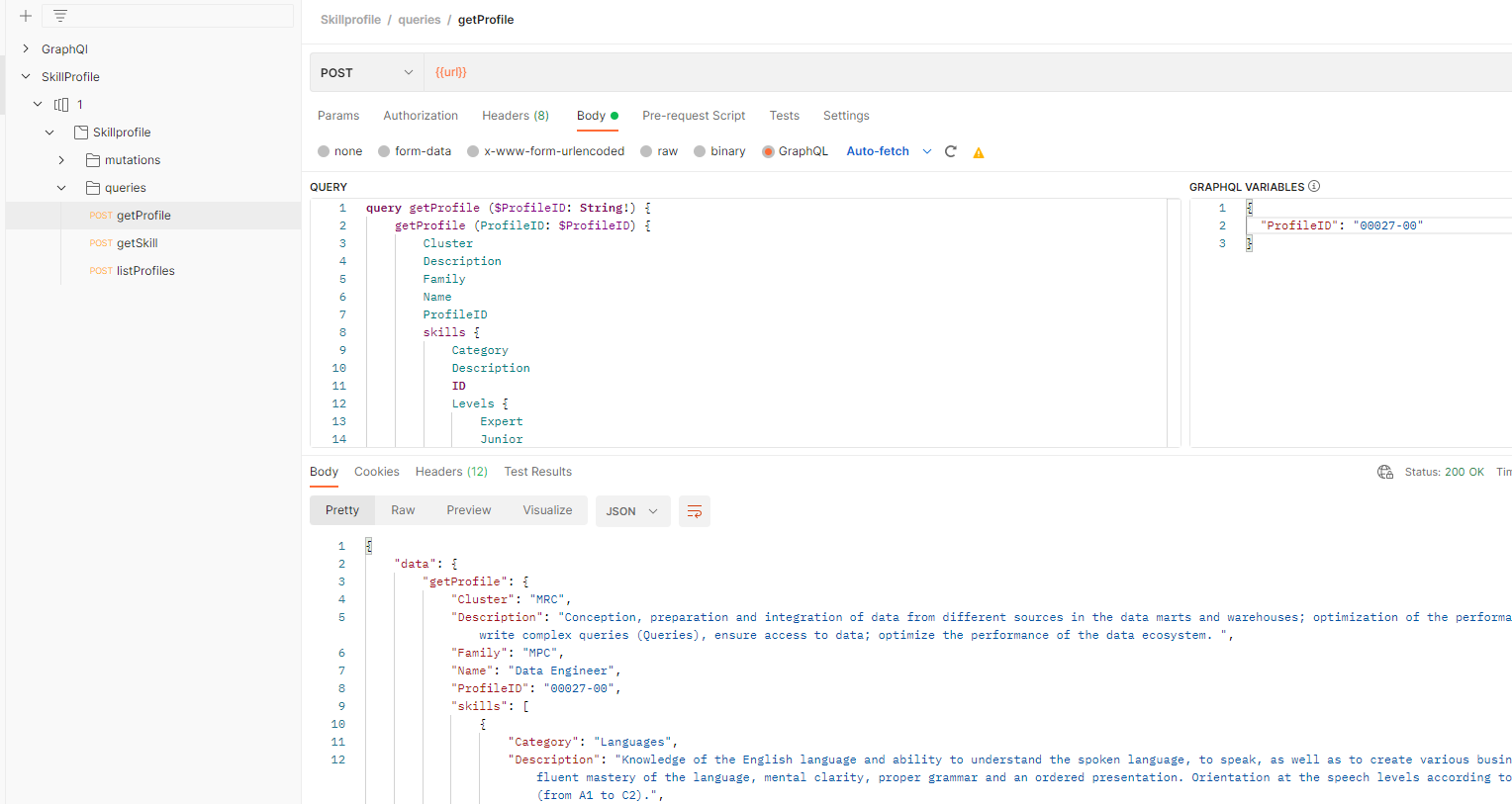
In the response Body we can see the data we have requested.
We have also include the code to deploy the whole app (infra + logic) using SST (Serverless Stack Framework) and the CDK (Typescript).
Available here
Some usefull resources and links can be checked here