Hello there! This is a vague feature request or suggestion, aimed at adding some colour to the Note List, to help scanning and finding notes visually.
At the moment, I can prefix the name of a note with an emoji, for example, "📚 Books". This works great in QOwnNotes, but the emoji becomes part of the filename on disc, creating some trouble in the shell, and for other tools that have difficulties with these characters.
Would it be possible to check if the text of a note opens with an emoji, and show this in the Note List, before the note name? For example, a note names book-list.md and opening with this heading
would appear in the Note List as "📚 book-list". This way we could keep filenames simple and compatible with other tools, but help specific notes stand out.
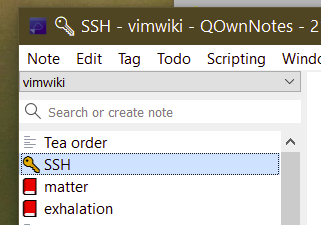
The position of the image could be ambiguous, for example if we had another file actually named 📚 stack-list.md. To avoid this issue, the "promoted" emoji could be rendered as the Note List line icon, replacing the "text placeholder" icon, as in the quick Paint mock below.
Hello there! This is a vague feature request or suggestion, aimed at adding some colour to the Note List, to help scanning and finding notes visually.
At the moment, I can prefix the name of a note with an emoji, for example, "📚 Books". This works great in QOwnNotes, but the emoji becomes part of the filename on disc, creating some trouble in the shell, and for other tools that have difficulties with these characters.
Would it be possible to check if the text of a note opens with an emoji, and show this in the Note List, before the note name? For example, a note names
book-list.mdand opening with this headingwould appear in the Note List as "📚 book-list". This way we could keep filenames simple and compatible with other tools, but help specific notes stand out.
The position of the image could be ambiguous, for example if we had another file actually named
📚 stack-list.md. To avoid this issue, the "promoted" emoji could be rendered as the Note List line icon, replacing the "text placeholder" icon, as in the quick Paint mock below.