A real-time solar system simulation for iPhone and Mac, powered by real orbital mechanics, NASA texture maps, and 8,920 real stars from the Hipparcos catalogue. One multi-platform Xcode target builds natively for iOS and macOS from the same source code.
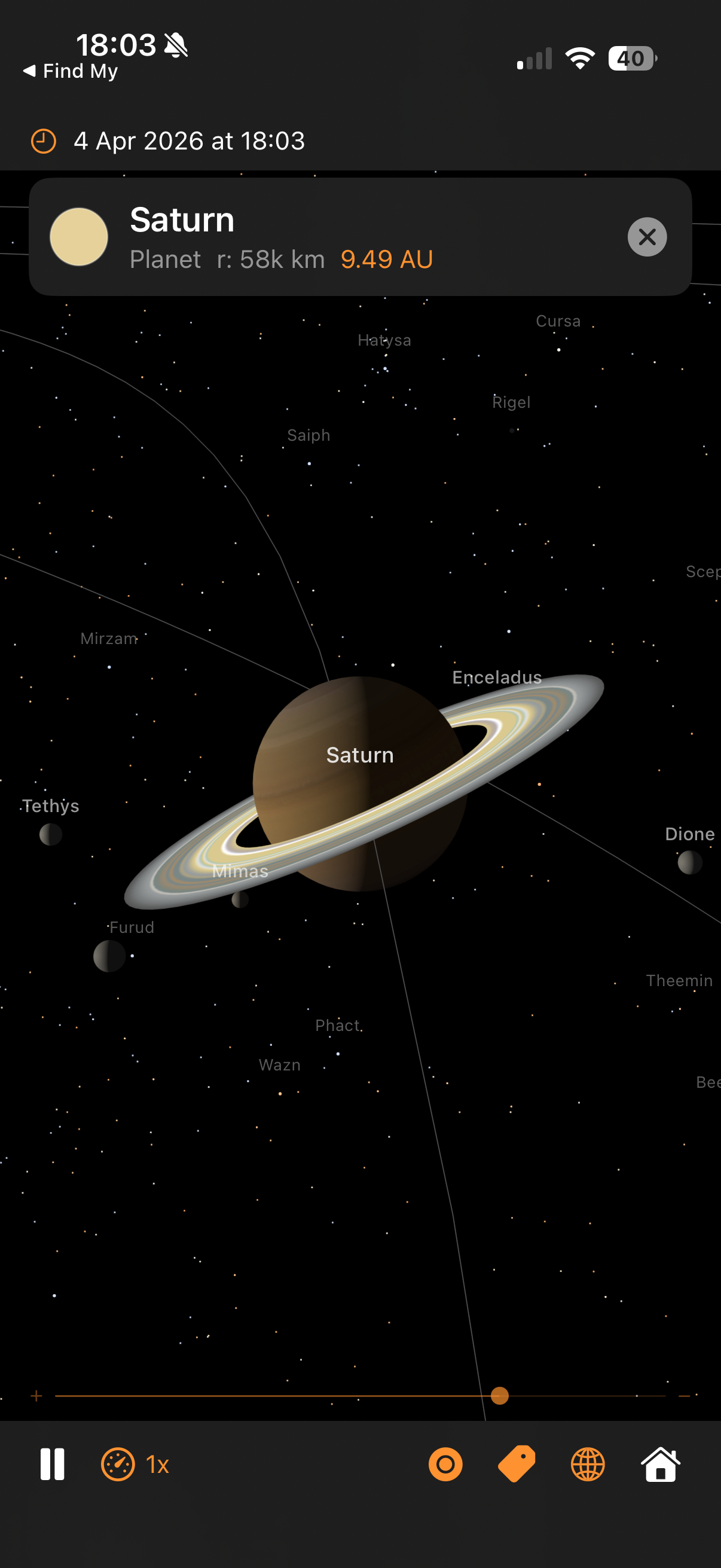

- Accurate planetary positions — Keplerian orbital elements from JPL calculate where every planet actually is right now
- NASA texture maps — All 9 planets, Earth's Moon, Jupiter's Galilean moons, and Pluto use real imagery from NASA, USGS, and Cassini
- 8,920 real stars — Hipparcos catalogue with correct positions, magnitudes, and B-V colours. Recognisable constellations, Milky Way density
- Realistic rotation — Every body spins at its real IAU sidereal rate with correct axial tilt. Venus rotates backwards, Uranus rolls on its side
- Tidally locked moons — Earth's Moon, all Galilean moons, and Saturn's moons always show the correct face to their parent
- Saturn's rings — Custom geometry with Cassini colour and transparency maps, correctly tilted and non-rotating
- Beautiful Sun — Procedural granulation texture, limb darkening, 4-layer corona, 25-day rotation
- Interactive exploration — One-finger drag to pan, two-finger drag to orbit, pinch to zoom, zoom slider
- Planet shortcuts — Tap planet labels or use the globe menu to fly to any body and see its moon system
- Time control — Real-time through 1,000,000x speed, reverse, Reset to Now
- Smart labels — Separate toggles for planet, moon, and star labels. Auto-deconflicted, occluded behind planets, persisted across launches
- 11 space missions — Historical and active mission trajectories with multi-vehicle support, runtime lunar orbit/landing phases, live telemetry (MET, distance, speed), and timed event detection. Lunar missions (
apollo8,apollo11,apollo13,artemis2), interplanetary gravity-assist tours (cassini,voyager1,voyager2,bepicolombo,parker), transfer arcs (perseverance), and outer planet flybys (newhorizons) all selectable via-mission <id>or the in-app missions menu. The mission UI shows a glass-morphism telemetry panel, an orange timeline scrubber, and animated event banners as each trajectory milestone passes. Lunar missions get a lazy-follow camera that frames Earth and the trajectory Sun-side until you drag. Trajectory data is one-shot exported from the companion web app into a bundled JSON resource — re-runnode tools/export-missions.mjswhen upstream data changes. - International Space Station — Toggleable via the Satellites menu. Procedural 3D model with central truss, pressurised modules, four pairs of solar panels, and two radiators; orbits Earth at 408 km altitude and 51.6° inclination with a 92-minute period.
- iOS 17.0+ / macOS 14.0+ (Sonoma)
- Xcode 16+
- iPhone build optimised for iPhone 16 Pro; Mac build runs natively on Apple Silicon and Intel
- Clone or copy the project
- Open
SolarSystem.xcodeprojin Xcode - Build and run on simulator or device
No API keys, no external dependencies — pure Apple frameworks.
- Current time is converted to Julian centuries from J2000.0 epoch
- Orbital elements are computed for each body from JPL data with linear rates
- Kepler's equation is solved iteratively (Newton-Raphson) to find each body's position
- Positions are scaled logarithmically so the whole solar system fits on screen
- IAU rotation is applied — axial tilt and spin angle from real sidereal periods
- SceneKit renders with PBR materials, NASA textures, and 60fps updates
- 8,920 stars from the Hipparcos catalogue form the background with real positions and colours
- SwiftUI overlays provide labels, controls, and a zoom slider
| Gesture | Action |
|---|---|
| One-finger drag | Pan / translate the view |
| Two-finger drag | Orbit / rotate the viewing angle |
| Pinch | Zoom in and out |
| Zoom slider | Fine zoom control (right edge) |
| Tap body or label | Select and fly to that body |
| Double-tap | Return to full solar system view |
| Input | Action |
|---|---|
| Left-mouse drag | Pan / translate the view |
| Right-mouse drag | Orbit / rotate the viewing angle |
| Scroll wheel / 2-finger scroll | Zoom in and out |
| Trackpad pinch | Zoom in and out |
| Zoom slider | Fine zoom control |
| Click body or label | Select and fly to that body |
| Double-click | Return to full solar system view |
- Play/Pause — Freeze or resume orbital motion
- Speed menu — 0.1x to 1,000,000x, reverse, Reset to Now
- Orbit toggle — Show/hide orbital path lines
- Label menu — Independent toggles for Planets, Moons, Stars
- Satellites menu — Toggle the ISS model (antenna icon)
- Missions menu — Pick any of 11 space missions to replay, or stop the current replay (airplane icon)
- Planet picker — Jump to any planet, the Sun, or overview
- Home — Return to the full solar system overview
| Argument | Example | Description |
|---|---|---|
-timeScale |
10000 |
Speed up orbital motion (overridden by -mission) |
-date |
2024-01-01 |
Override current date |
-focus |
saturn |
Start focused on a body |
-mission |
apollo11 |
Replay a mission: jumps simulation time to the launch date and applies an auto-speed preset |
-showISS / -hideISS |
Toggle the ISS satellite model | |
-showOrbits |
Draw orbital paths | |
-hideLabels |
Hide all labels | |
-innerOnly |
Inner solar system only | |
-logPositions |
Log AU coordinates to console | |
-frameLog |
Print per-frame timing diagnostics (fps, slow frames, sub-phase breakdown) |
The fastest way to get the app onto your Mac:
./run-macos.sh                                 # build Release, install to /Applications, launch
./run-macos.sh -mission apollo11 -focus earth  # any launch-arg works
The script builds Release, kills any running instance, copies into /Applications (or ~/Applications if unprivileged), and opens a fresh copy. Pass any of the launch args below on the command line.
Run the unit suite (scaling, CatmullRom curves, mission waypoint resolution, event detection):
xcodebuild -project SolarSystem.xcodeproj -scheme SolarSystem \
  -destination 'platform=iOS Simulator,name=iPhone 16 Pro' test \
  CODE_SIGNING_ALLOWED=NO
Build only:
xcodebuild -project SolarSystem.xcodeproj -scheme SolarSystem \
  -destination 'platform=iOS Simulator,name=iPhone 16 Pro' build \
CODE_SIGNING_ALLOWED=NO- SwiftUI — UI, overlays, gesture state
- SceneKit — GPU-accelerated 3D rendering
- Foundation — Date calculations, UserDefaults
- simd — Vector mathematics
Zero external dependencies.
- CLAUDE.md — Developer reference and architecture
- architecture.html — Interactive diagrams with SVG illustrations
- tutorial.html — Build narrative and development story
This project uses publicly available texture maps and star catalogue data for non-commercial, educational purposes.
| Body | Source | Licence |
|---|---|---|
| Earth | NASA Blue Marble Next Generation (Dec 2004) | Public domain |
| Moon | NASA Lunar Reconnaissance Orbiter Camera | Public domain |
| Mars | USGS Viking MDIM21 mosaic, via Wikimedia | Public domain |
| Jupiter | NASA/JPL/SSI Cassini cylindrical map PIA07782 | Public domain |
| Pluto | NASA/JHUAPL/SwRI New Horizons colour map | Public domain |
| Europa | NASA/JPL Voyager/Galileo mosaic, via Wikimedia | Public domain |
| Mercury | Solar System Scope | CC-BY 4.0 |
| Venus | Solar System Scope | CC-BY 4.0 |
| Uranus | Solar System Scope | CC-BY 4.0 |
| Neptune | Solar System Scope | CC-BY 4.0 |
| Saturn (body) | Planet Pixel Emporium by James Hastings-Trew | Free non-commercial |
| Saturn (rings) | Planet Pixel Emporium by James Hastings-Trew | Free non-commercial |
| Io | Assembled by Steve Albers from NASA/JPL data | Public domain source data |
| Ganymede | Assembled by Steve Albers from NASA/JPL data | Public domain source data |
| Callisto | Assembled by Bjorn Jonsson from NASA/JPL data | Public domain source data |
| Resource | Source | Licence |
|---|---|---|
| HYG Star Database v38 | astronexus/HYG-Database by David Nash. Compiled from ESA Hipparcos, Yale Bright Star Catalogue, and Gliese Catalogue of Nearby Stars. | CC-BY-SA 2.0 |
- Planetary orbital elements — JPL "Keplerian Elements for Approximate Positions of the Major Planets" (Standish, 1992)
- IAU rotation models — IAU Working Group on Cartographic Coordinates and Rotational Elements