secure javascript only - random password generator
using crypto.getRandomNumber() instead of Math.random()
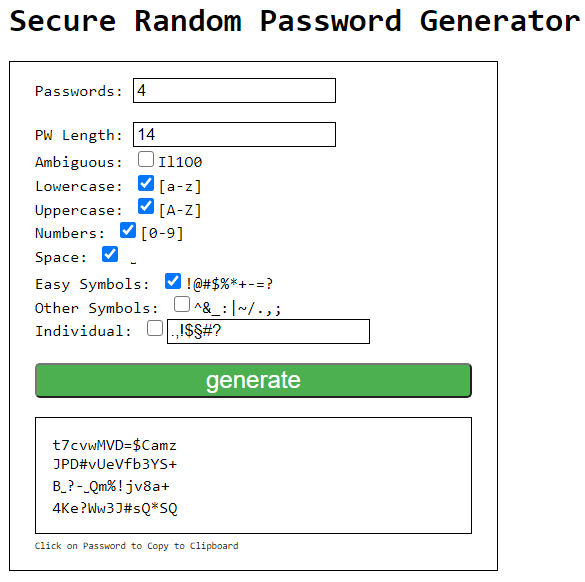
https://htmlpreview.github.io/?https://github.com/pg0/secure-password-generator/blob/main/pwgen.html
all needed code is in the single html file.
you could also strip it from the html and include the js script
removed <br /> for better view
<div class="container">
Passwords: <input type="number" id="pwamount" value="4" />
PW Length: <input type="number" id="pwlength" value="14" />
Ambiguous: <input type="checkbox" id="pwambigious" />Il1O0
Lowercase: <input type="checkbox" id="pwlowercase" checked="checked" />[a-z]
Uppercase: <input type="checkbox" id="pwuppercase" checked="checked" />[A-Z]
Numbers: <input type="checkbox" id="pwnumbers" checked="checked" />[0-9]
Easy Symbols: <input type="checkbox" id="pweasysymbols" checked="checked" />!@#$%*+-=?
Other Symbols: <input type="checkbox" id="pwothersymbols" />^&_:|~/.,;
Space: <input type="checkbox" id="pwspace" /> ␣
Individual: <input type="checkbox" id="pwindividual" /><input type="text" id="pwindiv" value=".,!$§#?" />
<button id="btnGenerate" class="generate" onclick="genPwd()">generate</button>
<div id="pwres"> </div>
<span class="smalltext">Click on Password to Copy to Clipboard</span>
</div>// generate multiple passwords, with selected complexity
function genPwd() {
let pwamount = document.querySelector('#pwamount').value;
let pwlength = document.querySelector('#pwlength').value;
let includeLowercase = document.querySelector('#pwlowercase').checked;
let includeUppercase = document.querySelector('#pwuppercase').checked;
let includeNumbers = document.querySelector('#pwnumbers').checked;
let includeAmbiguous = document.querySelector('#pwambigious').checked;
let includeEasySymbols = document.querySelector('#pweasysymbols').checked;
let includeOtherSymbols = document.querySelector('#pwothersymbols').checked;
let includeSpace = document.querySelector('#pwspace').checked;
let includeIndividual = document.querySelector('#pwindividual').checked;
document.querySelector('#pwres').innerHTML = '';
for (i=0; i < pwamount; i++) {
let pwresult = generateSecurePassword(pwlength,includeLowercase,includeUppercase,includeNumbers,includeAmbiguous,includeEasySymbols,includeOtherSymbols,includeIndividual);
let nladdon = '';
if (i > 0) nladdon = '<br/>';
document.querySelector('#pwres').innerHTML += nladdon + '<span class="clickme" onclick="copyToClipboard(replaceForCopy(this.innerText))">'+ filterSpecChars(pwresult) +'</span>';
}
}
// replace view chars to chars
function replaceForCopy(str) {
return str.replace(/␣/g, " ");
}
// copy to Clipboard
function copyToClipboard(value){
const textarea = document.createElement('textarea');
textarea.value = value;
document.body.appendChild(textarea);
textarea.select();
document.execCommand('copy');
textarea.remove();
}
// Secure Random Password Generator
function generateSecurePassword(length=10, includeLowercase=true, includeUppercase=false, includeNumbers=false, includeAmbiguous=false, includeEasySymbols=false, includeOtherSymbols=false, includeIndividual=false, secure=true) {
let charset = ""
if (includeLowercase) charset += "abcdefghjkmnpqrstuvwxyz";
if (includeLowercase && includeAmbiguous) charset += "iol";
if (includeUppercase) charset += "ABCDEFGHJKMNPQRSTUVWXYZ";
if (includeUppercase && includeAmbiguous) charset += "IOL";
if (includeNumbers) charset += "123456789";
if (includeNumbers && includeAmbiguous) charset += "0";
if (includeEasySymbols) charset += "!@#$%*+-=?";
if (includeOtherSymbols) charset += "^&_:|~/.,;";
if (includeSpace) charset += "␣";
if (includeIndividual) charset += document.querySelector('#pwindiv').value;
if(window.crypto && window.crypto.getRandomValues)
{
var result = "";
let values = new Uint32Array(length);
window.crypto.getRandomValues(values);
for(let i=0; i<length; i++)
{
result += charset[values[i] % charset.length];
}
return result;
}
else throw new Error("Your browser can't generate secure random numbers");
};
// to remove issues showing special chars
function filterSpecChars(str) {
return str.replace(/>/g, ">").replace(/</g, "<");
}