Please note that security bugs or issues should be reported to security@pgadmin.org.
Describe the bug
In the Query tool editor, the CodeMirror sidebar moves from it's fixed left side position to the middle of the screen.
To Reproduce
Steps to reproduce the behavior:
1st Scenario:
In the Query tool,
- write some long query
- move the horizontal scrollbar to the end of the written query
- close the scratch pad,
- the CodeMirror sidebar moves from it's position to the middle of the screen.
2nd Scenario:
In the Query tool,
- write some long query
- close the scratch pad
- move the horizontal scrollbar to the right
- click on reset layout button
- the CodeMirror sidebar moves from it's position to the middle of the screen.
Expected behavior
The CodeMirror sidebar must be fixed to the left side of the query tool editor.
Screenshots
1st Scenario Screenshot:
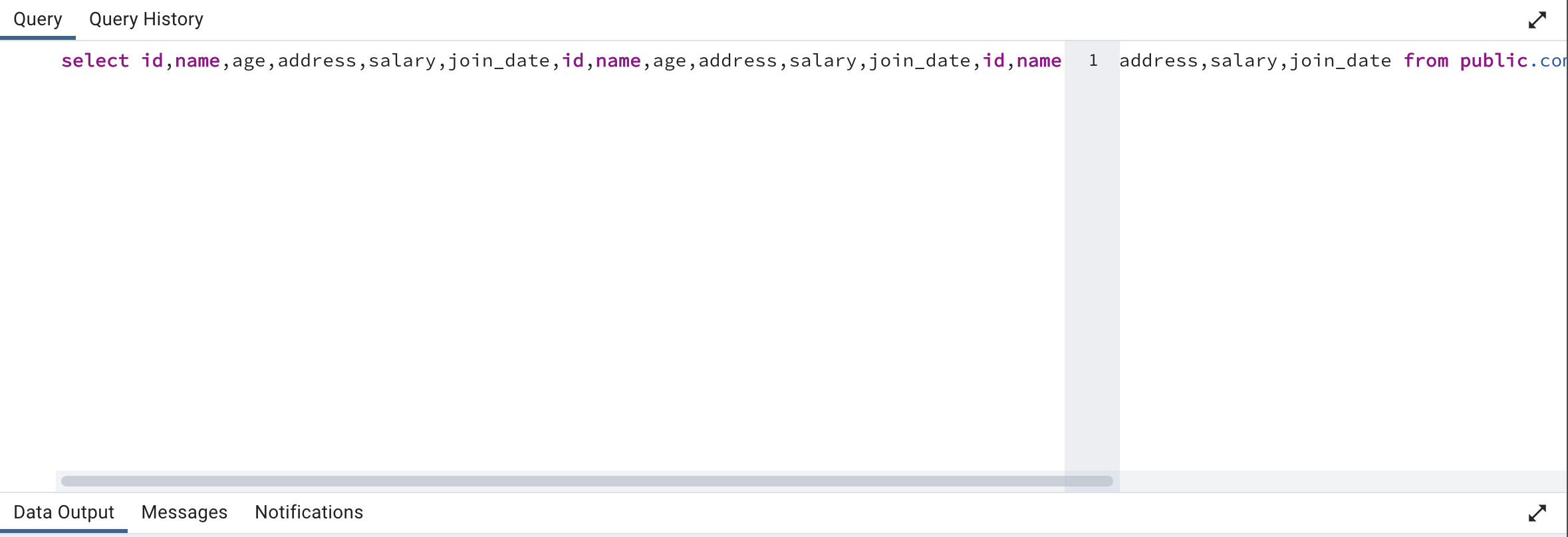
2nd Scenario Screenshot:

If applicable, add screenshots to help explain your problem.
Desktop (please complete the following information):
- OS: OSX monterey 12.6.3
- Version: 6.20
- Mode: Both
- Browser (if running in server mode): chrome


Please note that security bugs or issues should be reported to security@pgadmin.org.
Describe the bug
In the Query tool editor, the CodeMirror sidebar moves from it's fixed left side position to the middle of the screen.
To Reproduce
Steps to reproduce the behavior:
1st Scenario:
In the Query tool,
2nd Scenario:
In the Query tool,
Expected behavior
The CodeMirror sidebar must be fixed to the left side of the query tool editor.
Screenshots

1st Scenario Screenshot:
2nd Scenario Screenshot:

If applicable, add screenshots to help explain your problem.
Desktop (please complete the following information):