Releases: Pivotick/Pivotick
Release list
v2.0.1


Pivotick v2.0.0
Pivotick now does the thing it is named for: Pivots
Pull more graph out of wherever your data lives, and you choose what lands. History is the way back out of anything that does.
Pivots

Run an enrichment against the nodes you picked and the results arrive as candidates: not in the graph, not in the table, not in a count, until you commit them.
- Review them in the dock, one tab per source, searchable and sortable, with the rows already on canvas marked as such.
- Reject what you do not want. It stays rejected for the session, and Reject all remaining turns 1,800 rows into 12.
- Too many results means a refusal that says the number and the limit, never a silent sample. Narrow, and it lifts by itself.
- Everything that lands remembers which source vouched for it, so one source's contribution can be dropped again in one call.
One click, when the question is simple

Right-click a node and Pivot ▸ lists every enrichment that applies, each with what it is advertising. Picking a row is the run. Small results land straight on the canvas; large ones open the review tab.
Undo, over everything the canvas holds

The top bar's Undo and Redo buttons are wired up at last, with Ctrl+Z / Ctrl+Shift+Z behind them and a timeline dropdown behind each. Pivot results, deletions, hides and hand-drawn work all go in the same list.
Saving results back
A pivot can write its own results back into the system they came from, and Pivotick keeps the books on what has crossed and what has not, so re-running does not duplicate what was saved.
Also in this release
- Put your own mode on the left rail, beside Select, Create, View and Physics.
- Every UI feature has an on/off switch that takes its button, panel, menu entry and shortcut with it.
- The legend sits above the minimap in full mode, and the minimap draws notes.
- Notifications can carry an action and outlive the usual few seconds.
- Fixed: updating a node no longer replaces it, so its edges, position and physics survive.
- Security: an external review closed several routes out of a note and into the page around it. Note Markdown now renders against an allow-list, which costs a task list its checkbox. Thanks to @Wachizungu for the relentless effort!
Upgrading
Most breaking changes touch APIs that never shipped. The one to read is the retirement of UI.modeRail, whose disabled slots are exactly what custom rail modes now fill. The migration table is in CHANGELOG.md.
Docs: Pivots & enrichment · Saving results · Undo & history in the gallery.
Contributors

Assets 3
v1.6.0
Data dock, edge layers, a minimap, and a layout that tunes itself
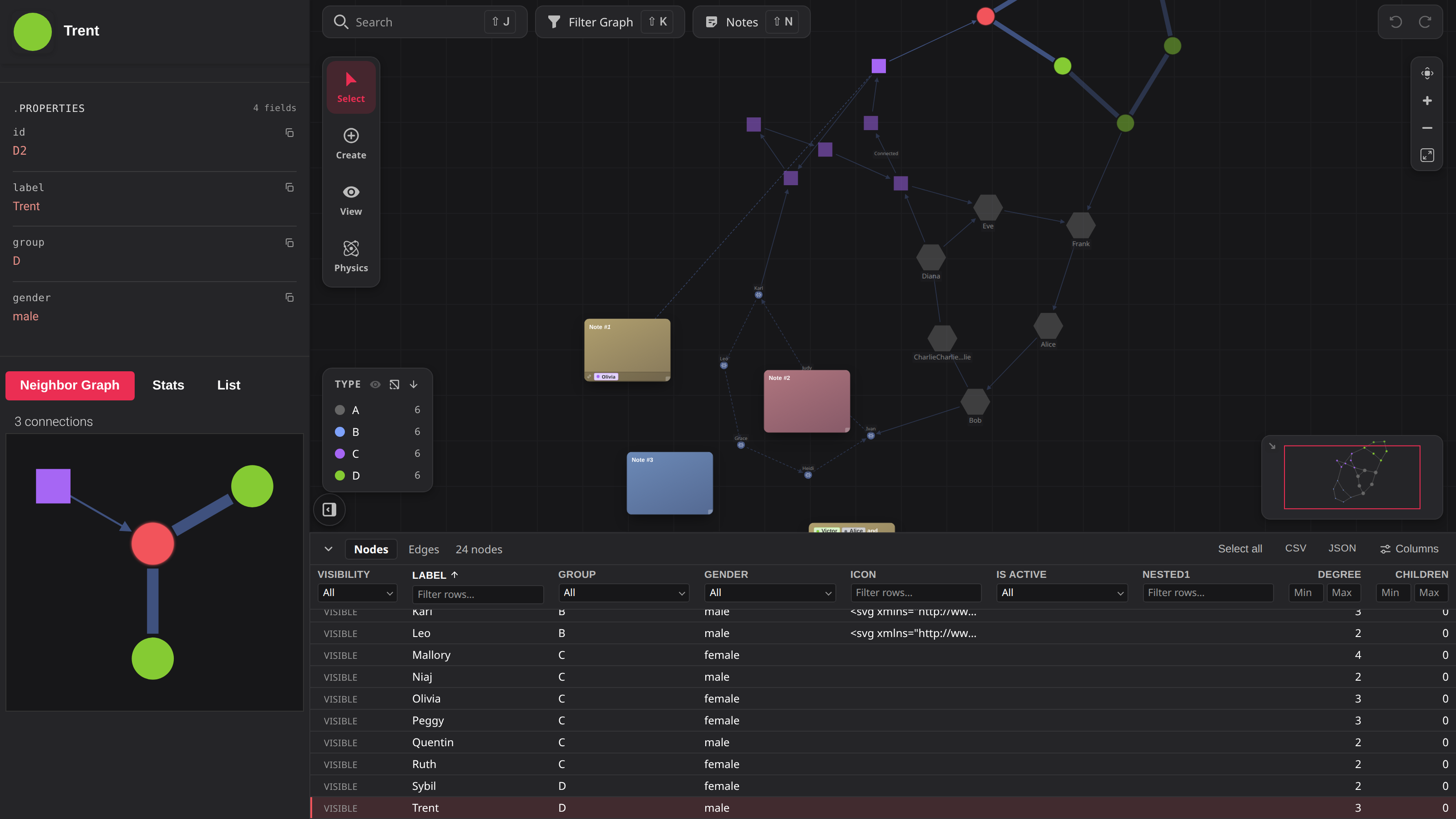
- A data dock under the canvas: the graph as a sortable, filterable, selectable table sharing
one selection with the canvas. It lists the whole graph — hidden nodes and collapsed clusters'
contents included — and hosts panes of your own viaaddDockTab(). - Edges come in kinds. Key them with
edgeTypeAccessor, style them withedgeStyleMap, and
switch a whole layer off from the filter panel or the legend — without moving the graph a pixel.
UI.filter.hideDisconnectedclears the nodes that leaves stranded. - A legend that filters, now keying several dimensions at once, through the same query engine
the filter panel drives. A minimap infullmode, built on the new public
getContentBounds()/setViewport(). Autois the default physics preset: forces derived from what is on screen, and re-derived
as the graph changes. Layout and physics also moved into a Physics rail mode.- Tree layouts no longer need a perfect hierarchy. Cycles, disconnected components and edgeless
nodes all lay out, spacing works itself out from the node sizes, andparentKey/depthKeylet
the data declare parents outright. - On the canvas: rim badges as a channel of their own, an HTML card as the whole node
(shape: 'none'), and edges meeting a node on its real border rather than a circle around it. - Every user-initiated write now goes through a before-hook you can veto, and content
renderers may return a promise.
 The data dock — every node and edge, Visibility leading each row. |
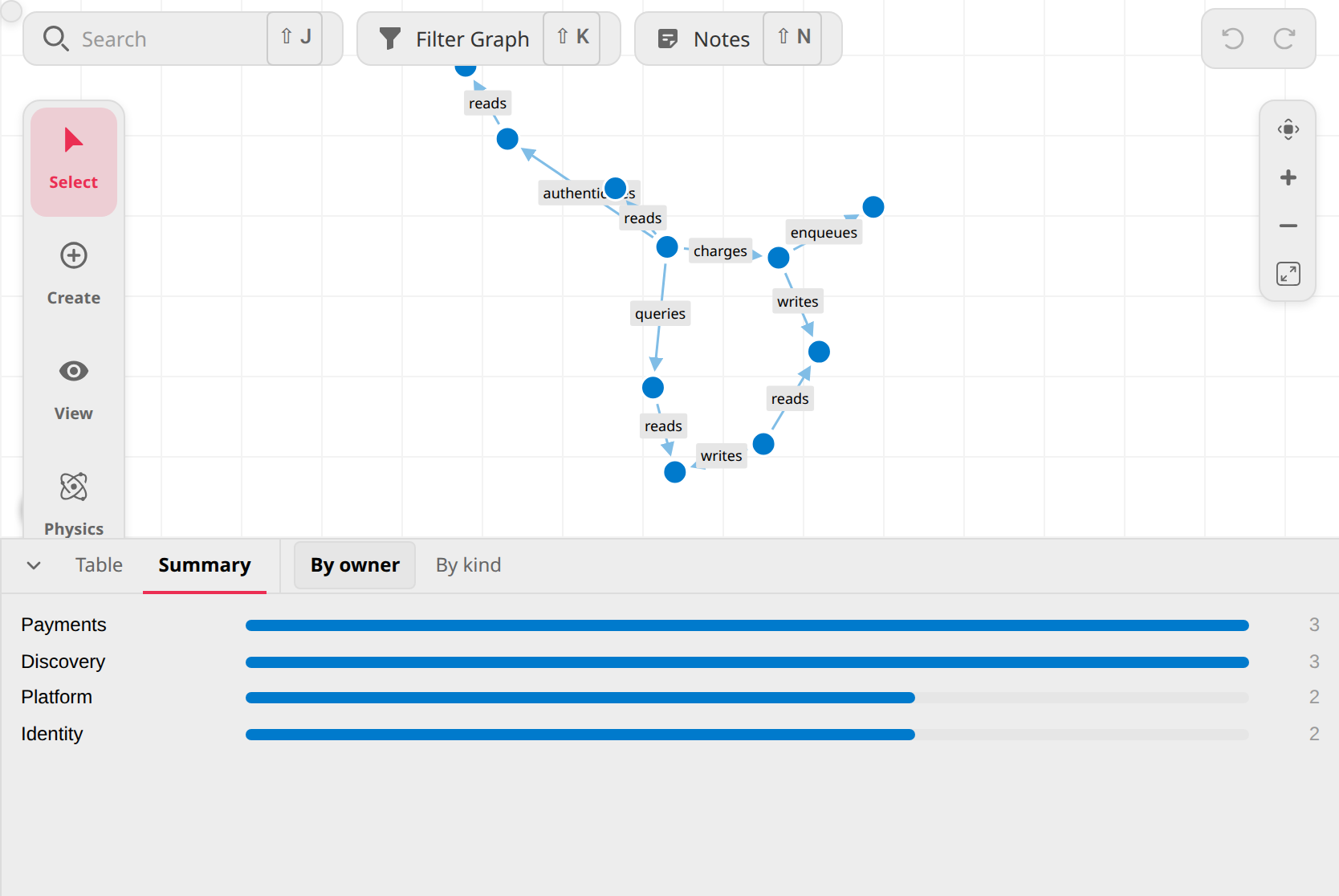 Panes of your own — addDockTab(), with its own views and toolbar. |
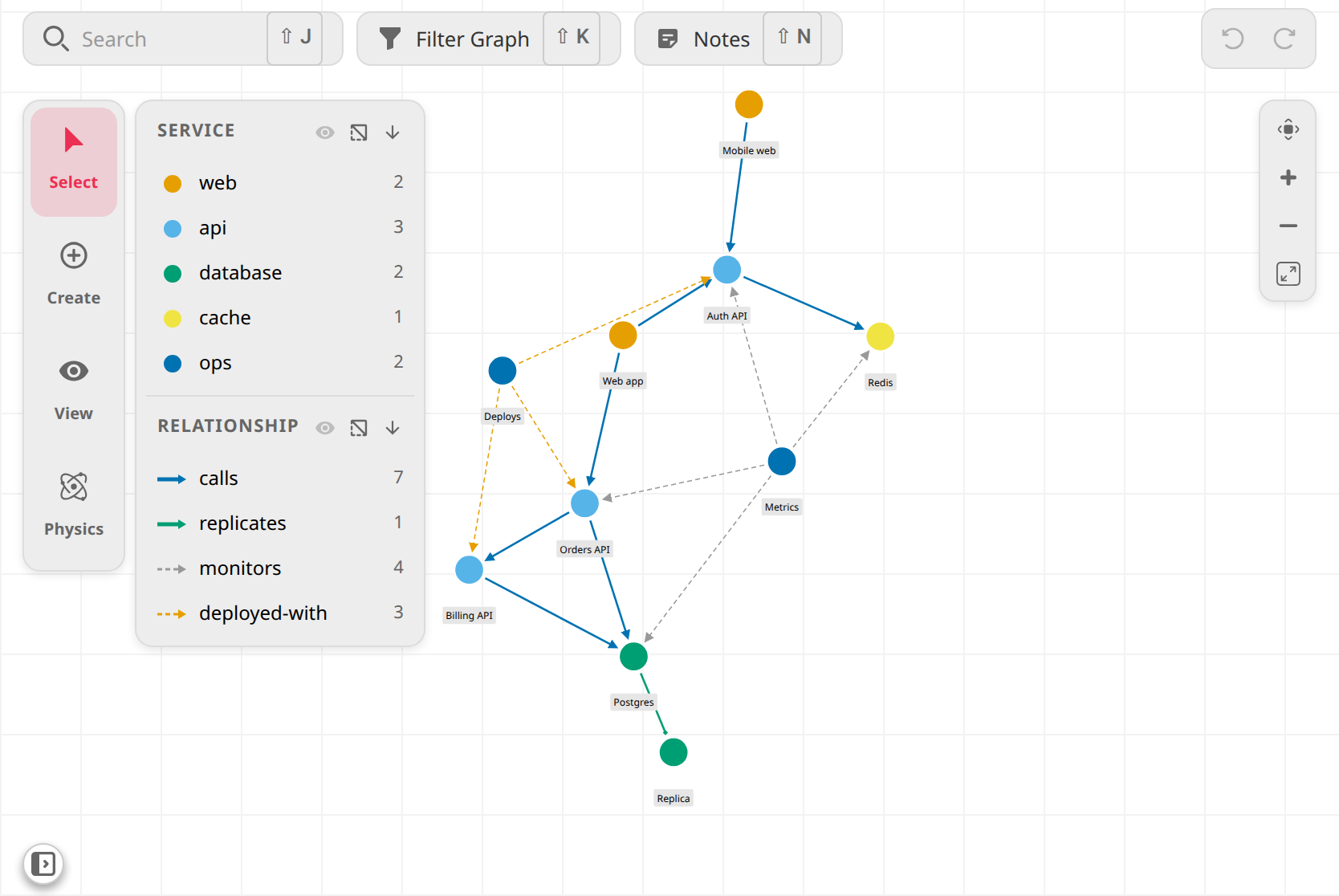 Edge kinds, keyed and switchable — styled per kind, stacked in the legend. |
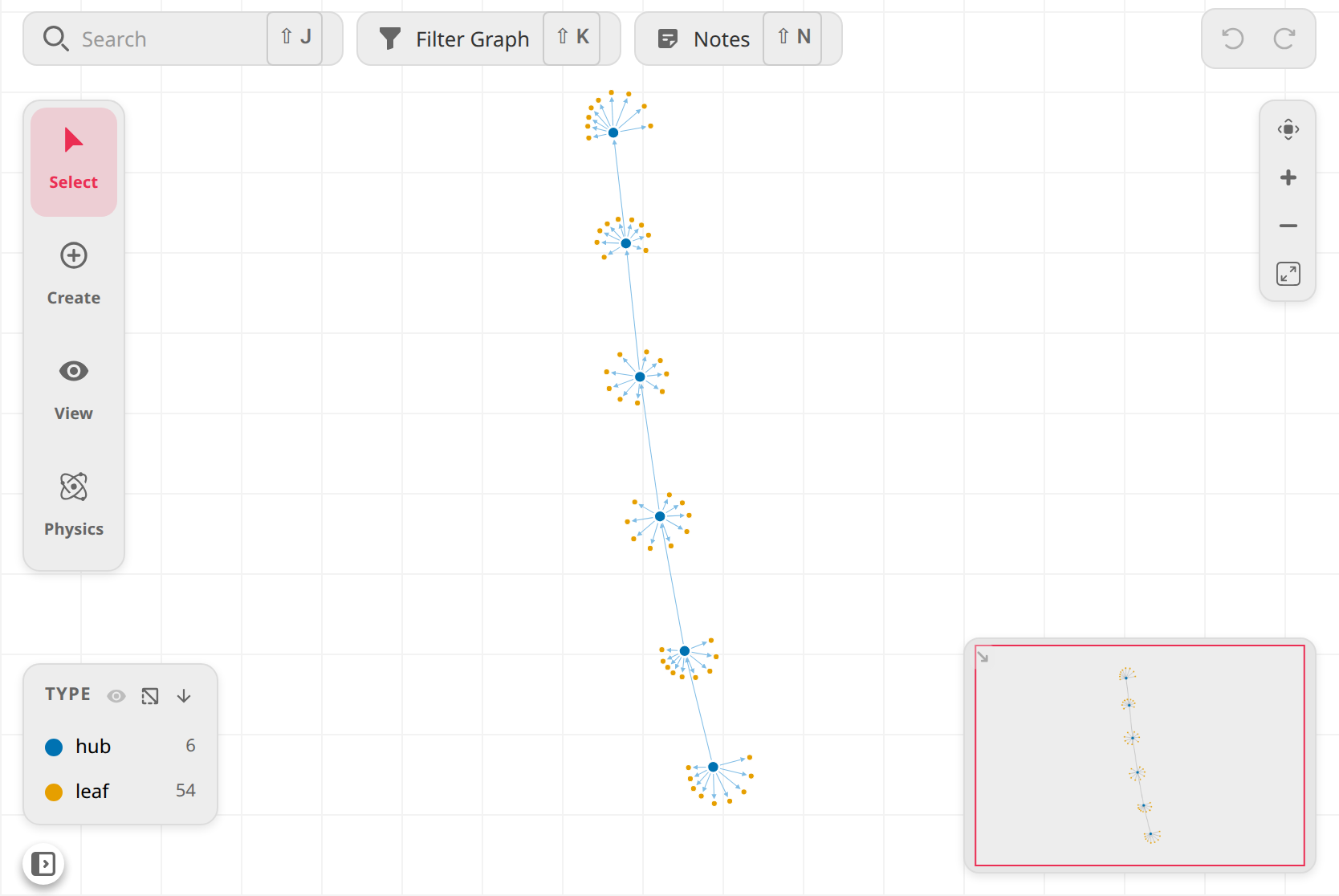 A minimap, on the public viewport API — click to recentre, drag to pan. |
 Rim badges — counts and states, on the shape's real rim. |
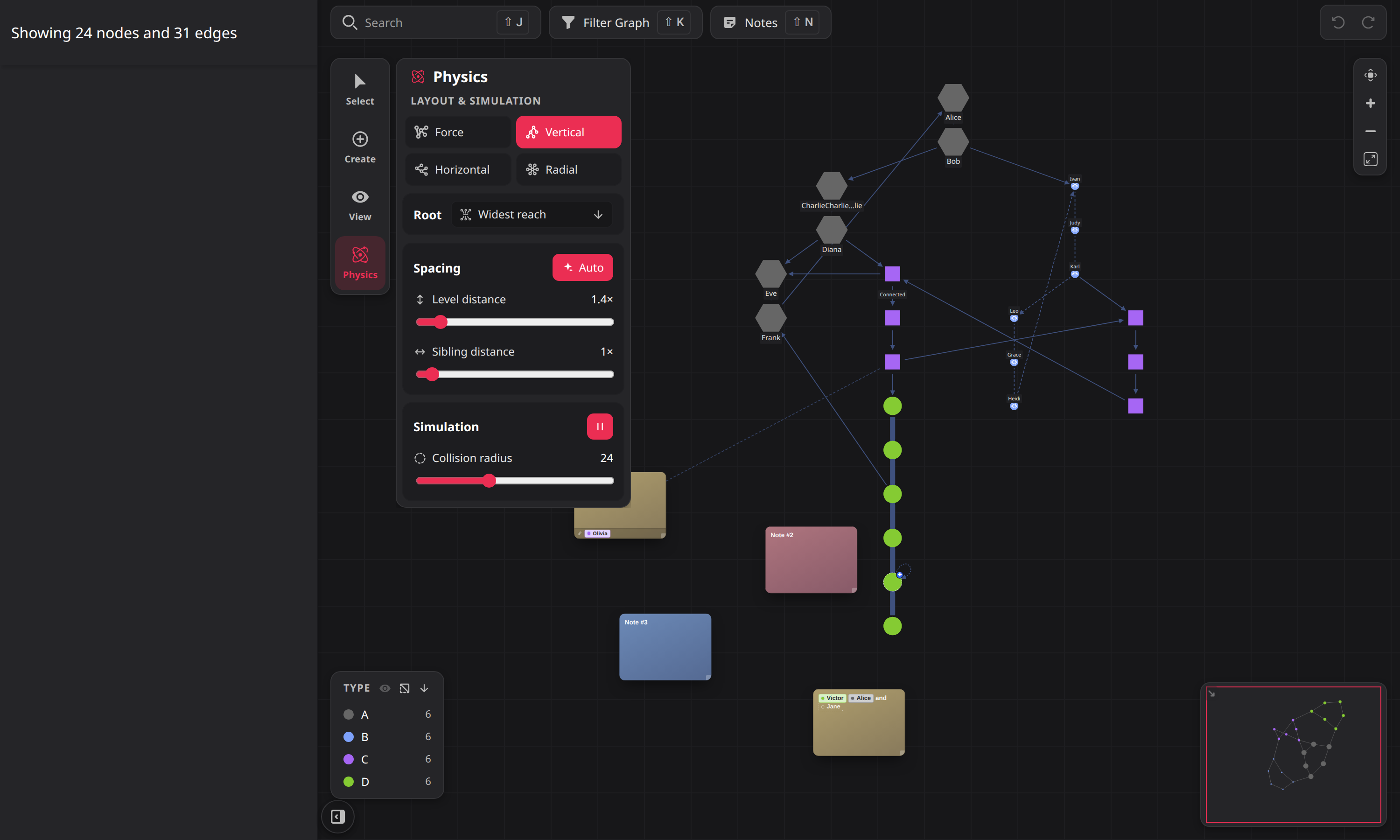
Physics is its own rail mode: a tile per layout, and — while a tree is active — a Root picker and
the two spacing sliders in place of the force knobs a tree ignores.
Breaking
Almost all of it is in the physics presets: PHYSICS_PRESETS.default is gone (Auto replaces the
concept), PhysicsKnobs widened from four fields to six, tight is re-tuned, and linkDistance's
range tops out higher. flipEdgeDirection is gone too: the tree layout now wor
when the arrows are not a hierarchy. In CSS, the legend's state classes moved t
.pvt-legend-section.
v1.5.0
Chrome UI - mode-driven UI redesign, Improvements & Security fixes
Replaces the classic control bar + toolbar with a mode-driven UI built around a left mode rail (Select / Create / View), a contextual tool panel, and a View flyout for layout / physics / grid. The top bar becomes a transparent overlay floating over the graph, and every panel — sidebar, slide panels, modal, context menu, tooltip — now sits on one shared floating-chrome surface, themed for both light and dark.
It also ships a security-hardening pass over everything reachable from untrusted graph data, which carries its own breaking change: a string returned from a render hook now renders as text, never as markup.
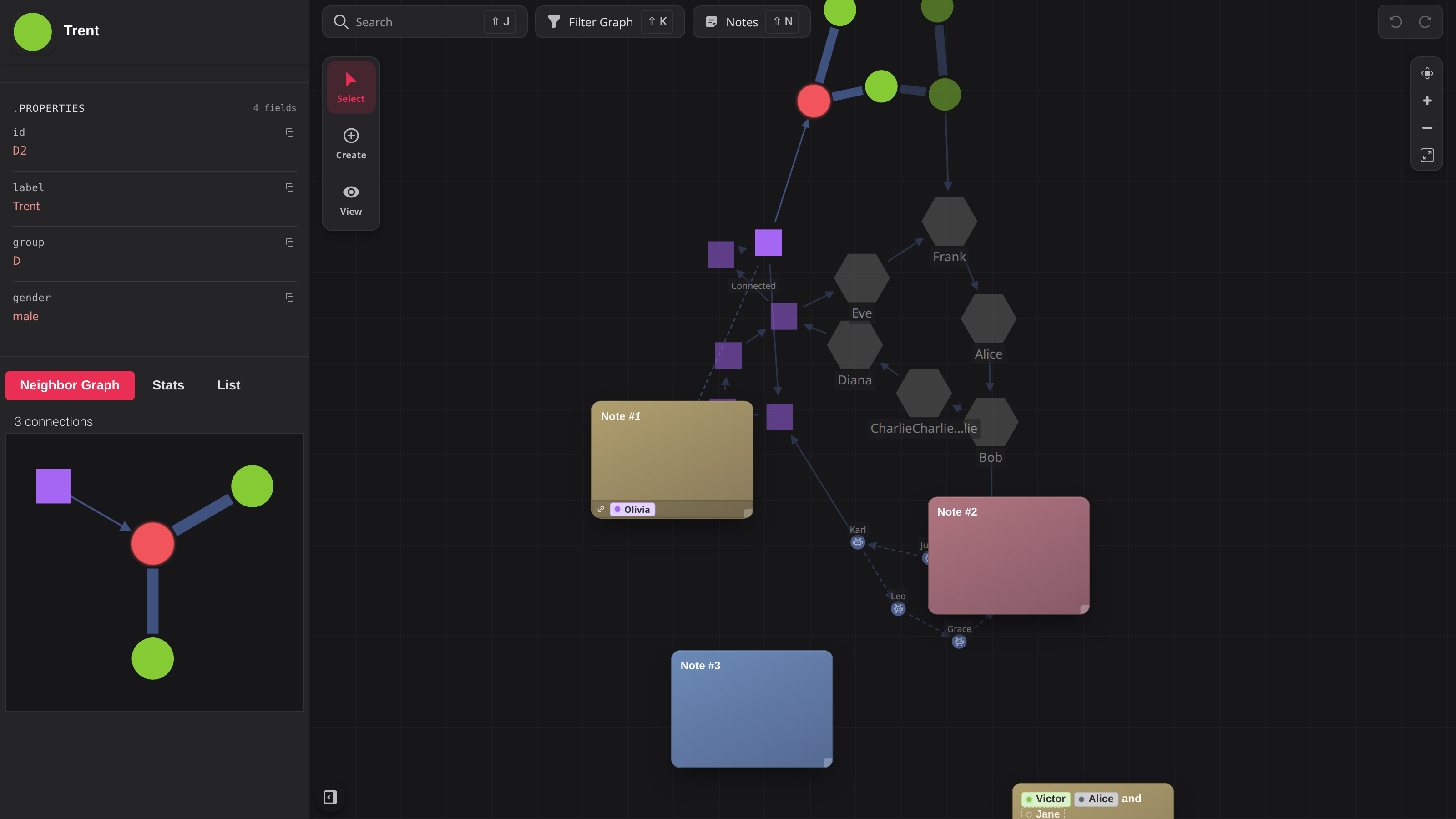
Mode-driven controls
- Mode rail — Select / Create / View as exclusive modes. The Select/Create slots double as split-buttons that reflect the armed tool (e.g. Select → Lasso). The coming-soon Explore / Enrich modes are opt-in via
UI.modeRail(both hidden by default; rendered as disabledSOONslots when enabled). - Tool panel — contextual tools per mode (Create → Add node / Add edge / Add note / Edit node), collapsible, with the rail reflecting the active tool.
- View flyout — layout picker, physics presets + live sliders, and grid / snap / freeze toggles.
| Mode rail | Tool panel (Create) | View flyout |
|---|---|---|
 |
 |
 |
Floating chrome
- Transparent top bar — Search / Filter / Notes float as pills over the graph grid.
- Sidebar, slide panels, modal, context menu and tooltip share one rounded, bordered surface; the Filters and Notes slide panels are mutually exclusive and restyled to match.
- Active-filter indicator restyled as a quiet accent chip; notes snap to the grid on drag when grid-snapping is on, and the decorative grid pitch now matches the snap
gridSize. - Accessibility: rail / chrome controls are focusable and expose their toggle state.
Sidebar: selection & bulk actions
- Clear-selection control, plus a bulk-action row for multi-selection: Pin / Unpin / Hide / Delete are functional; Group / Ungroup / Isolate / Bulk-edit are shown disabled with a
SOONbadge. - Empty panels and their separators collapse instead of leaving gaps.
New APIs
Simulationphysics setters, each mapping a 0–100 knob to the real force domain and reheating the simulation:setRepulsion,setLinkDistance,setCollisionRadius,setFriction, plusapplyPhysicsPreset('tight' | 'loose' | 'default').- New
UIManageraccessors:modeRail,toolPanel,viewFlyout. - New
UI.modeRailoption —{ explore?: boolean, enrich?: boolean }, both `f
Breaking changes
| Before | After |
|---|---|
graph.UIManager.graphControls |
Layout/physics moved to the View flyout — graph.UIManager.viewFlyout |
graph.UIManager.graphToolbar |
Select/Create tools — graph.UIManager.toolPRail |
graph.UIManager.graphNaviation |
graph.UIManager.graphNavigation (long-st |
UI.selectionMenu (per-node) |
UI.contextMenu |
UI.selectionMenu (multi-select) |
Sidebar bulk-action row |
render: () => '<b>hi</b>' on any string | HTMLElement option |
Renders ant` for markup |
GraphControlsandGraphToolbarare retired; the mode chrome is the defaul- The
e"Edit Graph" toggle is gone, superseded by the Create mode.
See the CHANGELOG.
Also in this release
- Reusable Typeahead wired to
[[node]]note references - Themed body-portaled scrollbars (typeahead / dropdown / context menu)
- Ego-graph capped to 50 neighbours; grayscale dropped from dimmed nodes; neigh
- Fixes: shadowlink-container SVG leak on tooltip rebuild; View-flyout run/pausatchdog; lasso outline + screen→graph mapping restored; edit-tool canvas cursors
restored; Edit-node tool disabled without a selection; picker input styling; fo square - Docs: new security guide, README hero regenerated for the new chrome (`npm ruails refreshed
Security hardening
Reported by @Wachizungu see the new security guide.
- Strings never render as markup. Every
string | HTMLElementoption — extes, main-header / properties-panel / tooltiprender— now resolves to text;return anHTMLElementfor markup. Breaking. style.svgIconis sanitized before insertion;style.imagePathand property links are limited tohttp:,https:,data:andblob:.- Node name and description render as text in the node modals, and the Markdown node-reference renderer escapes
nodeName. - Recursive walks over caller data (
hasCycle,findMaxReachabilityRoot,JsonViewer) are iterative and bounded, and node-id lookups areMap-keyed so__proto__/constructorids
no longer break the layout.
Assigned CVE/GCVE
- GCVE-1-2026-20067 - CVE-2026-66918
- GCVE-1-2026-20032 - CVE-2026-66919
- GCVE-1-2026-20113 - CVE-2026-66920
- GCVE-1-2026-20063 - CVE-2026-66921
- GCVE-1-2026-20118 - CVE-2026-66922
- GCVE-1-2026-20077 - CVE-2026-67173
- GCVE-1-2026-20149 - CVE-2026-67174
Testing
npm run build,tsc, and ESLint: clean.- Playwright visual suite: 175 / 175 passing on the chrome work; the security pass adds
security.spec.ts, covering the reported XSS surfaces with hostile graph data. - Gallery thumbnails refreshed for the new chrome.
Contributors
Assets 3
v1.4.0
Pivotick v1.4.0
Since v1.2.0 — bundles the 1.3.0 feature wave and the 1.4.0 hardening pass.
Highlights
- 🔌 Plugin API — register custom UI through a composite lifecycle and a declarative registry (
PivotickPlugin,UIComponent). - ✏️ Interactive edge creation —
onBeforeEdgeCreate/isValidConnectiongate edges, andctx.promptLabel/ctx.promptDataenrich them as you draw. - 🔎 Faceted multi-select sidebar — inspect a selection as distribution facets and click bars/pills to filter it.
- 🗂️ Type-aware node inspector — properties rendered by type (links, JSON, copy), with an auto-fitting header title and a neighbour graph/stats/list.
- 🗒️ Notes redesigned as jewel cards — colour-driven cards with a jewel/terminal surface toggle and Markdown content.
- 🎨 Theme-aware polish — themed scrollbars, a richer tooltip, and opt-in auto-fit on cluster expand/collapse.
- 🔒 Hardening pass (1.4.0) —
javascript:URL XSS blocked, cyclic-data stack-overflow guard, keybinding stacking, and more.
🔌 Plugin API & composite UI lifecycle
UI elements are now driven by a composite lifecycle and a declarative registry,
and third-party code can hook into it. A plugin receives a PluginContext
(with a live ctx.layout getter) and can mount its own UIComponents that
participate in the same phased setup/teardown as the built-in UI.
New public exports: UIComponent, PivotickPlugin, PluginContext, UIPhase
(also attached as Pivotick.UIComponent on the UMD/IIFE global).

Gallery: Extend with a plugin
✏️ Interactive edge creation — validate, enrich, and label
Edge creation (drag-and-drop or click-click) now has a full set of hooks:
onBeforeEdgeCreate+ liveisValidConnection— veto or approve an edge
before it commits; invalid targets are rejected as you drag.ctx.promptLabel({ mode })— prompt for an edge label at creation time
(inline free-text on drag, a predefined-label dropdown on click).ctx.promptData— open a rich edge-create modal, either from a
declarative form spec or fully custom HTML.edgeEditor.labelPrompt— the static/config equivalent for label prompts.
The async lifecycle behind these was hardened in 1.4.0 (zombie-mode guards,
promise rejections, static-mode dedup, and the modal prompt path).
▶ Try it live — edge creation is a motion, so these are best seen in the interactive gallery:
- Validate & enrich new edges — reject invalid targets and enrich edges on create
- Label an edge as you draw it — inline free-text on drag, predefined-label dropdown on click
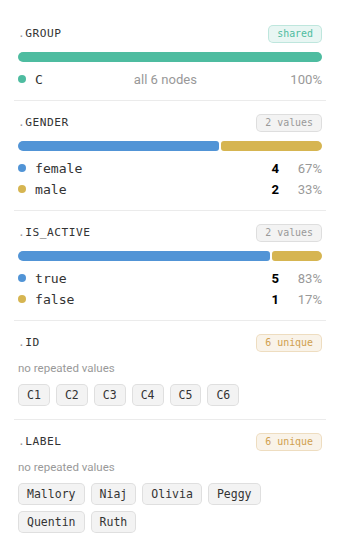
🔎 Faceted multi-select sidebar
Selecting multiple nodes now shows a faceted breakdown of the selection —
distribution bars for low-cardinality fields, value pills for high-cardinality
ones, plus a filterable connection-stat facet. Click a bar or pill (or the
hover Select / Exclude cluster) to filter the selection down; filtering to a
single node drops straight into the single-node view.
1.4.0 hardening: facet matching uses strict equality (so 80 and '80' stay
distinct), matches the displayed value rather than raw getData(), and caps
distribution rows/segments with a collapsed tail summary.
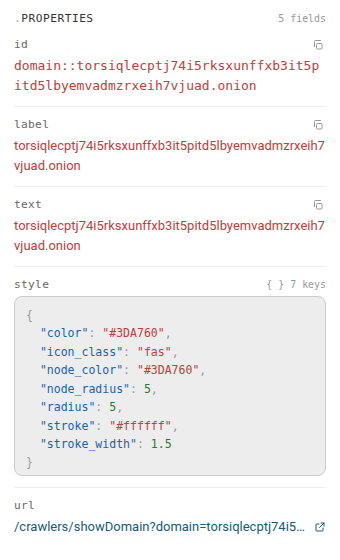
🗂️ Type-aware node inspector
The single-node sidebar renders each property according to its type — links
become clickable, objects render as collapsible JSON, and every value gets a
copy button. Long node titles auto-fit in the header (with a type-aware
fallback), and the neighbour section offers a graph / stats / list view.
1.4.0 hardening: property links are restricted to an allowlist of URL schemes
to block javascript: XSS, jsonToHtml guards against cyclic/deeply-nested
data (no more stack overflow), and middle-truncation slices by code point so
emoji/surrogate pairs aren't garbled.

🗒️ Notes redesigned as jewel cards
Notes are now colour-driven "jewel" cards. Each note can toggle between a solid
jewel surface and a neutral terminal panel, its first line is promoted to
the title, and content supports Markdown (bold / italic / code). Edit-mode
chrome was reworked (header drag, save button, thicker accent) and notes now
render above the graph nodes.


🎨 Tooltip & theming polish
- Tooltips reuse the sidebar's type-aware
PropertyList, with compact
properties, scrollable JSON, and a shared title-fit controller (each pinned
tooltip refits its own title on resize). - Theme-aware scrollbars throughout, including the tooltip and its resize grip.
- Opt-in auto-fit on cluster expand/collapse (
fitViewOnExpandCollapse, default off). - Copy buttons in pinned tooltips are re-wired after cloning so they keep working.
🔒 Hardening & fixes (1.4.0)
- Security: allowlist URL schemes in property links to block
javascript:XSS. - Robustness: guard
jsonToHtmlagainst cyclic / deeply-nested node data to prevent stack overflow. - Keybindings: stack bindings per key so a plugin's binding shadows the built-in instead of clobbering it.
- Notes: keep the dirty flag mid-edit and rebuild on edit-end so programmatic
setContentisn't lost. - Lifecycle: fire lifecycle phases once so
setData()doesn't stackgraphReadyhandlers; auto-remove subscriptions on destroy. - Build: attach
UIComponentto theGraphglobal so it's usable from the UMD/IIFE bundles. - Perf: update only the note connector on drag/resize instead of running a full renderer tick.
- Emoji-safe middle-truncation, strict-equality facet filtering, and assorted dead-code cleanup.
⚠️ Breaking changes
PropertyEntryvalue semantics — string values now render as text;
pass anHTMLElementto render HTML. Previously-HTML string values must be
converted to elements (1.4.0).
🧪 Tests & docs
- The Playwright visual regression suite (
tests/visual/) is now documented
inCLAUDE.mdand gained specs for edge-create veto, facet filtering, the
node panel, notes, the plugin API, and UI-lifecycle reentrancy. - New gallery examples ship with screenshots: Extend with a plugin,
Validate & enrich new edges, Label an edge as you draw it. - TypeDoc entry points and internal-type annotations were tidied.
Upgrading
npm install pivotick@1.4.0v1.2.0 → v1.4.0 — see the Breaking changes note above
before upgrading if you build property lists with HTML strings.
v1.2.0
Documentation gallery rebuild + library hardening (v1.2.0)
Rebuilds the examples gallery from scratch — 34 interactive cards across 8 phases
(styling, layouts, events, editing/notes, filtering, theming, and scale up to
~1,500 nodes) — and fixes/extends the library features those cards exercised.


New
- Gallery — 34 live, copy-pasteable cards demonstrating every major feature in the doc.
- Image nodes —
imageFitmodes (icon / cover / contain / frame), click-to-reveal
full picture, and a graceful fallback glyph for broken images. - Font-agnostic icons — resolve node icons across Font Awesome + misp-iconify.
- Seedable & pinnable layouts — preserve initial node x/y and honour caller
fx/fy. - Gravity tiers — configurable
d3GravityStrengthConnectedfloor.
Changes
- Version bumped to 1.2.0.
- Replaced tom-select with the in-house PivotickPicker.
- Simulation worker hardened: serialization-safe DTOs, compute-time slow-tick
detection, and main-thread fallback when the worker is blocked. - Sass modernized (
@useover@import); lint + dataset cleanups.
Fixes
- Simulation / clustering — positions written back by node id; external edges
re-anchored to expanded clusters; cross-cluster edges re-targeted through collapse
states; charge damping clamped (no more NaN); fit-and-center after the layout settles. - Rendering — measured
renderNodesize feeds the collision radius; visibility
observer guarded against an unset selection. - Filtering / query — null/undefined facet values dropped (crash); programmatic
setFilterreflected in the panel;excludeNode/includeNodeact on the live node;
integer attributes added to the numbers set. - Edges / tooltip — per-edge style preserved across
updateStyle; themed label
colours; tooltip honours its own header/properties maps.
v1.1.0
This release turns Pivotick from a graph viewer into a graph editor. It adds
two major new subsystems — free-floating Notes and an interactive editing
layer — plus a new editing toolbar, fullscreen, lasso selection, and Markdown-rich annotations.
All changes are backward compatible: existing options, events, and callbacks keep working. New capabilities are opt-in.
✨ Notes — free-floating annotations (new)

- Add free-floating notes anywhere on the canvas, passed via the constructor
(new Graph(el, { notes: [...] })) or created interactively from the toolbar. - Markdown content rendered with
marked+dompurify, including a custom
node-reference extension: link note text to graph nodes, styled with the
referenced node's color. - Inline edit mode (open with the
editshortcut), drag to reposition, resize,
and icon support. Notes are rendered as full HTML. - New Notes sidebar with header actions.
- New data events on the graph bus:
noteAdd,noteRemove,noteChange
(andnote:add/note:remove/note:changein batch changes).
✏️ Interactive editing layer (new) — graph.editing

- In-place node editing through an Edit Node modal, configured via
ui.editors.nodeEditor(enabled,fields, or a customrender(session)). - Hybrid edge creation: connect nodes by either drag-and-drop or
click-click, with a live "shadow edge" preview while you draw. - "Connect to…" action added to the node context menu.
🧰 Editing toolbar & selection (new)

- New graph toolbar for edit operations, with icons and node-vs-edge selection
awareness. - Lasso selection and inverse selection.
- Add note directly from the toolbar.
🧭 Navigation & canvas
- Fullscreen mode (close with
Esc). - Canvas tools moved into graph navigation; canvas grid highlighting.
- "Freeze nodes on drag" toggle in the options dropdown.
🔌 API & interaction layer
- Interaction callbacks reworked with more abstraction and a way to cancel
default behavior. - Quick-action menu items now accept Notes, support a
shortcuthint, and
newoutline-softvariant. - Note dragging events; "closest node to pointer" helper for interactions.
- Improved keybinding handler + a UI helper to render keybinding badges.
🧩 Components & UI

- New JSON viewer component and node picker widgets.
- Inspect node modal.
createNodePreviewhelper for node vignettes.- Dropdown styling/animation polish; modal lifecycle fix (removed from DOM once).
- Neighbors sidebar: hover a list item to highlight the node on the graph.
🐛 Fixes
- Non-directed graphs: correct edge rendering and neighbor resolution.
- Drag & text-selection behavior;
pointerdown/clickno longer call
preventDefault. - Note drawer: min-width, correct
foreignObjectsizing, action-button
positioning on resize, live shadow-link update while resizing. - Inspect modal no longer opens multiple times.
- Node-reference color applied in the Notes sidebar.
- Resolved 16 pre-existing TypeScript errors; getters now resolve object/boolea
types.
🛠️ Developer / internal
- New Playwright visual-regression test suite (10 areas: styling, dark theme,
layout, clustering, filtering, selection, hover/tooltip/context-menu, UI chro
notes, edge-creation). - Note rendering reworked from mixed SVG/HTML to full HTML — see upgrade notes.
- Pluggable note-content renderer pipeline (
NoteContentRenderer).
⚠️ Upgrade notes
- No breaking API changes — all new options/events/callbacks are additive.
- If you custom-styled notes via SVG selectors, note rendering is now full
HTML; update your selectors accordingly.
Full changelog: v1.0.0...v1.1.