Repository navigation
Comment – Editor & Reply Notification
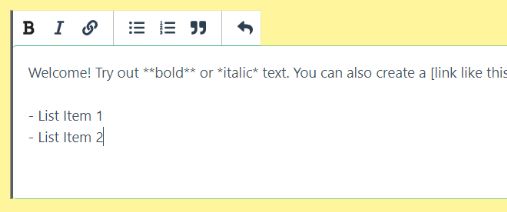
Enable a Markdown editor in the comment form and email notification whenever someone wrote a comment reply.
h-comment-editor
- Saved in database as Markdown and compiled before rendered.
- General keyboard shortcut like bold (CTRL+B), italic (CTRL+I), undo (CTRL+Z)
- Follow-up Notification
It will add a checkbox under the Comment Form. If it's checked, thecomment_karmawill be set to 1 and he will be notified whenever someone reply to him.

apply_filters( 'h_reply_email_settings', array $settings );SETTINGS PARAMETERS
label (string) - The checkbox label.
- default: "Notify me of follow-up comments by email."
checked (boolean) - Initially checked or not.
- default: true
mail_subject (string) - The template for Email subject.
- default: "Your comment at {{site_title}} has a new reply!"
- Available tag:
{{site_title}},{{post_title}}
mail_body (string) - The template for Email content. wpautop() will be applied here.
-
default:
Hi {{author}}, There\'s a new reply to your comment over on <a href="{{post_url}}">"{{post_title}}"</a>. As a reminder, here\'s your original comment on the post: <blockquote>{{content}}</blockquote> And here\'s the new reply from {{reply_author}}: <blockquote>{{reply_content}}</blockquote> <a href="{{post_url}}">Visit the article</a> to continue the conversation. Regards, - {{site_title}} Admin' -
Site tag:
{{site_title}},{{site_url}} -
Post tag:
{{post_title}},{{post_url}} -
Original comment tag:
{{date}},{{content}},{{author}} -
Reply comment tag:
{{reply_date}},{{reply_content}},{{reply_author}}
add_filter( 'h_reply_email_settings', function( $settings ) {
  $settings['label'] = 'Email me whenever someone reply';
  $settings['checked'] = false;

  $settings['mail_body'] = 'Dear {{author}},
  Your comment on the post <a href="{{post_url}}">"{{post_title}}"</a> just got a new reply.

  To read and reply, please visit the post by clicking the link above.

  Thank you';

  return $settings;
} );