Browser App
The browser application combines an ASN.1 definition editor, hybrid Form/JSON instance input, diagnostics, API Log, and standalone PkiStudioJS DER viewer routing.
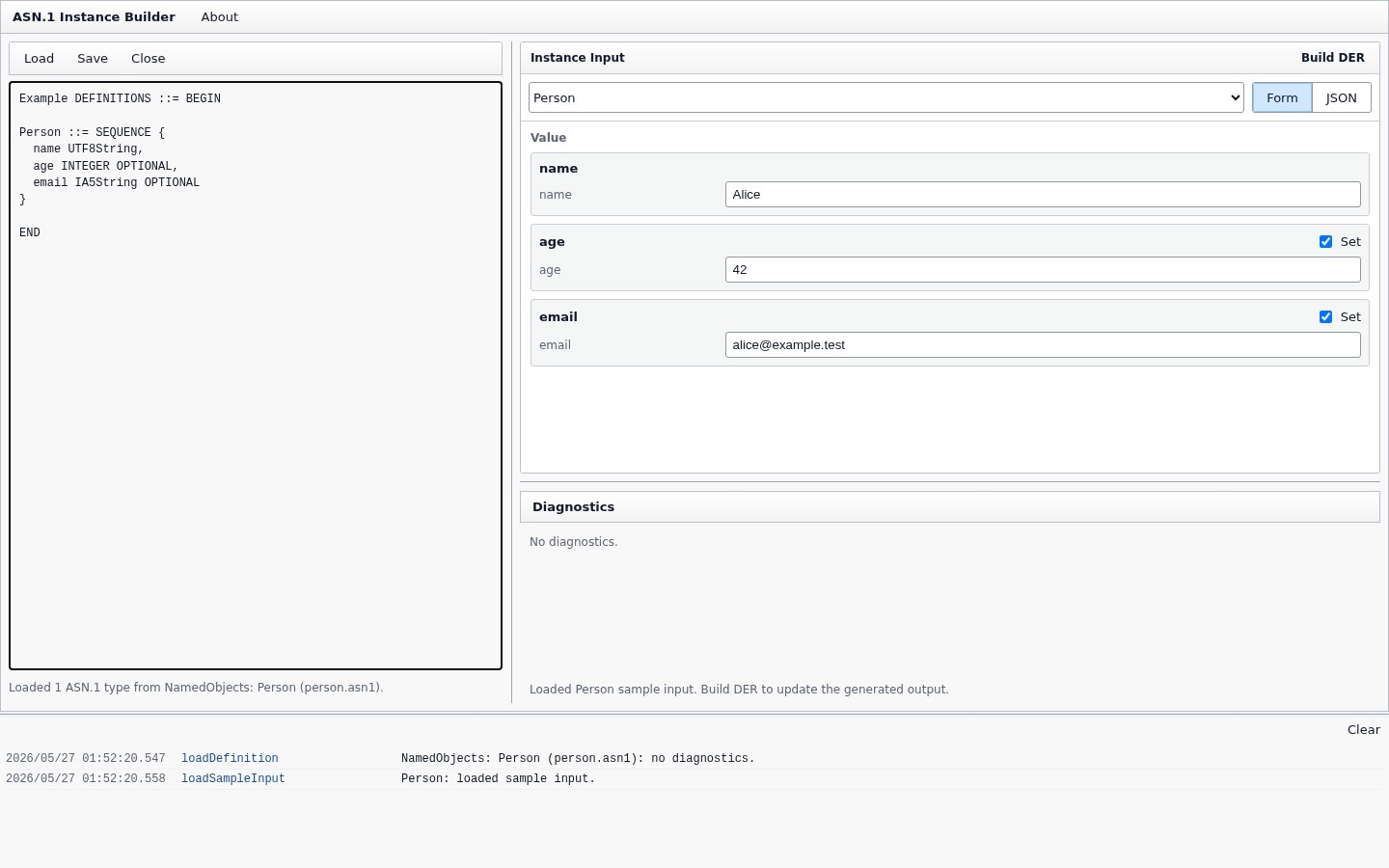
The left pane owns the active ASN.1 definition workspace.
The compact toolbar provides:
-
Load->from ASN.1/Schema File: load a local.asn1,.txt, or Schema Model JSON/text file into the Definition pane. -
Load->from Clipboard: load ASN.1 definition text from the clipboard. -
Load->Definition Bundle: load a.definition-bundle.jsonor.bundle.jsonfile, including its schema, entries, sample/default input, and optional UI Profiles. -
Load->NamedObjects: load a bundled example definition and matching sample input. -
Save->to File: save the current definition text asasn1-definition.asn1. -
Save->Definition Bundle: export the current definition workspace, selected type, current sample input, and active UI Profile metadata as a portable.definition-bundle.jsonfile. Bundle-backed workspaces preserve useful bundle and selected-entry metadata where possible, including non-selected entries. Generated bundles are validated before download. -
Close: clear the active definition, instance input, selected type, and diagnostics.
The definition textarea is read-only for now. Local definition files and clipboard text are parsed into the same Schema Model used by the Core API. Definition Bundle files use a separate loader so they can also populate the selected entry, Instance Input pane, and UI Profile metadata without being confused with raw Instance JSON. Invalid Definition Bundle files report structured diagnostics in the Diagnostics pane and API Log.
Bundled examples are available from Load -> NamedObjects.
Current parent objects include:
-
Person. -
TaggedPerson. -
BinaryRecord. -
DefaultRecord. -
SignedRecord. -
VersionedSerial. -
TBSCertificatePrefix. -
Certificate. -
CertificationRequest. -
CertificateList. -
AlgorithmIdentifier. -
PkiBundle.
Loading a parent object fills the Definition pane and loads a matching sample input. When the loaded definition contains child types, selecting another type in the Instance Input pane replaces the input with sample data when a sample is available.
The built-in Certificate, CertificationRequest, CertificateList, and PkiBundle NamedObjects include UI Profiles for their primary entries. In Form mode, those profiles improve generated field labels, descriptions, ordering, collapsed state, placeholders, and input-mode hints for common PKI sections such as issuer, subject, validity, subject public key info, extensions, attributes, revoked certificates, and signature values. The profiles only affect the input experience; the sample Instance JSON and DER generation behavior remain unchanged.
The right top pane owns the selected ASN.1 type and its instance input.
The type selector is populated from the parsed definition. Build DER reparses the definition, validates the schema, validates the selected instance, and then creates DER bytes.
The pane has two editing modes:
-
Form: generates controls from the selected ASN.1 type and writes changes back to the instance value. -
JSON: edits the raw instance JSON directly.
The two modes share the same underlying value. JSON remains the canonical interchange and debugging representation, while the Form view is a schema-driven editor for that value.
Initial Form coverage includes primitive values, named INTEGER and ENUMERATED values, SEQUENCE, SET, CHOICE, SEQUENCE OF, SET OF, optional/defaulted fields, byte inputs, BIT STRING unused bits, and OID name suggestions when available.
When a loaded Definition Bundle provides a UI Profile, the Form view can use optional hints such as labels, descriptions, placeholders, field order, collapsed groups, and input-mode preferences. Repeated item templates can use * in path segments, such as extensions.*.extnID, so one hint can apply across generated array items. Without a UI Profile, the Form view still generates controls directly from the Schema Model.
If the raw JSON cannot be parsed when switching to Form, the Form view reports the parse error and leaves JSON editing available.
Instance JSON uses plain JSON values plus a few structured forms for ASN.1 concepts such as CHOICE, BIT STRING, and binary data. See Schema and Instance Model.
PkiStudioJS editing dialogs are not embedded in this pane. They are only a UX reference; generated DER is still handed to PkiStudioJS through the existing viewer integration.
The Diagnostics pane reports Definition Bundle, schema, and instance diagnostics before DER generation.
Schema diagnostics can report issues such as duplicate type names, unknown references, duplicate field names, duplicate context-specific tags, unsupported tag numbers, and duplicate named numbers.
Instance diagnostics report value-level issues with stable paths, including OID, binary, and time value problems.
Definition Bundle diagnostics report JSON parse errors and bundle-shape problems, including missing ids, unsupported schema source formats, missing entries, or invalid sample/default inputs.
Errors block DER output. Warnings remain visible while still allowing the generated value to be inspected.
Successful user-triggered builds open a new full PkiStudioJS browser tab for the generated DER.
The app passes generated DER to viewer.html through local storage with a short-lived storage key. PkiStudioJS then parses and displays the generated object for ASN.1 inspection.
If the browser blocks the popup window, the API Log records a warning.
The bottom API Log records schema parsing, diagnostics, DER building, PkiStudioJS window opening, and generated DER parsing results for each build attempt.
The log is intended for local debugging and host integration work. It can be cleared from the log header.
The app fills the browser viewport and uses resizable Definition, Instance Input, Diagnostics, and API Log areas.
Pane sizes are persisted in local storage. The visual style follows the PKI Studio gadget family used by pvkgadgets and certgadgets.