When something in a table or in a specific column/row/cell is changed, an app script for Google Sheets📊 will notify the user through a Telegram bot.
Below are instructions for setting up a script, bot, and changing the script for your use (for use with a specific column, row, or cell).
For script working, you need to create bot through Telegram @BotFather by following these steps:
- Write to @BotFather command /start
- Now create new bot with command /newbot
- Give bot a name and after a username (with "bot" on the end)
- @BotFather will send you message with token to access the HTTP API. We will need it later
- In this massage, there is a link to your bot: "t.me/YOUR_USERBOT_NAME" - go to chat with your bot and use command /start
- Go to the table in which you need to track changes
- Go to Extensions > Apps Scripts
- In Editor replace code inside file with code from this repository and Save
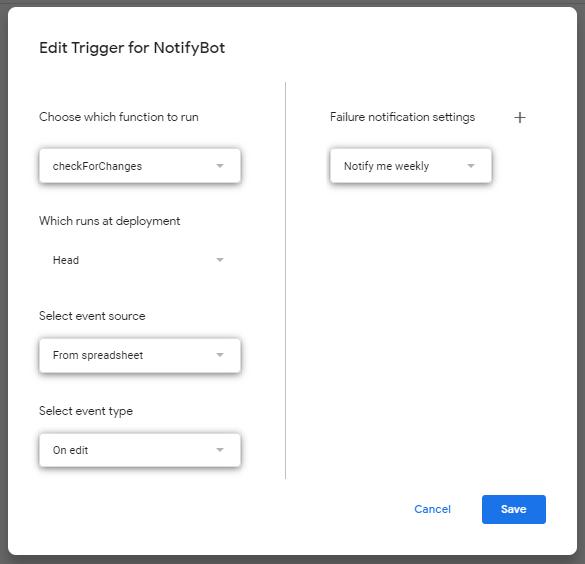
- After you added code - go to Triggers
- Create new trigger with options on image and save
- Script trying to send a message via bot to user using CHAT_ID, to get your CHAT_ID go to @userinfobot and write /start
- Change YOUR_CHAT_ID with your chat id from @userinfobot in start of script you added before in Editor
- Also change YOUR_TELEGRAM_BOT_TOKEN with token you get in bot setup
- You need to check a specific column? Change check_only_one_column to true and YOUR_COLUMN_LETTER to letter you need
- You need to check a specific row? Change check_only_one_row to true and YOUR_NUMBER to number you need (without quotation marks)
- You need to check specific cell? Do both steps 1 and 2