
A dependency manager for agentic markdown — skills, agents, and prompts for your AI tools.
Installation · Quick Start · Why melon? · How it works · Manifest Reference · Commands





Melon manages markdown-based packages that AI coding assistants read as context. It resolves dependencies from GitHub, fetches them into a local cache, and places them into your agent's expected directory (e.g. .claude/skills/) so they are available immediately.
📦 Global install
npm install -g @playsthisgame/melon🐹 Go
go install github.com/playsthisgame/melon/cmd/melon@latestRequires Git to be available on your PATH.
1. Initialize a project
melon initThis creates a melon.yaml manifest and the .melon/ cache directory. You'll be prompted for a package name, type, and which AI tools you use.
2. Add a dependency
Edit melon.yaml directly:
dependencies:
  github.com/playsthisgame/skills/agentic-spec-dev: "^1.0.0"
  github.com/anthropics/skills/skills/skill-creator: "main"
Dependency names are GitHub paths. You can use:
- A full repo:
github.com/owner/repo - A monorepo subdirectory:
github.com/owner/repo/path/to/skill - A GitHub web URL:
github.com/owner/repo/tree/main/path/to/skill(thetree/<branch>/is stripped automatically)
Versions can be a semver constraint (^1.2.0, ~2.0.0, 1.0.0) or a branch name ("main").
3. Install
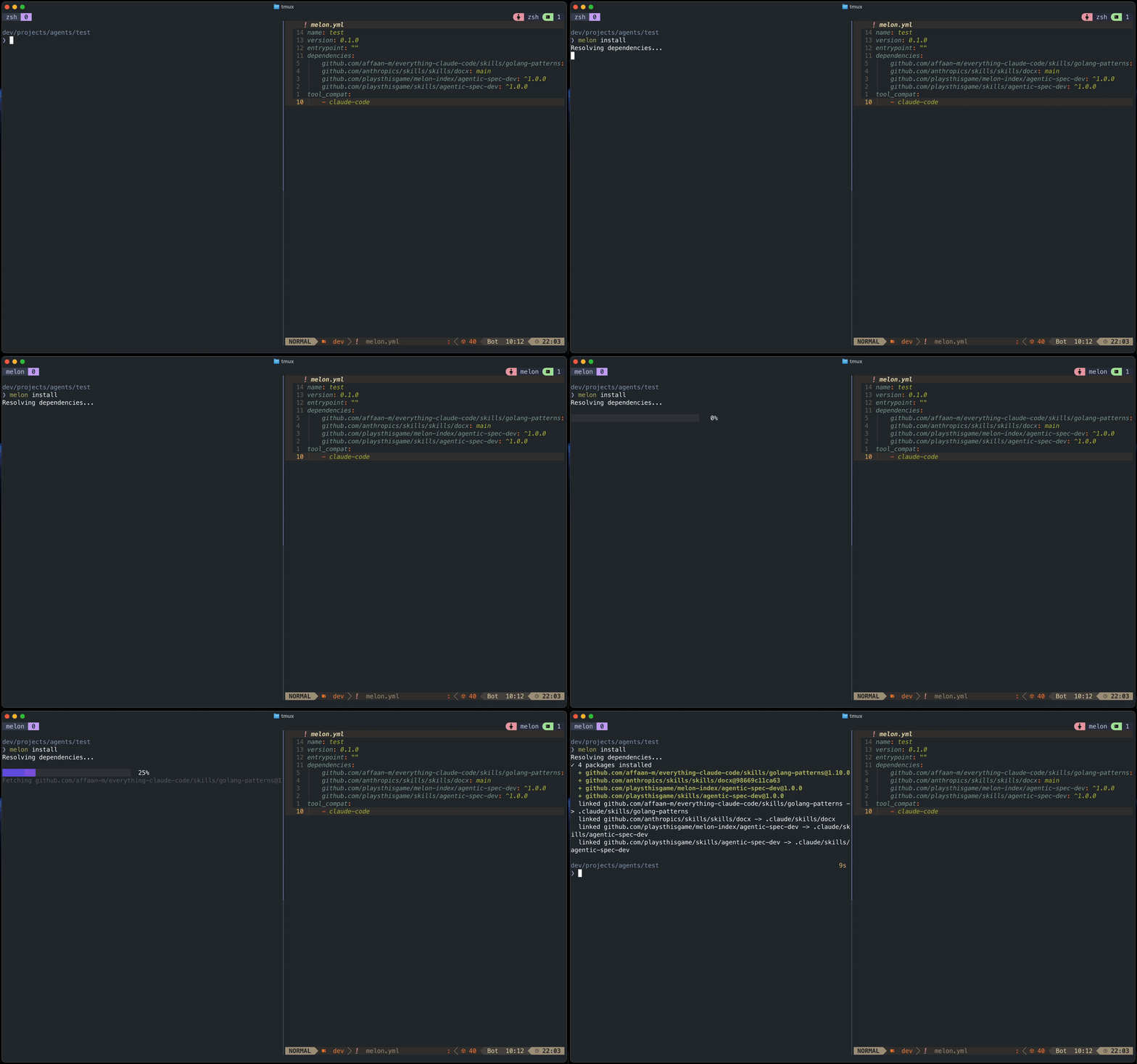
melon installMelon resolves each dependency, fetches it via sparse git checkout, writes melon.lock, and places skills into your tool directories.
  resolving github.com/playsthisgame/skills/agentic-spec-dev (^1.0.0)...
  fetching github.com/playsthisgame/skills/agentic-spec-dev@1.0.0...
  + github.com/playsthisgame/skills/agentic-spec-dev@1.0.0
  linked github.com/playsthisgame/skills/agentic-spec-dev -> .claude/playsthisgame/agentic-spec-dev
melon.yaml          — declares your dependencies and target AI tools    ← commit
melon.lock         — pins exact versions, git tags, and content hashes ← commit
.melon/            — local cache; one directory per dep@version        ← commit
.claude/skills/    — symlinks into .melon/ created by melon install      ← commit
Skills are fetched once into .melon/ and symlinked into the configured tools directories.
# melon.yaml

name: my-agent
version: 0.1.0

description: "My coding agent"

dependencies:
  github.com/anthropics/skills/skills/skill-creator: "main"
  github.com/playsthisgame/skills/agentic-spec-dev: "^1.0.0"

# tool_compat drives where melon install places skills.
# Melon knows the conventions for each agent automatically:
#   claude-code    -> .claude/skills/
#   cursor         -> .agents/skills/
#   windsurf       -> .windsurf/skills/
#   roo            -> .roo/skills/
#   ... (and more)
tool_compat:
  - claude-code

# outputs is optional. Use it to override the automatic placement paths.
# outputs:
#   .claude/skills/: "*"

tags: []| AI tool | Project skills directory |
|---|---|
claude-code |
.claude/skills/ |
cursor |
.agents/skills/ |
windsurf |
.windsurf/skills/ |
roo |
.roo/skills/ |
codex |
.agents/skills/ |
opencode |
.agents/skills/ |
gemini-cli |
.agents/skills/ |
github-copilot |
.agents/skills/ |
cline |
.agents/skills/ |
amp |
.agents/skills/ |
Scaffold a new melon.yaml and create the .melon/ store directory.
melon init
melon init --yes        # accept all defaults (for scripting)
melon init --dir ./app # initialize in a different directoryResolve dependencies, fetch them into .melon/, write melon.lock, and symlink skills into tool directories.
melon install
melon install --frozen    # fail if melon.lock would change (useful in CI)
melon install --no-place # fetch and lock only — skip placement into agent dirsAdd a dependency to melon.yaml and run install. If no version is specified, the latest semver tag is resolved automatically.
melon add github.com/playsthisgame/skills/agentic-spec-dev          # resolves latest tag → ^1.2.0
melon add github.com/playsthisgame/skills/agentic-spec-dev@^1.0.0   # explicit constraint
melon add github.com/playsthisgame/skills/agentic-spec-dev@main # branch pinRemove a dependency from melon.yaml, unlink its agent symlinks, and delete its .melon/ cache entry.
melon remove github.com/playsthisgame/skills/agentic-spec-devShow installed skills and audit installation state.
melon list                # list all installed skills
melon list --pending      # show skills in melon.yaml not yet installed
melon list --check        # verify skill symlinks exist in all tool directories
melon list --pending --check  # combine both checks
Default output:
  github.com/anthropics/skills/skills/skill-creator  main
  github.com/playsthisgame/skills/agentic-spec-dev   1.2.0
With --check:
  OK       github.com/playsthisgame/skills/agentic-spec-dev@1.2.0   .claude/skills/agentic-spec-dev
  MISSING  github.com/anthropics/skills/skills/skill-creator@main    .claude/skills/skill-creator
With --pending:
Pending (not installed):
  github.com/owner/repo/some-new-skill
Search for skills by keyword against the melon-index curated list. In a terminal, results are shown in an interactive list — navigate with ↑↓, press Enter to select, and melon will offer to run melon add for you.
melon search spec          # find spec-related skills
melon search git workflow  # find git workflow skills
Featured skills appear at the top of results. If nothing matches, melon will tell you and suggest submitting to the index.
Show metadata for a specific skill — description, author, and available versions — before installing it.
melon info github.com/playsthisgame/skills/agentic-spec-dev
melon info github.com/owner/repo/path/to/skillmelon.lock is generated by melon install and should be committed to version control. It pins the exact version, git tag, repo URL, subdirectory, and a SHA-256 tree hash for each dependency.
generated_at: "2025-03-31T12:00:00Z"
dependencies:
  - name: github.com/playsthisgame/skills/agentic-spec-dev
    version: "1.2.0"
    git_tag: v1.2.0
    repo_url: https://github.com/playsthisgame/skills/agentic-spec-dev
    subdir: ""
    entrypoint: SKILL.md
    tree_hash: "sha256:abc123..."
    files:
      - SKILL.md
Use --frozen in CI to ensure the lock file is always up to date:
melon install --frozenAs AI coding assistants become more capable, teams are building and sharing libraries of skills. Without a proper dependency manager, keeping these skills consistent across developers, environments, and CI becomes a manual, error-prone process.
Melon gives you a single source of truth. Define all the skills your project needs in one melon.yaml file, commit it alongside your code, and every developer (and your CI pipeline) gets exactly the same set of skills with a single melon install.
Skills are versioned, not just copied. Melon pins exact versions, git tags, and SHA-256 content hashes in melon.lock. If a skill author publishes a breaking change, your team won't silently pick it up, you'll see the diff in the lock file and upgrade intentionally. This means you can trust that the skill running in CI today is the same one that ran last week.
It works naturally with CI. Run melon install --frozen in your pipeline to fail fast if the lock file is out of sync with the manifest. No surprises, no drift. Because .melon/ and the generated symlinks are committed to the repo, CI doesn't even need network access to place skills, everything is already there.
Works across your whole team and all your tools. List the AI tools your project uses under tool_compat and melon places each skill into every agent's expected directory at once. One manifest, one install command, every agent ready to go.
Many agent skill collections ship a one-liner like npx install-skill <name> that copies files into your project. Melon takes a different approach:
| melon | npx installers | |
|---|---|---|
| Reproducibility | melon.lock pins exact versions and content hashes |
Each run may fetch a different version |
| Transitive deps | Resolves the full dependency graph | Usually single-package only |
| Multiple agents | tool_compat places skills for all your tools at once |
Typically one target agent |
| Offline / CI | Already-fetched deps are cached in .melon/ |
Always fetches from the network |
| Node.js required | No — pure Go binary, no runtime needed | Yes |
| Removal | melon remove unlinks symlinks and purges the cache |
Usually manual |