English | 中文
A locally running dashboard for managing Git repositories.
Given a parent directory, it automatically scans first-level subdirectories for Git repositories, and provides a unified web interface to view their status, file changes, and perform common operations.
Positioning: A multi-repository overview tool, not an IDE replacement.
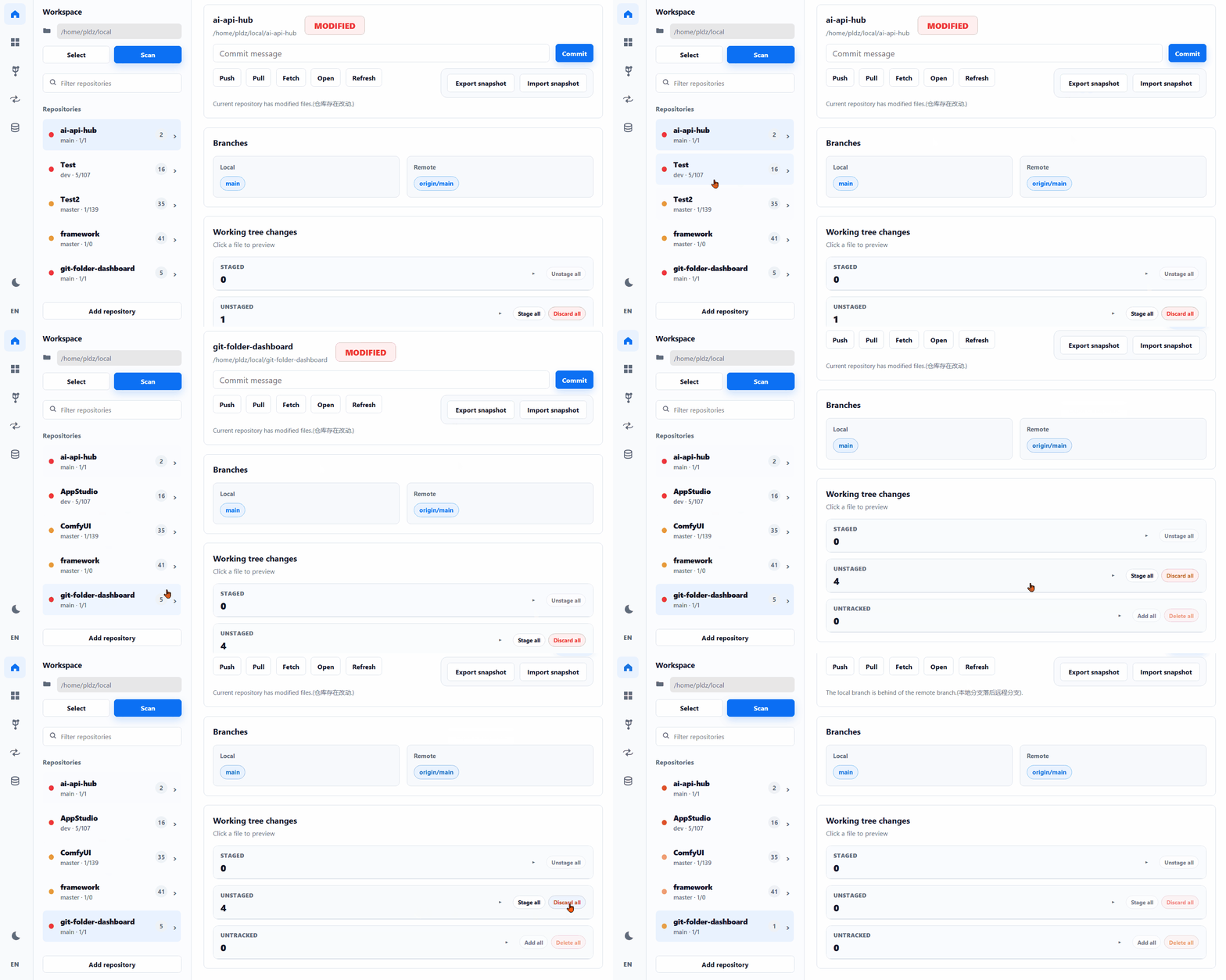
Suitable for directory structures like:
~/Code
  project-a
  project-b
  project-c
  notes
Features:
-
Scan directories and detect Git repositories
-
Display current branch and sync status (ahead / behind)
-
Show working tree changes (staged / unstaged / untracked)
-
Export the current working tree mismatch state as a snapshot zip
-
Import a snapshot zip and forcibly apply it to the current working tree
-
View file diffs or contents
-
Execute common operations:
- fetch / pull / push
- commit / checkout
-
File-level operations:
- stage / unstage
- discard changes
- delete / ignore untracked files
Runtime compatibility:
- Supports Python 3.6
- Suitable for Ubuntu 18.04 environments
- Dependency versions are pinned intentionally because newer ASGI stacks are not reliable in this Python 3.6 target
- The tested compatibility set is
Flask 2.0.3+Werkzeug 2.0.3 - Supports mounting under a subpath such as
/gitvia--base-path /git
The overall design is intentionally simple:
- Backend (Python / Flask): executes Git commands, accesses the filesystem, returns JSON
- Frontend (plain HTML / JS): renders UI, manages state, handles interactions
- In-memory store: maintains
repo_id -> pathmapping
Data flow:
Browser
  ↓
static (HTML / JS)
  ↓
Flask (app.py)
  ↓
git_service.py
  ↓
Git + filesystem
git-folder-dashboard/
  app.py
  git_service.py
  snapshot_service.py
  repo_store.py
  static/
    index.html
    style.css
    message.js
    app.js
Responsibilities:
-
app.py- Route definitions
- Parameter validation
- Calls service layer
- Returns responses
-
git_service.py- All Git operations
- Status parsing
- File operations
-
snapshot_service.py- Build working tree snapshots
- Export mismatch state as zip
- Import snapshot and overwrite files directly
-
repo_store.py- In-memory mapping:
repo_id -> path
- In-memory mapping:
-
static/- Frontend UI and interaction logic
Handles only three types of logic:
- Receive requests
- Execute Git / file operations
- Return JSON
Does NOT include:
- Template rendering
- Persistent storage
- Frontend state management
Core business logic.
run_git(repo_path, args)
Executes all Git commands in a unified way and returns structured results.
get_repo_status(repo_id, repo_path)
Returns:
- Current branch
- Branch list (local / remote)
- File changes (staged / unstaged / untracked)
- Dirty status
- Ahead / behind
- Repository state (clean / dirty / diverged, etc.)
Unified entry:
apply_file_action()
Supports:
- stage →
git add - unstage →
git restore --staged - discard →
git restore - delete → remove file
- ignore → write to
.git/info/exclude
Implements working tree snapshot export / import.
Principle:
- Does not use
git applyas the primary restore path - Exports the current working tree result, not a patch stream
- Restores by direct file overwrite / creation / deletion
Snapshot zip contents:
manifest.jsonfiles/*
Manifest records:
- relative path
- entry kind (
modified/added/deleted) - scope (
staged/unstaged/untracked) - payload file location inside the zip when content is required
Current behavior boundary:
- Restores the final working tree file state
- Supports modified / added / deleted files
- Supports nested newly created files
- Supports binary files because file contents are stored directly in the zip
- Does not attempt to recreate the exact Git index staging layout
- Does not rely on patch context matching
Maintains repository mapping:
repo_id → local path
Characteristics:
- In-memory only
- No persistence
- Requires re-scan after restart
Handles request dispatching:
request → route → service → refresh → response
Key flow:
- Get path from
repo_id - Execute Git operation
- Refresh repository state
- Return latest data
Startup notes:
- Uses Flask's synchronous local server instead of an ASGI stack
- Avoids
uvicorn,h11, andasynciocompatibility issues on Python 3.6 - Supports subpath hosting by stripping a configured URL prefix before routing
Example:
python app.py --host 0.0.0.0 --port 8765 --base-path /gitThen the app is served under:
https://example.com/git/
No framework, fully state-driven rendering.
Core state:
state = {
  repos,
  activeRepoId,
  theme,
  preview,
  ...
}
Responsibilities:
- Render repository list and details
- Manage UI state (tabs / expand / theme)
- Manage language switching (English / Chinese)
- Call APIs
- Re-render based on results
Backend returns flat paths:
a/b/c.txt
Frontend:
- Splits path
- Builds tree
- Renders nodes
Advantages:
- Keeps backend simple
- Flexible UI
Example: staging a file
Click button
  ↓
Frontend POST /files/action
  ↓
app.py route
  ↓
apply_file_action()
  ↓
git add
  ↓
refresh_repo()
  ↓
get_repo_status()
  ↓
Return result
  ↓
Frontend re-render
Configured via command-line arguments. No .env required.
Common commands:
| Scenario | Command |
|---|---|
| Start with defaults | python app.py |
| Custom host / port / default path | python app.py --host 127.0.0.1 --port 8080 --default-path ~/Code --no-browser=true |
| Mount under a subpath | python app.py --host 0.0.0.0 --port 8765 --base-path /git |
Arguments:
| Argument | Description | Default |
|---|---|---|
--host |
Bind address | 127.0.0.1 |
--port |
Port | 8765 |
--default-path |
Default workspace path | "" |
--base-path |
URL prefix for subpath hosting, such as /git |
"" |
--no-browser |
Disable auto browser open, supports true/false |
false |
Aliases:
| Alias | Equivalent |
|---|---|
--defaut-path |
--default-path |
--no-brower |
--no-browser |
Default URL:
http://127.0.0.1:8765
pip install -r requirements.txt
pyinstaller --onefile --name git-folder-dashboard --add-data "static:static" app.py
Windows:
pip install -r requirements.txt
pyinstaller --onefile --name git-folder-dashboard --add-data "static;static" app.py
Output:
dist/git-folder-dashboardExample:
./dist/git-folder-dashboard --host 127.0.0.1 --port 8080 --default-path ~/Code --base-path /git --no-browser=trueGET /api/config
POST /api/select-folderPOST /api/scan
POST /api/repos/{id}/refreshPOST /api/repos/{id}/fetchPOST /api/repos/{id}/pullPOST /api/repos/{id}/pushPOST /api/repos/{id}/commitPOST /api/repos/{id}/checkoutPOST /api/repos/{id}/discard
POST /api/repos/{id}/files/previewPOST /api/repos/{id}/files/actionPOST /api/repos/{id}/files/bulk-action
Browser request
  → app.py route
    → require_repo()
    → git_service.*()
    → refresh_repo()
      → get_repo_status()
    → return JSON
Responsibilities:
app.py: routing & orchestrationgit_service.py: executionget_repo_status(): view data generation
POST /api/scan
  → app.py.scan()
    → repo_store.clear()
    → repo_store.add()
    → get_repo_status()
    → repo_store.update()
Output:
- Repository list
- Non-Git directories
POST /files/action
  → app.py.file_action()
    → apply_file_action()
      → stage_file()
      → unstage_file()
      → discard_file()
      → ...
    → refresh_repo()
      → get_repo_status()
Key points:
- All file operations go through
apply_file_action() - State is always refreshed afterward
POST /files/preview
  → app.py.file_preview()
    → preview_repo_file()
      → git diff
      → git diff --cached
      → read file
Behavior:
- staged →
git diff --cached - unstaged →
git diff - untracked → read file directly
POST /repos/{id}/push
  → app.py.repo_action()
    → run_git(["push"])
    → refresh_repo()
Others follow the same pattern:
fetch / pull / checkout / commit
  → git_service
  → refresh_repo()
scan()
previewFile()
runRepoAction()
runFileAction()
  → requestJson()
    → call backend API
  → update state
  → render()
Render breakdown:
render()
  → renderTabs()
  → renderSidebar()
  → renderRepoDetail()
  → renderNonGit()
Click "Stage file"
  → runFileAction()
  → POST /files/action
  → apply_file_action()
  → git add
  → refresh_repo()
  → get_repo_status()
  → return state
  → render()
require_repo()
refresh_repo()
API routes
run_git()
get_repo_status()
commit_repo()
checkout_repo()
discard_repo_changes()
apply_file_action()
apply_bulk_file_action()

stage_file()
unstage_file()
discard_file()
delete_untracked_file()
ignore_untracked_file()
parse_porcelain_line()
normalize_status()
build_file_entry()
app.py → orchestration
git_service.py → execution
get_repo_status() → data generation
frontend → rendering
cleandirtyaheadbehinddivergedno_remoteerror
- Only scans first-level subdirectories
- No persistence
- Commit uses
git add . - No permission control (local use only)
- Entry:
app.py - Core:
git_service.py - Mapping:
repo_store.py - Frontend:
static/app.js