Another fix to the packing workflow#98
Conversation


| Remove-Item -Recurse ~\.nuget\packages\Plotly.NET.Interactive* -Force | ||
| Remove-Item -Recurse ~\.nuget\packages\Plotly.NET* -Force | ||
| # Clean up the previously-cached NuGet packages. | ||
| # Lower-case is intentional (that's how nuget stores those packages). |
There was a problem hiding this comment.
Oh btw, that's a fix of my own mistake. It does not clean well because the packages are stored by nuget in lower-case, which makes a different for pwsh, apparently

|
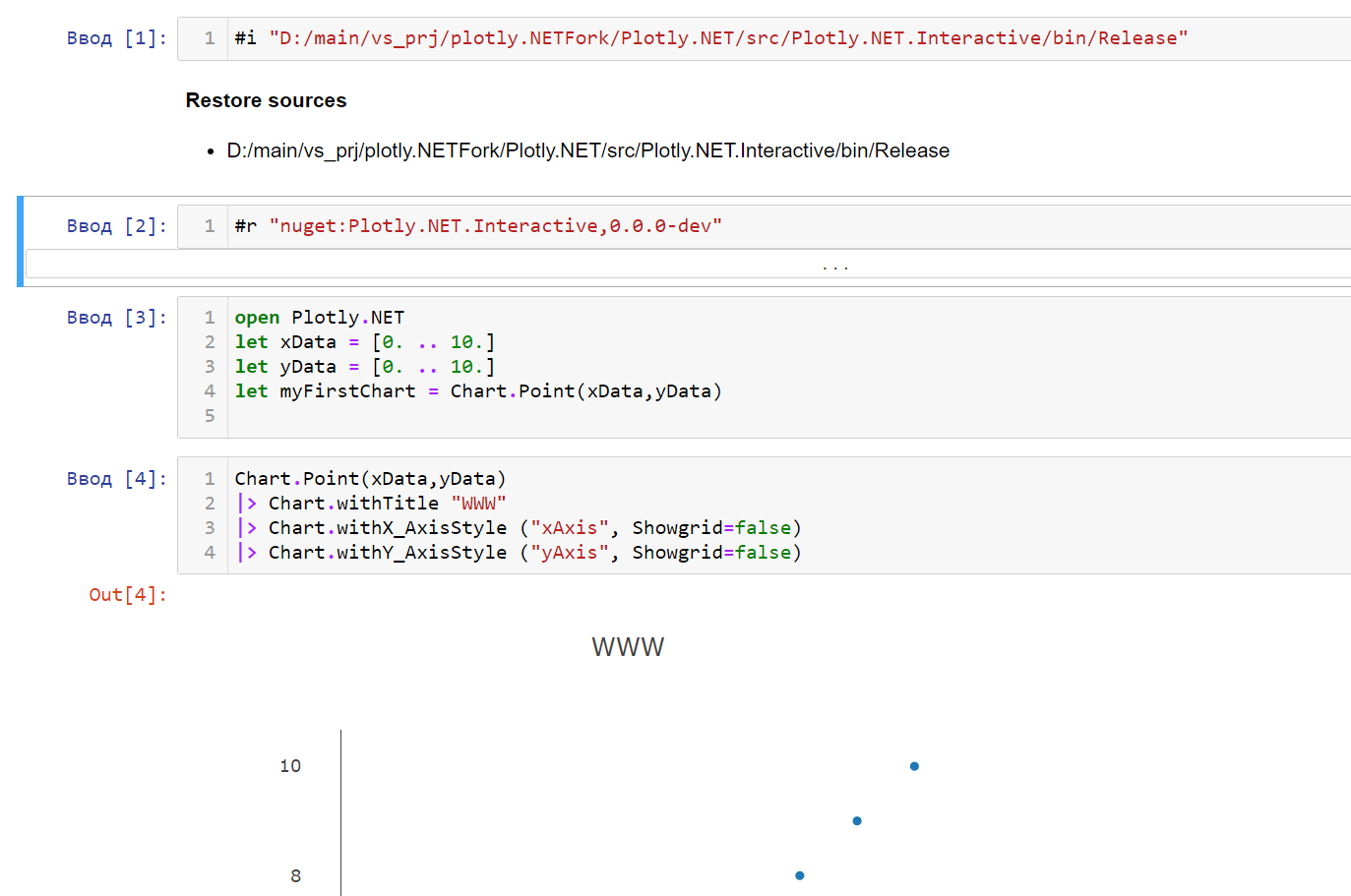
Also I made a ipynb file for local testing, which looks like this: If you want, I will include it in this or next PR too (so that other devs could just open it for local testing (although obviously I will change the |

|
Ah i see now, we might have to revert the changes to the .fsproj file, i have a look. This project gets built using this FAKE build script here: Line 179 in ab52433 Building using FAKE is a little more "fsharpy" and uses less MSBuild stuff inside the The reason for including the dlls from this path: Line 124 in ab52433 So it makes absolutely sense that the binaries are now not correctly copied anymore. It does not work for you because you only build via dotnet cli commands, which basically does everything we do in our buildchain but does not copy the binary files to the correct location. there is also a test notebook which should work locally: |
|
Alright, now I see it, but if you anyway build it with FAKE, why do you have to have that ItemGroup in the fsproj file? Does it even affect your build workflow? Also now mine copies them too, not sure what you mean (that's what |
You mean this one? <ItemGroup>
<Compile Remove="bin\**" />
<EmbeddedResource Remove="bin\**" />
<None Remove="bin\**" />
</ItemGroup>I'm not sure about that one, thats been there since the beginning and since it worked i did not think about it till now :D @WalternativE is there a specific reason why those binaries are removed from the package? |
|
@kMutagene I noticed that this <None Include="..\..\bin\Plotly.NET.Interactive\net5.0\Plotly.NET.Interactive.dll" Pack="true" PackagePath="interactive-extensions/dotnet" />works with the fake script (i. e. packs the dll into that folder), <None Include="$(OutputPath)/Plotly.NET.Interactive.dll" Pack="true" PackagePath="interactive-extensions/dotnet" />Does not. It would work in MSBuild, but I guess we can try to fix it in that script too. Or I can just abandon it and leave it as it is. Btw, we can discuss things in the chat we have. |

| <None Include="Repack.ps1" /> | ||
| <None Include="..\..\docs\img\logo.png" Pack="true" PackagePath="\" /> | ||
| <None Include="..\..\bin\Plotly.NET.Interactive\net5.0\Plotly.NET.Interactive.dll" Pack="true" PackagePath="interactive-extensions/dotnet" /> | ||
| <None Include="$(OutputPath)/Plotly.NET.Interactive.dll" Pack="true" PackagePath="interactive-extensions/dotnet" /> |

There was a problem hiding this comment.
this one needs to stay for the current build chain to work
Repack: getting back to the caller folder
The path in the fsproj reverted
Jupyter checkpoints added to git ignore
|
@kMutagene so the main fix now is that I made it lower-case. Btw, if you're gonna merge it, you may want to squash it to keep a clean history (but of course it's up to you) |

To be honest: because the template said so ^^ Could very well be, that this is not needed anymore. Have you tested if it still works if you remove it? |
|
It should work fine. I will double check tomorrow. I can add it to the current PR or fix it in the next one - up to the maintainers. Btw, if we remove that item group, it will be correctly packed from dotnet CLI |
|
As far as I just tested, everything works without the item group, @WalternativE . Please let me know if I should add it to this PR |

3 participants


In fact... my question is: how did it even work before?
What I did is I removed the item group which removed all binaries even from packing. I'm genuinely curious how you packed before - maybe I'm missing something? I tried packing in all possible ways, and it never included the dll into interactive-extensions/dotnet folder. It makes sense, because
<None Remove="bin\**">removes them as far as I understand 😅 .@kMutagene please, see