I've done quite a lot of searching and can't seem to find an answer to this specific problem I've encountered. I would greatly appreciate any insight!
Before I get into it, let me note that I am using unique, non-index-based key attributes in conjunction with shouldComponentUpdate.
My Particular Use Case
I am building a grid component for my employer that requires "pagination". Basically, I have a set of data that must be rendered as a grid, but it must be configurable such that only a certain number of "pages" are rendered at one time. As the user navigates through the grid (using arrow keys), new grid cells will be rendered on one side and removed (not rendered) from the other. More specifically, as the user moves toward the end of the grid, new "pages" will be rendered at the end and the same number of "pages" will be removed from the beginning. The opposite occurs when moving toward the beginning. This ensures that the number of rendered "pages" is always the same.
The Problem
This is somewhat similar to #338 I believe, but what I've found is that when adding a page to the end (which also removes a page from the beginning) the entire set of divs (cells) flash with chrome's purple highlight color. What's interesting is this does not happen when going the opposite way, i.e. when adding a page to the beginning (which removes a page from the end), only the first few divs flash as expected. What's also interesting is that shouldComponentUpdate is doing its job properly and apparently only rendering the cells that absolutely must be rendered.
A short, non-confidential example
Expected Behavior Example
A coworker spun up a simple example to illustrate the problem. First, here's what we'd expect. This is with adding 1 element to one side and removing 1 element from the other:
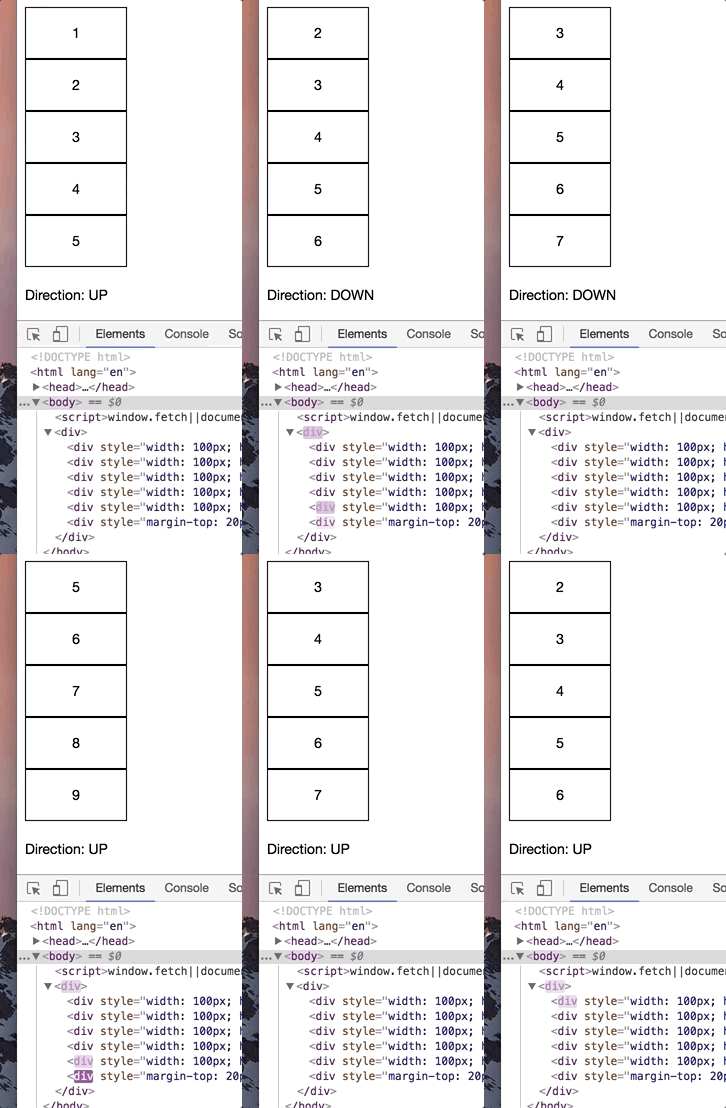
Here is the code for this example:
import './style';
import { Component } from 'preact';


export default class App extends Component {
    constructor() {
        super();

        this.state = {
            data: [1, 2, 3, 4, 5],
            direction: 1
        };

        document.onkeydown = (e) => {
            e = e || window.event;

            switch (e.keyCode) {
                case 38: // up
                    this.setState({
                        direction: -1
                    });
                    break;
                case 40: // down
                    this.setState({
                        direction: 1
                    });
                    break;
            }
        };

        setInterval(() => {
            let newData = [...this.state.data];

            if (this.state.direction === 1) {
                newData.shift();
                newData.push(newData[newData.length - 1] + 1);
                // let lastElem = this.state.data[this.state.data.length - 1];
                // const sliced = this.state.data.slice(2);
                // sliced.push(++lastElem);
                // sliced.push(++lastElem);
                // newData = sliced;
            } else {
                let numToInsert = newData[0] - 1;

                if (numToInsert > 0) {
                    newData.pop(); // remove from tail
                    newData.unshift(numToInsert); // insert at head
                    // const sliced = this.state.data.slice(0, this.state.data.length - 2);
                    // sliced.unshift(numToInsert--);
                    // sliced.unshift(numToInsert);
                    // newData = sliced;
                }
            }

            this.setState({
                data: newData
            });
        }, 2000);
    }


    render() {
        const styles = {
            width: '100px',
            height: '50px',
            border: '1px solid #000',
            textAlign: 'center',
            lineHeight: '50px'
        };

        const BoxArray = this.state.data.map(obj => {
            return <div style={styles} key={obj}>{obj}</div>;
        });

        const directionStr = (this.state.direction === -1) ? 'UP' : 'DOWN';

        return (
            <div>
		{BoxArray}

                <div style="margin-top:20px">
                    Direction: {directionStr}
                </div>
            </div>
        );
    }
}
Real Use Case Behavior
And here is the same example, but with removing 2 elements from one side and adding 2 to the other. This is the behavior I'm seeing in my real use case:
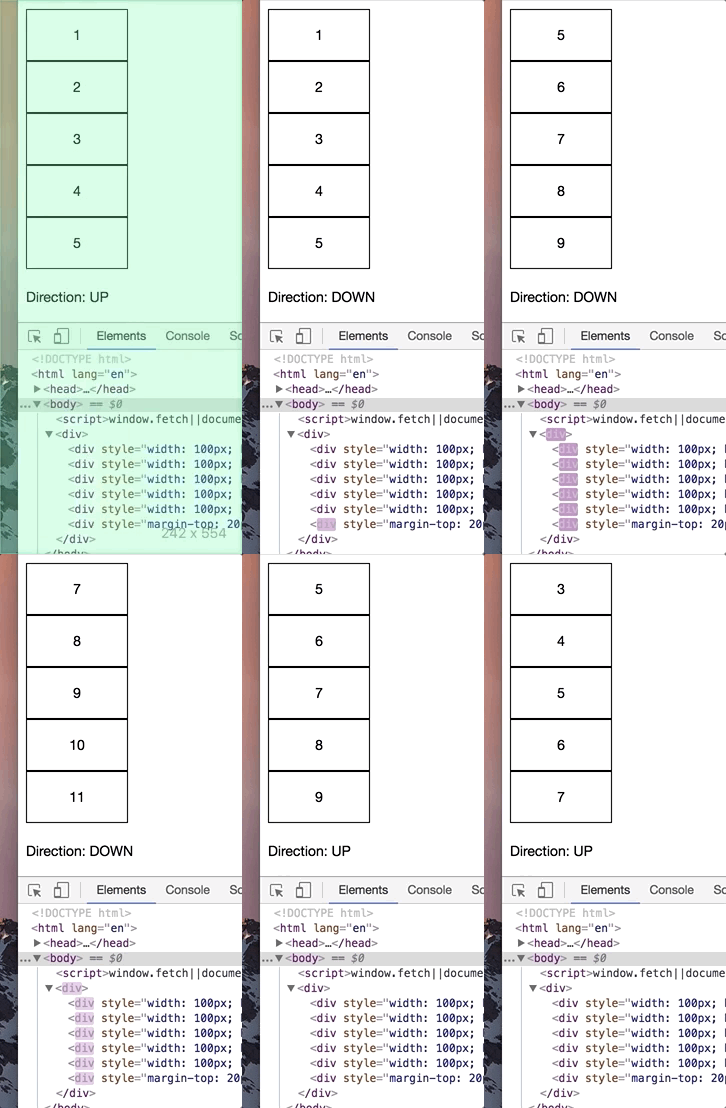
Here is the modified code for this example:
import './style';
import { Component } from 'preact';


export default class App extends Component {
    constructor() {
        super();

        this.state = {
            data: [1, 2, 3, 4, 5],
            direction: 1
        };

        document.onkeydown = (e) => {
            e = e || window.event;

            switch (e.keyCode) {
                case 38: // up
                    this.setState({
                        direction: -1
                    });
                    break;
                case 40: // down
                    this.setState({
                        direction: 1
                    });
                    break;
            }
        };

        setInterval(() => {
            let newData = [...this.state.data];
            // let newData;

            if (this.state.direction === 1) {
                // newData.shift();
                // newData.push(newData[newData.length - 1] + 1);
                let lastElem = this.state.data[this.state.data.length - 1];
                const sliced = this.state.data.slice(2);
                sliced.push(++lastElem);
                sliced.push(++lastElem);
                newData = sliced;
            } else {
                let numToInsert = newData[0] - 1;

                if (numToInsert > 1) {
                    // newData.pop(); // remove from tail
                    // newData.unshift(numToInsert); // insert at head
                    const sliced = this.state.data.slice(0, this.state.data.length - 2);
                    sliced.unshift(numToInsert--);
                    sliced.unshift(numToInsert);
                    newData = sliced;
                }
            }

            this.setState({
                data: newData
            });
        }, 2000);
    }


    render() {
        const styles = {
            width: '100px',
            height: '50px',
            border: '1px solid #000',
            textAlign: 'center',
            lineHeight: '50px'
        };

        const BoxArray = this.state.data.map(obj => {
            return <div style={styles} key={obj}>{obj}</div>;
        });

        const directionStr = (this.state.direction === -1) ? 'UP' : 'DOWN';

	return (
            <div>
                {BoxArray}

                <div style="margin-top:20px">
                    Direction: {directionStr}
                </div>
	    </div>
	);
    }
}
Why would adding/removing more than one element cause a re-render/reorder and only when adding to the end and removing from the beginning? My coworker and I are quite stumped at this point. I'd be happy to answer any questions if this explanation is not clear in any way. Thank you in advance!

I've done quite a lot of searching and can't seem to find an answer to this specific problem I've encountered. I would greatly appreciate any insight!
Before I get into it, let me note that I am using unique, non-index-based
keyattributes in conjunction withshouldComponentUpdate.My Particular Use Case
I am building a grid component for my employer that requires "pagination". Basically, I have a set of data that must be rendered as a grid, but it must be configurable such that only a certain number of "pages" are rendered at one time. As the user navigates through the grid (using arrow keys), new grid cells will be rendered on one side and removed (not rendered) from the other. More specifically, as the user moves toward the end of the grid, new "pages" will be rendered at the end and the same number of "pages" will be removed from the beginning. The opposite occurs when moving toward the beginning. This ensures that the number of rendered "pages" is always the same.
The Problem
This is somewhat similar to #338 I believe, but what I've found is that when adding a page to the end (which also removes a page from the beginning) the entire set of
divs (cells) flash with chrome's purple highlight color. What's interesting is this does not happen when going the opposite way, i.e. when adding a page to the beginning (which removes a page from the end), only the first fewdivs flash as expected. What's also interesting is thatshouldComponentUpdateis doing its job properly and apparently only rendering the cells that absolutely must be rendered.A short, non-confidential example
Expected Behavior Example
A coworker spun up a simple example to illustrate the problem. First, here's what we'd expect. This is with adding 1 element to one side and removing 1 element from the other:

Here is the code for this example:
Real Use Case Behavior
And here is the same example, but with removing 2 elements from one side and adding 2 to the other. This is the behavior I'm seeing in my real use case:

Here is the modified code for this example:
Why would adding/removing more than one element cause a re-render/reorder and only when adding to the end and removing from the beginning? My coworker and I are quite stumped at this point. I'd be happy to answer any questions if this explanation is not clear in any way. Thank you in advance!