
Replies: 13 comments 36 replies

|
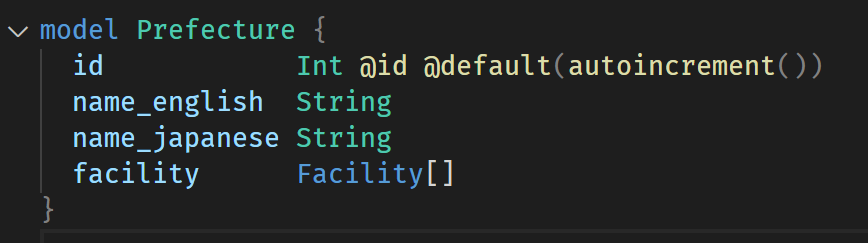
Okay, so the error magically went away the next day (today, at the time of writing this). I didn't change anything in the mean time. What gives? But now the problem is elsewhere. The So for example, I've put this in the schema: And yet: I must be missing something. It seems as if Prisma is not able to import types from the schema. It's stuck on whatever the project was initialised with. Update: But, "migrating" and seeding does somehow manage to work. Making a mistake (again, I have no way to know what a mistake is if the types are completely missing) does throw an error in the CLI. So it knows about types, but doesn't expose them to typescript or something. So I basically have to guess at the types that Prisma should expose, but doesn't, and mentally ignore the potentially tonnes of errors in my project. Doesn't feel right, does it? Suggestion: about about making schema files just plain typescript? Typescript has more than adequate facilities to transform an interface (which would be a table/model) to its CRUD functions and other supporting types. For instance, styled-components does similar typescript magic - transforming the type of one thing into several supporting types to work with that thing. |


|
You need to generate the prisma client using I find that it helps when you cmd+click into |

|

|
VSCode can't make up types from a schema file. Prisma generates types based on your schema, then VSCode reads them. They are typically stored in node_modules (depending on what package manager you use, usually in You can set the output to some folder within your project and commit the output to your source control if you wish to. However, I prefer not to commit those and just Also, a prisma schema can't be a typscript file (check the generated types to know the amount of work needed), a schema will also generate JS files not just typescript. |
|
And for VSCode, I think it doesn't quickly pickup the new types due to performance. VSCode can't just keep scanning all the time or your computer will choke. Sometimes you need to help VSCode parse again those types by Another way is to |
|
If schema files were typescript, then javascript files (or rather, typescript files that aren't type declaration files) could still be generated. The amount of types is the perfect reason to use typescript, not an excuse to generate it after the fact. It would also solve the problem of how one would derive I would much rather see a No sorry mate, but typescript is absolutely perfect for this. |
|
Thany, how would you define relations? How would you define extensions in the schema file? How would you add extensions to fields? How would you differentiate between a model and an embedded document? How would you define the database type? Please understand well Prisma before making such comments. The team is making great work and you'll need to understand fully how Prisma works before making such suggestions. Otherwise, just use other node libraries, there are many of them. |

|
Hi there, To keep our discussions organized and focused on the most relevant topics, we’re reviewing and tidying up our backlog. As part of this process, we’re closing discussions that have already been marked as answered but remain open. If this discussion still requires further input or clarification, feel free to reopen it or start a new one with updated details. Your contributions are invaluable to the community, and we’re here to help! For more details about our priorities and vision for the future of Prisma ORM, check out our latest blog post: https://www.prisma.io/blog/prisma-orm-manifesto. Thank you for your understanding and ongoing support of the Prisma community! |
|
Go ahead and close it, but it was not actually answered. Just some talking down on me. This was just some experimentation for me, and so the project is no longer active. I might use it again some day. |

|
Crazy how I'm having this problem years later, but seeing how this interaction went, I best go off and figure it myself. |

|
Same Problem! |

|
I had a similar problem and it was resolved by rm -rf node_modules |

|
Thanks for the help, it worked. |

|
that works out |

|
This really helped after hours of searching. Thanks |

I use Prisma version 7 and import Prisma generated client from I tried this sequence of commands, and still had the same error. The error disappeared after I also removed
|

|
Personally, neither option suited me. I found a solution by upgrading to the prisma v6.0.0 version. |

|
I had the same problem after I make "npx prisma generate" but you can directly insert the url of PrismaClient folder instead of using "@prisma/client" you can use something "../generated/prisma" like this based on the generated PrismaClient folder |

|
This really helped |

|
This is not a recommended approach right? |

|
Nice! |

|
This cause many errors after running "npm run build" for me. Then I revert it back to "import {PrismaClient} from "@/generated/prisma";". And finally "npm run build" worken without any error. PS: I saw "@/generated/prisma" import is currently recommended way in time I have searched for solution. |

|
I have faced the same problem. when i commented the output path in schema.prisma file , it generated the output inside the node module and error gone. |

|
be aware that in Prisma 7 specifying output will be required: https://www.prisma.io/docs/orm/prisma-client/setup-and-configuration/generating-prisma-client |

|
Thank you. I will keep this in mind. |

|
Facing similar problems just make the changes in schema file generator client { |

|
this way works fine for me, thanks a lot bro |

|
i was facing same issue ->Module '"@prisma/client"' has no exported member 'PrismaClient' import { PrismaClient } from '@prisma/client'; but my compiler was throwing error Module '"@prisma/client"' has no exported member 'PrismaClient'. so in my case my schema.prisma, I had this generator block: -> so either you have to delete this output = "../generated/prisma" -> this output part or either you have to |

|
that worked for me and exactly the problem was just wrong path importing like if you are using different output path in schema file than your index (the file where you are exporting it) -- it will give you error Hence it's just about importing correct path relatively! Thanks so much! |

|
1. Make sure that prisma is installed 2. Add the generator definition in schema.prisma file 3. Then install @prisma/client 4. Then run the following command 5. Then instantiate prisma client This is the best way according to documentation. |

|
Thanks a lot, you are a saviour. I still don't get it, why some code does import @prisma/client and that works, even I had done that in some of my projects and that worked fine, very strange. Anyway thanks man |

|
Thanks bro |

|
Thanks buddy!! This worked. |

|
Thanks, bro! But in my case "output" prop is not nessesary. If you don't specify this property, it will create the client at '@prisma/client', not in a separate folder in the root. |

|
Thanks bro |

|
I opened my schema.prisma file. I removed the output line inside the generator client block. Previous example: I updated the provider value to prisma-client-js. Final version: Then I ran the following command: ` ` Pressed Ctrl + Shift + P Selected Restart TS Server 🎯 Result After these steps, the error was completely resolved. Hope this helps someone facing the same issue 👍 |
|
That means: ❌ You can no longer just call new PrismaClient() without configuration. Step 1: Install the Prisma 7 Postgres Adapter 🔌I opened the terminal and installed the required packages: These packages allow Prisma to connect to Postgres using the new adapter system. Step 2: Import the Adapter and Configure Prisma ⚙️To use the adapter, I imported it in the file where I create the Prisma client (for example, lib/prisma.ts): Then I created a Postgres connection pool and passed the adapter to Prisma: The key point here is this: Step 3: Restart and Test 🚀I saved the file. Then I restarted the development server:
Once the server was running again, I went back to Thunder Client and resent the POST request. This time Prisma will:
|

|
This is not for not being supported by VsCode, i even tried by using Cursor |
|
if you want to configure your shema.prisma with Default output, it should be like this: then use like this: otherwise if you want to configurate with custom, your client configuration should be like this: then use like this: I used the default output for the nestjs app(recommended) prisma.service.ts shema.prisma |


 and others
Uh oh!
There was an error while loading. Please reload this page.
Uh oh!
There was an error while loading. Please reload this page.
Bug description
I'm getting this error in VScode after following this example's getting started steps, in the provided
seed.tsfile.Other imports work just fine.
I have never used Prisma before. I'm just following the steps listed.
This problem popped up after the step
npm i, which tells me either the example is set up wrong, or something specific on my computer is bollocksing up something. No idea. I assume these examples have been tested at some point, so I guess it must be something on my end. Otoh, I have never had this problem with typescript packages if they properly export their things.How to reproduce
Literally follow this:
https://github.com/prisma/prisma-examples/tree/latest/typescript/rest-nextjs-api-routes-auth
Expected behavior
No errors.
Prisma information
I really don't think it's relevant what the schema is. If it is, please have a look at the linked example 😉
Environment & setup
Prisma Version
All reactions