Skip to content

Conversation

@sixhat
Copy link
Contributor

@sixhat sixhat commented May 25, 2017

This deals with issue #1878 where users need to set pngs with transparency as textures. Until now the hack would be to call fill with a non-opaque color before calling texture or to manually enable the gl.BLEND mode with

gl = this._renderer.GL;
gl.enable(gl.BLEND);
gl.blendFunc(gl.SRC_ALPHA, gl.ONE_MINUS_SRC_ALPHA);

This solution activates gl.Blend when a texture call is made.

@sixhat
Copy link
Contributor Author

sixhat commented Jun 7, 2017

The latest commit 2475b16 also adds line to the webgl primitives as explained in #1638

@sixhat sixhat changed the title Set gl.BLEND in texture to allow transparent pngs to be used as textures Set gl.BLEND in texture to allow transparent pngs && added line to webgl primitives Jun 7, 2017
@stalgiag stalgiag merged commit 8fdd36a into processing:master Jun 20, 2017
@l3ehfar
Copy link

l3ehfar commented Jun 5, 2020

gl = this._renderer.GL;
gl.enable(gl.BLEND);
gl.blendFunc(gl.SRC_ALPHA, gl.ONE_MINUS_SRC_ALPHA);

hi i can't figure out where should i put this? would you give me an example with code? should I put it in my setup function?

@stalgiag
Copy link
Contributor

stalgiag commented Jun 5, 2020

This isn't necessary anymore. Transparent pngs work out of the box now. Here is an example.

@birkb85
Copy link

birkb85 commented Oct 9, 2020

This isn't necessary anymore. Transparent pngs work out of the box now. Here is an example.

Hi.

I tested out the example and found that it does not behave as I expected..

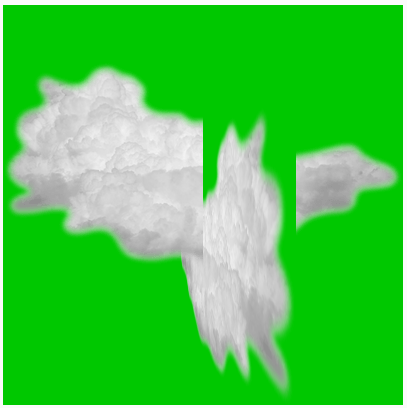
If I modify the code to display two clouds, one rotating and the other one staying still.
The transparency only applies for the cloud to be transparent with the background, not the other cloud.
Sorry if my sentence above does not make enough sense, please try out this code:

let tex;

function preload() {
  tex = loadImage('cloud.png');
}

function setup() {
  createCanvas(400, 400, WEBGL);
  noStroke();
}

function draw() {
  background(0,200,0);
  
  push();
  texture(tex);
  rotateY(frameCount * 0.02);
  rect(-width/2, -height/2 + 40, 400, 400);
  pop();
  
  push();
  texture(tex);
  rect(-width/2, -height/2 - 40, 400, 400);
  pop();
}

Is this the intended behavior?
Then the transparency is really not much use, or what??

I have also attached an image demonstrating the problem.
See that the transparence does not apply between the two clouds, it only works for the background.
Screenshot 2020-10-09 110828

EDIT:

Ahh.. Sorry, now I get it!
The transparency depends on the order the objects are drawn! :D
So I need to draw the objects further away first, and the objects that are closest last.
As in my own example I see that the cloud that is drawn last (the still one) is transparent with the cloud that is drawn first (the rotating one)..

Sign up for free to join this conversation on GitHub. Already have an account? Sign in to comment

Labels

None yet

Projects

None yet

Development

Successfully merging this pull request may close these issues.

4 participants