Terminal Dashboard
cronstable tui is the web dashboard's terminal
sibling: the same board, keyboard-first, rendered in your terminal — an
SSH session, a tmux pane, a serial console, a box where a browser is one
window too many. It is a client of the same
HTTP Control API the web page uses, so there is nothing
extra to enable on the daemon: if the dashboard works, so does the TUI.
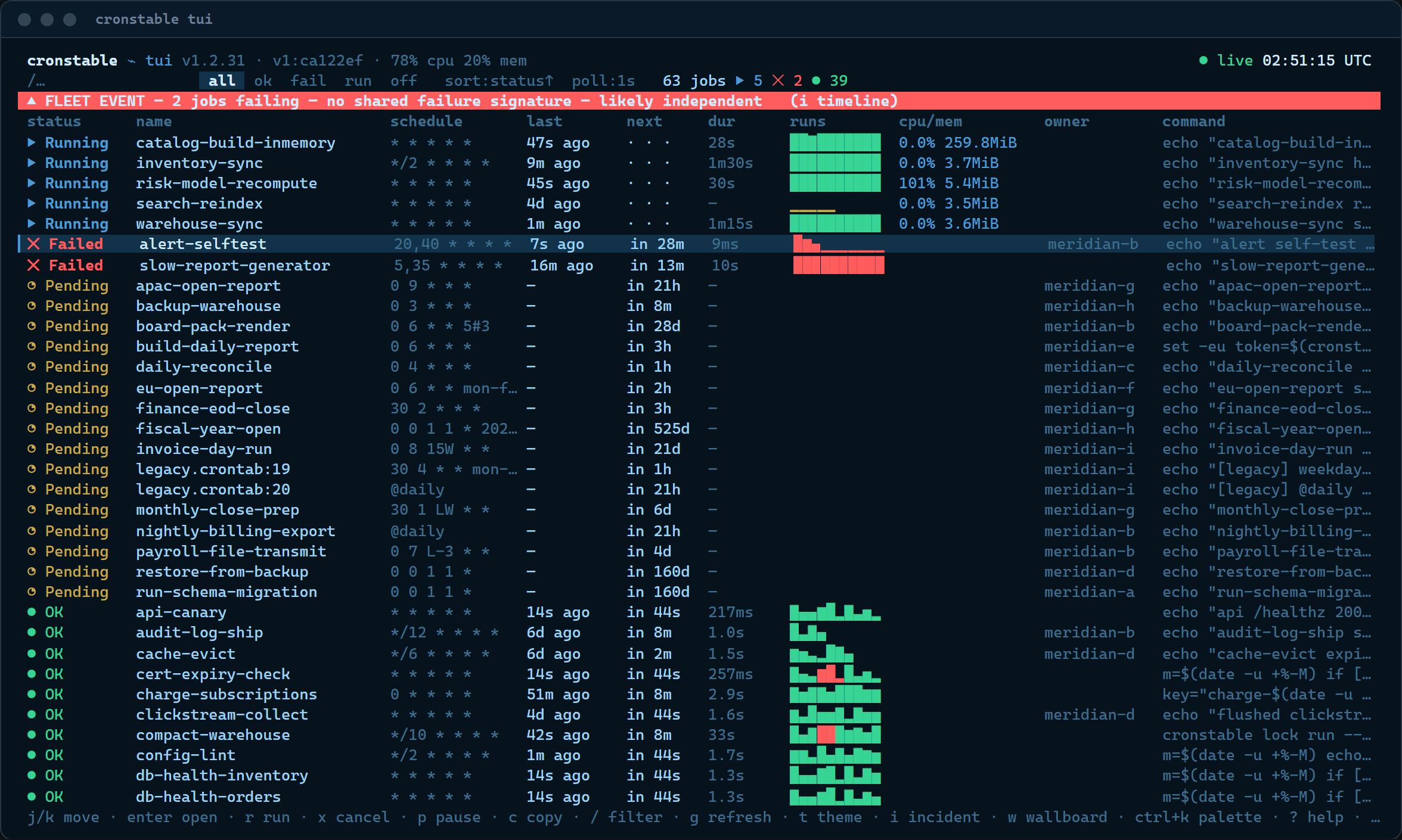
(This screenshot — like the larger gallery in the README's Terminal dashboard section — is the real TUI driven against the running grand tour fleet, the same one the web dashboard's screenshots use.)
cronstable tui                              # local daemon on :8080
cronstable tui --url http://prod-node:8080  # a remote daemon
cronstable tui --tv                         # straight to the wallboard
cronstable tui --job nightly-backup         # deep-link a job's drawer
It is hand-rolled on the standard library plus the core aiohttp
dependency (the same zero-new-dependency rule as the
MCP server), works on Linux, macOS and Windows, and ships in the
same package and binaries as the daemon. It does need a real terminal:
if stdin or stdout is not a tty (a pipe, a redirect, a CI runner), it
refuses to start, printing cronstable tui needs an interactive terminal (stdin/stdout are not a tty) to stderr and exiting with
code 2. On Windows it turns on the console's ANSI/VT processing
itself, so a stock Command Prompt or PowerShell window works; for
fonts missing the status glyphs there is --ascii.
| Flag | Meaning |
|---|---|
--url URL |
Daemon web listener (default http://127.0.0.1:8080). |
--token TOKEN |
Bearer token for web.authToken-protected daemons. |
--token-env VAR |
Env var to read the token from when --token is absent (default CRONSTABLE_WEB_TOKEN). |
--theme NAME |
Start on a theme (carolina, amber, green, modern, standard, each also as NAME-light); persisted. |
--tv |
Start on the wallboard, like opening the page at #tv. |
--job NAME |
Open a job's drawer at startup, like #job/NAME. |
--poll SECONDS |
Refresh interval; 0 pauses (default: remembered, else 3). |
--boot / --no-boot
|
Force or skip the boot self-test. |
--ascii |
Plain-ASCII status glyphs for limited fonts/terminals. |
The web page's shortcut table applies verbatim — the two frontends share
one muscle memory. Press ? at any time for the overlay.
| Key | Action |
|---|---|
Ctrl-K / Ctrl-P
|
Open the command palette |
/ |
Focus the filter |
j / ↓, k / ↑
|
Select the next / previous job |
Enter |
Open the selected job |
r / x
|
Run / cancel the selected job |
c |
Copy the selected job's command |
g |
Refresh now |
t / T
|
Cycle theme / flip phosphor ↔ paper |
i |
Incident timeline |
w |
Wallboard (TV) mode |
a |
Acknowledge the failure alarm |
? |
The shortcut overlay |
Esc |
Close the open panel or drawer |
Terminal-only extras (grouped separately in the ? overlay): q quits,
s/S cycle the sort key/direction, f cycles the status filter,
m opens the multi-tail console, ←/→ (or Tab) switch drawer
tabs, PgUp/PgDn scroll, and inside the Logs tab f/t/w toggle
follow/timestamps/wrap, / searches with n/N for next/previous
match, and d saves the log to your home directory as
cronstable-<job>-<YYYYmmdd-HHMMSS>.log (a toast confirms the exact
path).
Everything an operator drives from the web page:
- the jobs board — status glyphs, next-fire countdowns, last-run ages, duration sparklines, live CPU/memory chips for monitored jobs, the owner column under a spread cluster, filtering, sorting, and the status segments;
- the job drawer — the live SSE log tail (ANSI colors re-inked per theme, search, follow, wrap, timestamps, save-to-file), run history with success rate and per-run bars, resources for monitored jobs, and the schedule tab, whose plain-English text and next-fire preview come from the daemon's own cron engine;
- the fuzzy command palette, with the same global, per-job, and per-DAG actions;
- the verdict bar and incident timeline with the same
failure-correlation logic ("×4 share exit=69 — likely one cause"),
and the mitigate console with staggered bulk start/cancel, abort,
and a Markdown incident writeup, copied to the clipboard and
saved to
~/cronstable-incident-<YYYYmmdd-HHMMSS>.md(if the file write fails, the clipboard copy still stands); - the multi-tail console — up to four jobs' live logs merged with identity-colored prefixes;
- the DAG drawer — runs, an ASCII task graph, per-task states and
attempts, approval gates (
aapprove /Rreject), XCom values, task logs, trigger and backfill; - the cluster panel, fleet matrix (jobs × nodes, failing-only filter), node resources, activity heatmap punchcard, and next-fire radar;
- the state inspector for the durable store (inventory, document namespaces, record streams);
- the cron sandbox (
Ctrl-K→ "Cron sandbox"), evaluating expressions live against the daemon's own engine; - the wallboard (
w) with worst-first tiles, the tally foot, aNO SIGNALbanner when data goes stale, and the zen screensaver on an idle, healthy board; - the BIOS-style boot self-test, probing the daemon for real, once
per 12 hours (skippable with any key,
--no-boot, or a settings toggle).
Everything painted into the terminal is sanitized first. Raw log
lines get log-viewer carriage-return semantics — only the last
non-empty \r segment of a line is kept, so progress bars and
cmd.exe's CRLF output collapse cleanly — tabs expand, and other
control characters are dropped. Every escape sequence except SGR
styling is scrubbed from job output and from API-derived strings such
as job and node names (under clustering those arrive from other
machines over gossip): untrusted output can color a line, but it can
never move the cursor, retitle your window, or write your clipboard
via OSC 52.
Web-only physics stay in the browser: CRT glow, scanlines, desktop notifications (the TUI rings the terminal bell instead, off by default), the run ledger, and the pendulum wordmark.
The same five hues as the web page — carolina (default), amber and
green phosphor, flat modern and standard — each in a dark
(phosphor) and light (paper) variant; t cycles hues and T flips the
variant, exactly as in the browser. The color-vision remaps
(red-green and blue-yellow) re-ink the status colors with the same
shape-differs-too guarantee, and --ascii swaps the status glyphs for
plain ASCII. Preferences (theme, refresh, toggles) persist in a small
JSON file — %APPDATA%\cronstable\tui.json on Windows,
$XDG_CONFIG_HOME/cronstable/tui.json (or ~/.config/...) elsewhere —
the TUI's analogue of the page's localStorage.
The settings panel is opened from the command palette (Ctrl-K →
"Open settings"); it has no dedicated key. j/k (or the arrow keys)
select a row; Enter, Space, ← or → cycle or toggle the
selected value; every change saves immediately to the prefs file,
whose path the panel's footer shows. Twelve rows: Theme,
Light / dark, Color vision, and ASCII glyphs (the
knobs above); Refresh interval (the
--poll cadence, 1s–10s or paused); Wrap log lines and
Log timestamps (the Logs tab's w/t toggles); Audible cues
(bell) (off by default); Boot self-test; and two that live only
here:
- Compact density drops the schedule and sparkline columns from the jobs board so the rest fits a narrower terminal (also in the palette as "Toggle compact density");
- Zen screensaver and Zen idle govern the wallboard's screensaver: on a healthy board (nothing failing or running, data fresh) it engages once the keyboard has been idle for the Zen idle interval — 30, 60, 90, 120, or 300 seconds, default 90 — and any key wakes it without acting.
Every copy action — c on a job, the palette's "Copy version" and
"Copy job set id", the incident writeup — takes two paths at once: an
OSC 52 escape asking the terminal emulator itself to set the system
clipboard, plus the platform's copy tool (clip.exe on Windows,
pbcopy on macOS, wl-copy or xclip on Linux, whichever is
installed). Over SSH the platform tool runs on the remote box, so
OSC 52 is the only path that can reach your local clipboard — it
needs an emulator that supports it (most modern ones do; tmux only
passes it through when its set-clipboard option allows). A failed
copy is silent: the TUI cannot see whether the OSC 52 escape landed,
so it reports success either way. If pastes come up empty in a remote
session, check the emulator's OSC 52 support; the incident writeup is
the one copy that also lands in a file.
With web.authToken enabled, pass the token
with --token, or export it and let the default --token-env CRONSTABLE_WEB_TOKEN pick it up. Exactly like the page, an
unauthenticated start is fine: the first 401 opens the token prompt,
and the token is kept for the session only (never written to the prefs
file). Mutating keys (r, x, DAG trigger/backfill/decision) go
through the same POST endpoints, and the daemon's cross-site Origin
gate does not apply to a native client, so no extra configuration is
needed.
The same endpoints, on the same cadence model, as the web page: GET /jobs on the refresh interval (1s–10s or paused, default 3s), with
/cluster and /node riding each successful poll; /fleet, /state,
and the heatmap's batched /jobs/{name}/runs only while their panels
are open; GET /jobs/{name}/logs as a Server-Sent-Events stream while
a Logs tab or multi-tail pane is attached (replay-then-follow, with the
page's same reconnect throttle). Run cronstable tui against any
daemon you can curl.
- Web Dashboard: the browser original — every surface the TUI mirrors, annotated with screenshots.
- HTTP Control API: the endpoints and authentication both frontends are built on.
- MCP: the third frontend — the same daemon, for AI agents.