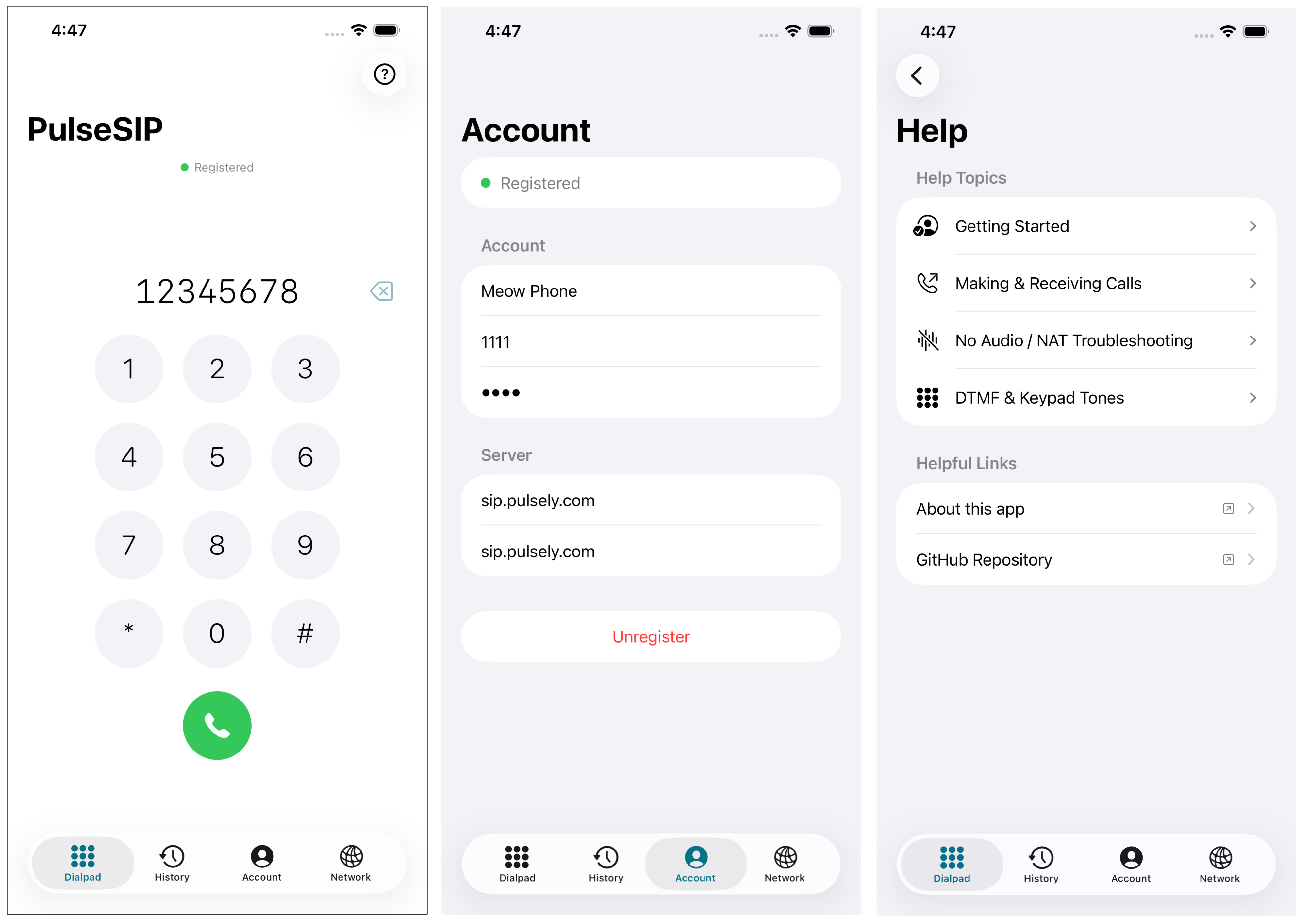
A native iOS SIP phone client built with SwiftUI and PJSIP 2.14. Supports registering a SIP account, making and receiving calls, mute, hold, DTMF, and call history — with no CallKit dependency.
- SIP account registration (any standard SIP server / Asterisk)
- Outgoing calls via a 12-key dialpad with real DTMF tone feedback
- Incoming call full-screen overlay with Answer / Decline
- In-call controls: mute, hold/resume, DTMF keypad (inband + RFC 2833 + SIP INFO)
- Call history with tap-to-callback and swipe-to-delete
- Network settings: STUN server, ICE, DNS SRV
- Auto-registers on launch if credentials are saved
- Credentials stored in
UserDefaults; password stored in the iOS Keychain - Call duration timer
SwiftUI Views
      │
SIPPhoneManager          @MainActor ObservableObject — bridges PJSIP state into SwiftUI
      │
AKSIPUserAgent / AKSIPAccount / AKSIPCall    Objective-C wrappers around PJSUA
      │
libpjproject.xcframework    PJSIP 2.14 built from source (device arm64 + simulator arm64/x86_64)
| Layer | Files |
|---|---|
| Views | Views/AccountSetupView.swift, Views/DialpadView.swift, Views/ActiveCallView.swift, Views/CallHistoryView.swift, Views/NetworkSettingsView.swift, ContentView.swift |
| Manager | Manager/SIPPhoneManager.swift, Manager/CallHistoryEntry.swift |
| Audio | DTMFPlayer.swift |
| ObjC SIP wrappers | SIP/AKSIPUserAgent.{h,m}, SIP/AKSIPAccount.{h,m}, SIP/AKSIPCall.{h,m}, SIP/AKSIPURI.{h,m} |
| PJSIP | PJSIP/libpjproject.xcframework, PJSIP/Headers/ |
- Xcode 15 or later
- macOS 14+ (build host)
- iOS 15+ deployment target
autoconf,automake,libtool(for building PJSIP from source)
brew install autoconf automake libtoolThis step compiles PJSIP 2.14 from source and produces SIPPhone/PJSIP/libpjproject.xcframework. It takes roughly 15 minutes.
bash scripts/build_pjsip.shThe script:
- Downloads pjproject 2.14.1 from GitHub
- Builds for iOS device (arm64) and simulator (arm64 + x86_64)
- Merges the libraries and packages them as an xcframework
- Copies all public headers to
SIPPhone/PJSIP/Headers/
open SIPPhone.xcodeprojSelect an iOS Simulator or device target and press ⌘B to build, ⌘R to run.
Note: The xcframework is referenced in the project file but not committed to the repository. You must run
build_pjsip.shbefore the first build.
SIPPhone/
├── scripts/
│   └── build_pjsip.sh              # Automated PJSIP build script
├── SIPPhone/
│   ├── SIPPhoneApp.swift           # App entry point, injects SIPPhoneManager
│   ├── ContentView.swift           # Tab bar root + active/incoming call overlays
│   ├── DTMFPlayer.swift            # AVAudioEngine DTMF tone generator (pre-call)
│   ├── Info.plist
│   ├── SIPPhone-Bridging-Header.h
│   ├── Manager/
│   │   ├── SIPPhoneManager.swift   # Swift ObservableObject bridging PJSIP → SwiftUI
│   │   └── CallHistoryEntry.swift  # Codable call record model
│   ├── SIP/                        # Objective-C PJSIP wrappers
│   │   ├── AKSIPUserAgent.{h,m}
│   │   ├── AKSIPAccount.{h,m}
│   │   ├── AKSIPCall.{h,m}
│   │   ├── AKSIPURI.{h,m}
│   │   └── PJSIPCodecStubs.c       # Stub for disabled iLBC codec
│   ├── Views/
│   │   ├── AccountSetupView.swift  # SIP credential entry + register/unregister
│   │   ├── DialpadView.swift       # 12-key dialpad (pre-call) / DTMF pad (in-call)
│   │   ├── ActiveCallView.swift    # In-call screen with mute/hold/keypad/hang-up
│   │   ├── CallHistoryView.swift   # Recents list with tap-to-callback
│   │   └── NetworkSettingsView.swift # STUN, ICE, DNS SRV configuration
│   └── PJSIP/                      # Generated by build_pjsip.sh (not committed)
│       ├── libpjproject.xcframework
│       └── Headers/
└── SIPPhone.xcodeproj
- Launch the app — if saved credentials exist, it registers automatically.
- Go to the Account tab to enter or update SIP credentials and tap Register.
- Switch to the Dialpad tab, type a SIP URI or number, and tap the green call button.
- Incoming calls show a full-screen overlay with Answer and Decline.
- During a call, use Mute, Hold, and Keypad buttons as needed.
- The History tab shows recent calls; tap any entry to call back.
- The Network tab configures STUN server, ICE traversal, and DNS SRV lookup.
DTMF digits are transmitted three ways simultaneously to maximise server compatibility:
| Method | When used |
|---|---|
| RFC 2833 (out-of-band RTP) | Servers with dtmfmode=rfc2833 (Asterisk default) |
| SIP INFO | Servers with dtmfmode=info |
| Inband audio tone | Servers with dtmfmode=inband; also provides local audible feedback |
Pre-call dialpad keypresses play real dual-tone DTMF audio via AVAudioEngine (DTMFPlayer.swift).
PJSIP is compiled with the following flags:
--disable-video
--disable-opencore-amr
--disable-ilbc-codec
--with-ssl=no
Audio uses iOS CoreAudio exclusively (PJMEDIA_AUDIO_DEV_HAS_COREAUDIO=1). A linker stub (PJSIPCodecStubs.c) satisfies a residual reference to pjmedia_codec_ilbc_init that pjsua-lib emits even when iLBC is disabled.
Enable STUN in the Network tab (default: stun.l.google.com:19302). Without STUN, the device advertises its private IP in the SDP, and the remote server cannot route RTP back — resulting in one-way audio.
This app uses a custom SwiftUI call UI instead of CallKit. Incoming calls will not appear on the lock screen when the app is backgrounded.
SourceKit shows "Cannot find X in scope" errors for ObjC SIP types and CallHistoryEntry because the PJSIP xcframework is not visible to the IDE's index. These are expected and clear on a full Xcode build (⌘B).
This project uses PJSIP, which is licensed under the GPL v2. The ObjC wrappers are derived from Telephone by Alexei Kuznetsov.