For consideration your consideration:
This project includes an editor for producing customized tooltip. Users can customize the following attributes:
- The content of the tooltip;
- The placement of the tooltip relative to the target;
- The delay prior to the appearance of the tooltip after the user cursor enters the target area;
- The delay prior to the dissappearance of the tooltip after the user cursor leaves the target area.
The application includes a responsive preview of the appearance and attributes of the customized tooltip:
https://s3-us-west-2.amazonaws.com/hiring-rsr/app-screenshot.png
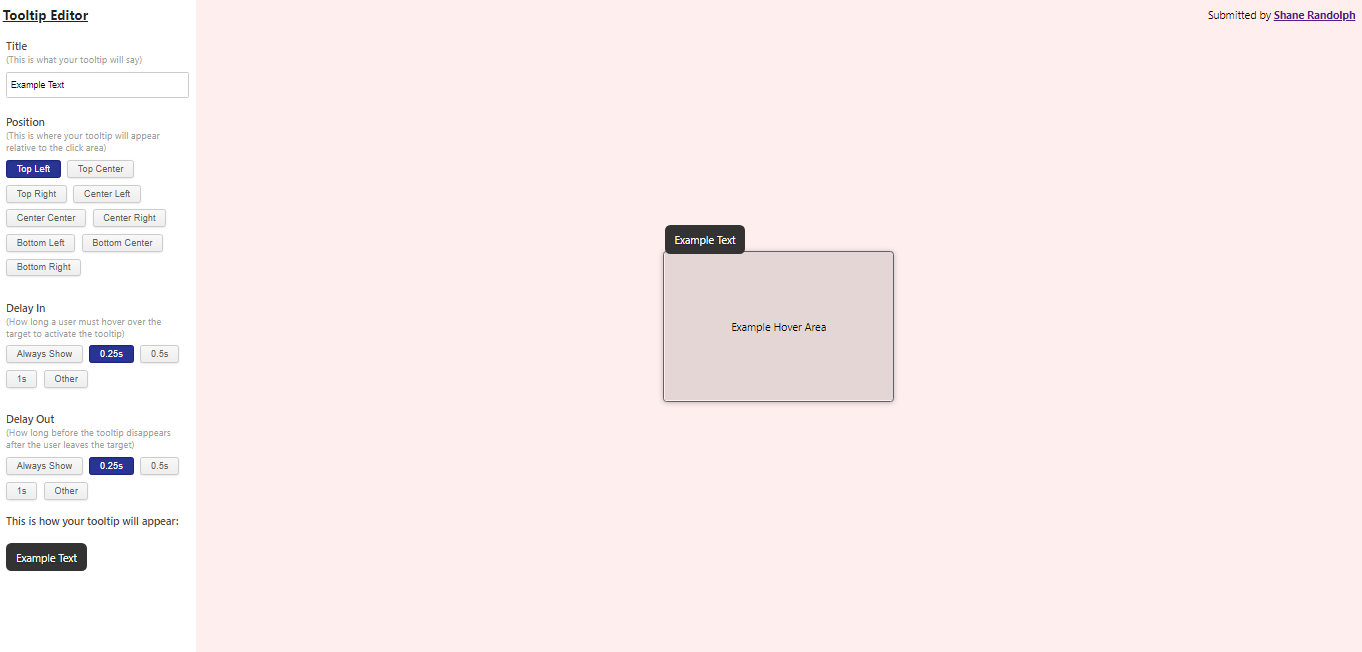
I chose to implement the input controls as buttons that a user can select with pre-set options wherever possible.
I think this is the right choice from a usability standpoint as it requires less input from the user (clicking a button versus typing a value); it also gives the user context as to what an appropriate input is if they do choose to enter a custom value (a feature accessible through "Other" option, which reveals an input where the user can free-type any input they choose.)
Rather than implementing the inputs as JSX/HTML, I instead opted to store all input data as an array of JS objects that could be interpreted by the appropriate components and subsequently turned into JSX/HTML.
Setting up that scheme took longer than a straight-forward JSX/HTML markup, but it makes the code easier to iterate and maintain. It also makes it substantially easier to add additional inputs (something I found out personally when I realized I needed to add customization options for the time delay for the disappearance of the tooltip after a user leaves the target area).
Another drawback is that the formatted JSON approach limits customization of controls for future required inputs that may not be string inputs or "select from a list"-style inputs; however, and such inputs could easily be implemented in regular JSX/HTML markup.
I chose not to implement a state manager (e.g., Redux) in the interest of simplicity given the narrow scope of the application. However, if the scope of the application were to extend beyond one view or included multiple state transitions (conditional inputs or layouts), I would have implemented a state manager.
I encountered an interesting issue related to the mouseIn event on the tooltip. Basically, when mousing over the tooltip it triggers a mouseOut event for the container (even when the tooltip is within the countainer). In my application this triggered the process for the tooltip to disappear.
I discovered that there were both JS and CSS approaches to solving this problem; I chose a simpler CSS approach in the interest of time. This CSS approach removes all mouse-over event for the tooltip.
Since the tooltip did not need to do anything but display, the CSS approach is suffient. However, if the scope of this application included, for example, click-events for the tooltip I would have implemented the JS approach.
I added a simple media query to update the layout of the main view on mobile-ish sized screens (<900px).
(https://s3-us-west-2.amazonaws.com/hiring-rsr/app-screenshot-mobile.png)
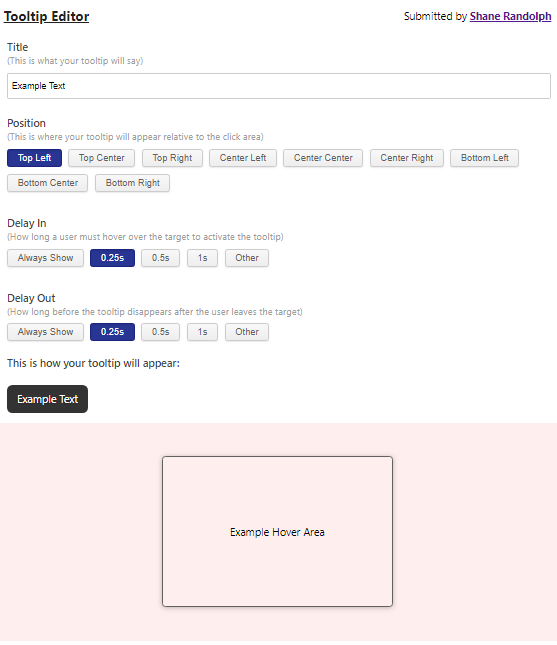
If this was an application intended for production I would have spent more time ensuring that the layout and performance of the application were optimized for mobile. (I would probably have broken down the main form [title, position, delay] into seperate panels that the users went through one-at-a-time for mobile-sized screens).
I would also use JS to implement dynamic positioning of the tooltip to avoid it going "off-screen" or otherwise stretching the layout.
Currently, the application allows 9 positioning option (essentially, within a 3 by 3 grid relative to the target). If this application was intended for production, I would add a more dynamic way to set the positioning of the tooltip relative to the target (maybe with some drag-and-drop functionality).
If a user elects to enter their own values for tooltip appearance/disappearance delays, in the current state, they can enter invalid values. These don't break the application, it just makes all delays 0 seconds.
If this application was intended for production I would implement robust input validation along with well-written error messaging.
In the interest of time and since the data structures involved with this application were relatively simple (and the EditorInputs data was hand-coded by me), I elected not to implement a JS unit testing protocol (like MochaJS). However, if the complexity of the application were greater, I would have implemented a JS unit testing protocol.
This was a very interesting mini-application to design and develop (one of the best hiring-related projects I've seen).
Thanks for taking the time to review my submission.
Regards,
Shane