


Regular expressions (regex) are character sequences that define specific search patterns. The benefit of using regex is that complex search patterns that would require many lines of code can be written in just one line, which saves time and keeps your code tidy.
There are many use cases for regex, but they are typically used for input validation. Here we will examine URL validation using regex, first by identifying the components of a valid URL, then identifying which characters will form a regular expression to test for valid URL components.
For context, here is a snippet of a regex URL matching sequence:

In this tutorial you will learn how to use regular expressions to validate URLs and how they work!
A URL (Uniform Resource Locator) is typically used to locate an existing internet resource by submitting it in a request to a server.
The three major components of a valid URL are Protocol, Resource Name, and Path, as shown in the example below:

The Protocol or Hypertext Transfer Protocol, defines the rules for the transfer of data on the web. There are two types, HTTP (without SSL) or HTTPS (with SSL), the latter being more secure as the link is encrypted using Secure Sockets Layer.
The resource name is the meat and potatoes of a valid URL, and is actually comprised of three sub-units: the sub-domain, domain name, and top-level domain. The sub-domain (the WWW part) is not "necessarily" needed these days for reasons beyond the scope of this gist. You can read more about this issue here: https://love2dev.com/blog/www-subdomain/
The domain name is the most important element of a valid URL as it is the primary instructions that the browser needs to submit a valid request to the intended server. If one decides to enter the URL without the protocol, sub-domain, the file path, or maybe even the top-level domain, most modern web browsers have enough built in resources to automatically wrap shortcuts around the domain name in order to submit a valid request.
The top-level domain is parent element of a resource name, as it is a node that contains a collection of records corresponding to domain names. For example, google.com, google.ru, and google.sk are three seperate URLs. Google owns the rights to each domain name, yet different language content is served from each - english from .com, russian from .ru, and czechoslovakian from .sk. If google is queried in the browser without the top-level domain, MOST browsers will wrap it with the top-level domain appropriate to the country where the query was initiated.
The path is a set of instructions that tell the server where to locate a specific webpage in a website. For example, google.com/store will send you directly to Google's online store, but you can also navigate to the store through a link on Google's homepage. Speaking of homepages, wouldn't the path for Google's homepage actually be google.com/index.html? Yes and no. The path does include index.html, but the servers that host websites can be programmed to automatically route requests containing "naked URLs" to the home page.
We know that the protocol and path are always present in a URL, but not always visible.
We also know that the domain name and top-level domain are always present and visible.
Sub-domains are a wildcard - maybe it is part of the URL, maybe it isn't. Our browsers will figure it out either way.
If the browser and/or the server will resolve elements like the protocol, path, and sub-domain, would the only two components needed to verify a valid URL be the domain name and top-level domain? At bare minimum, yes. However, the answer to that question would depend on requirements established on a case by case basis.
Let's take another look at the snippet from earlier:
At first it looks like your cat sat down on your keyboard, again.. Actually, this expression contains seven distinct operations that make more sense if we examine them one at a time.
An easy way to determine how many seperate functions, or components are contained in a regex is to identify the escape characters. These are usually backslashes and they signify the beginning or end of a function. The backslashes themselves do not necessarily mark a transition, but they will change the function of the character in front of it to have a literal meaning. For example, if you wanted to match '1+1=2', the plus sign has a special meaning so it would actually match '111=2' in '123+111+234'. No worries though, all we need to do is add a backslash before the plus sign like this '1+1=2' The fact that the following character's function is being modified gives us a clue that a different set of conditions could be starting. We will see that happening below.
A helpful way to think of regex is that it is a sorting algorithm. Each component utilizes the processing resources from a larger application to search for a pattern match which is "captured", or held in state while the rest of the components continue looking for more matches, compares those matches with previous matches, and continues this process until there are no more strings left to compare, or until a certain part of the pattern conditionally fails.
One of these sorting methods that is used in this expression is the lookahead and lookbehind. These components are matching the characters in front of or behind an expression match, then assigning boolean values to the result.
-
- We will address this later, but it is helpful to know that any part of the expression that is enclosed in brackets is searching for a character class. Here we can see there are three sets of brackets separated by some weird number, and 'http' and 'www' happens to be contained in the first set of brackets. So it's pretty safe to assume that the first brackets will address the protocol and part of the resource name. The presence of lookbehinds and lookaheads justify that assumption! We see that 'http(s)?//' is trying to match http, https, followed by ':', which would be the first URL component - the protocol. The sequence '(s)?)' would be considered a lookbehind behind because the capturing parentheis ?) is outsie the lookbehind 'https(s)'. If a match is found, a value of "true" is captured, otherwise a "false" value is captured.
-
- The second component, '(www/.)' looks for an occurance of a World Wide Web sub-domain, which we can tell is a lookahead because the capturing parenthisis is inside of (www/.).
As mentioned earlier, brackets search for character classes. Character matches contained in those classes can be grouped and captured using parenthesis. We saw that previously in the case of '(http(s) and (www.). However, the addition of the lookbehind and lookahead turned the first two groupings into a conditionals, or "if, then" statements. In this case, "if" there is http, https, or www present "then" we might have a valid URL, "if, else" the following ranges are matched.
Anchors do not match any specific characters, instead they match positions before or after characters. In this expression we will be looking at '+' and . as shown in the image below:

-
- The component between the '?' and '+' is matching any lowercase or uppercase letters, or numbers 0 through 9. The previous components have matched the protocol and the sub-domain, so this MUST be checking for the domain, right? Yes, but what other ways besides process of elimination can we determine it's matching the domain?
First off, we can see that the component begins with a '?' which makes it a conditional match. Remember from earler when we said the bare minimum requirements for a valid URL are the domain and top-level domain? Up to this point the expression is telling us that http, https, and www, can match, but isn't a deal breaker if they don't. But, the domain has to include a combination of upper and lowercase letters. numbers, and some other stuff we haven't got to yet as eluded to by '+', or our URL will be invalid.
Finally, we are at the exciting part!
Lets take a look at where we're at in our expression:

-
- We have reached the end of our first set of brackets, and the beginning of some odd looking sets of curly brackets.. The numbers inside the curly brackets represent a minimum and a maximum. The wing-dings at the end of the first bracket tell us that the entire character count of whatever our current state happens to be must be at least 2 characters, but no more than 256 characters.

Q: Why is the maximum character limit set at 256?
A: Because Windows 10 has a 256 character path limit.
-
- [a-z] {2,6} verifies that there are between 2 and 6 lowercase letters in the top-level domain. The reason for this is tricky - most legitimate top-level domains will have between 2 and 6 characters like .ru, .com, .blog, .bible, or .camera. There are many top-level domain names that contain more than six characters like .careers, .construction, .diamonds, .education, or .yokohama. However, these non-standard top-level domains are usually provisioned for special purposes like .example, or .invalid, which are used for testing, or .localhost which is for a local server. It could be argued that any "legitimate" non- standard top-level domain that is not used for special purposes only exists for marketing purposes, or to duplicate a domain name that has already been assigned to a .com - in other words, they are somewhat unnecessary and will never gain mainstream adoption. For instance, If there is already an established top-level domain for educational institutions such as .edu, will there ever be a growing demand for .acadamy, .univesity, or .education? Probably not, which puts those longer top-level domains in the "edge case" category. Since there are special-use top-level domains with six or more characters that are known to be invalid, it is not worth spending resources or taking the risk to validate any top-level domain longer than six characters.
The last component in our expression is delimited by this character:  Which is appropriately called a word boundary. Becuase it is a lowercase b, this component is matching before and after an alphanumeric sequence.

-
- \b identifies a word boundary between a word character and non-word character, in this case the separation between the top-level domain and the path. (a valid URL would not contain a valid path if it did not contain a valid top-level domain)
-
- The final component ([-a-zA-Z0-9@:%_+.~#?&//=]*)
is meant to identify upper and lowercase letters, numbers 0 through 9. + is an escaped character that searches for any combination of the set of literal characters to the right '., ~, #, ?, &, //, =', and the '*'
at the end tells us to run this sequence zero times, or onceThis pattern will identify a "possible" valid path. Interestingly enough we can see the logic in action by observing the URL for this gist. '//' is matching two foreward slashes in the path. What you know, there are two forward slashes in this path!

Luckily for us regexr.com has some very robust tools that we can use to test validation patterns.
The clip below shows the various URL formats that this expression will match:
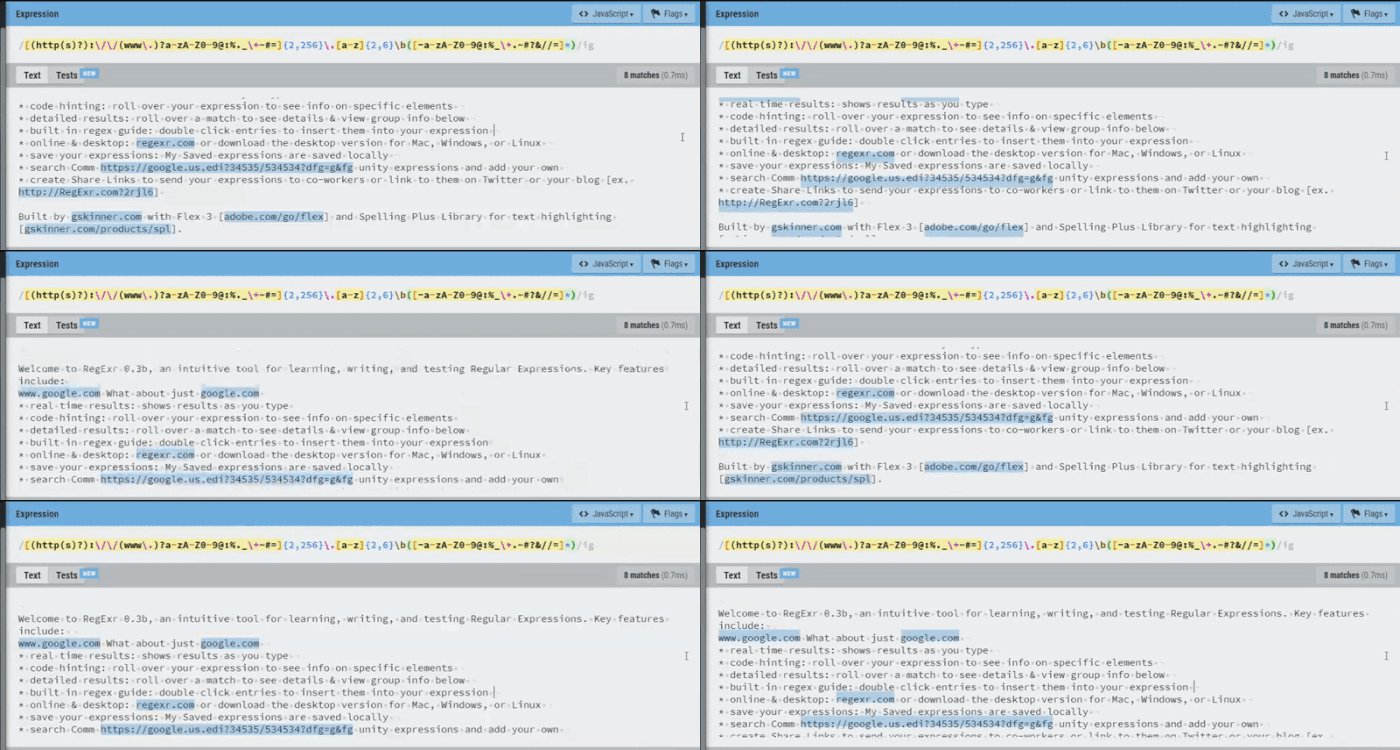
- domain + top-level domain
- entire resource name [sub-domain + domain + top-level domain]
- protocol + resource name + file path
- domain + top-level domain + file path
- Then it had this little booboo:

It messed up on one URL, but the accuracy that a complex regex like this offers is still quite impressive!
Thank you for reading this tutorial!
I hope that you enjoyed it and that you learned something.
Cheers!

Permission to use this information is granted under the Creative Commons license: https://creativecommons.org/licenses/
wonderfulengineering.com
ibm.com
verisign.com
zvelo.com
love2dev.com
regexr.com
regular-expressions.info
javascript.plainenglish.io
wikipedia.org
threesl.com
BONUS:
If you're looking to get a little crazy this weekend, you should check out this site dedicated to finding the perfect email validation regex for every programming language!
emailregex.com
Rob Atalla
Email: rob.atalla@robatalla816.com
Github: https://github.com/ratalla816/
Portfolio: https://ratalla816.github.io/professional-portfolio/