We will be building this infrastructure.
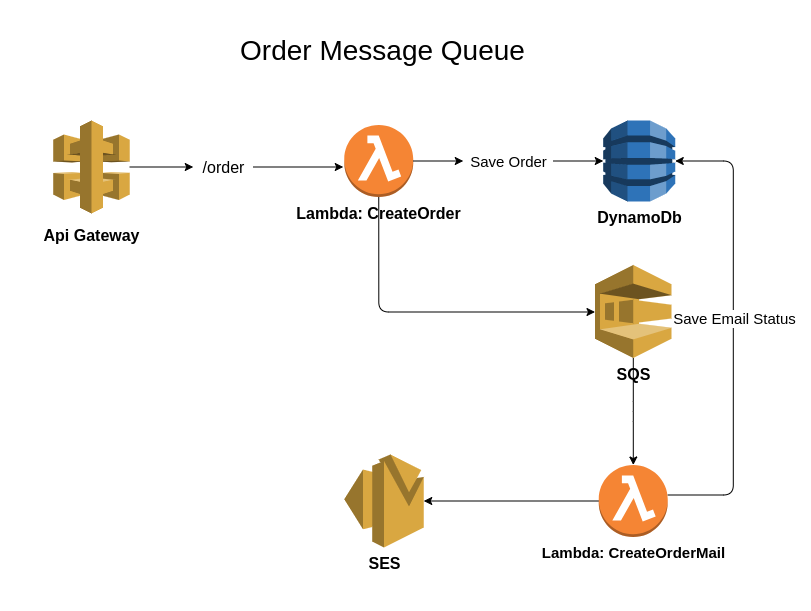
Tools used:
- AWS Cloud Development Kit - Cloud infrastructure using javascript
- API Gateway - Managed by AWS
- Lambda - Cloud functions
- Amazon Simple Queue - Managed Queue
- DynamoDb - Fast NoSQL for any scale
The whole application is implemented by the principle "Infrastructure as Code", so you just need an Amazon account run these commands and the whole application would be hosted in your cloud:
- Add to env your amazon access keys
- run
npm install npm run deploy
You are done :)
To implement the solution as Infrastructure as Code I used 2 stacks:
dbStackordersStack
Stack: dbStack
- Deploys DynamoDb table
Orders, I have set the billing modeOnDemandso there will be no weird problems even if many people hit it.
Stack: ordersStack
- Deploys ApiGateway with route
/orderand methodPOST - Deploys SQS
- Deploys 2 lambda:
createOrder=> ApiGateway will redirect the request here (once it gets the request it will run the JSON schema to check if the request is valid), it has access to send messages to the Queue (producer)createOrderMail=> SQS consumer, once it gets the event will send an email to theuserEmailusing SES and will put a record on DynamoDb
- Lambdas are complied using Webpack because of the tree-shaking (small size=> small cold start)
I already hosted the app in my AWS account, you can find postman collection in here.
We want to make sure that we don't break the system when we edit code, so it's time for automation testing. I have used mocha framework, tests can be found here.
To run the tests:
- run
npm install - run
npm run testEnjoy
Problems: To test the flow end to end I needed to make sure the email is correct too, automating the opening of the email and getting the content can be tricky...
Solution: I have used mailosaur which makes automating email tests easier.