Expected Results
- I was expecting that the Font component would provide a easier way to use fonts. Right now, it's not working without editing the values in the browser.
Steps to reproduce
- Install
@react-email/fonts or @react-email/components@latest
- Include the example from the package:
const Email = () => {
  return (
    <Html lang="en">
      <Head>
        <Font
          fontFamily="Roboto"
          fallbackFontFamily="Verdana"
          webFont={{
            url: 'https://fonts.gstatic.com/s/roboto/v27/KFOmCnqEu92Fr1Mu4mxKKTU1Kg.woff2',
            format: 'woff2',
          }}
        />
      </Head>
    </Html>
  );
};
- Start the email dev server and preview the sample e-mail
- Check for font-face styles from the browser console. All single quotes are converted to their hex code values (
'). For more info, please refer to the screenshots in the next section
Screenshots
font-face with hexcode values
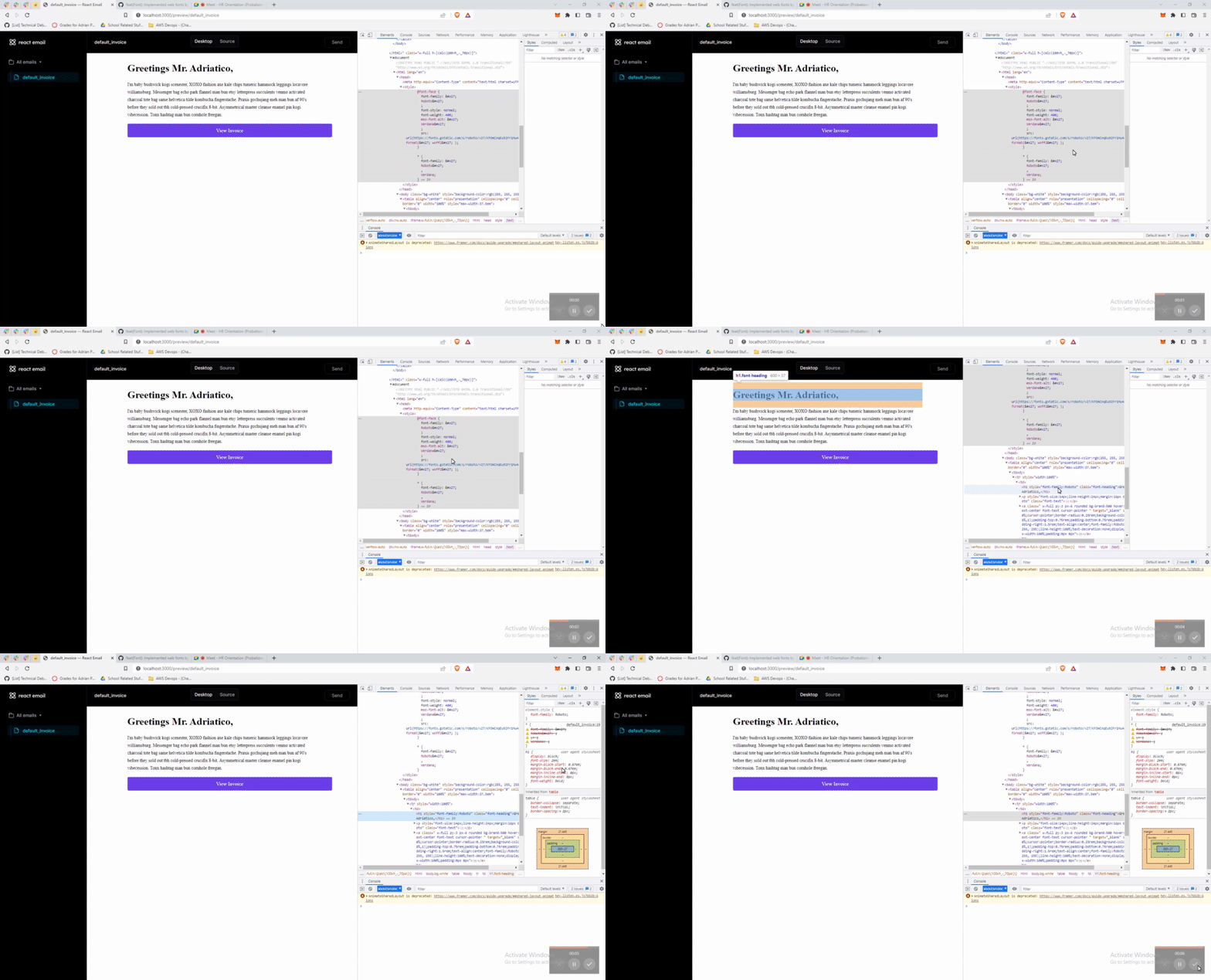
font-face with non-hexcode values. Manually removed


Expected Results
Steps to reproduce
@react-email/fontsor@react-email/components@latest'). For more info, please refer to the screenshots in the next sectionScreenshots
font-face with hexcode values
font-face with non-hexcode values. Manually removed