Adding Khmer fonts to texts. #238

Replies: 5 comments

-
|
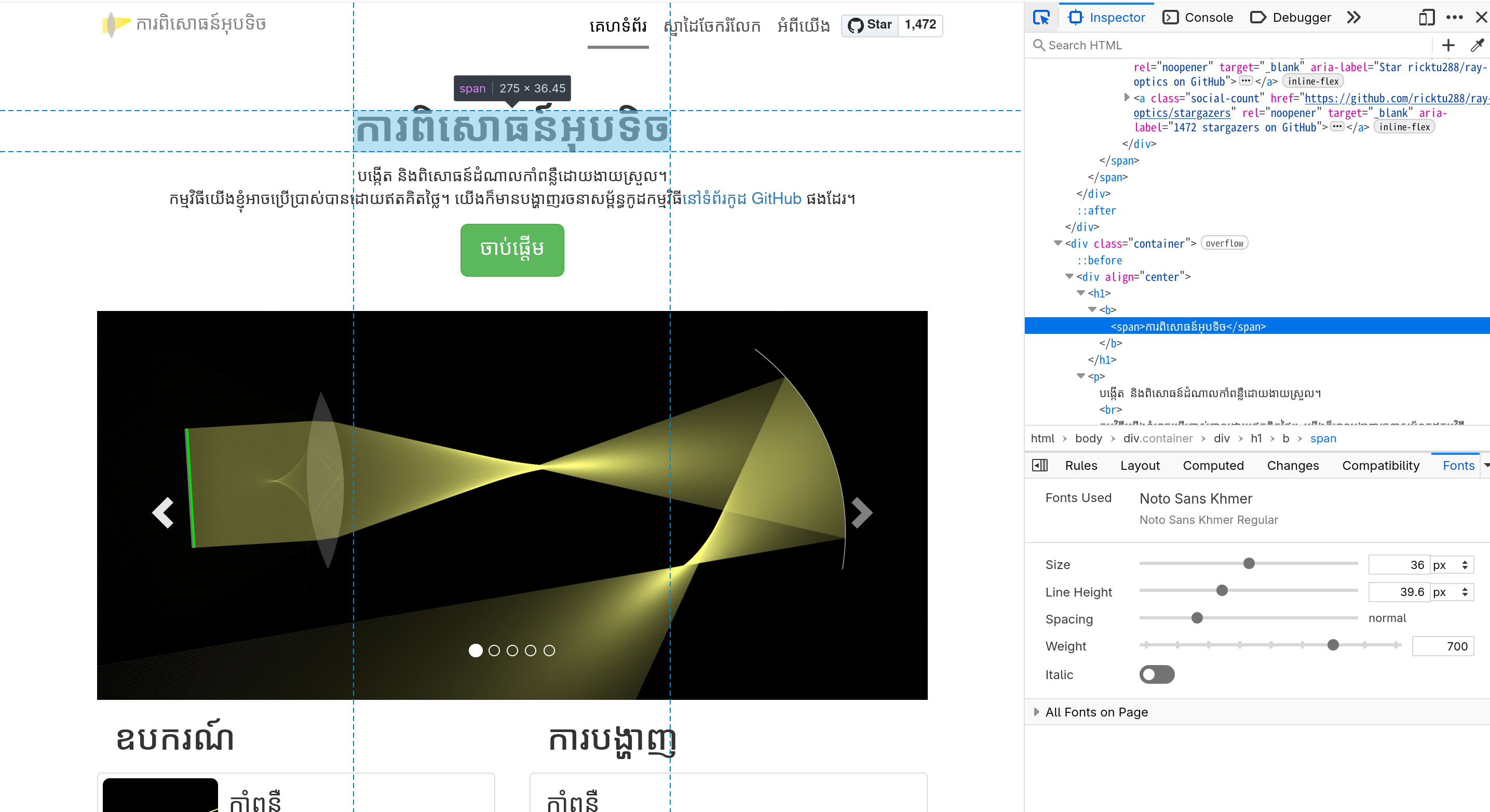
Continuing the discussion in https://hosted.weblate.org/translate/ray-optics-simulation/simulator/km/?checksum=dca67d7e999fb75e I think there are two separate issues/proposals related to language specific fonts:
For 1, it seems that Bootstrap (the UI library we use) does not specify the exact font name for each language, and only the font family. So that the font it actually uses is chosen by the browser and depends on the environment. On my laptop, it is already Noto Sans Khmer that you mentioned. Since I didn’t manually set up any environment for Khmer and has no knowledge about this language, I would like to know that, is it true that on most computer used by Khmer user, this webpage will instead show some font which is not usually preferred? Note that this may possibly an issue of Bootstrap if it causes the browser to use a font for Khmer not usually preferred in the context. For 2, I need to see how other similar web apps are handling this, as I am not familiar with fonts, especially in multiple languages. If you are familiar with Khmer fonts, can you tell me what is the expected to show up in the font selection menu of a text label? I mean like a dozen of them, rather than like in Microsoft Word where there are sometimes more than a hundred which is clearly overkilled for this web app. A related issue of is about the Tamil font, where the Tamil script’s combining character does not work on the CI environment except for using the “Courier New” font for the text label, which makes the text looks weird. See ray-optics/scripts/buildImages.mjs Line 206 in 582c70f |
Beta Was this translation helpful? Give feedback.

-
|
(1.) Yes, it is preferred for most Khmer websites to display Khmer texts with Noto Sans Khmer in their UI. Regarding the image you have attached, my browser still displays the undesired font.
The font is displayed properly in Android platforms:
As I went through some CSS, I can see that the website is using Helvetica Neue as its display font, which is not for displaying Khmer. I have tried modifying the CSS to use the desired font and linked the font file from Google Fonts by adding this line of code: After that, it has finally displayed the desired font:
(2.) I would expect the fonts below to be shown in the fonts list:
I would like to recommend the Khmer Times or the Koh Santepheap website to see how they managed to display 3 languages (English, Khmer, Chinese). |


Beta Was this translation helpful? Give feedback.
-
|
For the webpage font, can you try that whether you can make it a desired font by just editing the CSS (without linking to external server like Google Fonts)? The AI agent in my IDE told me that it should be the case, and there should be no need to link to an external font server or bundling. It suggests adding a list of common preferred fonts to the {
"meta": {
"languageName": "ភាសាខ្មែរ",
"fonts": "Noto Sans Khmer, Khmer Sangam MN, Leelawadee UI, Khmer UI, sans-serif"
}
}And use the primary list as the CSS font stack for the webpage where the best font is the first, and if unavailable on the device, fallback go the second, and so on. For
The AI agent suggests adding a list of fonts widely available on most systems: {
"textLabelFonts": "Noto Sans Khmer, Khmer OS, Khmer OS System, Hanuman, serif"
}If some users really want to use other fonts, I may add a "Custom..." option on the font dropdown of |
Beta Was this translation helpful? Give feedback.
-
Note that as no font CDN is used, please only add fonts which are most likely to be available on the user's system (you can add some common fonts on each of Windows, Mac, etc and let the user decide which to use). |
Beta Was this translation helpful? Give feedback.
-
|
Okay, the font I have requested is now live. Thank you. |
Beta Was this translation helpful? Give feedback.


Uh oh!
There was an error while loading. Please reload this page.
-
Is it possible to add a different Khmer font to the website? There is a plethora of available fonts online, for example, the Noto Sans and the Noto Serif Khmer fonts, and many others from Google Fonts. Here is the Google Fonts website for the Khmer fonts: https://fonts.google.com/?lang=km_Khmr
Beta Was this translation helpful? Give feedback.
All reactions