A beautiful, interactive year-at-a-glance calendar component for high-level planning in React applications. Perfect for tracking campaigns, sprints, deadlines, and milestones across the entire year.
Live Demo | Built with love by RoboticForce
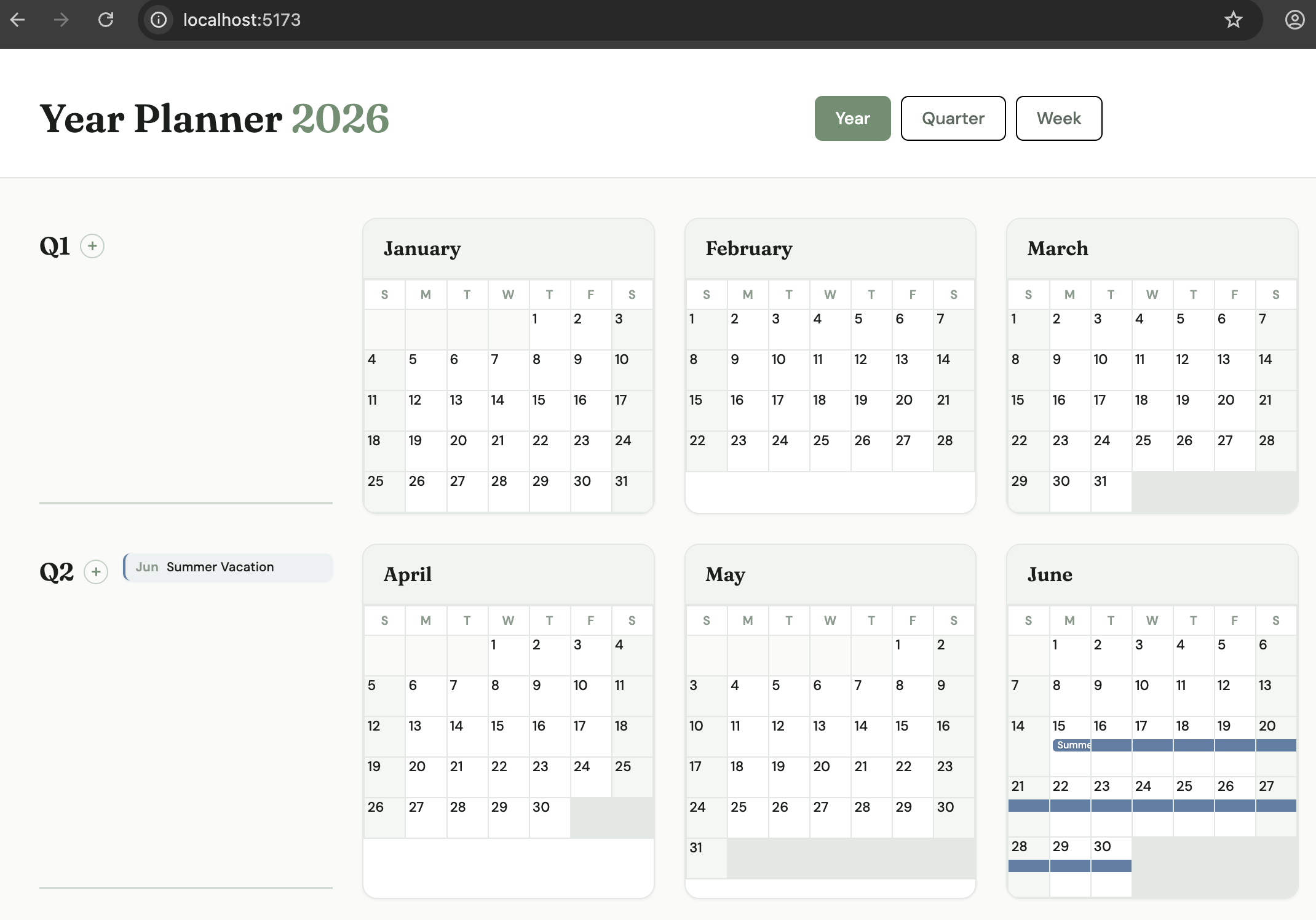
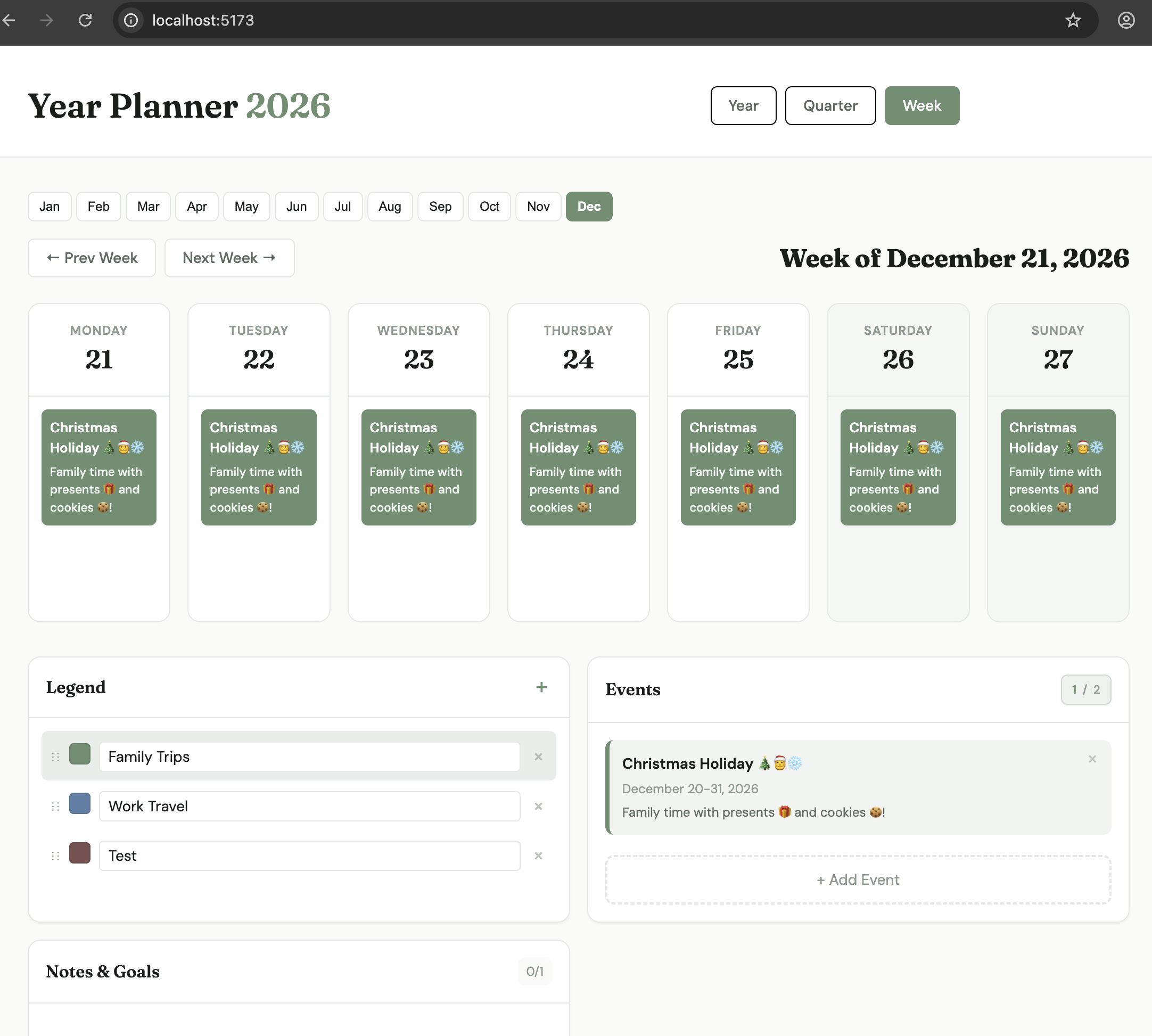
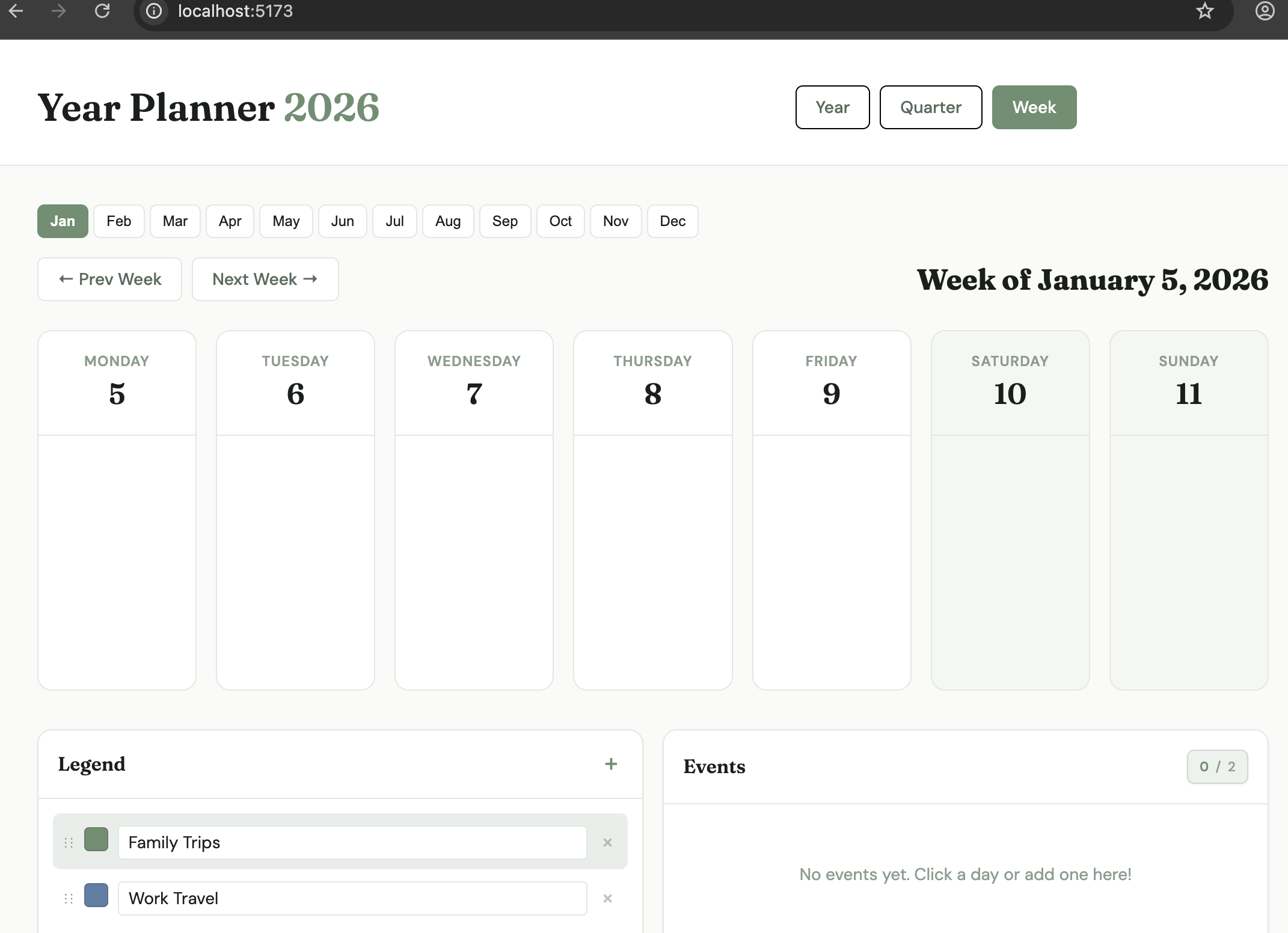
- Multiple View Modes - Year, Quarter, and Week views for different levels of detail
- Date Range Events - Create events that span multiple days (trips, projects, campaigns)
- Sticky Notes - Add quick notes to specific dates
- Blocked Days - Mark days as unavailable with custom categories
- Customizable Legend - Define your own categories with colors (Recruiting, Sprints, Deadlines, etc.)
- Drag & Drop - Easily move notes between dates
- Theme Customization - Customize colors, fonts, shadows, and border radius
- Persistence Adapters - Built-in support for localStorage, API backends, or custom storage solutions
- TypeScript Support - Fully typed with comprehensive type definitions
- Rails Integration - Stimulus controller for seamless Rails integration
npm install yearflowor
yarn add yearflowimport { YearPlanner } from 'yearflow';
import 'yearflow/styles.css';
function App() {
return <YearPlanner year={2026} />;
}| Prop | Type | Default | Description |
|---|---|---|---|
year |
number |
Current year | The year to display |
initialView |
'year' | 'quarter' | 'week' |
'year' |
Initial view mode |
weekStartsOn |
0 | 1 | 6 |
1 |
Day to start the week (0=Sunday, 1=Monday, 6=Saturday) |
persistenceAdapter |
PersistenceAdapter |
localStorage | Storage adapter for loading/saving data |
initialData |
Partial<PlannerData> |
{} |
Initial data to populate the planner |
theme |
Partial<PlannerTheme> |
Default theme | Theme overrides for colors, fonts, etc. |
colorPalette |
ColorPalette |
Built-in palette | Available colors for legend items |
labels |
Partial<PlannerLabels> |
Default English | Custom labels for i18n / text customization |
className |
string |
'' |
Additional CSS class |
features |
object |
All enabled | Feature flags to enable/disable functionality |
onBlockDay |
(date, category) => void |
- | Callback when a day is blocked |
onClearDay |
(date) => void |
- | Callback when a day is cleared |
onAddNote |
(note) => void |
- | Callback when a note is added |
onDeleteNote |
(noteId) => void |
- | Callback when a note is deleted |
onUpdateNote |
(note) => void |
- | Callback when a note is updated |
onAddEvent |
(event) => void |
- | Callback when an event is added |
onUpdateEvent |
(event) => void |
- | Callback when an event is updated |
onDeleteEvent |
(eventId) => void |
- | Callback when an event is deleted |
onLegendChange |
(legend) => void |
- | Callback when legend items are modified |
onDataChange |
(data) => void |
- | Callback when any data changes |
onViewChange |
(view) => void |
- | Callback when view mode changes |
features?: {
  enableNotes?: boolean;          // Default: true
  enablePrint?: boolean;          // Default: true
  enableLegendEdit?: boolean;     // Default: true
  enableLegendReorder?: boolean;  // Default: true
  enableLegendAdd?: boolean;      // Default: true
  enableLegendDelete?: boolean;   // Default: true
  enableDragDrop?: boolean;       // Default: true
}Customize all user-facing text for internationalization or personalization:
import { YearPlanner } from 'yearflow';
import 'yearflow/styles.css';

const spanishLabels = {
  header: {
    title: 'Planificador Anual',
    viewYear: 'Año',
    viewQuarter: 'Trimestre',
    viewWeek: 'Semana',
    quarterOptions: [
      'T1 (Ene - Mar)',
      'T2 (Abr - Jun)',
      'T3 (Jul - Sep)',
      'T4 (Oct - Dic)',
    ],
  },
  eventModal: {
    titleAdd: 'Añadir Evento',
    titleEdit: 'Editar Evento',
    labelTitle: 'Título',
    labelStartDate: 'Fecha de Inicio',
    labelEndDate: 'Fecha de Fin',
    labelCategory: 'Categoría',
    labelDescription: 'Descripción (opcional)',
    placeholderTitle: 'ej. Sprint de Q1, Campaña de reclutamiento...',
    buttonSave: 'Guardar',
    buttonCancel: 'Cancelar',
    buttonAdd: 'Añadir Evento',
    buttonDelete: 'Eliminar',
  },
  legend: {
    title: 'Categorías',
    addButtonTitle: 'Añadir categoría',
    placeholderCategoryName: 'Nombre de categoría...',
  },
  notesPanel: {
    title: 'Notas y Metas',
    emptyDefault: 'Sin notas. ¡Añade una para comenzar!',
    buttonAdd: '+ Añadir Nota',
  },
  eventsPanel: {
    title: 'Eventos',
    empty: 'Sin eventos. ¡Haz clic en un día para añadir uno!',
    buttonAdd: '+ Añadir Evento',
  },
  weekView: {
    weekOfFormat: 'Semana del {day} de {month}, {year}',
    prevWeek: '← Semana Anterior',
    nextWeek: 'Próxima Semana →',
    monthAbbreviations: [
      'Ene', 'Feb', 'Mar', 'Abr', 'May', 'Jun',
      'Jul', 'Ago', 'Sep', 'Oct', 'Nov', 'Dic',
    ],
  },
  general: {
    loading: 'Cargando...',
  },
};

function App() {
  return <YearPlanner year={2026} labels={spanishLabels} />;
}| Section | Description |
|---|---|
header |
Title, view buttons, quarter dropdown options |
eventModal |
Event modal title, form labels, placeholders, buttons |
addNoteModal |
Note modal title, form labels, placeholders, buttons |
blockDayModal |
Block day modal labels and buttons |
legend |
Legend panel title, add button, category placeholder |
notesPanel |
Notes panel title, empty states, add button |
eventsPanel |
Events panel title, empty state, add button |
weekView |
Week header format, navigation buttons, month abbreviations |
calendarGrid |
Add event button title, overflow text |
eventBar |
Event overflow indicator text |
general |
Loading text |
import { defaultLabels, mergeLabels } from 'yearflow';

// Get all default labels
console.log(defaultLabels);

// Merge partial custom labels with defaults
const customLabels = mergeLabels({
  header: { title: 'My Calendar' },
});Customize the appearance by providing a theme object:
import { YearPlanner } from 'yearflow';
import 'yearflow/styles.css';

const customTheme = {
  colors: {
    primary: '#4a90e2',
    background: '#ffffff',
    surface: '#f8f9fa',
    text: '#212529',
    textSecondary: '#6c757d',
    textMuted: '#adb5bd',
    border: '#dee2e6',
    weekend: '#f1f3f5',
  },
  fonts: {
    sans: "'Inter', sans-serif",
    serif: "'Merriweather', serif",
  },
  radius: {
    sm: '4px',
    md: '8px',
    lg: '12px',
  },
  shadows: {
    sm: '0 1px 3px rgba(0,0,0,0.1)',
    md: '0 4px 8px rgba(0,0,0,0.1)',
    lg: '0 10px 20px rgba(0,0,0,0.1)',
  },
};

function App() {
  return <YearPlanner year={2026} theme={customTheme} />;
}Define your own color palette for legend items:
const customColors = [
  { id: 'ocean-blue', value: '#0077be', name: 'Ocean Blue' },
  { id: 'sunset-orange', value: '#ff6b35', name: 'Sunset Orange' },
  { id: 'forest-green', value: '#2d6a4f', name: 'Forest Green' },
  { id: 'lavender', value: '#9d84b7', name: 'Lavender' },
];

const customLegend = [
  { id: 'recruiting', label: 'Recruiting', colorId: 'ocean-blue', order: 0 },
  { id: 'sprints', label: 'Engineering Sprints', colorId: 'sunset-orange', order: 1 },
  { id: 'onboarding', label: 'Onboarding', colorId: 'forest-green', order: 2 },
  { id: 'deadlines', label: 'Deadlines', colorId: 'lavender', order: 3 },
];

function App() {
  return (
    <YearPlanner
      year={2026}
      colorPalette={customColors}
      initialData={{ legend: customLegend }}
    />
  );
}Automatically saves data to browser localStorage:
import { YearPlanner, localStorageAdapter } from 'yearflow';

function App() {
  return (
    <YearPlanner
      year={2026}
      persistenceAdapter={localStorageAdapter('myPlanner2026')}
    />
  );
}Save data to your backend API:
import { YearPlanner, apiAdapter } from 'yearflow';

function App() {
  return (
    <YearPlanner
      year={2026}
      persistenceAdapter={apiAdapter('/api/planner', 'your-auth-token')}
    />
  );
}
The API adapter expects:
GET /api/planner- ReturnsPlannerDataJSONPUT /api/planner- AcceptsPlannerDataJSON in request body
Implement your own persistence logic:
const customAdapter = {
  async load() {
    // Load data from your storage
    const data = await yourCustomLoadFunction();
    return data;
  },
  async save(data) {
    // Save data to your storage
    await yourCustomSaveFunction(data);
  },
};

function App() {
  return <YearPlanner year={2026} persistenceAdapter={customAdapter} />;
}Use noopAdapter to fully control data externally:
import { YearPlanner, noopAdapter } from 'yearflow';

function App() {
  const [plannerData, setPlannerData] = useState(initialData);

  return (
    <YearPlanner
      year={2026}
      persistenceAdapter={noopAdapter}
      initialData={plannerData}
      onDataChange={setPlannerData}
    />
  );
}Provide initial events, notes, and blocked days:
const initialData = {
  events: [
    {
      id: '1',
      title: 'Q3 Recruiting Push',
      startDate: '2026-07-01',
      endDate: '2026-07-14',
      category: 'default-green',
      description: 'Engineering team expansion',
    },
  ],
  notes: [
    {
      id: '1',
      title: 'Review job postings',
      date: '2026-06-01',
      category: 'default-blue',
    },
  ],
  blockedDays: {
    '2026-12-25': 'default-red',
    '2026-12-26': 'default-red',
  },
  legend: [
    { id: 'default-green', label: 'Recruiting', colorId: 'green', order: 0 },
    { id: 'default-blue', label: 'Sprints', colorId: 'blue', order: 1 },
    { id: 'default-red', label: 'Company Events', colorId: 'red', order: 2 },
  ],
};

function App() {
  return <YearPlanner year={2026} initialData={initialData} />;
}A Stimulus controller is available for seamless Rails integration. See the /integrations/rails directory for:
yearflow_controller.js- Stimulus controllerREADME.md- Rails integration guide
Example Rails setup:
<!-- app/views/planners/show.html.erb -->
<div data-controller="yearflow"
     data-yearflow-year-value="2026"
     data-yearflow-api-url-value="/api/planner">
</div>For custom layouts or advanced integration, you can use the underlying hooks and components:
import {
  PlannerProvider,
  usePlanner,
  Header,
  CalendarGrid,
  Sidebar,
} from 'yearflow';

function CustomPlanner() {
  const { state, actions } = usePlanner();

  return (
    <div>
      <Header year={2026} />
      <div style={{ display: 'flex' }}>
        <CalendarGrid year={2026} />
        <Sidebar />
      </div>
      <pre>{JSON.stringify(state, null, 2)}</pre>
    </div>
  );
}

function App() {
  return (
    <PlannerProvider>
      <CustomPlanner />
    </PlannerProvider>
  );
}All major components are exported for custom layouts:
YearPlanner- Main componentHeader- Header with view controlsCalendarGrid- Month grid for year/quarter viewWeekView- Week detail viewSidebar- Sidebar with legend, notes, and eventsMonthCard- Individual month componentDayCell- Individual day cell- And more...
The library includes comprehensive TypeScript definitions. Key types:
import type {
  YearPlannerProps,
  PlannerData,
  PlannerEvent,
  Note,
  Legend,
  LegendItem,
  ColorPalette,
  PlannerTheme,
  PersistenceAdapter,
  ViewMode,
  // Labels / i18n types
  PlannerLabels,
  HeaderLabels,
  EventModalLabels,
  AddNoteModalLabels,
  BlockDayModalLabels,
  LegendLabels,
  NotesPanelLabels,
  EventsPanelLabels,
  WeekViewLabels,
  CalendarGridLabels,
  EventBarLabels,
  GeneralLabels,
  DeepPartial,
} from 'yearflow';MIT
YearFlow is part of the RoboticForce ecosystem of developer tools and services:
- Sugar - A dev team that never stops. Delegate full tasks to AI in the background.
- RoboticForce - Open source AI tools and autonomous agent development
Building something with AI? Let's talk.