🔍 Chrome DevTools-style network inspector for Node.js - Intercept and visualize all HTTP/HTTPS requests in an interactive terminal dashboard.




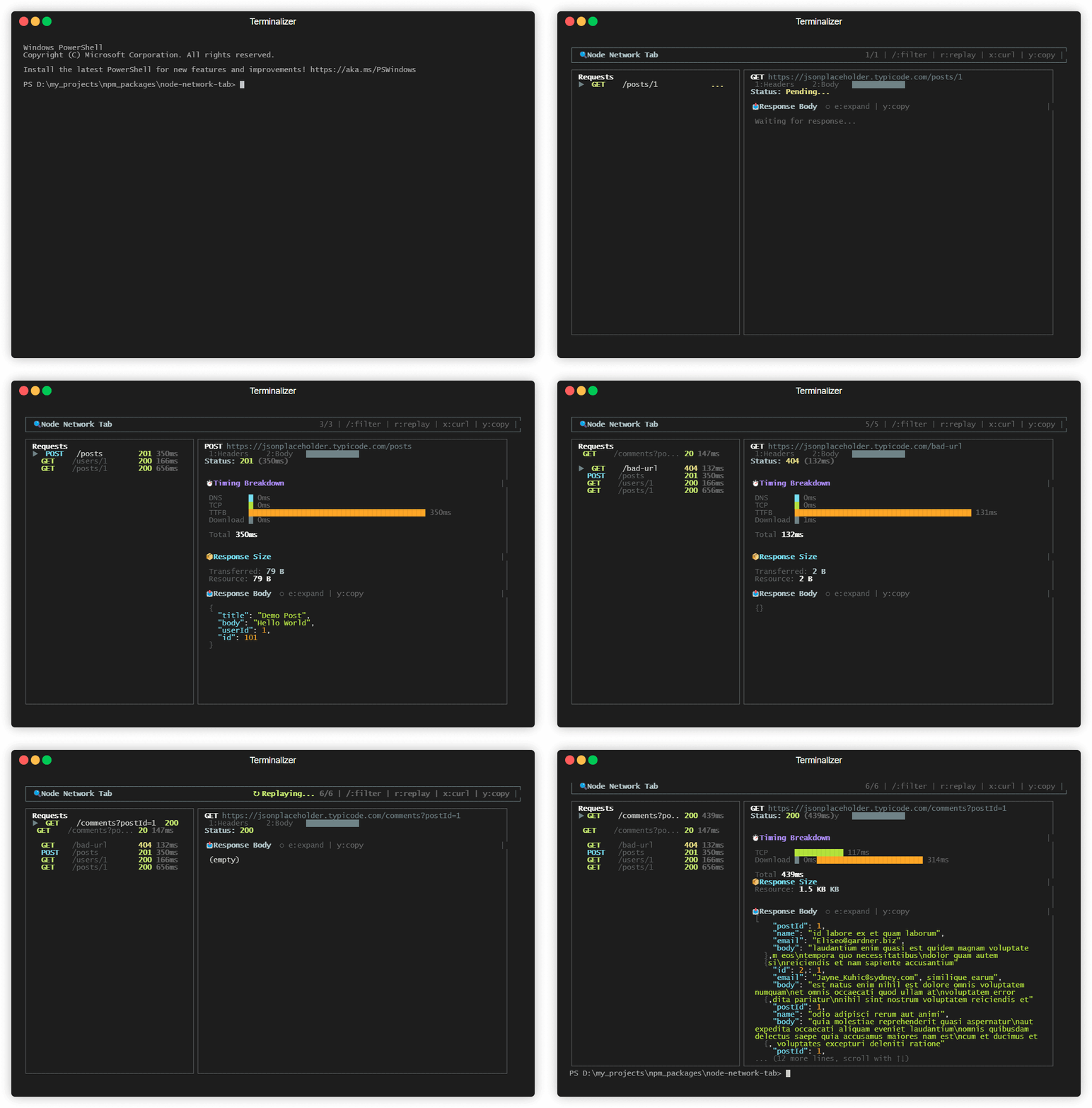
- 🎯 Zero-Config Magic - Just import the package, everything works automatically
- 🔒 Non-Destructive - Intercepts requests without modifying behavior
- 🎨 Beautiful TUI - Professional terminal UI with color-coded status
- ⚡ Real-time Updates - See requests as they happen
- 🔎 Smart Filtering - Filter by URL, method (GET/POST), status (200/500), or fuzzy search
- ⏱️ Timing Breakdown - See where time went: DNS, TCP, TTFB, Download with waterfall chart
- 📦 Size & Compression - See transferred vs resource size with compression savings
- 🔄 Request Replay - Re-run any request without restarting the app
- 📋 Request/Response Details - View headers, body, and response data
- 🎨 Syntax Highlighting - Colorized JSON with keys, strings, numbers, booleans
- ⌨️ Keyboard Navigation - Vim-style (j/k) and arrow key support
- 🔍 Expand Mode - View full response body with scrolling
- 📋 Copy to Clipboard - Copy headers/body/response or as cURL command
- 🛡️ Safety First - Only runs in development mode
npm install node-network-tabThis keeps your app logs clean and opens the UI in a second terminal:
import 'node-network-tab/start';

// Your application code...
// All HTTP/HTTPS requests are now monitored!
# Terminal 1: run your app as usual
node server.js
# (optional) explicit headless flag
NODE_NETWORK_TAB_HEADLESS=1 node server.js
# Terminal 2: open the viewer
npx node-network-tabIf you prefer the UI to open in the same terminal as your app:
NODE_NETWORK_TAB_INLINE_UI=1 node server.jsFor more control:
import { startInterceptor, renderUI, stopInterceptor } from 'node-network-tab';

// Start intercepting
startInterceptor();

// Render the TUI (optional - only works in TTY terminals)
renderUI();

// Your application code...

// Stop intercepting when done
stopInterceptor();If you want minimal request logs in the app terminal (without UI):
NODE_NETWORK_TAB_HEADLESS_LOGS=1 node server.js| Key | Action |
|---|---|
/ or f |
Open filter bar |
↑ / k |
Navigate up (requests or scroll in expand mode) |
↓ / j |
Navigate down (requests or scroll in expand mode) |
Tab / l / h |
Switch detail tabs |
1 |
Headers tab |
2 |
Body tab |
3 |
Response tab |
e |
Toggle expand mode (full-screen detail view) |
r |
Replay selected request |
x |
Copy request as cURL command |
y |
Copy current tab content to clipboard |
c |
Clear all requests and filter |
q |
Quit |
Press / or f to open the filter bar. The filter supports:
| Filter Type | Example | Description |
|---|---|---|
| Method | GET, POST |
Show only requests with that method |
| Status Code | 200, 404, 5 |
Match exact code or prefix (5 = 5xx) |
| Status Keywords | error, success, pending |
Filter by status category |
| Fuzzy Search | user, api |
Match any part of URL/path |
┌───────────────────────────────────────────────────────────────────────────────┐
│ 🔍 Node Network Tab                     🔎 "GET" 3/9 | /:filter | q:quit      │
└───────────────────────────────────────────────────────────────────────────────┘
┌──────────────────────────────────┐┌───────────────────────────────────────────┐
│ Requests (filtered)              ││ GET https://api.example.com/users         │
│                                  ││                                           │
│ ▶ GET    /users        200 142ms ││  [ 1:Headers ] [ 2:Body ] [ 3:Response ]  │
│   GET    /users/1      200 89ms  ││                                           │
│   GET    /posts        200 156ms ││  Status: 200 (142ms)                      │
└──────────────────────────────────┘└───────────────────────────────────────────┘
┌───────────────────────────────────────────────────────────────────────────────┐
│ 🔎 Filter: GET                                | Enter:apply | Esc:clear       │
└───────────────────────────────────────────────────────────────────────────────┘
Filter Bar Controls:
- Type to filter requests
- Press
Enterto apply and close the filter bar - Press
Escto clear the filter and close
Press e to toggle expand mode and view the full response/body/headers:
In Expand Mode:
- Use
↑/↓orj/kto scroll through content - Press
yto copy the full content to clipboard - Press
eagain to collapse back to normal view
┌────────────────────┬────────────────────────────────────────┐
│   Request List     │          Request Details               │
│   (35% width)      │          (65% width)                   │
│                    │                                        │
│ ▶ GET /api/users   │  [ 1:Headers ] [ 2:Body ] [ 3:Response ]│
│   POST /api/login  │                                        │
│   GET /api/data    │  Status: 200 (142ms)                   │
│                    │  📥 Response Body ○ e:expand | y:copy   │
│                    │  {                                     │
│                    │    "users": [...]                      │
│                    │  }                                     │
└────────────────────┴────────────────────────────────────────┘
| Feature | Description |
|---|---|
| Production Safety | Automatically disabled when NODE_ENV=production |
| Memory Safety | Only keeps the last 50 requests |
| Non-Destructive | Never modifies, blocks, or delays requests |
- Debug API Calls - See exactly what your app is sending to external services
- Monitor Third-Party SDKs - Watch requests from Stripe, OpenAI, AWS, etc.
- Development Mode Logging - Better visibility than console.log
- Teaching/Learning - Understand how HTTP works in Node.js
// Main API
import {
  startInterceptor,
  stopInterceptor,
  isInterceptorActive,
  renderUI,
  unmountUI,
  store,
  getStore,
  interceptorEmitter,
} from 'node-network-tab';

// Types
import type {
  RequestLog,
  RequestStatus,
  RequestStartEvent,
  RequestBodyEvent,
  ResponseHeadersEvent,
  ResponseCompleteEvent,
  RequestErrorEvent,
} from 'node-network-tab';- Monkey Patching - Overrides
http.requestandhttps.requestat the module level - Transparent Interception - Captures data using event listeners and PassThrough streams
- EventEmitter Architecture - Internal events update the store and UI
- Ink TUI - React-based terminal UI with real-time updates
- Node.js >= 18.0.0
- Terminal with TTY support (for the UI)
| Feature | node-network-tab | console.log | Postman |
|---|---|---|---|
| Zero Config | ✅ | ✅ | ❌ |
| Auto-capture | ✅ | ❌ | ❌ |
| Real-time | ✅ | ✅ | ❌ |
| Pretty UI | ✅ | ❌ | ✅ |
| In-process | ✅ | ✅ | ❌ |
| Smart Filtering | ✅ | ❌ | ✅ |
| Expand/Scroll | ✅ | ❌ | ✅ |
| Copy to Clipboard | ✅ | ❌ | ✅ |
Contributions are welcome! Please feel free to submit a Pull Request.
- Fork the repository
- Create your feature branch (
git checkout -b feature/amazing-feature) - Commit your changes (
git commit -m 'Add some amazing feature') - Push to the branch (
git push origin feature/amazing-feature) - Open a Pull Request
MIT © rohit-jsfreaky
Made with ❤️ for the Node.js community