Client API
The API to create or remove a queue is exposed through the Logical Queue Factory, which just needs the address of the Global Configuration Manager to start. It maintains a cache of the RoQ cluster topology.
String configServerAddress = "192.23.25.25";
LogicalQFactory factory = new LogicalQFactory(configServerAddress);
factory.createQueue(qName, host);
In the same way, to remove a queue just call:
factory.removeQueue("queue1");The Publisher API allows clients to send messages to queues.
//1. Creating the connection
IRoQConnectionFactory factory = new RoQConnectionFactory(configServerAddress);
IRoQConnection connection = factory.createRoQConnection("queue1");
connection.open();
//2. Creating the publisher and sending message
IRoQPublisher publisher = connection.createPublisher();
// Wait for the connection is established before sending the first message
connection.blockTillReady(10000);
publisher.sendMessage("sabri".getBytes(), "hello".getBytes()The architecture is shown in the figure below.
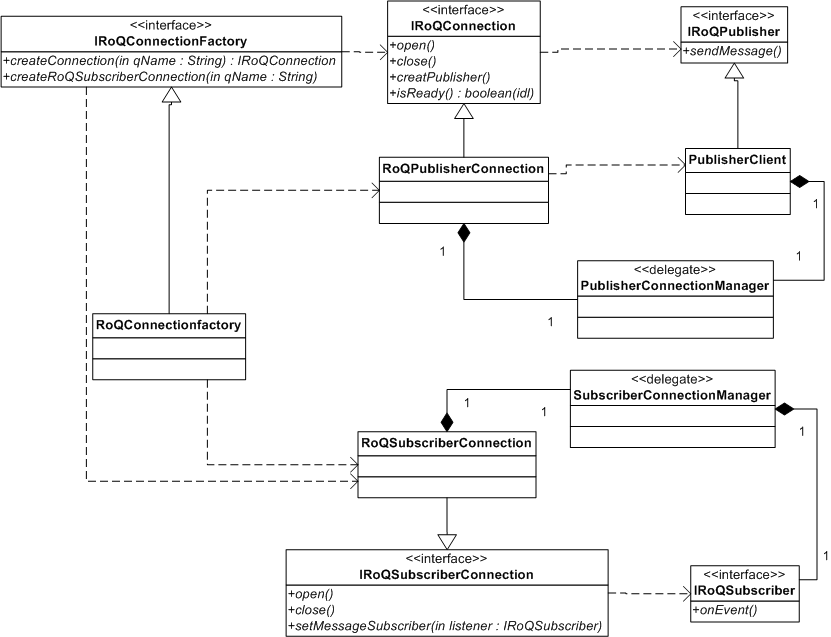
The RoQPublisherConnection manages the life cycle of the PublisherConnectionManager thread. This thread is responsible for targeting the right Exchange, it can be notified through the management channel by the Monitor of the queue in order to re-allocate the publisher to another Exchange. This re-allocation can be caused by an Exchange failure or by the fact that an Exchange is overloaded.
The close method on the RoQConnection stops the PublisherConnectionManager thread.
The RoQConnectionFactory is a factory that is responsible for creating a RoQConnection instance. The factory needs the address of the Global Configuration Manager in order to fetch the address of the Monitor associated with the logical queue name that the publisher must bind to. As a result the PublisherConnectionManager thread can directly send requests to the right Monitor thread.
In the same way, the Subscriber API needs a connection. This object will manage any topological changes to the logical queue. As a result, if an exchange is added or removed, the connection thread reconfigures the underlying connections. Like the publisher connection, the subscriber connection must be opened and closed when the client caller has finished sending messages.
//1. Create with the factory, create the connection
String configServerAddress = "192.23.25.25";
IRoQConnectionFactory factory= new RoQonnectionFactory(configServerAddress );
//Create a Q connection on the logical queue name queue1 with the filter key sabri.
IRoQSubscriberConnection subConnection = factory.createRoQSubscriberConnection("queue1","sabri");
//2. Open the connection to the logical queue
subConnection.open();
//3. Register a message listener
subConnection.setMessageSubscriber(new IRoQSubscriber() {
     public void onEvent(byte[] msg) {
     String content= new String(msg,0,msg.length) ;
     assert content.equals("hello");
       logger.info("In message lIstener recieveing :"+ content);
     }
});For any non-JAVA process that needs to subscribe to KPIs sent by the Statistics Monitor server, a statistics broadcasting channel is available. The only task to write is the subscription to the Statistics Monitor's broadcast channel. To get this channel the client can ask directly to the Global Configuration Manager.
// 1. Get the location in BSON
// 1.1 Create the request socket
ZMQ.Socket globalConfigReq = context.socket(ZMQ.REQ);
globalConfigReq.connect("tcp://" + this.configurationServer + ":5000");

// 1.2 Send the request
// Prepare the request BSON object
BSONObject request = new BasicBSONObject();
request.put("CMD", RoQConstant.BSON_CONFIG_GET_HOST_BY_QNAME);
request.put("QName", qName);
//Send
globalConfigReq.send(BSON.encode(request), 0);
byte[] configuration = globalConfigReq.recv(0);

//1.3 decode the host address
BSONObject dConfiguration = BSON.decode(configuration);
String monitorStatServer = (String) dConfiguration.get(RoQConstant.BSON_STAT_MONITOR_HOST);
Assert.assertNotNull(monitorStatServer);

// 2. Register a socket to the stat monitor
kpiSocket = context.socket(ZMQ.SUB);
kpiSocket.connect(monitorStatServer);
kpiSocket.subscribe("".getBytes());
Notice that if you are in JAVA, you can still use the JAVA serialisation for encoding the global configuration request:
globalConfigReq.send((RoQConstant.BSON_CONFIG_GET_HOST_BY_QNAME + "," + qName).getBytes(), 0);Once we have subscribed to statistics from a queue's Statistics Monitor, we receive information about that queue. We receive the following information from each Exchange (forwarded to us by the Statistics Monitor) as a muli-part message:
{
    "CMD" : 20 ,
    "X_ID" : "XChange 1340470515568"
}
{
    "CMD" : 21 ,
    "Minute" : "1" ,
    "TotalProcessed" : "500" ,
    "Processed" : "500" ,
    "TotalThroughput" : "0" ,
    "Throughput" : "3890" ,
    "Producers" : "1"
}
{
    "CMD" : 22 ,
    "CPU" : "1.12" ,
    "MEMORY" : "4.6083984375"
}
In addition we can receive information at the Logical Queue level:
{
	"CMD" : 23 ,
	"QName" : "queueTestStat:5500" ,
	"XChanges" : "1" ,
	"Producers" : "0" ,
	"Throughput" : "0"
}
From the subscriber we get:
{
	"CMD" : 31 ,
	"Minute" : "0" ,
	"TotalReceived" : "1000" ,
	"Received" : "0" ,
	"SubsriberID" : "b1a92da6-d9c6-4231-b1b4-70f62590822d" ,
	"MeanLat" : "0"
}
The Management Controller broadcasts every minute the configuration of the RoQ cluster. Any client can connect to the broadcast port on :5005 (default value, can be changed) and start receiving topology information in BSON.
// 1. ZMQ Init
this.context = ZMQ.context(1);
// 2. Register a socket to the stat monitor
mngtSubSocket = context.socket(ZMQ.SUB);
mngtSubSocket.connect("tcp://"+globalMgntAddress+":5005");
mngtSubSocket.subscribe("".getBytes());
The information we get is in the following format:
{
	"CMD" : 1500
}
{
  "Queues" :
    [ { "Name" : "queue1" , "Host" : "172.23.107.160" , "State" : false} ,
      { "Name" : "queueTest" , "Host" : "172.23.107.160" , "State" : true} ,
      { "Name" : "queue2" , "Host" : "172.23.107.160" , "State" : true}
    ]
}
{
	"Hosts" : [ "172.23.107.160"]
}
In order to let third-party clients manage a RoQ cluster, we expose a BSON-encoded admin API on port 5003 (default value) of the Global Configuration Manager.
The remove code request is 2001, we need to specify the queue name.
{ "CMD" : 2001 , "QName" : "myName"}
The reply contains the result and comments. The result code 0 = SUCCESS, 1101 = FAIL.
{ "RESULT" : 1101 , "COMMENT" : "The queue does not exist"}
The stop code request is 2002, we need to specify the queue name. Note that you can only stop a queue that exists.
{ "CMD" : 2002 , "QName" : "myName"}
The reply contains the result and comments. The result code 0 = SUCCESS, 1101 = FAIL.
{ "RESULT" : 1101 , "COMMENT" : "The queue does not exist"}
The create code request is 2003, we need to specify the queue name.
{ "CMD" : 2003 , "QName" : "myName", "Host" : "168.0.1.1"}
The reply contains the result and comments. The result code 0 = SUCCESS, 1101 = FAIL.
{ "RESULT" : 0 , "COMMENT" : "SUCCESS"}
The Start code request is 2005, we need to specify the queue name. If the queue exists and is present in the topology maintained by the GCM, the Management Controller retrieves its host and commands the Host Configuration Manager running on that machine to start the queue. Note that you can only start a queue that has been stopped. To start a queue that does not exist, use the Create Queue command.
{ "CMD" : 2005 , "QName" : "myName"}
The reply contains the result and comments. The result code 0 = SUCCESS, 1101 = FAIL.
{ "RESULT" : 1101 , "COMMENT" : "The queue does not exist"}