



A lightweight app that triggers a real incoming phone call to your Android device with a single tap (through a widget). Perfect for politely exiting conversations.
Android App (Button / Widget)
  → HTTPS POST
  → Vercel Serverless Backend
  → Twilio Voice API
  → Real incoming call to your phone
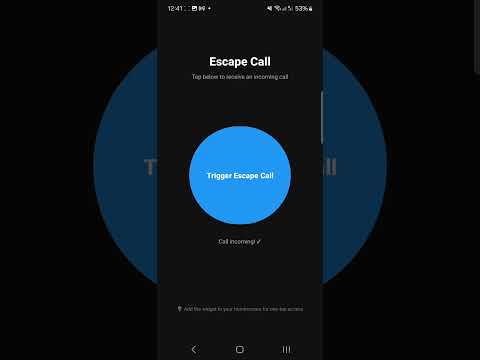 |
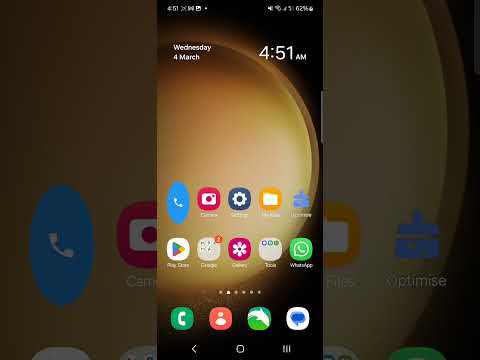 |
|---|---|
| Demo 1 (One tap → real incoming call in seconds) | Demo 2 (Triggering a call through the widget) |
escape-call/
├── backend/                    # Vercel serverless functions
│   ├── api/
│   │   ├── trigger-call.js     # POST endpoint — initiates the Twilio call
│   │   └── twiml-silent.js     # GET endpoint — returns silent TwiML
│   ├── package.json
│   ├── vercel.json
│   └── .env.example
│
├── android/                    # Android app (Kotlin)
│   ├── app/src/main/
│   │   ├── java/com/escapecall/
│   │   │   ├── Config.kt              # ← EDIT THIS: your backend URL + token
│   │   │   ├── MainActivity.kt        # In-app trigger button
│   │   │   ├── network/
│   │   │   │   ├── ApiClient.kt       # HTTP client
│   │   │   │   └── TriggerCallService.kt  # Foreground service for widget
│   │   │   └── widget/
│   │   │       └── EscapeCallWidget.kt    # Homescreen widget
│   │   └── res/                        # Layouts, drawables, XML configs
│   ├── build.gradle.kts
│   └── settings.gradle.kts
│
└── README.md
- Node.js (v18+)
- Vercel CLI (
npm i -g vercel) - Android Studio (Hedgehog or newer)
- A Twilio account (free trial works)
- A Twilio phone number (you get one free on trial)
- Sign up at twilio.com
- From the Console dashboard, note your:
- Account SID (starts with
AC) - Auth Token
- Account SID (starts with
- Get a phone number: Phone Numbers → Manage → Buy a Number
- Note your Twilio phone number (e.g.,
+12025551234)
Pro tip: Save the Twilio number as a contact on your phone (e.g., "Mom" or "Boss") so incoming calls look completely natural.
cd backend

# Install dependencies
npm install

# Deploy to Vercel
vercel

# Follow the prompts (link to a new project, accept defaults)
After deployment, set your environment variables:
# Set each variable (Vercel will prompt for values)
vercel env add TWILIO_ACCOUNT_SID        # Your AC... string
vercel env add TWILIO_AUTH_TOKEN          # Your auth token
vercel env add TWILIO_PHONE_NUMBER        # +1XXXXXXXXXX (your Twilio number)
vercel env add USER_PHONE_NUMBER          # +1XXXXXXXXXX (YOUR real phone number)
vercel env add ESCAPE_SECRET_TOKEN        # Any random string (e.g., generate with: openssl rand -hex 32)
Redeploy to pick up the env vars:
vercel --prodNote your production URL (e.g., https://escape-call-abc123.vercel.app).
Test it:
curl -X POST https://YOUR-URL.vercel.app/api/trigger-call \
  -H "Content-Type: application/json" \
  -H "X-Escape-Token: YOUR_SECRET_TOKEN" \
  -d '{}'
Your phone should ring within a few seconds!
- Open
android/in Android Studio - Edit
app/src/main/java/com/escapecall/Config.kt:
object Config {
    const val BACKEND_URL = "https://your-project.vercel.app"  // ← Your Vercel URL
    const val SECRET_TOKEN = "your_random_secret_token_here"   // ← Same token as backend
}-
Build and install on your device:
- Run → Run 'app' (or
./gradlew installDebug)
- Run → Run 'app' (or
-
Add the widget:
- Long-press on your homescreen
- Select Widgets
- Find Escape Call → drag it to your homescreen
- You tap the button (app) or widget (homescreen)
- App sends
POST /api/trigger-callwithX-Escape-Tokenheader - Backend validates the token
- Backend calls
twilio.calls.create()with your phone number - Twilio calls your phone — it rings like a normal call
- When you answer, the call is silent (30-second pause, then hangs up)
- Twilio credentials are only on the Vercel backend (env vars)
- The Android app only knows the backend URL and a shared secret token
- The endpoint rejects requests without a valid token
- No phone numbers are stored in the app
| Service | Free Tier | Expected Cost |
|---|---|---|
| Vercel | 100GB bandwidth, serverless functions | $0 |
| Twilio | ~$1/mo for phone number + ~$0.014/min per call | ~$1-2/mo |
For occasional use (a few calls per month), total cost is ~$1/month (just the Twilio number).
The architecture is designed for easy extension:
- Voice playback: Replace
twiml-silent.jswith<Say>or<Play>TwiML - Multiple personas: Add a query param to
trigger-callto select different TwiML responses - Random delay: Add
setTimeoutin the backend before calling Twilio - Cooldown: Track last call time in a simple KV store
- Scheduled calls: Use Vercel Cron or similar
Twilio Trial Note: On a free trial, you can only call verified phone numbers. Go to Twilio Console → Phone Numbers → Verified Caller IDs and add your personal number.