
This script is a DFPlayer Mini Serial Controller. A Python-based Graphical User Interface (GUI) to control the DFPlayer Mini MP3 module via Serial (UART). This tool allows you to manage folders, volume, equalizers, and real-time status monitoring.
- Coded with the help of Google AI - Gemini.
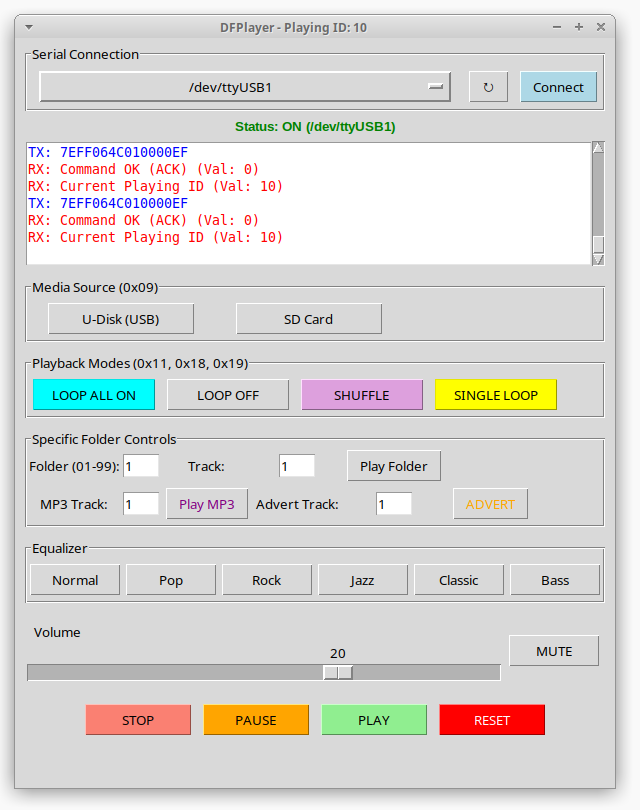
- Auto-Connect: Automatically scans for
ttyUSBorttyACMports. - Robustness: Handles cable disconnections without crashing.
- Equalizer: Support for 6 EQ modes (Normal, Pop, Rock, Jazz, Classic, Bass).
- Folder Support: Play specific tracks from folders
01-99. - Real-time Log: Monitor hexadecimal responses (ACK, Card Inserted, Track ID).
- Serial Connection Port Selector (↻): Automatically scans your system for available USB/ACM serial ports.
Connect: Initializes the serial communication at 9600 baud.
- Playback Controls PLAY: Resumes playback or starts the current track from the beginning after a STOP.
PAUSE: Freezes the current track at its exact position.
STOP: Ends playback and resets the track pointer to the start.
RESET: Performs a hardware reset on the DFPlayer module.
- Folder Management Play Folder (0x0F): Plays a specific track from a numbered folder (01-99).
Play MP3 (0x12): Accesses the special MP3 folder. Supports up to 3000 files.
ADVERT (0x13): Plays an announcement from the ADVERT folder. Crucial feature: It pauses the current music, plays the advert, and then automatically resumes the music from where it left off.
- Audio Customization Equalizer: Quick buttons for 6 preset modes: Normal, Pop, Rock, Jazz, Classic, and Bass.
Volume Slider: Real-time volume control (0 to 30).
MUTE: Instantly silences the output. It has a "memory" feature that restores your previous volume level when unmuted.
- Advanced Monitoring Real-time Log: Displays Hexadecimal packets sent (TX) and received (RX).
Auto-Title Update: The window title automatically updates every 5 seconds to show the ID of the file currently playing (via Query 0x4C).
To use all features, organize your SD card as follows:
Folders named 01, 02, etc. (01-99), containing files named 001.mp3, 002.mp3.
A folder named MP3 for general files (must be named 0001.mp3, 0002.mp3, etc.).
A folder named ADVERT for interruptive announcements (files must be named 0001.mp3, 0002.mp3, etc.).
- Install dependencies:
pip install pyserial
Connect your DFPlayer to your computer using a USB-to-Serial adapter.
Run the script:
python df_player_gui.pyTo test your setup, you can use high-quality royalty-free tracks.
- Download the Free Fantasy RPG Tracks (Check the file license).
- Create a folder named
01on your FAT32 SD Card. - Rename the files to
001.mp3,002.mp3, etc. - Use the Folder Control in the GUI to play them!
To ensure stability and protect your hardware, follow these guidelines:
Most USB-to-Serial adapters (like FTDI or CH340) operate at 5V. However, the DFPlayer Mini UART pins are 3.3V level.
- The 1K Resistor Trick: You must place a 1kΩ resistor in series between the Adapter's TX and the DFPlayer's RX pin.
- Why? This reduces voltage noise and prevents the common "digital hum" or "popping" sounds in the speaker.
- Ground: Ensure the Adapter and DFPlayer share a common GND.
The DFPlayer Mini can handle USB in two distinct ways using the USB+ (DP) and USB- (DM) pins:
Use this to play music from a USB Flash Drive.
- Wiring: Connect DP and DM pins to a female USB-A connector.
- Power: Ensure your power supply can provide enough current for both the module and the Flash Drive.
- Command: Select "USB" in the GUI (Command
0x09 0x01).
Connect the DFPlayer directly to your Computer's USB port.
- Wiring: Connect DP/DM pins to a male USB cable.
- Function: Your computer will recognize the MicroSD card as a "Removable Drive". You can drag and drop MP3 files without removing the card.
- Note: While the PC is accessing the card, serial commands for playback may be ignored.
- Max Capacity: 32GB (MicroSDHC or USB 2.0).
- File System: FAT16 or FAT32 only (exFAT is NOT supported).
- Partition Style: MBR (GPT is not supported).
- File Naming: * Folders:
01,02, ...,99.- Files:
001.mp3,002.mp3, etc.
- Files:
- Pro Tip: Avoid hidden system files (like
.DS_Storeor._track.mp3). Always clean your drive after copying files to ensure the module reads the tracks in the correct order.
List of related parts:
- DFPlayer Mini
- FTDI232 USB Serial Converter (red board)
- 1k resistor
- SD card
- Udisk
- USB A connector (for USB disk)
- Computer with Python (Linux)
Software License: This library is free software; you can redistribute it and/or modify it under the terms of the GNU Lesser General Public License as published by the Free Software Foundation; either version 2.1 of the License, or (at your option) any later version.
This library is distributed in the hope that it will be useful, but WITHOUT ANY WARRANTY; without even the implied warranty of MERCHANTABILITY or FITNESS FOR A PARTICULAR PURPOSE. See the GNU Lesser General Public License for more details.
You should have received a copy of the GNU Lesser General Public License along with this library; if not, write to the Free Software Foundation, Inc., 51 Franklin St, Fifth Floor, Boston, MA 02110-1301 USA