A Claude Code skill that gives Claude the ability to capture, inspect, and debug GPU frames using RenderDoc. Works with Vulkan, D3D11, D3D12, and OpenGL.
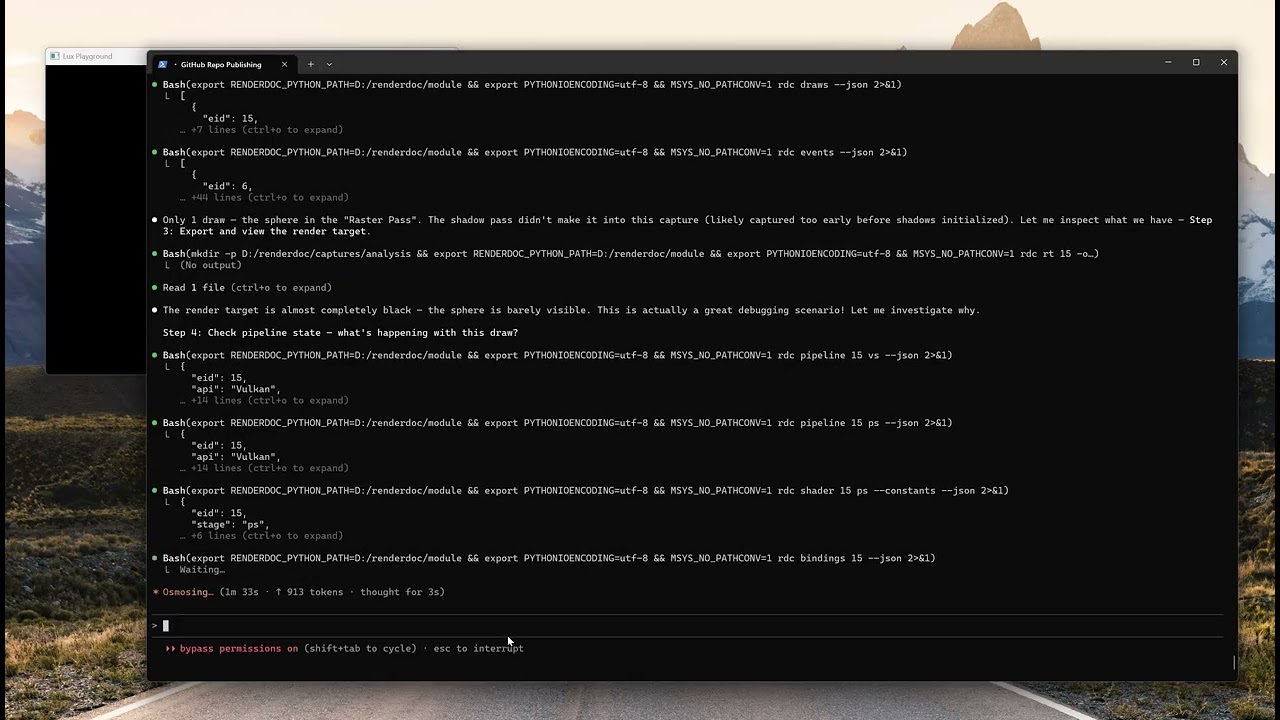
This skill teaches Claude Code how to do GPU debugging. When you describe a rendering problem — broken shadows, wrong colors, missing objects, performance issues — Claude can:
- Capture GPU frames from your application using RenderDoc's Python API
- Inspect pipeline state at any draw call (shaders, blend, depth, rasterizer, bindings)
- Export and view render targets as PNGs (Claude is multimodal — it can see your framebuffer)
- Debug shaders line-by-line, tracing pixel/vertex/compute execution
- Trace pixel history to find which draw wrote a color and why
- Edit and replay shaders without recompiling your application
- Compare frames side-by-side to find regressions
It works through rdc-cli, a 66-command CLI that wraps RenderDoc's Python API into shell commands that Claude Code can call.
| Requirement | Notes |
|---|---|
| RenderDoc | Need renderdoc.pyd + renderdoc.dll (from RenderDoc install or built from source) |
| Python 3.10+ | Must match the Python version renderdoc.pyd was built against |
| rdc-cli | pip install rdc-cli |
| Claude Code | Anthropic's CLI agent |
# Option A: Clone into your project directory
cd /path/to/your/project
git clone https://github.com/rudybear/renderdoc-skill .claude/skills/renderdoc-gpu-debug

# Option B: Clone standalone and copy the skill files
git clone https://github.com/rudybear/renderdoc-skill
cp -r renderdoc-skill/.claude/skills/renderdoc-gpu-debug /path/to/your/project/.claude/skills/pip install rdc-cliSet RENDERDOC_PYTHON_PATH to the directory containing renderdoc.pyd and renderdoc.dll:
# In your shell profile (.bashrc, .zshrc, etc.)
export RENDERDOC_PYTHON_PATH=/path/to/renderdoc/module
If you installed RenderDoc from the official installer, this is typically:
- Windows:
C:/Program Files/RenderDoc/ - Linux:
/usr/lib/renderdoc/or wherever you built it
For Vulkan capture, the RenderDoc implicit layer must be registered:
- Windows: Add
renderdoc.jsontoHKCU\SOFTWARE\Khronos\Vulkan\ImplicitLayers(DWORD 0) - Linux: Copy
renderdoc.jsonto~/.local/share/vulkan/implicit_layer.d/
Also set: export ENABLE_VULKAN_RENDERDOC_CAPTURE=1
rdc doctorAll checks should pass.
Edit the CLAUDE.md in this repo to fill in your project-specific paths (application executable, working directory, capture output directory). This tells Claude about your specific setup.
Instead of (or in addition to) the skill, you can use the MCP server. This registers rdc-cli as native Claude Code tools that appear in /mcp.
pip install -r requirements-mcp.txtclaude mcp add rdc-tools -- python D:/renderdoc/mcp_server/server.pyIn Claude Code, run /mcp — you should see rdc-tools listed with 13 tools, 2 resources, and 6 prompts.
| Tool | Commands | Purpose |
|---|---|---|
rdc_session |
open, close, status | Session lifecycle |
rdc_overview |
info, stats, passes, count, gpus | First-look after opening |
rdc_draws |
draws, draw | Draw call navigation |
rdc_events |
events, event | API event listing |
rdc_pipeline |
pipeline, bindings | Pipeline state inspection |
rdc_shader |
shader, shaders, search, shader-map | Shader inspection |
rdc_export |
rt, texture, thumbnail, mesh, buffer | Visual export (inline image + path) |
rdc_pixel |
pixel, pick-pixel, debug pixel/vertex/thread | Pixel debugging |
rdc_diff |
diff | Frame comparison |
rdc_resources |
resources, resource, usage, tex-stats | Resource inspection |
rdc_shader_edit |
shader-build/replace/restore/encodings | Edit-replay |
rdc_capture |
capture, attach, trigger, list, copy | Frame capture |
rdc_vfs |
ls, tree, cat | Virtual filesystem |
rdc_command |
any rdc command | Generic fallback |
Claude Code loads skills based on YAML frontmatter keywords. When you mention GPU debugging, RenderDoc, shaders, render targets, pipeline state, or visual glitches, Claude activates this skill and gains access to the full rdc-cli command vocabulary.
Every inspection session follows open-work-close:
rdc open path/to/capture.rdc   # Load a capture
# ... inspection commands ...
rdc close # Release GPU resourcesClaude can see images. The core debugging loop is:
- Export a render target or texture to PNG (
rdc rt EID -o output.png) - View it using Claude Code's Read tool (multimodal — Claude sees the image)
- Correlate with pipeline state data (
rdc pipeline,rdc shader,rdc bindings) - Diagnose the issue and suggest fixes
The skill includes 6 ready-made debugging workflows:
- Object is invisible — culling, depth, blend, vertex transform checks
- Colors are wrong — texture bindings, constants, blend state, shader trace
- Shadows are broken — shadow map export, depth bias, light matrices, PCF
- Performance is bad — draw counts, resource sizes, overdraw, GPU counters
- What changed between frames — frame diff with visual comparison
- Debug this pixel — pixel history, shader trace, variable inspection
.claude/skills/renderdoc-gpu-debug/
  SKILL.md                          # Main skill (loaded by Claude Code)
  references/
    commands-quick-ref.md           # All 66 rdc-cli commands with args/options
    debugging-recipes.md            # 6 extended debugging workflows

CLAUDE.md                           # Project context (customize for your app)
capture_frame.py                    # Example: capture a frame via RenderDoc Python API
Once installed, just talk to Claude Code naturally:
> The shadows in my scene look blocky and have acne artifacts. Can you debug it?

> Capture a frame and show me what the shadow map looks like.

> Why is the sphere rendering black? It should be red.

> Compare these two captures and tell me what changed.

> Debug pixel (256, 300) — why is it transparent?
Claude will use rdc-cli commands, export PNGs to inspect visually, check pipeline state, and trace shader execution to diagnose the issue.
- rdc-cli by Jim (BANANASJIM) — the 66-command CLI that makes this skill possible. MIT license.
- RenderDoc by Baldur Karlsson — the GPU debugger that powers everything underneath. MIT license.
- Claude Code by Anthropic — the AI coding agent that runs the skill.
MIT. See LICENSE.