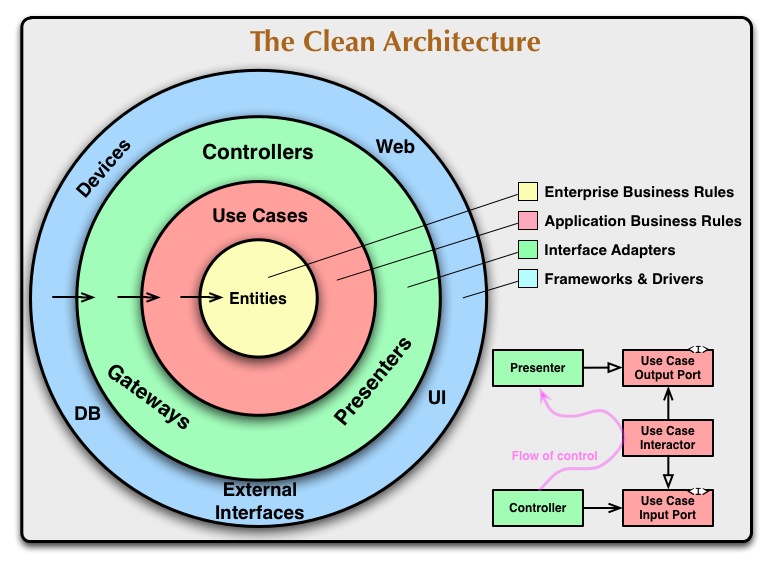
This Node.js application provides an API for managing workouts. It follows the clean architecture principles introduced by Bob Martin and serves as a demonstration of how to implement such architecture in a Node.js project.
Before running this project, ensure you have the following installed:
- Node.js: Ensure you have Node.js installed.
- MongoDB: Use MongoDB Atlas or install and run MongoDB locally.
-
Clone the repo and install dependencies:
git clone https://github.com/ruth-cohen89clean-arch-workouts-api.git
cd clean-arch-workouts-api
npm install
-
Create a
.envfile: Create a.envfile in the root directory of the project. -
Define the
NODE_ENVvariable: In the.envfile, set theNODE_ENVvariable to eitherdevelopmentorproduction. For example:NODE_ENV=developmentThis environment variable controls the application's runtime environment.
-
Set up MongoDB connection: Replace
your-database-namewith your MongoDB database name andyour-database-passwordwith your MongoDB database password in the.envfile. Make sure to replaceyour-database-nameandyour-database-passwordwith your actual MongoDB database name and password, respectively.DATABASE=your-database-name DATABASE_PASSWORD=your-database-password
-
Start the server:
npm start
-
Access the API endpoints using a tool like
curl,Postman, or integrate it into your frontend application.
The project follows the clean architecture principles proposed by Bob Martin. Here's a brief overview of the project structure:
src/: Contains the application source code.controllers/: Controllers responsible for handling HTTP requests and responses.middlewares/: Middleware functions.models/: Data models representing domain entities.routes/: Route definitions for mapping endpoints to controller actions.services/: Business logic and application services.utils/: Utility functions and helpers.
config/: Configuration files.app.js: Entry point of the application..env: Environment variables.
Contributions are welcome! If you have suggestions for improvements, or if you encounter any issues, feel free to open an issue or submit a pull request.
This project is licensed under the MIT License.