Repository navigation
Main Hardware Output
s3g Main Hardware Out 32 is the end-of-chain device for decoded or panned multichannel audio. Place it immediately after a multichannel s3g Ambi Decoder …, s3g Panner …, or another compatible wrapper on the same audio track. It takes the preceding device's first 32 auxiliary output channels; it does not receive a numbered bus by itself.
For an Ambisonic speaker setup, the device order is:
s3g Bus Receive 36 → s3g Ambi Decoder Speaker → s3g Main Hardware Out 32

Set Receive's BUS to the encoder's Send bus. Configure the speaker layout in the decoder's EDITOR. In Main, use the mono channel map to choose which decoded channel reaches each output slot, then choose the corresponding Live hardware stereo pairs in HARDWARE. This allows individual mono assignments inside Live's pair-based output system.
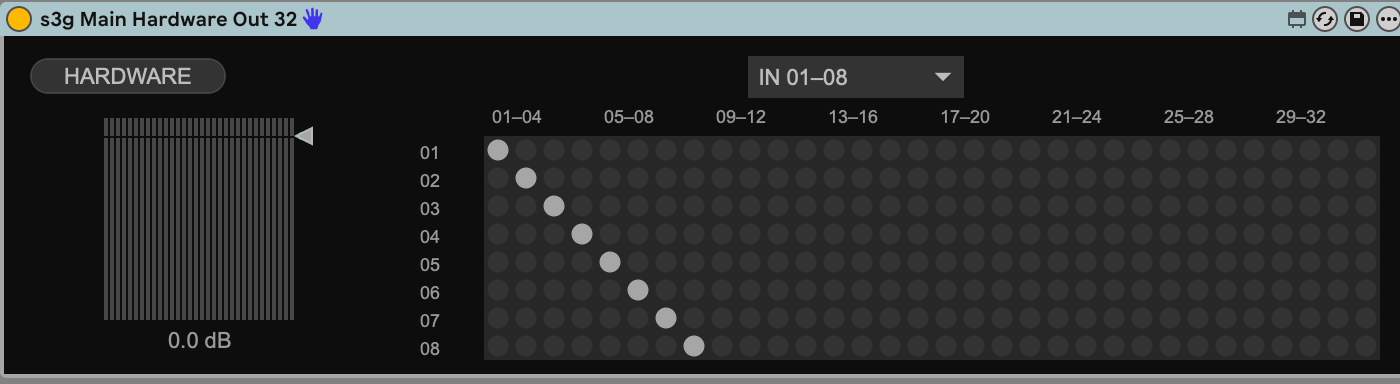
The IN 01–08 menu changes which eight input channels the grid displays; the columns are output slots 01–32. The HARDWARE button opens the Live output-pair assignments. The grid remaps mono channels before those pair assignments.
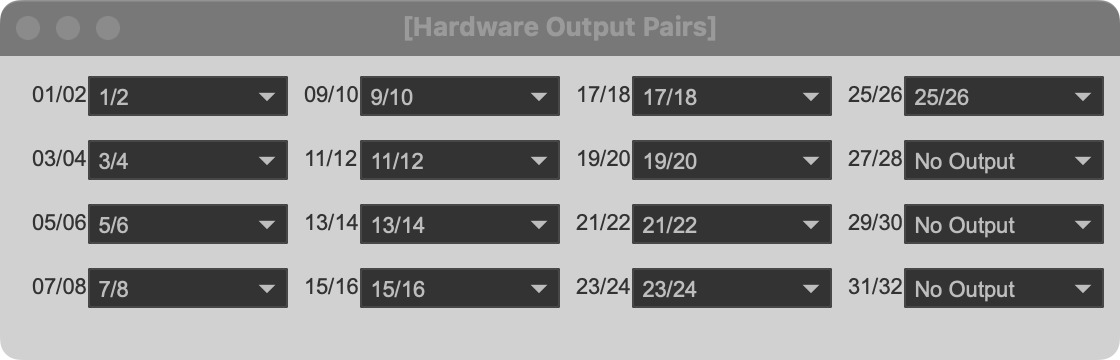
Each popup menu assigns one pair of Main's output slots to a Live hardware stereo pair. Choose No Output for pairs you are not using. Available hardware pairs depend on Live's audio-output configuration.
Main addresses up to 32 mono outputs. That is a separate limit from the 36-channel bus feeding the decoder. The decoder must reduce the field to 32 or fewer outputs before Main. A stereo Head or Stereo decoder, or s3g Output Autogain Stereo, returns to Live's ordinary stereo track output and does not need Main.
Start with monitoring levels low when assigning hardware outputs. If Main shows signal but a speaker is silent, check the decoder's active output format, Main's mono map, its HARDWARE assignments, and Live's audio interface output configuration.