Skip to content

PBI AB#20349 [My Ministry > Members] [mobile] - Implement page details banner#66

Merged
groberts314 merged 7 commits intosaddlebackdev:devfrom
gbulatov:features/20349-page-details-fixes
Oct 9, 2019
Merged

PBI AB#20349 [My Ministry > Members] [mobile] - Implement page details banner#66
groberts314 merged 7 commits intosaddlebackdev:devfrom
gbulatov:features/20349-page-details-fixes

Conversation

@IlyaRadinsky
Copy link
Copy Markdown
Contributor

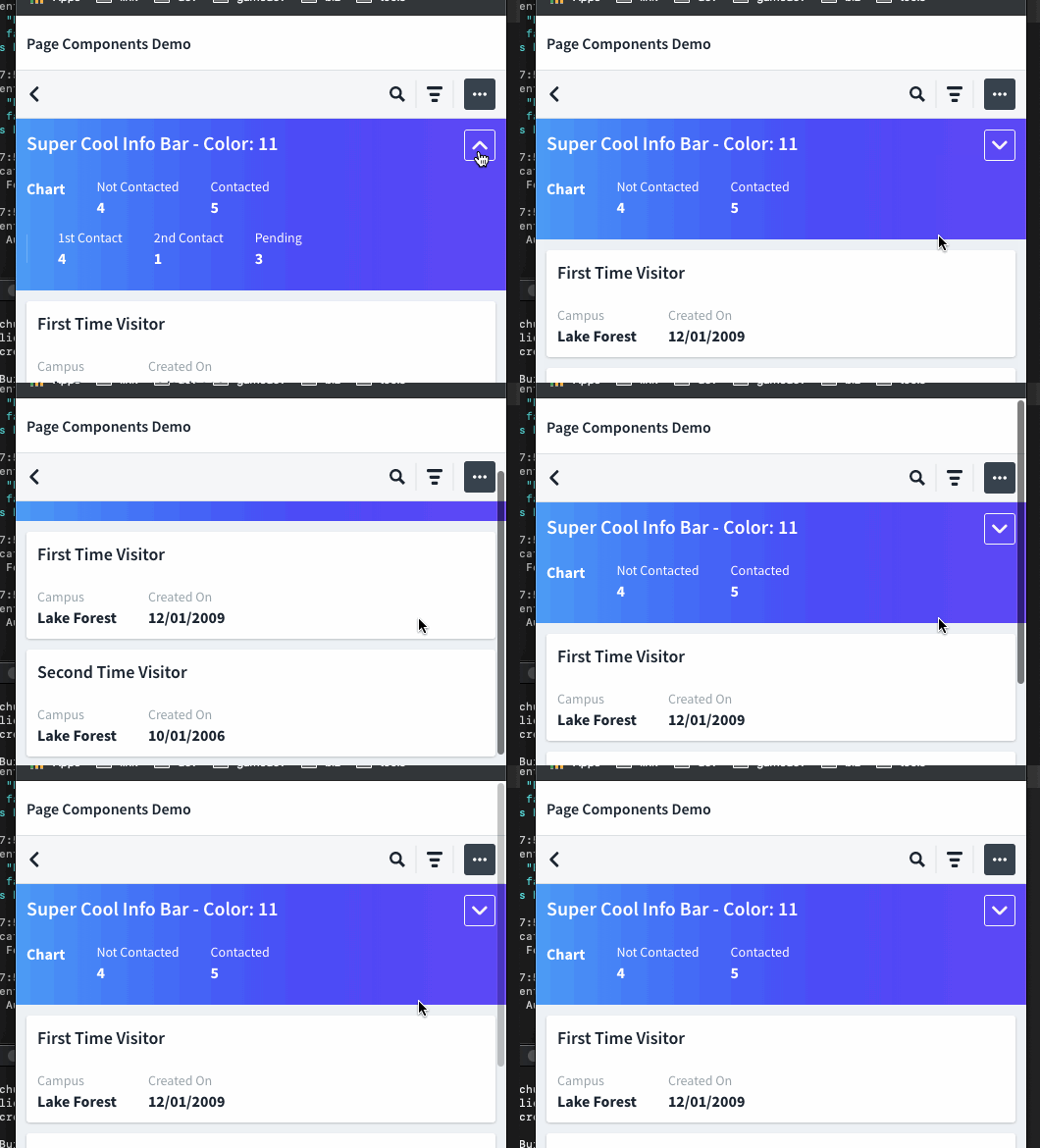
In this demo the Expand button showing in mobile mode only.

page-details-demo

@groberts314 , @morethanfire please have a look

@groberts314
Copy link
Copy Markdown
Contributor

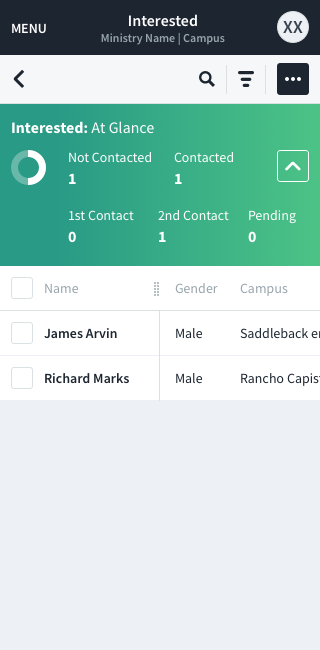
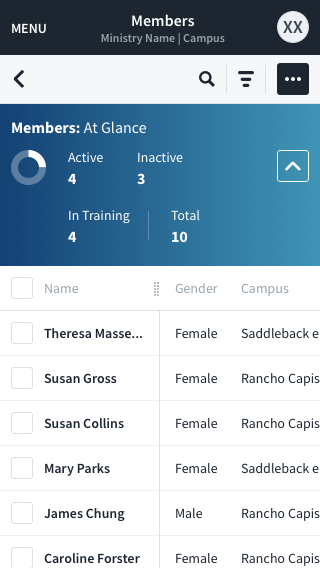
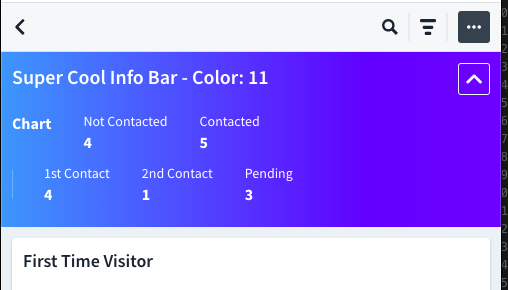
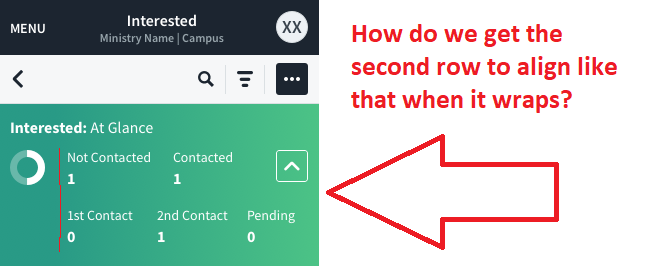
Is there any way to align the second row of statistics with the start of the first (leaving the space below the chart empty), like the mocks for My Ministry?

Members Page Details Interested Expanded

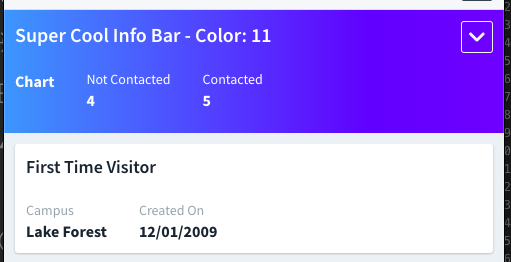
Members Page Details Mobile Expanded

Copy link
Copy Markdown
Contributor

@groberts314 groberts314 left a comment

Choose a reason for hiding this comment

The reason will be displayed to describe this comment to others. Learn more.

Looks pretty good overall to me. I had one styling concern around the margins/position of the expanded row of detailed statistics (which, in the My Ministry comps are aligned under the always visible stats, not under the donut chart). Of course that may or may not have bearing in here; the "right" answer might well be that the consumer (HC client application) can override styling on its side.

Also, let's maybe tweak the Demo page slightly to make the detailed columns that are collapsible have different content (right now, it is the always visible data copied again).

@IlyaRadinsky
Copy link
Copy Markdown
Contributor Author

@groberts314 yes, I saw the alignment problem, and we should decide how to resolve it (if it possible). The problem is that actually in demo page banner we have 3 columns:

  • tittle (full width)
  • stats column
  • extra stats column

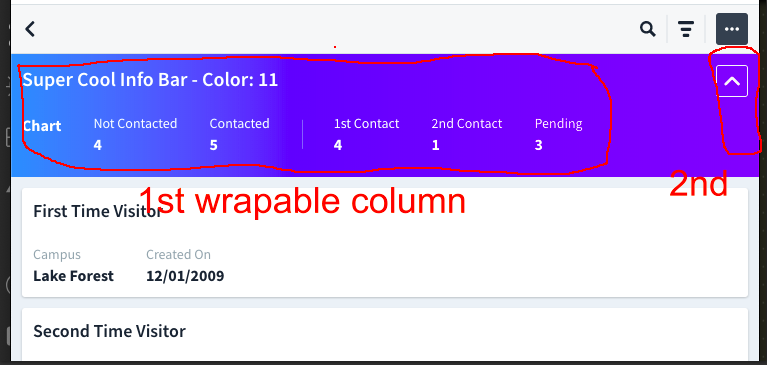
So, to align the Expand button with stats column there are should be in the same row and there are should be ability to pull right the Expand button. In my opinion, as the result, the config for columns will be tricky and complicated. So, after some thought, I've decided to present this variant - when all title/stats columns are in a single (and wrapable) column, and Expand button - is another one pulled right.

As another option, we could add expandButtonMarginTop prop for Page.Details.

@IlyaRadinsky
Copy link
Copy Markdown
Contributor Author

page-details-demo2

@groberts314
Copy link
Copy Markdown
Contributor

So, after some thought, I've decided to present this variant - when all title/stats columns are in a single (and wrapable) column, and Expand button - is another one pulled right.

If I understand this option, correctly, this sounds like a good plan. Will you be able to update this by tomorrow? Did you need any further feedback from @morethanfire or me?

@IlyaRadinsky
Copy link
Copy Markdown
Contributor Author

@groberts314 this is already done

@groberts314
Copy link
Copy Markdown
Contributor

Oh, sorry, I thought it was still TODO. Mainly because the screenshot still shows the second row left-aligned under the "chart" placeholder. Do you have a screen shot of it with the desired alignment?

@IlyaRadinsky
Copy link
Copy Markdown
Contributor Author

IlyaRadinsky commented Oct 9, 2019

@groberts314

Screen Shot 2019-10-09 at 7 40 30 PM

Screen Shot 2019-10-09 at 7 42 20 PM

Screen Shot 2019-10-09 at 7 42 30 PM

@groberts314
Copy link
Copy Markdown
Contributor

image

@IlyaRadinsky
Copy link
Copy Markdown
Contributor Author

Ah, I see...
So, the alignment of Not Contacted with 1st Contact we can get by adding the invisible stub for extra stats column (with the same size as the donut chart). The question is about margin top for Expand button. If it OK to add expandButtonMarginTop to Page.Details - I'll do

@groberts314
Copy link
Copy Markdown
Contributor

So, the alignment of Not Contacted with 1st Contact we can get by adding the invisible stub for extra stats column (with the same size as the donut chart).

Okay, got it, so this should be dealt with on consumer side when configuring the columns. Makes sense.

The question is about margin top for Expand button. If it OK to add expandButtonMarginTop to Page.Details - I'll do

@morethanfire How do you feel about expandButtonMarginTop prop?

@groberts314
Copy link
Copy Markdown
Contributor

groberts314 commented Oct 9, 2019

@IlyaRadinsky I'm hoping we're going to :shipit: on this one today shortly here, and release it in React CM UI 6.4.0. Assuming that's the case, will you be able to complete the HC side and submit a PR tomorrow?

@IlyaRadinsky
Copy link
Copy Markdown
Contributor Author

@groberts314 yes, will do

{hasDetailedColumns && (
<Button
color="light"
icon
Copy link
Copy Markdown
Contributor

Choose a reason for hiding this comment

The reason will be displayed to describe this comment to others. Learn more.

We should probably add a className and/or id here.

Copy link
Copy Markdown

@oilywithraybans oilywithraybans left a comment

Choose a reason for hiding this comment

The reason will be displayed to describe this comment to others. Learn more.

This is looking pretty good. @groberts314, as we discussed let's take this and update the one or two lines and put it in today's release.

@groberts314 groberts314 merged commit 73b0185 into saddlebackdev:dev Oct 9, 2019
@IlyaRadinsky IlyaRadinsky deleted the features/20349-page-details-fixes branch October 10, 2019 08:26
Sign up for free to join this conversation on GitHub. Already have an account? Sign in to comment

Labels

None yet

Projects

None yet

Development

Successfully merging this pull request may close these issues.

3 participants