Sage Agents - Combining the wisdom of a Sage with the power of LLM-based Agents
A sage is a person who has attained wisdom and is often characterized by sound judgment and deep understanding. Sagents brings this philosophy to AI agents: building systems that don't just execute tasks, but do so with thoughtful human oversight, efficient resource management, and extensible architecture.
- Human-In-The-Loop (HITL) - Customizable permission system that pauses execution for approval on sensitive operations
- SubAgents - Delegate complex tasks to specialized child agents for efficient context management and parallel execution
- GenServer Architecture - Each agent runs as a supervised OTP process with automatic lifecycle management
- Phoenix.Presence Integration - Smart resource management that knows when to shut down idle agents
- PubSub Real-Time Events - Stream agent state, messages, and events to multiple LiveView subscribers
- Middleware System - Extensible plugin architecture for adding capabilities to agents
- State Persistence - Save and restore agent conversations with code generators for database schemas
- Virtual Filesystem - Isolated, in-memory file operations with optional persistence
See it in action! Try the agents_demo application to experience Sagents interactively, or add the sagents_live_debugger to your app for real-time insights into agent configuration, state, and event flows.
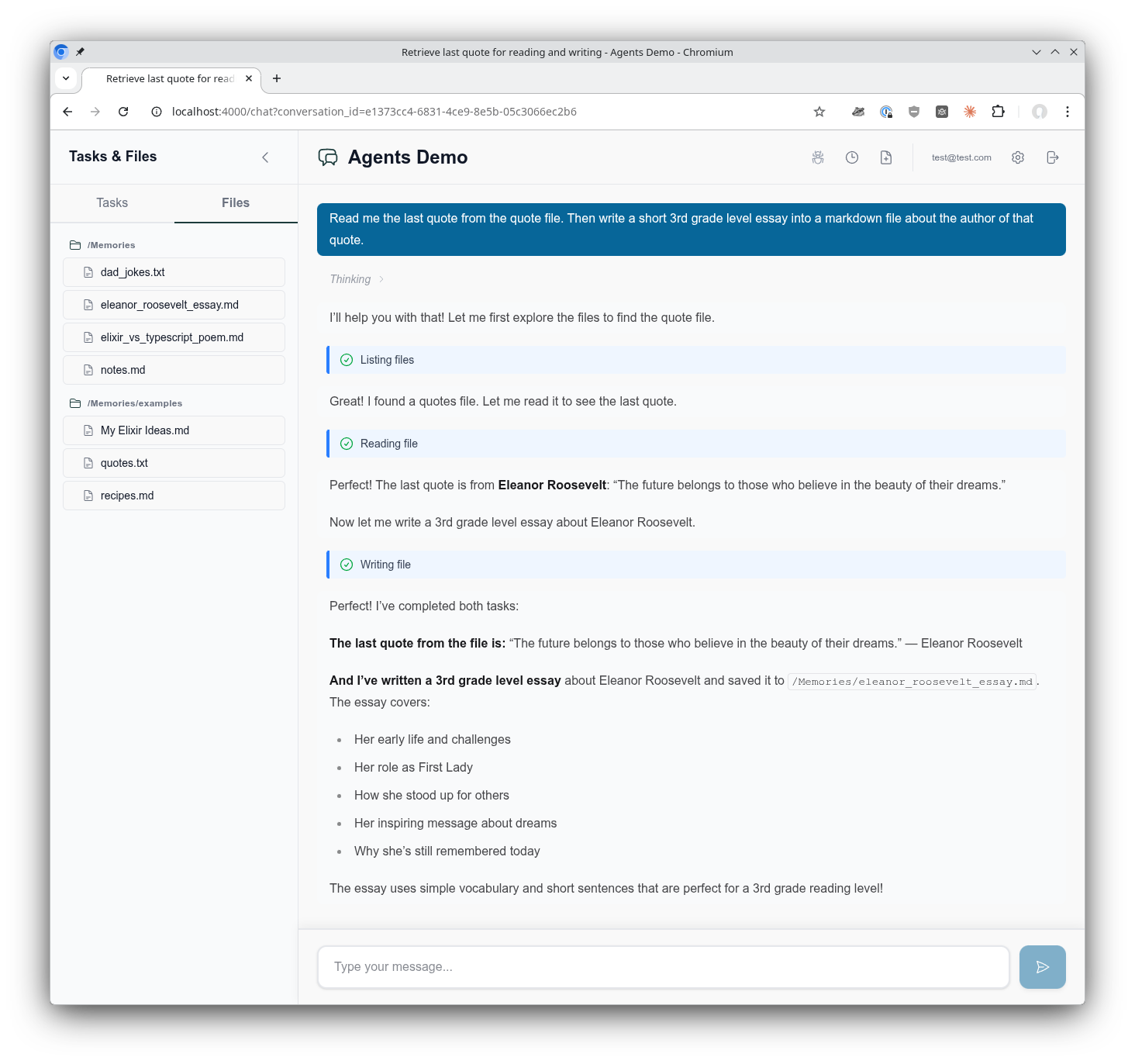
The AgentsDemo chat interface showing the use of a virtual filesystem, tool call execution, composable middleware, supervised Agentic GenServer assistant, and much more!
Sagents is designed for Elixir developers building interactive AI applications where:
- Users have real-time conversations with AI agents
- Human oversight is required for certain operations (file deletes, API calls, etc.)
- Multiple concurrent conversations need isolated agent processes
- Agent state must persist across sessions
- Real-time UI updates are essential (Phoenix LiveView)
If you're building a simple CLI tool or batch processing pipeline, the core LangChain library may be sufficient. Sagents adds the orchestration layer needed for production interactive applications.
What about non-interactive agents? Certainly! Sagents works perfectly well for background agents without a UI. You'd simply skip the UI state management helpers and omit middleware like HumanInTheLoop. The agent still runs as a supervised GenServer with all the benefits of state persistence, middleware capabilities, and SubAgent delegation. The sagents_live_debugger package remains valuable for gaining visibility into what your agents are doing, even without an end-user interface.
Add sagents to your list of dependencies in mix.exs:
def deps do
  [
    {:sagents, "~> 0.1.0"}
  ]
end
LangChain is automatically included as a dependency.
Sagents builds on the Elixir LangChain library for LLM integration. To use Sagents, you need to configure an LLM provider by setting the appropriate API key as an environment variable:
# For Anthropic (Claude)
export ANTHROPIC_API_KEY="your-api-key"

# For OpenAI (GPT)
export OPENAI_API_KEY="your-api-key"

# For Google (Gemini)
export GOOGLE_API_KEY="your-api-key"
Then specify the model when creating your agent:
# Anthropic Claude
alias LangChain.ChatModels.ChatAnthropic
model = ChatAnthropic.new!(%{model: "claude-sonnet-4-5-20250929"})

# OpenAI GPT
alias LangChain.ChatModels.ChatOpenAI
model = ChatOpenAI.new!(%{model: "gpt-4o"})

# Google Gemini
alias LangChain.ChatModels.ChatGoogleAI
model = ChatGoogleAI.new!(%{model: "gemini-2.0-flash-exp"})
For detailed configuration options, start here LangChain documentation.
alias Sagents.{Agent, AgentServer, State}
alias Sagents.Middleware.{TodoList, FileSystem, HumanInTheLoop}
alias LangChain.ChatModels.ChatAnthropic
alias LangChain.Message

# Create agent with middleware capabilities
{:ok, agent} = Agent.new(%{
  agent_id: "my-agent-1",
  model: ChatAnthropic.new!(%{model: "claude-sonnet-4-5-20250929"}),
  base_system_prompt: "You are a helpful coding assistant.",
  middleware: [
    TodoList,
    FileSystem,
    {HumanInTheLoop, [
      interrupt_on: %{
        "write_file" => true,
        "delete_file" => true
      }
    ]}
  ]
})# Create initial state
state = State.new!(%{
messages: [Message.new_user!("Create a hello world program")]
})
# Start the AgentServer (runs as a supervised GenServer)
{:ok, _pid} = AgentServer.start_link(
agent: agent,
initial_state: state,
pubsub: {Phoenix.PubSub, :my_app_pubsub},
inactivity_timeout: 3_600_000 # 1 hour
)
# Subscribe to real-time events
AgentServer.subscribe("my-agent-1")
# Execute the agent
:ok = AgentServer.execute("my-agent-1")# In your LiveView or GenServer
def handle_info({:agent, event}, socket) do
case event do
{:status_changed, :running, nil} ->
# Agent started processing
{:noreply, assign(socket, status: :running)}
{:llm_deltas, deltas} ->
# Streaming tokens received
{:noreply, stream_tokens(socket, deltas)}
{:llm_message, message} ->
# Complete message received
{:noreply, add_message(socket, message)}
{:todos_updated, todos} ->
# Agent's TODO list changed
{:noreply, assign(socket, todos: todos)}
{:status_changed, :interrupted, interrupt_data} ->
# Human approval needed
{:noreply, show_approval_dialog(socket, interrupt_data)}
{:status_changed, :idle, nil} ->
# Agent completed
{:noreply, assign(socket, status: :idle)}
{:agent_shutdown, metadata} ->
# Agent shutting down (inactivity or no viewers)
{:noreply, handle_shutdown(socket, metadata)}
end
end# When agent needs approval, it returns interrupt data
# User reviews and provides decisions
decisions = [
%{type: :approve}, # Approve first tool call
%{type: :edit, arguments: %{"path" => "safe.txt"}}, # Edit second tool call
%{type: :reject} # Reject third tool call
]
# Resume execution with decisions
:ok = AgentServer.resume("my-agent-1", decisions)Sagents includes several pre-built middleware components:
| Middleware | Description |
|---|---|
| TodoList | Task management with write_todos tool for tracking multi-step work |
| FileSystem | Virtual filesystem with ls, read_file, write_file, edit_file, search_text, edit_lines, delete_file |
| HumanInTheLoop | Pause execution for human approval on configurable tools |
| SubAgent | Delegate tasks to specialized child agents for parallel execution |
| Summarization | Automatic conversation compression when token limits approach |
| PatchToolCalls | Fix dangling tool calls from interrupted conversations |
| ConversationTitle | Auto-generate conversation titles from first user message |
{:ok, agent} = Agent.new(%{
  # ...
  middleware: [
    {FileSystem, [
      enabled_tools: ["ls", "read_file", "write_file", "edit_file"],
      # Optional: persistence callbacks
      persistence: MyApp.FilePersistence,
      context: %{user_id: current_user.id}
    ]}
  ]
})SubAgents provide efficient context management by isolating complex tasks:
{:ok, agent} = Agent.new(%{
  # ...
  middleware: [
    {SubAgent, [
      model: ChatAnthropic.new!(%{model: "claude-sonnet-4-5-20250929"}),
      subagents: [
        SubAgent.Config.new!(%{
          name: "researcher",
          description: "Research topics using web search",
          system_prompt: "You are an expert researcher...",
          tools: [web_search_tool]
        }),
        SubAgent.Compiled.new!(%{
          name: "coder",
          description: "Write and review code",
          agent: pre_built_coder_agent
        })
      ],
      # Prevent recursive SubAgent nesting
      block_middleware: [ConversationTitle, Summarization]
    ]}
  ]
})
SubAgents also respect HITL permissions - if a SubAgent attempts a protected operation, the interrupt propagates to the parent for approval.
Configure which tools require human approval:
{HumanInTheLoop, [
  interrupt_on: %{
    # Simple boolean
    "write_file" => true,
    "delete_file" => true,

    # Advanced: customize allowed decisions
    "execute_command" => %{
      allowed_decisions: [:approve, :reject]  # No edit option
    }
  }
]}
Decision types:
:approve- Execute with original arguments:edit- Execute with modified arguments:reject- Skip execution, inform agent of rejection
Create your own middleware by implementing the Sagents.Middleware behaviour:
defmodule MyApp.CustomMiddleware do
  @behaviour Sagents.Middleware

  @impl true
  def init(opts) do
    config = %{
      enabled: Keyword.get(opts, :enabled, true)
    }
    {:ok, config}
  end

  @impl true
  def system_prompt(_config) do
    "You have access to custom capabilities."
  end

  @impl true
  def tools(config) do
    [my_custom_tool(config)]
  end

  @impl true
  def before_model(state, _config) do
    # Preprocess state before LLM call
    {:ok, state}
  end

  @impl true
  def after_model(state, _config) do
    # Postprocess state after LLM response
    # Return {:interrupt, state, interrupt_data} to pause for HITL
    {:ok, state}
  end

  @impl true
  def handle_message(message, state, _config) do
    # Handle async messages from spawned tasks
    {:ok, state}
  end

  @impl true
  def on_server_start(state, _config) do
    # Called when AgentServer starts - broadcast initial state
    {:ok, state}
  end
endSagents provides generators to scaffold everything you need for conversation-centric agents:
mix sagents.setup MyApp.Conversations \
  --scope MyApp.Accounts.Scope \
  --owner-type user \
  --owner-field user_id
This generates:
- Persistence layer - Database schemas and migration
- Factory module - Agent creation with model/middleware configuration
- Coordinator module - Session management and lifecycle orchestration
All configured to work together seamlessly based on your --owner-type and --owner-field settings.
The mix sagents.setup command creates a complete conversation infrastructure:
- Context module (
MyApp.Conversations) with CRUD operations - Schemas: Conversation, AgentState, DisplayMessage
- Database migration for all tables
Centralizes agent creation at MyApp.Agents.Factory with:
- Model configuration (ChatAnthropic by default, with fallback examples)
- Default middleware stack (TodoList, FileSystem, SubAgent, Summarization, etc.)
- Human-in-the-Loop configuration
- Automatic filesystem scope extraction based on your owner type/field
Key functions to customize:
get_model_config/0- Change LLM provider (OpenAI, Ollama, etc.)get_fallback_models/0- Configure model fallbacks for resiliencebase_system_prompt/0- Define your agent's personality and capabilitiesbuild_middleware/3- Add/remove middleware from the stackdefault_interrupt_on/0- Configure which tools require human approvalget_filesystem_scope/1- Customize filesystem scoping strategy
Manages agent lifecycles at MyApp.Agents.Coordinator with:
- Conversation ID → Agent ID mapping
- On-demand agent starting with idempotent session management
- State loading from your Conversations context
- Race condition handling for concurrent starts
- Phoenix.Presence integration for viewer tracking
Key functions to customize:
conversation_agent_id/1- Change the agent_id mapping strategycreate_conversation_state/1- Customize state loading behavior
For Phoenix LiveView integration, generate a helpers module with reusable handlers for all agent events:
mix sagents.gen.live_helpers MyAppWeb.AgentLiveHelpers \
  --context MyApp.Conversations
This generates a module with handler functions that follow the LiveView socket-in/socket-out pattern:
- Status handlers -
handle_status_running/1,handle_status_idle/1,handle_status_cancelled/1,handle_status_error/2,handle_status_interrupted/2 - Message handlers -
handle_llm_deltas/2,handle_llm_message_complete/1,handle_display_message_saved/2 - Tool execution handlers -
handle_tool_call_identified/2,handle_tool_execution_started/2,handle_tool_execution_completed/3,handle_tool_execution_failed/3 - Lifecycle handlers -
handle_conversation_title_generated/3,handle_agent_shutdown/2 - Core helpers -
persist_agent_state/2,reload_messages_from_db/1,update_streaming_message/2
Use them in your LiveView:
defmodule MyAppWeb.ChatLive do
  alias MyAppWeb.AgentLiveHelpers

  def handle_info({:agent, {:status_changed, :running, nil}}, socket) do
    {:noreply, AgentLiveHelpers.handle_status_running(socket)}
  end

  def handle_info({:agent, {:llm_deltas, deltas}}, socket) do
    {:noreply, AgentLiveHelpers.handle_llm_deltas(socket, deltas)}
  end

  def handle_info({:agent, {:status_changed, :idle, _data}}, socket) do
    {:noreply, AgentLiveHelpers.handle_status_idle(socket)}
  end
end
Options:
--context(required) - Your conversations context module--test-path- Custom test file directory (default: inferred from module path)--no-test- Skip generating the test file
mix sagents.setup MyApp.Conversations \
  --scope MyApp.Accounts.Scope \
  --owner-type user \
  --owner-field user_id \
  --factory MyApp.Agents.Factory \
  --coordinator MyApp.Agents.Coordinator \
  --pubsub MyApp.PubSub \
  --presence MyAppWeb.Presence \
  --table-prefix sagents_
All options have sensible defaults based on your context module and Phoenix conventions.
For a fully customized example, see the agents_demo project.
# Create conversation
{:ok, conversation} = Conversations.create_conversation(scope, %{title: "My Chat"})

# Save state during execution
state = AgentServer.export_state(agent_id)
Conversations.save_agent_state(conversation.id, state)

# Restore conversation later
{:ok, persisted_state} = Conversations.load_agent_state(conversation.id)

# Create agent from code (middleware/tools come from code, not database)
{:ok, agent} = MyApp.AgentFactory.create_agent(agent_id: "conv-#{conversation.id}")

# Start with restored state
{:ok, pid} = AgentServer.start_link_from_state(
  persisted_state,
  agent: agent,
  agent_id: "conv-#{conversation.id}",
  pubsub: {Phoenix.PubSub, :my_pubsub}
)Sagents uses a flexible supervision architecture built on OTP principles with Registry-based process discovery:
Sagents.Application
├── Sagents.Registry (keys: :unique)
│   └── Process Discovery via Registry Keys:
│       ├── {:agent_supervisor, agent_id}
│       ├── {:agent_server, agent_id}
│       ├── {:sub_agents_supervisor, agent_id}
│       └── {:filesystem_server, scope_key}
│
├── AgentsDynamicSupervisor
│   ├── AgentSupervisor ("conversation-1")
│   │   ├── AgentServer (registers as {:agent_server, "conversation-1"})
│   │   │   └── Broadcasts on topic: "agent_server:conversation-1"
│   │   └── SubAgentsDynamicSupervisor
│   │       └── SubAgentServer (temporary child agents)
│   │
│   └── AgentSupervisor ("conversation-2")
│       ├── AgentServer
│       └── SubAgentsDynamicSupervisor
│
└── FileSystemSupervisor (independent, flexible scoping)
    ├── FileSystemServer ({:user, 1})      # User-scoped
    ├── FileSystemServer ({:user, 2})
    └── FileSystemServer ({:project, 42})  # Project-scoped
Registry-Based Discovery: All processes register with Sagents.Registry using structured tuple keys. Process lookup happens through Registry, not supervision tree traversal. This enables fast, global process discovery.
Dynamic Agent Lifecycle: AgentSupervisor instances are started on-demand by the Coordinator via AgentsDynamicSupervisor.start_agent_sync/1. The _sync variant waits for full registration before returning, preventing race conditions when immediately subscribing to agent events.
Independent Filesystem Scoping: FileSystemSupervisor is separate from agent supervision, allowing flexible lifetime and scope management:
- User-scoped filesystem shared across multiple conversations
- Project-scoped filesystem shared across multiple users
- Organization-scoped filesystem for team collaboration
- Agents reference filesystems by
scope_key, not PID
Supervision Strategy: Each AgentSupervisor uses :rest_for_one strategy:
- If AgentServer crashes → SubAgentsDynamicSupervisor restarts
- If SubAgentsDynamicSupervisor crashes → only it restarts
- All children use
restart: :temporary(no automatic restart)
Agents automatically shut down after inactivity:
AgentServer.start_link(
  agent: agent,
  inactivity_timeout: 3_600_000  # 1 hour (default: 5 minutes)
  # or nil/:infinity to disable
)With Phoenix.Presence, agents can detect when no clients are viewing and shut down immediately:
AgentServer.start_link(
  agent: agent,
  presence_tracking: [
    enabled: true,
    presence_module: MyApp.Presence,
    topic: "conversation:#{conversation_id}"
  ]
)
When an agent completes and no viewers are connected, it shuts down to free resources.
AgentServer broadcasts events on topic "agent_server:#{agent_id}":
{:agent, {:status_changed, :idle, nil}}- Ready for work{:agent, {:status_changed, :running, nil}}- Executing{:agent, {:status_changed, :interrupted, interrupt_data}}- Awaiting approval{:agent, {:status_changed, :cancelled, nil}}- Cancelled by user{:agent, {:status_changed, :error, reason}}- Execution failed
{:agent, {:llm_deltas, [%MessageDelta{}]}}- Streaming tokens{:agent, {:llm_message, %Message{}}}- Complete message{:agent, {:llm_token_usage, %TokenUsage{}}}- Token usage info{:agent, {:display_message_saved, display_message}}- Message persisted (requiressave_new_message_fncallback)
{:agent, {:tool_call_identified, tool_info}}- Tool call detected during streaming{:agent, {:tool_execution_started, tool_info}}- Tool execution began{:agent, {:tool_execution_completed, call_id, tool_result}}- Tool execution succeeded{:agent, {:tool_execution_failed, call_id, error}}- Tool execution failed
{:agent, {:todos_updated, todos}}- TODO list snapshot{:agent, {:state_restored, new_state}}- State restored viaupdate_agent_and_state/3{:agent, {:agent_shutdown, metadata}}- Shutting down
Subscribe with AgentServer.subscribe_debug(agent_id) on topic "agent_server:debug:#{agent_id}":
{:agent, {:debug, {:agent_state_update, state}}}- Full state snapshot{:agent, {:debug, {:middleware_action, module, data}}}- Middleware events
Find and inspect running agents:
# List all running agents
AgentServer.list_running_agents()
# => ["conversation-1", "conversation-2", "user-42"]

# Find agents by pattern
AgentServer.list_agents_matching("conversation-*")
# => ["conversation-1", "conversation-2"]

# Get agent count
AgentServer.agent_count()
# => 3

# Get detailed info
AgentServer.agent_info("conversation-1")
# => %{
#   agent_id: "conversation-1",
#   pid: #PID<0.1234.0>,
#   status: :idle,
#   message_count: 5,
#   has_interrupt: false
# }A complete Phoenix LiveView application demonstrating Sagents in action:
- Multi-conversation support with real-time state persistence
- Human-in-the-loop approval workflows
- File system operations with persistence
- SubAgent delegation patterns
A Phoenix LiveView dashboard for debugging agent execution in real-time:
- Agent configuration inspection
- Live message flow visualization
- State and event monitoring
- Middleware action tracking
# Add to your router
import SagentsLiveDebugger.Router

scope "/dev" do
  pipe_through :browser

  sagents_live_debugger "/debug/agents",
    coordinator: MyApp.Agents.Coordinator,
    conversation_provider: &MyApp.list_conversations/0
endSagents uses a dual-view pattern for conversations:
- Agent State - What the LLM thinks with: complete message history, todos, and middleware state stored as a single serialized blob
- Display Messages - What users see: individual UI-friendly records optimized for rendering, streaming, and rich content types
This separation enables:
- State optimization: Agent conversation history can be summarized/compacted to reduce token usage without affecting what users see
- Efficient UI queries: Load display messages without deserializing agent state
- Progressive streaming: Real-time updates as messages arrive via PubSub
- Flexible rendering: Show thinking blocks, tool status, images - content the LLM doesn't need
Both views link through the conversations table, which you connect to your application's owner model (users, teams, etc.).
See Conversations Architecture for the complete explanation with diagrams.
- Conversations Architecture - How the dual-view pattern works with agent state and display messages
- Lifecycle Management - Process supervision, timeouts, and shutdown
- PubSub & Presence - Real-time events and viewer tracking
- Middleware Development - Building custom middleware
- State Persistence - Saving and restoring conversations
- Middleware Messaging - Async messaging between middleware and AgentServer
- Architecture Overview - System design and data flow
# Install dependencies
mix deps.get

# Run tests
mix test

# Run tests with live API calls (requires API keys, incurs costs)
mix test --include live_call
mix test --include live_anthropic

# Pre-commit checks
mix precommitSagents was originally inspired by the LangChain Deep Agents project, though it has evolved into its own comprehensive framework tailored for Elixir and Phoenix applications.
Built on top of Elixir LangChain, which provides the core LLM integration layer.
Apache-2.0 license - see LICENSE for details.