This project automate the Cara Android Application.
- Install Lombok 1.18.2
- Install
Cucumber Eclipse pluginon yourEclipseor the alternative forIntellij - Install Cara Android Application
- Run Appium server using
Appium Desktopor byAppiumcommand - Run
adb devicesover the command line and get theuuid, then write theuuid
There are two different ways to run the test:
-
From
src/test/resourcesopen the*.feature. Right click on it,Run as > Cucumber featureThis approach does not generate any report -
From
src/test/java/runneropen theTestRunnerJUnitclass. Right click on it,Run as > JUnit testThis approach generates an HTML report in the target folder. -
mvn test
| Technology | Stack |
|---|---|
| Build Tool | Maven |
| Language | Java 1.8 |
| UI technology | Selenium / Cucumber / Appium |
| Test framework | Junit |
| Reporting | cucumber-extentsreport 3.1.1 |
| Manage boilerplate code | Lombok 1.18.2 |
| IDE | STS 3.9.6.RELEASE |
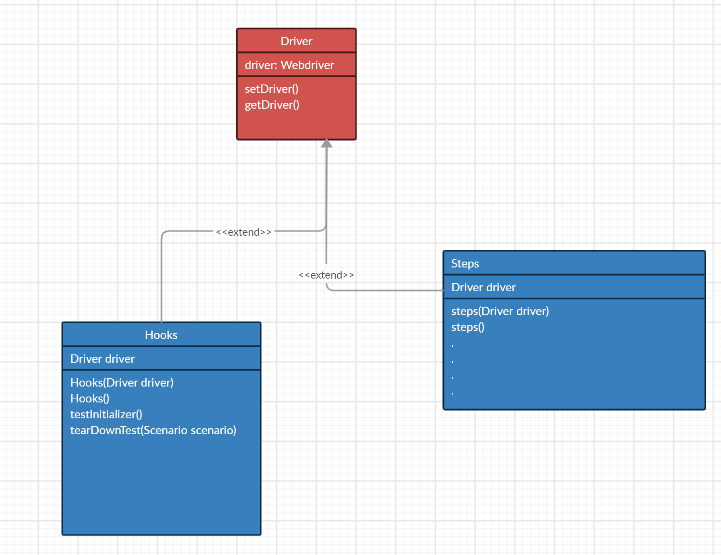
Inorder to connect Hook to steps, we need to use the cucumber-picocontainer as dependency:
<dependency>
      <groupId>info.cukes</groupId>
      <artifactId>cucumber-picocontainer</artifactId>
      <version>1.2.5</version>
 </dependency>
And then implementation of dependency injection in cucumber and selenium is as below:
The step class:
public class *Steps extends Driver{

	Driver driver;


	public *Steps(Driver driver) {

		this.driver = driver;
	}

	public *Steps() {}
The Hook class
public class Hooks extends Driver {

    Driver driver;

    public Hooks(Driver driver) {
        this.driver = driver;
    }

    public Hooks() {}

    @Before
    public void testInitializer() throws MalformedURLException {

        DesiredCapabilities cap = new DesiredCapabilities();
        cap.setCapability("deviceName", "Your-Device-Name");
        cap.setCapability("udid","UUID of Your Device");
        cap.setCapability("platformName","Android");
        cap.setCapability("platformVersion","Your Android Version");

        cap.setCapability("appPackage","com.gohidoc.cara");
        cap.setCapability("appActivity","com.gohidoc.cara.MainActivity");

        AppiumDriver<MobileElement> dr = new AppiumDriver<MobileElement>(new URL("http://127.0.0.1:4723/wd/hub"),cap);

        driver.setDriver(dr);

    }


    @After
    public void tearDownTest(Scenario scenario){

        driver.closeTheApp();
    }

}
And finally the Driver class:
public class Driver  {

	//WebDriver driver;
	 AppiumDriver<MobileElement> driver;
}
Here is the class diagram of the Driver, Step and Hooks